Win 7 & GeForce Go 6200

alejandroh

New member
Local time
6:21 PM
Messages
4
Hey all!

I'm new to the forum and lookin for a bit of help. Here's the deal: I'm running Windows 7 on a notebook with a GeForce Go 6200. No aero, and under the Device Manager, the video card shows up as "Standard VGA Graphics Adapter". I tried going through the Nvidia drivers online but they apparently don't offer drivers for the Geforce Go 6 series.

I took a look at the thread about issues people were having with the regular GeForce 6200 card here and tried some of the things people suggested but i'm no better off.

Who's got a solution? Thanks for any help.
 

My Computer

Computer Manufacturer/Model Number
Acer TravelMate C200
OS
Windows 7
CPU
Intel Pentium M processor 2.00GHz
Memory
1.00 GB
Graphics Card(s)
Nvidia GeForce Go 6200
Hi Alejandro,
Have you tried to make Windows to find a proper driver online?
I'm using the Geforce Go 7300 on my laptop and after the installation I had the same problem you have. I just went to the device manager (right click on "computer", then properties and "devise manager" on the left column, open the "display adapters", right click on "Standard VGA Graphics Adapter" and "update driver software", then "search automatically for updated driver software" and it should search, find and install the driver (if available)

It worked for me, I hope it works for you.
 

My Computer

Computer Manufacturer/Model Number
Lenovo 300 N100 0768 BLG
OS
Windows 7 RC
CPU
Intel core 2 T5500 (2x 1.66 GHz)
Memory
2 Gb
Graphics Card(s)
GeForce Go 7300
Sound Card
SoundMAX integrated digital HD audio
Screen Resolution
1280 x 800
Hard Drives
100 Gb 5400 RPM
Thanks for the tip roenano; I gave it a shot and unfortuneatley, I see no change. When I go to the device manager and try to update the drivers for the VGA controller automatically, Windows says the drivers are already up to date.

Another thing that may be helpful is that I used to run XP on the same notebook and under XP, it would identify the graphics card as the GeForce Go 6200 instead of "Standard VGA Graphics Adapter", So I don't think it has to do with the notebook itself. Still, I've been wrong before...
 

My Computer

Computer Manufacturer/Model Number
Acer TravelMate C200
OS
Windows 7
CPU
Intel Pentium M processor 2.00GHz
Memory
1.00 GB
Graphics Card(s)
Nvidia GeForce Go 6200
Welcome to seven forums. One thing that always helps others help you is to go to your user cp and list your system specs. It could be that your card is not suported by seven.
 
Last edited:

My Computer

Computer Manufacturer/Model Number
Self Built
OS
Windows 7 ultimate 64 bit / XP Home sp3
CPU
intel Core 2 Duo E8400 3.0ghz
Motherboard
Asus P5ND bios 1401
Memory
8 gigs 1066 OCZ Fata1ty
Graphics Card(s)
EVGA GTX 580 Call of Duty Black Ops Edition
Sound Card
Creative Soundblaster Audigy 2zs
Monitor(s) Displays
Asus 24in LCD's 2MS X2
Screen Resolution
1920x1080p @60Hz
Hard Drives
WD Caviar 500 Black/ WD Caviar 200 Blue
PSU
OCZ 700W GameXtreme
Case
NZXT Apollo
Cooling
Corsair H50 CPU/120mm x3 /60mm x2 /Corsair Dominator Ram
Keyboard
Logitech Bluetooth Wireless MX5000
Mouse
Logitech Bluetooth Wireless MX1000
Internet Speed
Download 19.83 Upload 0.97
Other Info
Logitech Z2300 Speakers/ Bose Noise Cancelling Headphones/Avermedia PCI-e Hybrid TV Bravo/Epson NX415 all in one/ 4 Port Powered USB Hub/ LG 10x Bluray Burner /TSST Corp DVDRW External
got my system specs up now. i've tried a few other things and no change yet. anyone else got some helpful insight?
 

My Computer

Computer Manufacturer/Model Number
Acer TravelMate C200
OS
Windows 7
CPU
Intel Pentium M processor 2.00GHz
Memory
1.00 GB
Graphics Card(s)
Nvidia GeForce Go 6200

My Computer

Computer Manufacturer/Model Number
Self Built
OS
Windows 7 ultimate 64 bit / XP Home sp3
CPU
intel Core 2 Duo E8400 3.0ghz
Motherboard
Asus P5ND bios 1401
Memory
8 gigs 1066 OCZ Fata1ty
Graphics Card(s)
EVGA GTX 580 Call of Duty Black Ops Edition
Sound Card
Creative Soundblaster Audigy 2zs
Monitor(s) Displays
Asus 24in LCD's 2MS X2
Screen Resolution
1920x1080p @60Hz
Hard Drives
WD Caviar 500 Black/ WD Caviar 200 Blue
PSU
OCZ 700W GameXtreme
Case
NZXT Apollo
Cooling
Corsair H50 CPU/120mm x3 /60mm x2 /Corsair Dominator Ram
Keyboard
Logitech Bluetooth Wireless MX5000
Mouse
Logitech Bluetooth Wireless MX1000
Internet Speed
Download 19.83 Upload 0.97
Other Info
Logitech Z2300 Speakers/ Bose Noise Cancelling Headphones/Avermedia PCI-e Hybrid TV Bravo/Epson NX415 all in one/ 4 Port Powered USB Hub/ LG 10x Bluray Burner /TSST Corp DVDRW External
wow, thanks alot Fabe for the driver link- right now I'm looking at the glorious Win 7 aero interface and experiencing better video as well. good on ya
 

My Computer

Computer Manufacturer/Model Number
Acer TravelMate C200
OS
Windows 7
CPU
Intel Pentium M processor 2.00GHz
Memory
1.00 GB
Graphics Card(s)
Nvidia GeForce Go 6200
hi everybody i am new to this forum and to the same problem... i have a sony vaio notebook with the go 6200 graphics adapter and i tried many drivers ... nothing worked for me it says theres no compatible hardware found or it says its the wrong OS - i am using windows 7 professional 32bit (original and final from MSDNAA no RC or beta) i hope u can help me with this

thanks to all in advance

sry i am german and my english sux :)
 

My Computer

OS
windows 7
have you tried installing this driver in safe mode? Dox Optimised 180.84 - NVISION


The fabe.. I went to that site, and there is no 7 support. It only has options for Vista and XP there is not even a link for 7. Am I missing something? I tried to install it anyway, and it would not let me when I tried the Vista version. Should I try the XP version? There is no option for 7 so I can't figure out how that other guy had success with your link. Anyway, hope you get this soon.

-John
 

My Computer

OS
Windows 7 / XP SP3
Oh and for the guy with the Vaio, I am having having your same exact issue as I have a VAIO as well. You might find this helpful. Is your sound working? It turns out Sony will tell you your laptop is not compatible with 7 but it is in fact very compatible from what I've noticed. If you are having trouble getting your sound to work, it is a Realtek high definition Audio card and you can get working 7 drivers from realtek.com Hope that helps if you didn't figure this out already.
 

My Computer

OS
Windows 7 / XP SP3

My Computer

Computer Manufacturer/Model Number
Self Built
OS
Windows 7 ultimate 64 bit / XP Home sp3
CPU
intel Core 2 Duo E8400 3.0ghz
Motherboard
Asus P5ND bios 1401
Memory
8 gigs 1066 OCZ Fata1ty
Graphics Card(s)
EVGA GTX 580 Call of Duty Black Ops Edition
Sound Card
Creative Soundblaster Audigy 2zs
Monitor(s) Displays
Asus 24in LCD's 2MS X2
Screen Resolution
1920x1080p @60Hz
Hard Drives
WD Caviar 500 Black/ WD Caviar 200 Blue
PSU
OCZ 700W GameXtreme
Case
NZXT Apollo
Cooling
Corsair H50 CPU/120mm x3 /60mm x2 /Corsair Dominator Ram
Keyboard
Logitech Bluetooth Wireless MX5000
Mouse
Logitech Bluetooth Wireless MX1000
Internet Speed
Download 19.83 Upload 0.97
Other Info
Logitech Z2300 Speakers/ Bose Noise Cancelling Headphones/Avermedia PCI-e Hybrid TV Bravo/Epson NX415 all in one/ 4 Port Powered USB Hub/ LG 10x Bluray Burner /TSST Corp DVDRW External
That's great fabe thanks for the insight, but I think you missed the other thread I wrote above that last one you responded to, that's the one I really need the help on. Which file do I download off that dox thing. In fact if you could put up a direct URL to the file download that would be ideal. I did everything you mentioned but in your post you don't say which file works. The only options on that page are for windows XP or Vista, I assumed the Vista was the one to use since it is closer to 7 but it did not. That one guy running the same equipment I am seemed really happy with the answer you gave him so I hope it works for me too. And by the way, so you know, I did everything else right so that's not the problem. Uninstalled my Video driver in Device manager, ran in safe mode etc. Any help is always appreciated, I almost have my system completely Windows 7 compatible even though the manufacturer said my model is not compatible with Windows 7- I just need this one last thing..

Thanks,

-John
 

My Computer

OS
Windows 7 / XP SP3
If you are refering to your post #9 then.Their is actually another solution that has worked. That post as you can tell is rather old. Another way is to use the latest Nvidia driver from their site and then follow the modding of the .inf file form this site NVIDIA MobilityModder - HardwareHeaven.com As I believe you are referring to your video card Go 6200. Give this a try. Just follow the directions and post back. Thanks Fabe
 

My Computer

Computer Manufacturer/Model Number
Self Built
OS
Windows 7 ultimate 64 bit / XP Home sp3
CPU
intel Core 2 Duo E8400 3.0ghz
Motherboard
Asus P5ND bios 1401
Memory
8 gigs 1066 OCZ Fata1ty
Graphics Card(s)
EVGA GTX 580 Call of Duty Black Ops Edition
Sound Card
Creative Soundblaster Audigy 2zs
Monitor(s) Displays
Asus 24in LCD's 2MS X2
Screen Resolution
1920x1080p @60Hz
Hard Drives
WD Caviar 500 Black/ WD Caviar 200 Blue
PSU
OCZ 700W GameXtreme
Case
NZXT Apollo
Cooling
Corsair H50 CPU/120mm x3 /60mm x2 /Corsair Dominator Ram
Keyboard
Logitech Bluetooth Wireless MX5000
Mouse
Logitech Bluetooth Wireless MX1000
Internet Speed
Download 19.83 Upload 0.97
Other Info
Logitech Z2300 Speakers/ Bose Noise Cancelling Headphones/Avermedia PCI-e Hybrid TV Bravo/Epson NX415 all in one/ 4 Port Powered USB Hub/ LG 10x Bluray Burner /TSST Corp DVDRW External
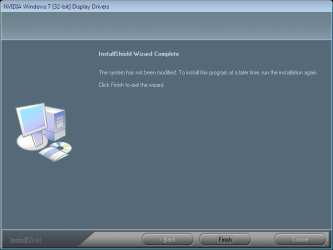
We try following the instruction to the letter and downloaded the newest 32bit drivers that were on the modding site for Nvidia. I can tell that running the mod did have some effect on Nvidia driver because it let me run the installer all the way to the finish the error that I am getting I have attached as a screen shot, please call me if you can at (909)664-3824 so we can get this figured out once and for all.
 

Attachments

  • Nvidia error.png
    Nvidia error.png
    16.3 KB · Views: 246

My Computer

OS
Windows 7 / XP SP3
Hey Fabe, you there? Could still really use your help. Issue is posted in prior thread
 

My Computer

OS
Windows 7 / XP SP3
You can try The Dox file for Vista install in compatibliity mode Vista download the file>unpack> right click on the .exe file> properties>compatibility> check the run in compatibility mode box>drop down menu vista.> Run the setup file. As administrator. see were were at then. Or try the 32 or 64 bit version of driver from nvidia here is the 32 bit http://www.nvidia.com/object/win7_winvista_32bit_196.21_whql.html Fabe
 
Last edited:

My Computer

Computer Manufacturer/Model Number
Self Built
OS
Windows 7 ultimate 64 bit / XP Home sp3
CPU
intel Core 2 Duo E8400 3.0ghz
Motherboard
Asus P5ND bios 1401
Memory
8 gigs 1066 OCZ Fata1ty
Graphics Card(s)
EVGA GTX 580 Call of Duty Black Ops Edition
Sound Card
Creative Soundblaster Audigy 2zs
Monitor(s) Displays
Asus 24in LCD's 2MS X2
Screen Resolution
1920x1080p @60Hz
Hard Drives
WD Caviar 500 Black/ WD Caviar 200 Blue
PSU
OCZ 700W GameXtreme
Case
NZXT Apollo
Cooling
Corsair H50 CPU/120mm x3 /60mm x2 /Corsair Dominator Ram
Keyboard
Logitech Bluetooth Wireless MX5000
Mouse
Logitech Bluetooth Wireless MX1000
Internet Speed
Download 19.83 Upload 0.97
Other Info
Logitech Z2300 Speakers/ Bose Noise Cancelling Headphones/Avermedia PCI-e Hybrid TV Bravo/Epson NX415 all in one/ 4 Port Powered USB Hub/ LG 10x Bluray Burner /TSST Corp DVDRW External
John I alos need your What your system specsd are please fill them in here usercp 1.png
 

My Computer

Computer Manufacturer/Model Number
Self Built
OS
Windows 7 ultimate 64 bit / XP Home sp3
CPU
intel Core 2 Duo E8400 3.0ghz
Motherboard
Asus P5ND bios 1401
Memory
8 gigs 1066 OCZ Fata1ty
Graphics Card(s)
EVGA GTX 580 Call of Duty Black Ops Edition
Sound Card
Creative Soundblaster Audigy 2zs
Monitor(s) Displays
Asus 24in LCD's 2MS X2
Screen Resolution
1920x1080p @60Hz
Hard Drives
WD Caviar 500 Black/ WD Caviar 200 Blue
PSU
OCZ 700W GameXtreme
Case
NZXT Apollo
Cooling
Corsair H50 CPU/120mm x3 /60mm x2 /Corsair Dominator Ram
Keyboard
Logitech Bluetooth Wireless MX5000
Mouse
Logitech Bluetooth Wireless MX1000
Internet Speed
Download 19.83 Upload 0.97
Other Info
Logitech Z2300 Speakers/ Bose Noise Cancelling Headphones/Avermedia PCI-e Hybrid TV Bravo/Epson NX415 all in one/ 4 Port Powered USB Hub/ LG 10x Bluray Burner /TSST Corp DVDRW External
Thank you fabe. The further clarification you provided me in your last post was more than ample to easily guide me through the installation process. The two problems I was having were I wasn't running in Vista Compatibility mode and I didn't know which drivers were best on Nvidia or Docs site because there were so many of them, and I didn't know whether to use the Vista or XP Dox mod tool and now I know that since I have 7 it is the Vista tool. We are now looking at the beautiful Aero 3d effects on this Sony Vaio thanks to you my friend. This was awesome advice. I have totally upgraged my Vaio and My geforce go 6200 to work with Windows 7. Hey lastly I am actually going to go for the gusto. I am very interested in trying to get Sony's software that controls the blue Function hotkeys to work in 7 so I can have access to the features such as volume switching, controlling multiple monitors with the switch monitor button, and being able to adjust the LCD brightness. If anyone has any advice on this is would be greatly appreciated.

Thanks again fabe for your expert advice. It is all here now. This has been an amazing experience. Look forward to hearing from you down the line.

-John
 

My Computer

OS
Windows 7 / XP SP3
Hey namesake! Welcome to SF. As you have already discovered it's a great place to be and there are some really lovely people on this forum.

I had already thought that there were altogether too few of us so if you know any more get them to register as well.
Eventually we could have our own thread!;)

sincerely, John Williams:)
 

My Computer

Computer Manufacturer/Model Number
The Monolith. 3.1
OS
Windows 7 Home Premium 64 bit
CPU
i7 [email protected]
Motherboard
Gigabyte Z77-D3H
Memory
2x4GB Corsair Vegeance DDR3
Graphics Card(s)
XFX GTX 260 Black Edition
Sound Card
none-through large stereo hi fi
Monitor(s) Displays
Croosover 27MDP LED IPS Dell 2408 WFP
Screen Resolution
2560x1440 1920x1200
Hard Drives
1x Samsung 840Pro 128GB SSD
1x Samsung Spinpoint F1 1TB
PSU
Corsair AX 850 Watt
Case
Cooler Master ACTS 840
Cooling
Be Quiet! Dark Rock Pro
Keyboard
Enermax Aurora
Mouse
Logitech Ballmouse
Internet Speed
20MBPS
Any other tips on how you guys got the drivers to install for the Geforce Go 6200?

I tried the latest version from nVidia's site plus an older version that was linked to on the Mobility Modder site. I changed the inf files using the Mobility Modder, ran them in Vista compatibility mode, and even tried the older version in Safe Mode.

I think the big problem is that the device is shown as "Standard VGA Graphics Adapter" in the Device Manager (just like someone else stated earlier in this thread). However, that guy got it to work.

What am I doing wrong???
 

My Computer

Computer Manufacturer/Model Number
Sony VAIO VGN-S380P
OS
Windows 7 Professional 32-bit
Graphics Card(s)
GeForce Go 6200
Back
Top