Solved win 7 GUI boot help

chaosrealm93

New member
Member
VIP
Local time
5:26 AM
Messages
174
win 7 booting animation / logo missing

this is NOT the problem where its displaying the vista-style loading screen, but rather the win 7 animation (spinning balls that form into the logo) is absent altogether when im booting into win 7. this happens regardless of whether im doing a normal startup or restart

ive tried

-toggling "No GUI boot" in msconfig
-bcdedit /set {current} locale en-US in cmd
-bcdedit /set {current} quietboot yes in cmd

but they didnt work

the BIOS "American Megatrends" screen doesnt show up on restart either
 
Last edited:

My Computer

Computer type
PC/Desktop
OS
Windows 7 Pro 64 bit
CPU
Intel i7 6700k
Motherboard
ASUS Z-170-A
Memory
Kingston HyperX Fury 16GB 2133MHz
Graphics Card(s)
EVGA GTX 1060 6GB
Sound Card
N/A
Monitor(s) Displays
Viewsonic VX2240w
Screen Resolution
1680 x 1050
Hard Drives
Sandisk Ultra II 480GB SSD,
WD Caviar Black 1TB
PSU
Corsair RM750x
Case
Corsair 550D
Cooling
CoolerMaster Hyper 212
Keyboard
$20 Logitech El Cheapo
Mouse
Logitech G500s
Antivirus
avast! free antivirus
Browser
Google Chrome
Hello mate now if I understand you correctly you mean you cannot get the BIOS screen up by tapping the BIOS key on boot up??

Now have you tried these either?
SFC /SCANNOW Command - System File Checker
Disk Check < if necessary include the /f and /r in the command line as per Option2
Run these in safe mode and the sfc often best run for two to three runs – you can leave out the /r switch in ckdsk if you feel it not necessary
 

My Computer

Computer type
PC/Desktop
Computer Manufacturer/Model Number
Own build (new) Desk1 / Asus ROG Win 7 / Desk2 1st build
OS
Desk1 7 Home Prem / Desk2 10 Pro / Main lap Asus ROG 10 Pro 2 laptop Toshiba 7 Pro Asus P2520 7 & 10
CPU
Desk1 i5 3750K / Laptop i7 GTX 860M / Desk2 i5 2500
Motherboard
Desk1 Asus P877-V / Desk2 Gigabyte H67 UD3H / Laptop ?
Memory
Desk1 8GB (1866) / Desk2 16GB (1333) / Laptop 8Gb DDR3
Graphics Card(s)
Desk 1& 2NVidia GTX 650 & Laptops on board Intel
Sound Card
Desk 1 & 2 -XONAR DG Realtek High Def audio Laptop
Monitor(s) Displays
Desk 1 Benq HD 2450 / Desk2 Philips 24" / Laptop 17.5"
Screen Resolution
1920x1080 D1 & D2 & Laptop 1
Hard Drives
Desk1 Samsung 120GB 830 SSD
Asus ROG 256GB 850 Pro SSD
Desk2 Samsung 840 256 SSD
Toshiba 120GB EVO
PSU
Desk 1 Corsair HX 1050/ Laptop ? / Desk 2 Corsair HX 650
Case
Desk 1 Cooler HAF XM ? Toshiba laptop / Desk2 Coolermaster
Cooling
Fans on all Desk1 -2 Desk2 - all Coolermasters 5 Laptop ?
Keyboard
Desk 1 MS Sidewinder X6 Desk 2 MS Sidewinder X 4
Mouse
Desk 1&2 - Gigabyte MS 900 gamer - laptop - Logitec wireless
Internet Speed
ADSL2+
Other Info
One other Desktop (tester) and spare Toshba laptop both with SSD's
Running Kaspersky 2016 ISS on all machines config'd identically
Logitec audio stereo systems on each machine (x3)
Canon MG5250MFC
Router/modem TP-Link running WPA2SK
sfc /scannow in elevated cmd
it said it "did not find any integrity violations"

chkdsk c: /f
chkdsk c: /r
i typed it in elevated cmd in windows and upon restart, it went into a black screen and couldnt see any diagnostic info. the AMI POST screen didnt show either
 

My Computer

Computer type
PC/Desktop
OS
Windows 7 Pro 64 bit
CPU
Intel i7 6700k
Motherboard
ASUS Z-170-A
Memory
Kingston HyperX Fury 16GB 2133MHz
Graphics Card(s)
EVGA GTX 1060 6GB
Sound Card
N/A
Monitor(s) Displays
Viewsonic VX2240w
Screen Resolution
1680 x 1050
Hard Drives
Sandisk Ultra II 480GB SSD,
WD Caviar Black 1TB
PSU
Corsair RM750x
Case
Corsair 550D
Cooling
CoolerMaster Hyper 212
Keyboard
$20 Logitech El Cheapo
Mouse
Logitech G500s
Antivirus
avast! free antivirus
Browser
Google Chrome
sfc /scannow in elevated cmd
it said it "did not find any integrity violations"

chkdsk c: /f
chkdsk c: /r
i typed it in elevated cmd in windows and upon restart, it went into a black screen and couldnt see any diagnostic info. the AMI POST screen didnt show either
Mate so I have it right you were running that chkdsk as admin?? and you did make sure there was a space between chkdsk space C: space /f space /r

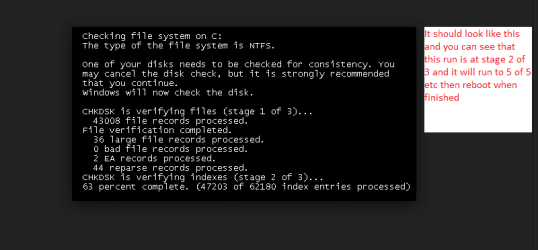
Now it should have gone to a count down screen (black with white command prompt type lettering) then launch into the chkdsk that then should have run in five sections and it takes anything from 5 - 20 minutes depends on the drive size.
 

My Computer

Computer type
PC/Desktop
Computer Manufacturer/Model Number
Own build (new) Desk1 / Asus ROG Win 7 / Desk2 1st build
OS
Desk1 7 Home Prem / Desk2 10 Pro / Main lap Asus ROG 10 Pro 2 laptop Toshiba 7 Pro Asus P2520 7 & 10
CPU
Desk1 i5 3750K / Laptop i7 GTX 860M / Desk2 i5 2500
Motherboard
Desk1 Asus P877-V / Desk2 Gigabyte H67 UD3H / Laptop ?
Memory
Desk1 8GB (1866) / Desk2 16GB (1333) / Laptop 8Gb DDR3
Graphics Card(s)
Desk 1& 2NVidia GTX 650 & Laptops on board Intel
Sound Card
Desk 1 & 2 -XONAR DG Realtek High Def audio Laptop
Monitor(s) Displays
Desk 1 Benq HD 2450 / Desk2 Philips 24" / Laptop 17.5"
Screen Resolution
1920x1080 D1 & D2 & Laptop 1
Hard Drives
Desk1 Samsung 120GB 830 SSD
Asus ROG 256GB 850 Pro SSD
Desk2 Samsung 840 256 SSD
Toshiba 120GB EVO
PSU
Desk 1 Corsair HX 1050/ Laptop ? / Desk 2 Corsair HX 650
Case
Desk 1 Cooler HAF XM ? Toshiba laptop / Desk2 Coolermaster
Cooling
Fans on all Desk1 -2 Desk2 - all Coolermasters 5 Laptop ?
Keyboard
Desk 1 MS Sidewinder X6 Desk 2 MS Sidewinder X 4
Mouse
Desk 1&2 - Gigabyte MS 900 gamer - laptop - Logitec wireless
Internet Speed
ADSL2+
Other Info
One other Desktop (tester) and spare Toshba laptop both with SSD's
Running Kaspersky 2016 ISS on all machines config'd identically
Logitec audio stereo systems on each machine (x3)
Canon MG5250MFC
Router/modem TP-Link running WPA2SK
yes there was a space in between the terms and no there was no countdown. it told me it would perform the chkdsk on next restart because its the only drive attached
 

My Computer

Computer type
PC/Desktop
OS
Windows 7 Pro 64 bit
CPU
Intel i7 6700k
Motherboard
ASUS Z-170-A
Memory
Kingston HyperX Fury 16GB 2133MHz
Graphics Card(s)
EVGA GTX 1060 6GB
Sound Card
N/A
Monitor(s) Displays
Viewsonic VX2240w
Screen Resolution
1680 x 1050
Hard Drives
Sandisk Ultra II 480GB SSD,
WD Caviar Black 1TB
PSU
Corsair RM750x
Case
Corsair 550D
Cooling
CoolerMaster Hyper 212
Keyboard
$20 Logitech El Cheapo
Mouse
Logitech G500s
Antivirus
avast! free antivirus
Browser
Google Chrome
Yes mate that what should happen and when the machine is restarted it should come up with the Windows dots spinning and then it normally just suddenly cuts to a black screen with that command like white lettering on black saying to hit Enter within a few seconds to stop the chkdsk and you just leave it to start the chkdsk then it starts to check out the drive. See pic

Edit: I meant to add never stop a chkdsk once started it really screws the system around;)
 

Attachments

  • chkdsk.PNG
    chkdsk.PNG
    7.6 KB · Views: 1

My Computer

Computer type
PC/Desktop
Computer Manufacturer/Model Number
Own build (new) Desk1 / Asus ROG Win 7 / Desk2 1st build
OS
Desk1 7 Home Prem / Desk2 10 Pro / Main lap Asus ROG 10 Pro 2 laptop Toshiba 7 Pro Asus P2520 7 & 10
CPU
Desk1 i5 3750K / Laptop i7 GTX 860M / Desk2 i5 2500
Motherboard
Desk1 Asus P877-V / Desk2 Gigabyte H67 UD3H / Laptop ?
Memory
Desk1 8GB (1866) / Desk2 16GB (1333) / Laptop 8Gb DDR3
Graphics Card(s)
Desk 1& 2NVidia GTX 650 & Laptops on board Intel
Sound Card
Desk 1 & 2 -XONAR DG Realtek High Def audio Laptop
Monitor(s) Displays
Desk 1 Benq HD 2450 / Desk2 Philips 24" / Laptop 17.5"
Screen Resolution
1920x1080 D1 & D2 & Laptop 1
Hard Drives
Desk1 Samsung 120GB 830 SSD
Asus ROG 256GB 850 Pro SSD
Desk2 Samsung 840 256 SSD
Toshiba 120GB EVO
PSU
Desk 1 Corsair HX 1050/ Laptop ? / Desk 2 Corsair HX 650
Case
Desk 1 Cooler HAF XM ? Toshiba laptop / Desk2 Coolermaster
Cooling
Fans on all Desk1 -2 Desk2 - all Coolermasters 5 Laptop ?
Keyboard
Desk 1 MS Sidewinder X6 Desk 2 MS Sidewinder X 4
Mouse
Desk 1&2 - Gigabyte MS 900 gamer - laptop - Logitec wireless
Internet Speed
ADSL2+
Other Info
One other Desktop (tester) and spare Toshba laptop both with SSD's
Running Kaspersky 2016 ISS on all machines config'd identically
Logitec audio stereo systems on each machine (x3)
Canon MG5250MFC
Router/modem TP-Link running WPA2SK
i never saw the spinning dots or the black screen with text saying CHKDSK is running, i only got a black screen.

it took unusually long to startup so i could only assume it was doing the chkdsk, but i couldnt see any progress or results from it.
 

My Computer

Computer type
PC/Desktop
OS
Windows 7 Pro 64 bit
CPU
Intel i7 6700k
Motherboard
ASUS Z-170-A
Memory
Kingston HyperX Fury 16GB 2133MHz
Graphics Card(s)
EVGA GTX 1060 6GB
Sound Card
N/A
Monitor(s) Displays
Viewsonic VX2240w
Screen Resolution
1680 x 1050
Hard Drives
Sandisk Ultra II 480GB SSD,
WD Caviar Black 1TB
PSU
Corsair RM750x
Case
Corsair 550D
Cooling
CoolerMaster Hyper 212
Keyboard
$20 Logitech El Cheapo
Mouse
Logitech G500s
Antivirus
avast! free antivirus
Browser
Google Chrome
Well something is amiss then mate because that is how it should run. Now can you boot into safe mode - power up and tap F8 at the same time. It should give you a screen that says Windows is lading files with the system flipping them up quite quickly.

See the pics there are two ways to do this one as above and two just power up after a power off without a proper shut down.
 

Attachments

  • SAFE.PNG
    SAFE.PNG
    111.9 KB · Views: 0
  • SAFE 2.PNG
    SAFE 2.PNG
    12.6 KB · Views: 2

My Computer

Computer type
PC/Desktop
Computer Manufacturer/Model Number
Own build (new) Desk1 / Asus ROG Win 7 / Desk2 1st build
OS
Desk1 7 Home Prem / Desk2 10 Pro / Main lap Asus ROG 10 Pro 2 laptop Toshiba 7 Pro Asus P2520 7 & 10
CPU
Desk1 i5 3750K / Laptop i7 GTX 860M / Desk2 i5 2500
Motherboard
Desk1 Asus P877-V / Desk2 Gigabyte H67 UD3H / Laptop ?
Memory
Desk1 8GB (1866) / Desk2 16GB (1333) / Laptop 8Gb DDR3
Graphics Card(s)
Desk 1& 2NVidia GTX 650 & Laptops on board Intel
Sound Card
Desk 1 & 2 -XONAR DG Realtek High Def audio Laptop
Monitor(s) Displays
Desk 1 Benq HD 2450 / Desk2 Philips 24" / Laptop 17.5"
Screen Resolution
1920x1080 D1 & D2 & Laptop 1
Hard Drives
Desk1 Samsung 120GB 830 SSD
Asus ROG 256GB 850 Pro SSD
Desk2 Samsung 840 256 SSD
Toshiba 120GB EVO
PSU
Desk 1 Corsair HX 1050/ Laptop ? / Desk 2 Corsair HX 650
Case
Desk 1 Cooler HAF XM ? Toshiba laptop / Desk2 Coolermaster
Cooling
Fans on all Desk1 -2 Desk2 - all Coolermasters 5 Laptop ?
Keyboard
Desk 1 MS Sidewinder X6 Desk 2 MS Sidewinder X 4
Mouse
Desk 1&2 - Gigabyte MS 900 gamer - laptop - Logitec wireless
Internet Speed
ADSL2+
Other Info
One other Desktop (tester) and spare Toshba laptop both with SSD's
Running Kaspersky 2016 ISS on all machines config'd identically
Logitec audio stereo systems on each machine (x3)
Canon MG5250MFC
Router/modem TP-Link running WPA2SK
i can only get into safe mode from a cold boot, a restart lands me with a black screen and i suspect a freeze too because the LED light below the southbridge stays on and doesnt go off and it doesnt go into windows afterwards

what do you want me to do once im in safe mode?

ps i suspect this is a software issue because from a fresh install it can restart fine, right up till i installed either the intel SATA drivers/Rapid Storage Technology or visual studio 2015

 
Last edited:

My Computer

Computer type
PC/Desktop
OS
Windows 7 Pro 64 bit
CPU
Intel i7 6700k
Motherboard
ASUS Z-170-A
Memory
Kingston HyperX Fury 16GB 2133MHz
Graphics Card(s)
EVGA GTX 1060 6GB
Sound Card
N/A
Monitor(s) Displays
Viewsonic VX2240w
Screen Resolution
1680 x 1050
Hard Drives
Sandisk Ultra II 480GB SSD,
WD Caviar Black 1TB
PSU
Corsair RM750x
Case
Corsair 550D
Cooling
CoolerMaster Hyper 212
Keyboard
$20 Logitech El Cheapo
Mouse
Logitech G500s
Antivirus
avast! free antivirus
Browser
Google Chrome
I'm not sure how VS2015 could cause your issue.

Check the Device Manager to see if it shows any warnings related to the Intel SATA drivers/Rapid Storage Technology item.
 

My Computer

Computer type
PC/Desktop
Computer Manufacturer/Model Number
n/a
OS
W7 Ultimate SP1, LM19.2 MATE, W10 Home 1703, W10 Pro 1703 VM, #All 64 bit
CPU
AMD Phenom II x6 1100T, 3.3 GHz
Motherboard
ASUS M4A88T-M/USB3 (AM3)
Memory
12GB DDR3 1333 G-Skill (4GB x 2), G-Skill (2GB x 2)
Graphics Card(s)
NVIDIA GeForce GTX 660
Sound Card
Realtek?
Monitor(s) Displays
Samsung S23B350
Screen Resolution
1920x1080
Hard Drives
WD Green 2TB (SATA), WD Green 3TB (SATA), WD Blue 4TB (SATA), WD Blue 6TB (SATA)
PSU
Cooler Master
Case
Antec GX300 Tower
Cooling
3x Antec TRICOOL 120mm Fans
Mouse
Wired Optical
Internet Speed
DSL
Antivirus
Avast
Browser
Pale Moon (64 bit)
Other Info
2018-12-27 Upgraded HDDs
2015-12-10 Upgraded case, graphics card, storage
2015-08-15 Upgraded motherboard & RAM
2015-07-15 Upgraded LM17.1 to LM17.2
Back
Top