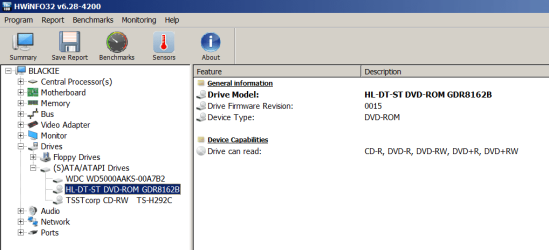
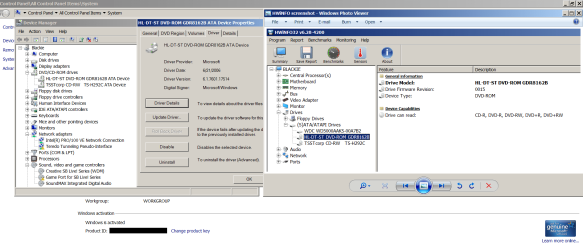
*edit* I was mixed up when I started this topic. It is only about making an old internal DVD-ROM drive read DWD+RW discs. The drive is HL-DT-ST DVD ROM GDR8162B. There is a screenshot with info about the drive added to this post.
The computer is DELL Dimension 4600 with Windows 7 Home Premium 32-bit installed on it. It was a clean install of Windows 7, or whatever you call it when you install Windows to a formatted HDD that had everything that was already there wiped off it, not an upgrade from a previous version of Windows. The drive this topic is about came with the desktop computer when it was first purchased.
All the stuff I wrote between here and where F22 Simpilot posted a HWiNFO screenshot and asked me to run HWiNFO can be ignored, I guess. Sorry about all that.
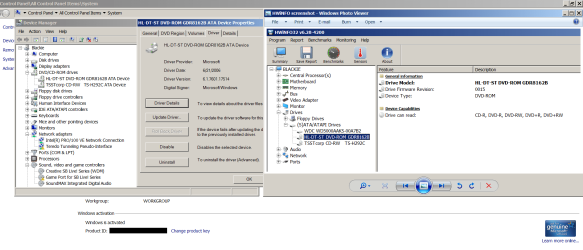
Hello. My desktop listed as the second computer in my specs thing, Windows 7 Home Premium 32-bit, has a DVD ROM drive and a DVD RW drive. Neither DVD drive detects any disks I saved stuff to using the other computer with Windows 7 Ultimate 64-bit. Both DVD drives read commercial DVDs and CDs and all the DVD disks I saved stuff on when the other computer was running Windows XP. It has been like this since I installed Windows 7 on both computers a long time ago. I tried uninstalling the DVD drives on the older computer with Windows Home Premium 32-bit and restarting the computer. The drivers listed in Device Manager look like the same version as the newest ones there are to download anywhere.
I thought since they were both Windows 7 computers, the DVDs I saved files on with the computer I used daily (Windows 7 Ultimate 64-bit) would be readable on the Windows 7 Home Premium 32-bit computer. Is that not right? Is there anything anyone knows that I could do to be able to read the DVDs I have stuff saved on?
Just to say, the Windows 7 Ultimate 64-bit desktop died. I ordered a new Windows 10 Pro computer from CUKUSA that won't be delivered for a while because I could never get the computer I bought stuff to build last year to work. $2000 worth of stuff just setting there. I was trying to move forward, not just keep using Windows 7 forever, but right now all I have is this 16-year-old computer to use, so I was trying to get some files from the DVDs I saved stuff to with the Win 7 Ult x64 desktop I had been using daily for the past however many years.
Do you think those DVDs I have stuff saved on from the Windows 7 Ultimate 64-bit computer will be readable with the Windows 10 computers when the CUKUSA one finally gets here or if I ever manage to get the one I tried to build functioning? The CUKUSA will have Windows 10 Pro 64-bit installed and the home build I can't get to work has Windows 10 Home purchased for it.
Thank you for reading this. I appreciate it.
May I also just add this about it? You know how when you put a blank DVD in, and Windows asks if you want to use it like a flash drive that you can keep writing to and deleting from, or whatever, or like a read only DVD that can't be rewritten to which might be readable on a wider range of devices or something like that? It's both kinds of DVDs that the DVD drives in the Windows 7 Home Premium 32-bit desktop PC won't read or detect or whatever. It just acts like there's no disk in the drives.
The computer is DELL Dimension 4600 with Windows 7 Home Premium 32-bit installed on it. It was a clean install of Windows 7, or whatever you call it when you install Windows to a formatted HDD that had everything that was already there wiped off it, not an upgrade from a previous version of Windows. The drive this topic is about came with the desktop computer when it was first purchased.
All the stuff I wrote between here and where F22 Simpilot posted a HWiNFO screenshot and asked me to run HWiNFO can be ignored, I guess. Sorry about all that.
Hello. My desktop listed as the second computer in my specs thing, Windows 7 Home Premium 32-bit, has a DVD ROM drive and a DVD RW drive. Neither DVD drive detects any disks I saved stuff to using the other computer with Windows 7 Ultimate 64-bit. Both DVD drives read commercial DVDs and CDs and all the DVD disks I saved stuff on when the other computer was running Windows XP. It has been like this since I installed Windows 7 on both computers a long time ago. I tried uninstalling the DVD drives on the older computer with Windows Home Premium 32-bit and restarting the computer. The drivers listed in Device Manager look like the same version as the newest ones there are to download anywhere.
I thought since they were both Windows 7 computers, the DVDs I saved files on with the computer I used daily (Windows 7 Ultimate 64-bit) would be readable on the Windows 7 Home Premium 32-bit computer. Is that not right? Is there anything anyone knows that I could do to be able to read the DVDs I have stuff saved on?
Just to say, the Windows 7 Ultimate 64-bit desktop died. I ordered a new Windows 10 Pro computer from CUKUSA that won't be delivered for a while because I could never get the computer I bought stuff to build last year to work. $2000 worth of stuff just setting there. I was trying to move forward, not just keep using Windows 7 forever, but right now all I have is this 16-year-old computer to use, so I was trying to get some files from the DVDs I saved stuff to with the Win 7 Ult x64 desktop I had been using daily for the past however many years.
Do you think those DVDs I have stuff saved on from the Windows 7 Ultimate 64-bit computer will be readable with the Windows 10 computers when the CUKUSA one finally gets here or if I ever manage to get the one I tried to build functioning? The CUKUSA will have Windows 10 Pro 64-bit installed and the home build I can't get to work has Windows 10 Home purchased for it.
Thank you for reading this. I appreciate it.
May I also just add this about it? You know how when you put a blank DVD in, and Windows asks if you want to use it like a flash drive that you can keep writing to and deleting from, or whatever, or like a read only DVD that can't be rewritten to which might be readable on a wider range of devices or something like that? It's both kinds of DVDs that the DVD drives in the Windows 7 Home Premium 32-bit desktop PC won't read or detect or whatever. It just acts like there's no disk in the drives.
Attachments
Last edited:
My Computer
At a glance
Windows 7 Ultimate 64-bit SP1Intel Core i5-3570KCorsair Vengeance Blue 4x8 GBNvidia GTX 1060
- Computer type
- PC/Desktop
- Computer Manufacturer/Model Number
- I do not know. It was put together with separately purchased parts.
- OS
- Windows 7 Ultimate 64-bit SP1
- CPU
- Intel Core i5-3570K
- Motherboard
- ASUS P8Z77-V PRO
- Memory
- Corsair Vengeance Blue 4x8 GB
- Graphics Card(s)
- Nvidia GTX 1060
- Sound Card
- M-Audio Delta 1010LT
- Monitor(s) Displays
- 2 Asus VS247H-P 23.6-Inch LED-Lit LCD monitors
- Screen Resolution
- 1920x1080
- Hard Drives
- Western Digital WD1002FAEX Caviar Black 1TB SATA III
(no SSD)
My Passport Ultra external hard drive 2TB
- PSU
- CORSAIR RM650 650W 80 PLUS GOLD Full Modular PSU
- Case
- Corsair Obsidian Series Black 550D Mid Tower
- Cooling
- Zalman CNPS9500AT CPU Cooler
- Keyboard
- Azio Large Print Tri-Color Backlit Wired Keyboard (KB505U)
- Mouse
- Logitech Gaming Mouse G300
- Internet Speed
- 6-8Mbps down, 2Mbps up
- Antivirus
- Malwarebytes Premium
- Browser
- IE, Firefox, Chrome
- Other Info
- 2nd PC: Dell Dimension 4600
OS: Windows 7 Home Premium 32-bit SP1
PSU: EVGA 500W 80+ thingo
CPU: Intel Pentium 4
RAM: 3.00 GB Dual Channel DDR @ 199MHz
MB: Dell 02Y832
GPU: 512MB Nvidia GeForce 6200
HDD: 465GB WDC WD5000AAKS-00A7B2 ATA (SATA)
Opt Drive: HL-DT-ST DVD-ROM GDR8162B ATA Device
Opt Drive: TSSTcorp CD-RW TS-H292C ATA Device
Audio: Creative SB Live
Monitor: Asus-VS247H-P