
Hi,
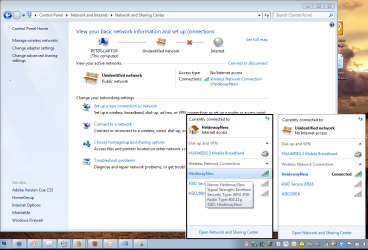
I have three Windows7 machines and 1 windows XP machines on a home network. Yesterday morning all the Win7 machines indicated that they were connected via their wireless connections to the wireless router - but none had internet access. (Yellow exclamation mark shows on the tray icon - see attached screenshot).
Thinking that this was a router probelm I reset it - without any change to the win7 machines. Connecting them via the network cable connection was working fine, so I thought that it was a problem with the wireless software/hardware on the router.
However, the XP machine was (and still is) connecting fine with the router via the wireless signal. Our iPods, iPhone & an Android tablet are still connecting without any issues to the wireless and have internet connection, so this is limited to teh win 7 machines ( My laptop is on win 7 professional, the 2nd & 3rd machines are win 7 home premium x64bit.)
Additional Info:
- None of the Win 7 machines are doing automatic software updates.
- The router is a Netgear CG814WG v3 which has not had any software updates either.
- Wireless encryption details as per the "NetworkSnapshot" picture attached
Any help will be apprecaited,
Thanks Pete
I have three Windows7 machines and 1 windows XP machines on a home network. Yesterday morning all the Win7 machines indicated that they were connected via their wireless connections to the wireless router - but none had internet access. (Yellow exclamation mark shows on the tray icon - see attached screenshot).
Thinking that this was a router probelm I reset it - without any change to the win7 machines. Connecting them via the network cable connection was working fine, so I thought that it was a problem with the wireless software/hardware on the router.
However, the XP machine was (and still is) connecting fine with the router via the wireless signal. Our iPods, iPhone & an Android tablet are still connecting without any issues to the wireless and have internet connection, so this is limited to teh win 7 machines ( My laptop is on win 7 professional, the 2nd & 3rd machines are win 7 home premium x64bit.)
Additional Info:
- None of the Win 7 machines are doing automatic software updates.
- The router is a Netgear CG814WG v3 which has not had any software updates either.
- Wireless encryption details as per the "NetworkSnapshot" picture attached
Any help will be apprecaited,
Thanks Pete
My Computer
- OS
- Win 7 Professional
