
Win 7 Move Drive

rbassman98003

New member
Member
Local time
11:44 PM
Messages
34
Location
Federal Way, Washington
Looking for a solution for the dilemma I'm in. My C: drive is 250GB.... It is down to
having 20gb available..... I have a second internal drive that is 650GB or I could purchase another bigger internal drive, either way. My question is, can I transfer
my system, files, etc from my C: drive over to my 650gb drive and if so how do
I do that. All I have found is transferring one computer to another. Suggestions
on how I go about this.......Also, how do I delete a thread here.... Thanks
 

My Computer

OS
Windows 7 64bit
CPU
AMD Phenom II X4 955
Motherboard
ASUS M4A79T Deluxe
Memory
CORSAIR DDR3-PC3-10700H
Graphics Card(s)
ATI Radeon HD 4800
Sound Card
Creative SB Audigy 2
Monitor(s) Displays
Sceptre LCD 20"
Hard Drives
Western Digital 250GB
Hitachi 200GB
You can't delete a thread. That's for administrators. What was wrong with the first thread?

You can transfer via cloning or imaging, but it may be totally unnecessary.

In your other thread, you said you had no data on C.

What is the size of your C:\Users directory?
 

My Computer

Computer type
PC/Desktop
Computer Manufacturer/Model Number
Ignatz Special; 4 speed manual gearbox; factory air conditioning; one of one
OS
Windows 7 Home Premium SP1, 64-bit
CPU
Intel Skylake i5-6600K, not overclocked
Motherboard
AsRock Z170M Extreme 4, micro ATX
Memory
8 GB HyperX DDR4-2666 (2 x 4 GB)
Graphics Card(s)
none; graphics are integrated on CPU
Sound Card
onboard: Realtek ALC1150; external: USB Behringer UF0-202
Monitor(s) Displays
Dell S2340M 23 inch IPS
Screen Resolution
1600 x 900
Hard Drives
System: Crucial MX100 series SSD, 128 GB;
Data: Samsung Spinpoint 103SJ, 1 TB;
Backup: WD Caviar Green WD30EZRX-00D8PB0, 3 TB
PSU
Rosewill SilentNight 500 watt fanless, semi-modular
Case
Antec Solo II
Cooling
Noctua NH-U12S; Noctua F12 intake, Noctua S12A exhaust
Keyboard
Microsoft 200 6JH-00001 USB
Mouse
Dell or Microsoft optical wired; USB
Antivirus
Microsoft Security Essentials and Malwarebytes Premium
Browser
Pale Moon
Other Info
All fans PWM; speeds at idle: CPU circa 500 rpm; intake circa 600 rpm; exhaust circa 600 rpm; CPU temps 27 idle and 47 C load in a warm room (27 C/81 F) when running Intel Extreme Tuning Utility stress test.
Three program folders 103 gb, Windows folder 37 gb, users folder 33 gb Total used 212 gb, free 20 gb
 

My Computer

OS
Windows 7 64bit
CPU
AMD Phenom II X4 955
Motherboard
ASUS M4A79T Deluxe
Memory
CORSAIR DDR3-PC3-10700H
Graphics Card(s)
ATI Radeon HD 4800
Sound Card
Creative SB Audigy 2
Monitor(s) Displays
Sceptre LCD 20"
Hard Drives
Western Digital 250GB
Hitachi 200GB
I can understand 2 program folders: Program Files and Program Files (x86).

What is the name of the third program folder?

If you don't keep data on C, I wouldn't expect C:\Users to be anywhere near that big. Mine is under 3 GB.

Do you use hibernation?

How much space is devoted to System Restore?

How large is your page file?

Have you run Disc Cleanup on the C drive?

Have you uninstalled unnecessary applications?

These are all things that can reduce the space occupied by C.

You should install and run a program such as WinDirStat, which can identify the file types and folders that are taking up the most space on C.

If you have no interest in reducing the size of C, your options are to clone to a new drive, restore an image to a new drive, or do a fresh install on a new drive.
 

My Computer

Computer type
PC/Desktop
Computer Manufacturer/Model Number
Ignatz Special; 4 speed manual gearbox; factory air conditioning; one of one
OS
Windows 7 Home Premium SP1, 64-bit
CPU
Intel Skylake i5-6600K, not overclocked
Motherboard
AsRock Z170M Extreme 4, micro ATX
Memory
8 GB HyperX DDR4-2666 (2 x 4 GB)
Graphics Card(s)
none; graphics are integrated on CPU
Sound Card
onboard: Realtek ALC1150; external: USB Behringer UF0-202
Monitor(s) Displays
Dell S2340M 23 inch IPS
Screen Resolution
1600 x 900
Hard Drives
System: Crucial MX100 series SSD, 128 GB;
Data: Samsung Spinpoint 103SJ, 1 TB;
Backup: WD Caviar Green WD30EZRX-00D8PB0, 3 TB
PSU
Rosewill SilentNight 500 watt fanless, semi-modular
Case
Antec Solo II
Cooling
Noctua NH-U12S; Noctua F12 intake, Noctua S12A exhaust
Keyboard
Microsoft 200 6JH-00001 USB
Mouse
Dell or Microsoft optical wired; USB
Antivirus
Microsoft Security Essentials and Malwarebytes Premium
Browser
Pale Moon
Other Info
All fans PWM; speeds at idle: CPU circa 500 rpm; intake circa 600 rpm; exhaust circa 600 rpm; CPU temps 27 idle and 47 C load in a warm room (27 C/81 F) when running Intel Extreme Tuning Utility stress test.
OK... I've been working on figuring out why my C drive shows 212 gb used, so here goes
I wish I send snapshots of the screens but the reply folder here does not allow paste so I'll try
to type all data
1) The three program folders are Program Files, Program Files (x86) and Program Data
2) Users folder shows 33gb used, All Users folder 9.61 gb, Bobby folder only show 32.8 gb
Looked at the properties on all other folders, all under 1 gb. Can't access all of them
Under Bobby folder AppData - 19 gb My Documents 6.81 gb My Music 5.7 gb
3) I do not hibernation but I don't know if I know how to turn it off. I did notice the
hiberfil.sys file is 7.49 gb, the pagefile.sys file is 14.9 gb I don't know where the System Restore file is.
4) I have run Disc Cleanup and I always uninstall applications I decide not to use.
5) I will go download WinDirStat and run it and give you the results.

Thanks for your help...
 

My Computer

OS
Windows 7 64bit
CPU
AMD Phenom II X4 955
Motherboard
ASUS M4A79T Deluxe
Memory
CORSAIR DDR3-PC3-10700H
Graphics Card(s)
ATI Radeon HD 4800
Sound Card
Creative SB Audigy 2
Monitor(s) Displays
Sceptre LCD 20"
Hard Drives
Western Digital 250GB
Hitachi 200GB
Do you have windows.old folder on C? It is the entire contents of your old OS stored there if you only ran and not booted the Win7 installer.
 
You can't delete a thread. That's for administrators. What was wrong with the first thread?

You can transfer via cloning or imaging, but it may be totally unnecessary.

In your other thread, you said you had no data on C.

What is the size of your C:\Users directory?
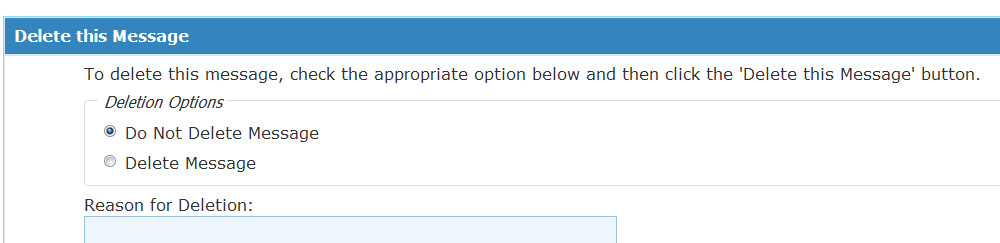
You can actually delete your own threads. Go to Edit > Advanced and check the delete.
 

My Computer

Computer Manufacturer/Model Number
HP, Dell, Gateway, Toshiba - 4 laptops and 2 desktops
OS
Vista, Windows7, Mint Mate, Zorin, Windows 8
CPU
from 1.6GHz Duo to i7
Monitor(s) Displays
2x HP w2207
Hard Drives
5x HDD, 7x SSD, 12x Externals
Keyboard
with trackball - no mices
Mouse
Trackball mice
Internet Speed
DSL 6000
OK... I've been working on figuring out why my C drive shows 212 gb used, so here goes
I wish I send snapshots of the screens but the reply folder here does not allow paste so I'll try
to type all data
1) The three program folders are Program Files, Program Files (x86) and Program Data
2) Users folder shows 33gb used, All Users folder 9.61 gb, Bobby folder only show 32.8 gb
Looked at the properties on all other folders, all under 1 gb. Can't access all of them
Under Bobby folder AppData - 19 gb My Documents 6.81 gb My Music 5.7 gb
3) I do not hibernation but I don't know if I know how to turn it off. I did notice the
hiberfil.sys file is 7.49 gb, the pagefile.sys file is 14.9 gb I don't know where the System Restore file is.
4) I have run Disc Cleanup and I always uninstall applications I decide not to use.
5) I will go download WinDirStat and run it and give you the results.

Thanks for your help...
In my book it woul be easier to move your user folders rather than the whole system - which isposible though. http://www.sevenforums.com/tutorials/18629-user-folders-change-default-location.html

To delete the hiberfile, open an elevated command prompt (run as admin) and run this command powercfg -h off
 

My Computer

Computer Manufacturer/Model Number
HP, Dell, Gateway, Toshiba - 4 laptops and 2 desktops
OS
Vista, Windows7, Mint Mate, Zorin, Windows 8
CPU
from 1.6GHz Duo to i7
Monitor(s) Displays
2x HP w2207
Hard Drives
5x HDD, 7x SSD, 12x Externals
Keyboard
with trackball - no mices
Mouse
Trackball mice
Internet Speed
DSL 6000
OK Answer to questions.....
1) Do you have windows.old folder on C? It is the entire contents of your old OS stored there if you only ran and
not booted the Windows 7 installer.
no widows.old file

2) You can actually delete your own threads. Go to Edit > Advanced and check the delete.
Edit where on the original post? You say advanced is that the same as go advanced? I see no delete

3) Will try moving the user folders to a different location. I have the User folder down to 28 gb. Got rid of music
in iTunes folder. Will put it somewhere else. I'll turn the hibernation off.... Should the pagefile be that big?
It is set to that because in System Settings Performance Options Advanced Virtual Memory Total paging
file size for all drives 15357 MB

Thanks for everyones help.....
 

My Computer

OS
Windows 7 64bit
CPU
AMD Phenom II X4 955
Motherboard
ASUS M4A79T Deluxe
Memory
CORSAIR DDR3-PC3-10700H
Graphics Card(s)
ATI Radeon HD 4800
Sound Card
Creative SB Audigy 2
Monitor(s) Displays
Sceptre LCD 20"
Hard Drives
Western Digital 250GB
Hitachi 200GB
2. see picture

3. Pagefile of 1GB should suffice.
 

Attachments

  • 2011-12-09_2113.png
    2011-12-09_2113.png
    4.8 KB · Views: 10

My Computer

Computer Manufacturer/Model Number
HP, Dell, Gateway, Toshiba - 4 laptops and 2 desktops
OS
Vista, Windows7, Mint Mate, Zorin, Windows 8
CPU
from 1.6GHz Duo to i7
Monitor(s) Displays
2x HP w2207
Hard Drives
5x HDD, 7x SSD, 12x Externals
Keyboard
with trackball - no mices
Mouse
Trackball mice
Internet Speed
DSL 6000
You should still check on System Restore.

Look in Control Panel then system then system protection. Then poke the configure button.

What is shown as current usage and max usage?

You should still run WinDirStat and post a picture of what it reveals.

See TheOG's post number 6 for how to post a picture in this thread.
 

My Computer

Computer type
PC/Desktop
Computer Manufacturer/Model Number
Ignatz Special; 4 speed manual gearbox; factory air conditioning; one of one
OS
Windows 7 Home Premium SP1, 64-bit
CPU
Intel Skylake i5-6600K, not overclocked
Motherboard
AsRock Z170M Extreme 4, micro ATX
Memory
8 GB HyperX DDR4-2666 (2 x 4 GB)
Graphics Card(s)
none; graphics are integrated on CPU
Sound Card
onboard: Realtek ALC1150; external: USB Behringer UF0-202
Monitor(s) Displays
Dell S2340M 23 inch IPS
Screen Resolution
1600 x 900
Hard Drives
System: Crucial MX100 series SSD, 128 GB;
Data: Samsung Spinpoint 103SJ, 1 TB;
Backup: WD Caviar Green WD30EZRX-00D8PB0, 3 TB
PSU
Rosewill SilentNight 500 watt fanless, semi-modular
Case
Antec Solo II
Cooling
Noctua NH-U12S; Noctua F12 intake, Noctua S12A exhaust
Keyboard
Microsoft 200 6JH-00001 USB
Mouse
Dell or Microsoft optical wired; USB
Antivirus
Microsoft Security Essentials and Malwarebytes Premium
Browser
Pale Moon
Other Info
All fans PWM; speeds at idle: CPU circa 500 rpm; intake circa 600 rpm; exhaust circa 600 rpm; CPU temps 27 idle and 47 C load in a warm room (27 C/81 F) when running Intel Extreme Tuning Utility stress test.
Life is good..... Cleaned up my C drive by moving the My Music which contained iTunes media music. Tried moving
My Documents also but Outlook did not like me doing that. Even when I gave it the new path when it asked, it was
still not happy, so I restored it back. I also turned off hibernation which I don't use and reduced the pagefile.sys size from 15.9 gb to 1 gb. C drive is now 177 gb Used 54 gb Free. Life is good.... No re-install.... YEA!!!!

Thanks again for everyones help.....
 

My Computer

OS
Windows 7 64bit
CPU
AMD Phenom II X4 955
Motherboard
ASUS M4A79T Deluxe
Memory
CORSAIR DDR3-PC3-10700H
Graphics Card(s)
ATI Radeon HD 4800
Sound Card
Creative SB Audigy 2
Monitor(s) Displays
Sceptre LCD 20"
Hard Drives
Western Digital 250GB
Hitachi 200GB
Glad you got it sorted. Happy surfing.

But there is still a lot of stuff on your C: partition. I would create more folders in your Data partition and move stuff to there. Then right click on those folders and INCLUDE them into the respective library. That way you need not change the path of anything - you just get an additional folder in the library. Note that this works only for folders for which you have libraries. But you can always create a library for whatever you like.
 

My Computer

Computer Manufacturer/Model Number
HP, Dell, Gateway, Toshiba - 4 laptops and 2 desktops
OS
Vista, Windows7, Mint Mate, Zorin, Windows 8
CPU
from 1.6GHz Duo to i7
Monitor(s) Displays
2x HP w2207
Hard Drives
5x HDD, 7x SSD, 12x Externals
Keyboard
with trackball - no mices
Mouse
Trackball mice
Internet Speed
DSL 6000
Back
Top