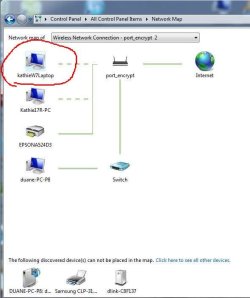
Does anyone know why one [COLOR=blue !important][COLOR=blue !important]laptop[/COLOR][/COLOR] cannot be placed in the Win 7 network map? The troubled machine is running Win 7 Pro, 32 bit, and has the Link Layer Topology Discovery (LLTD) enabled in the wireless adapter.
View from [COLOR=blue !important][COLOR=blue !important]Asus[/COLOR][/COLOR] P8P67 running Win 7 Ultimate 64 Bit
http://i26.photobucket.com/albums/c136/p23185/viewfromasusP8_zps52e22107.jpg
Here is the view from Dell 17R wireless Laptop running Win 7 Home Premium 64 bit
http://i26.photobucket.com/albums/c136/p23185/viewfromdell17R_zps16b0d367.jpg
And last here is the view from the problem PC a Dell 1501 wireless laptop running Win 7 Pro 32 bit - NOTE BIG ? IN MAP, PC name is 'KATHIEW7LAPTOP'
http://i26.photobucket.com/albums/c136/p23185/viewfromproblemDell1501_zps6970e5bc.jpg
I have home network setup and can see the shared folders from each to the other. I do not share printers because my printers are all networked through the router. The P4S8X-X shown is an old Win XP machine that I loaded the LLTD (Link Layer Topology Discovery and installed through a very complicated procedure in the CMD window. All machines are running AVAST anti-virus.
It is not a big deal that this network map will not work, but a irritant that I have something setup differently on the 32 bit laptop than I don on the 64 bit laptop. I sat the two PCs next to each other and checked all the settings in the Control Panel Network Setup and cannot find the difference. The firewall setting are all identical, although I did not go through the extensive list of outbound and inbound rules. The view on the problem PC shows a big question mark between the Dell 1501 and the router and I have no clue what it is. It is connected wirelessly just like the other laptop, which shows up just fine. COULD IT BE THE 32 BIT O/S?
View from [COLOR=blue !important][COLOR=blue !important]Asus[/COLOR][/COLOR] P8P67 running Win 7 Ultimate 64 Bit
http://i26.photobucket.com/albums/c136/p23185/viewfromasusP8_zps52e22107.jpg
Here is the view from Dell 17R wireless Laptop running Win 7 Home Premium 64 bit
http://i26.photobucket.com/albums/c136/p23185/viewfromdell17R_zps16b0d367.jpg
And last here is the view from the problem PC a Dell 1501 wireless laptop running Win 7 Pro 32 bit - NOTE BIG ? IN MAP, PC name is 'KATHIEW7LAPTOP'
http://i26.photobucket.com/albums/c136/p23185/viewfromproblemDell1501_zps6970e5bc.jpg
I have home network setup and can see the shared folders from each to the other. I do not share printers because my printers are all networked through the router. The P4S8X-X shown is an old Win XP machine that I loaded the LLTD (Link Layer Topology Discovery and installed through a very complicated procedure in the CMD window. All machines are running AVAST anti-virus.
It is not a big deal that this network map will not work, but a irritant that I have something setup differently on the 32 bit laptop than I don on the 64 bit laptop. I sat the two PCs next to each other and checked all the settings in the Control Panel Network Setup and cannot find the difference. The firewall setting are all identical, although I did not go through the extensive list of outbound and inbound rules. The view on the problem PC shows a big question mark between the Dell 1501 and the router and I have no clue what it is. It is connected wirelessly just like the other laptop, which shows up just fine. COULD IT BE THE 32 BIT O/S?
My Computer
At a glance
Windows 7 Ultimate x64i7-26008GbBFGgts250
- Computer Manufacturer/Model Number
- me/na
- OS
- Windows 7 Ultimate x64
- CPU
- i7-2600
- Motherboard
- Asus P8P67eluxe_i7-2600
- Memory
- 8Gb
- Graphics Card(s)
- BFGgts250
- Sound Card
- mobo
- Monitor(s) Displays
- Acer P236H
- Hard Drives
- 500Gb system Hitachi
1000Gb video Seagate 6.0 Gp/s SATA
1000Gb special project Seagate 3.0Gb/s SATA
- PSU
- thermaltake_600w
- Case
- Antec_900
- Cooling
- fans