Win 7 - Not sharing nicely with the other children

mediaman09

New member
Member
VIP
Local time
7:35 AM
Messages
260
Location
Toronto
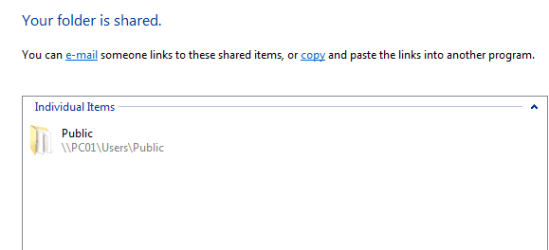
PC01 = Win 7. its Users\Public folder is shared for Everyone use
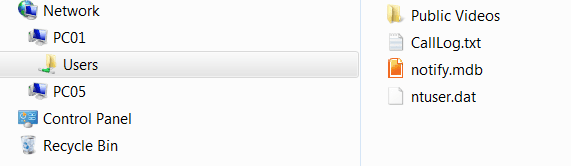
PC05 = Win 7 ; it can the PC01 publc folder fine
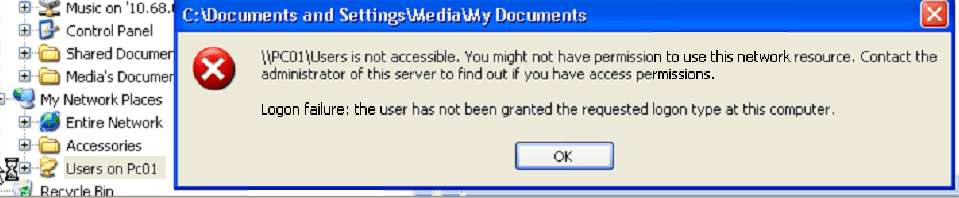
PC04 = XP , it cane "see' the name of sahre, but cant access it
PCnn = All my other XP machine same issue.

See screen shots.

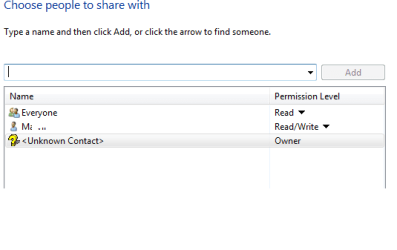
1) What am I doing wrong? How do I ensure my XPs machines get read access to the PC01 publc folder?

2) On the first screen shot, is the Owner entry normal (re" Unknown Contact")?

When on PC01, I have no problems access any machine.
 

Attachments
  • public_sahre.png
    public_sahre.png
    4.8 KB · Views: 1
  • public_share_2.png
    public_share_2.png
    3.3 KB · Views: 1
  • public_share_3.png
    public_share_3.png
    23.1 KB · Views: 3
  • public_share_4.png
    public_share_4.png
    5.1 KB · Views: 1

My Computer My Computer

At a glance

DELL Win 7 Home Premium 64 BitIntel Core i7-930 (8MB L2, 2.8GHz) // ntel Co...16GB // 18GB DDR3 SDRAM 1333Mhhz 6 DIMMS (3x2...AMD HD7570 // AMD Radeon HD6750 // ATI Radeon...
Computer type
PC/Desktop
Computer Manufacturer/Model Number
DELL XPS 8500 // DELL XPS Studio 9100 // DELL Dim 9200
OS
DELL Win 7 Home Premium 64 Bit
CPU
Intel Core i7-930 (8MB L2, 2.8GHz) // ntel Core 2 Quad Q6600
Motherboard
?? // Dell A02 BIOS // ??
Memory
16GB // 18GB DDR3 SDRAM 1333Mhhz 6 DIMMS (3x2, 3x4) //4 GB
Graphics Card(s)
AMD HD7570 // AMD Radeon HD6750 // ATI Radeon HD5670 1 GB GD
Sound Card
?? // THX TruStudio PC //?
Monitor(s) Displays
Dual Dell 2405 WFP-HC24 //SAmsung 27" // Triple 19" LCD
Screen Resolution
1900 x 1200
Hard Drives
Main :WD Caviar Black 1 TB SATA WD1002FAEX
Backup :WD Caviar Black 1 TB SATA WD1002FAEX
PSU
?? // Ultra 900W // ??
Last edited:

My Computer My Computer

At a glance

Win7 & Win8 64bitIntel i5
Computer Manufacturer/Model Number
Lenovo Desktop/Samsung Laptop
OS
Win7 & Win8 64bit
CPU
Intel i5
Internet Speed
Charter-20 Mbps
Antivirus
Avast
Browser
FF, IE9 and Chrome
Hi mediaman09,

Make sure that Netbios is enabled.
PracticallyNetworked.com

Where? On my xp machines?? How? Don't even see any references to this on that link. Wouldn't my xp settings be fine, given I had public file sharing working fine when PC01 was running Vista?

Hi mediaman09,
Also, create Identical UserName and Passwords on all the computers.
Thats not something I would ever do, nor did I need to do it when I was running vista on PC01.
 

My Computer My Computer

At a glance

DELL Win 7 Home Premium 64 BitIntel Core i7-930 (8MB L2, 2.8GHz) // ntel Co...16GB // 18GB DDR3 SDRAM 1333Mhhz 6 DIMMS (3x2...AMD HD7570 // AMD Radeon HD6750 // ATI Radeon...
Computer type
PC/Desktop
Computer Manufacturer/Model Number
DELL XPS 8500 // DELL XPS Studio 9100 // DELL Dim 9200
OS
DELL Win 7 Home Premium 64 Bit
CPU
Intel Core i7-930 (8MB L2, 2.8GHz) // ntel Core 2 Quad Q6600
Motherboard
?? // Dell A02 BIOS // ??
Memory
16GB // 18GB DDR3 SDRAM 1333Mhhz 6 DIMMS (3x2, 3x4) //4 GB
Graphics Card(s)
AMD HD7570 // AMD Radeon HD6750 // ATI Radeon HD5670 1 GB GD
Sound Card
?? // THX TruStudio PC //?
Monitor(s) Displays
Dual Dell 2405 WFP-HC24 //SAmsung 27" // Triple 19" LCD
Screen Resolution
1900 x 1200
Hard Drives
Main :WD Caviar Black 1 TB SATA WD1002FAEX
Backup :WD Caviar Black 1 TB SATA WD1002FAEX
PSU
?? // Ultra 900W // ??
My apology, I had no clue what happened to the first link. Pls verify that netbios is enabled in your XP machines see if I gave you the right link this time: Enabling NetBIOS over TCP/IP

Good to know that all is well in Vista, changing to a diff OS things wouldn't be the same as it used to be.

In my experience with Files and printer sharing, creating the same user names and passwords on the computers that need to communicate is very typical, It helps to give them access to their shared resources.

Also, pls verify that if you are using and Firewall or Security software on all your computers allow the files and printer sharing. For test purpose you may try disabling the firewall for now.
 
Last edited:

My Computer My Computer

At a glance

Win7 & Win8 64bitIntel i5
Computer Manufacturer/Model Number
Lenovo Desktop/Samsung Laptop
OS
Win7 & Win8 64bit
CPU
Intel i5
Internet Speed
Charter-20 Mbps
Antivirus
Avast
Browser
FF, IE9 and Chrome
EDIT


NETBIOS SUGGESTION -

Netbios is enabled on XP. I really dont think its that at all. I checked other XP machines and some had is DISABLED. No difference. To remind myself which setting is correct, I've have juat googled this issue and found a few dozen references why it should remain DISABLED - (reasons are
-for security reasons on your Internet connection.
-better performance
-avoids BSOD isses in many cases
Here is one of many references


USER ACCOUNTS
Seems to be a permissions issue, not an access issue. Will try settng up the same accont on multiple machines... But I dont understand why I (as John on Win7) am not able to assign read rights on my public folder to Jack (on XP), unless I create a Jack account on Win 7 ???? IS this really the way it works??
 
Last edited:

My Computer My Computer

At a glance

DELL Win 7 Home Premium 64 BitIntel Core i7-930 (8MB L2, 2.8GHz) // ntel Co...16GB // 18GB DDR3 SDRAM 1333Mhhz 6 DIMMS (3x2...AMD HD7570 // AMD Radeon HD6750 // ATI Radeon...
Computer type
PC/Desktop
Computer Manufacturer/Model Number
DELL XPS 8500 // DELL XPS Studio 9100 // DELL Dim 9200
OS
DELL Win 7 Home Premium 64 Bit
CPU
Intel Core i7-930 (8MB L2, 2.8GHz) // ntel Core 2 Quad Q6600
Motherboard
?? // Dell A02 BIOS // ??
Memory
16GB // 18GB DDR3 SDRAM 1333Mhhz 6 DIMMS (3x2, 3x4) //4 GB
Graphics Card(s)
AMD HD7570 // AMD Radeon HD6750 // ATI Radeon HD5670 1 GB GD
Sound Card
?? // THX TruStudio PC //?
Monitor(s) Displays
Dual Dell 2405 WFP-HC24 //SAmsung 27" // Triple 19" LCD
Screen Resolution
1900 x 1200
Hard Drives
Main :WD Caviar Black 1 TB SATA WD1002FAEX
Backup :WD Caviar Black 1 TB SATA WD1002FAEX
PSU
?? // Ultra 900W // ??
Windows 7 , whne working, is great...but whne not, is unbeleivable frustrating. I am still looking forward to a full week of ease-of-use on my recently upgraded machine. Nothing but furstration to date.

OKAY, I have now added the same users and same password on both machines.

FROM MY XP MACHINE, I can see my Win 7 shared public folders, and can read/write to them. Half the problem solved.


FROM MY WIN7 MACHINE, I can:
  • see the XP_C partition, and write to it ( as it's fully shared)
  • see the XP_D partition, and write to it ( as it's fully shared)
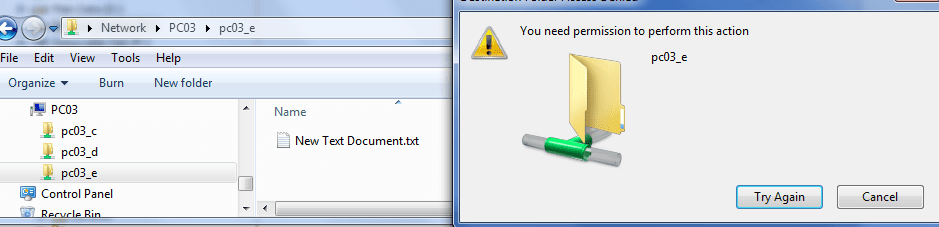
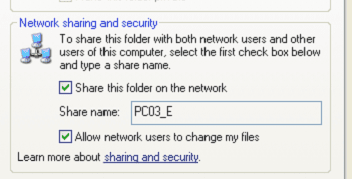
  • see the XP_E partition, and CANNOT write to it ( even though it's fully shared the same was as the other drives on the same machine)
Any suggestions? I guess am still missing something?
 

Attachments

  • pc03.PNG
    pc03.PNG
    21.5 KB · Views: 3
  • pc03_on_03.PNG
    pc03_on_03.PNG
    9.2 KB · Views: 0
Last edited:

My Computer My Computer

At a glance

DELL Win 7 Home Premium 64 BitIntel Core i7-930 (8MB L2, 2.8GHz) // ntel Co...16GB // 18GB DDR3 SDRAM 1333Mhhz 6 DIMMS (3x2...AMD HD7570 // AMD Radeon HD6750 // ATI Radeon...
Computer type
PC/Desktop
Computer Manufacturer/Model Number
DELL XPS 8500 // DELL XPS Studio 9100 // DELL Dim 9200
OS
DELL Win 7 Home Premium 64 Bit
CPU
Intel Core i7-930 (8MB L2, 2.8GHz) // ntel Core 2 Quad Q6600
Motherboard
?? // Dell A02 BIOS // ??
Memory
16GB // 18GB DDR3 SDRAM 1333Mhhz 6 DIMMS (3x2, 3x4) //4 GB
Graphics Card(s)
AMD HD7570 // AMD Radeon HD6750 // ATI Radeon HD5670 1 GB GD
Sound Card
?? // THX TruStudio PC //?
Monitor(s) Displays
Dual Dell 2405 WFP-HC24 //SAmsung 27" // Triple 19" LCD
Screen Resolution
1900 x 1200
Hard Drives
Main :WD Caviar Black 1 TB SATA WD1002FAEX
Backup :WD Caviar Black 1 TB SATA WD1002FAEX
PSU
?? // Ultra 900W // ??
Good to hear about the progress.

Is this a physical partition? Any more errors?
see the XP_E partition,
 

My Computer My Computer

At a glance

Win7 & Win8 64bitIntel i5
Computer Manufacturer/Model Number
Lenovo Desktop/Samsung Laptop
OS
Win7 & Win8 64bit
CPU
Intel i5
Internet Speed
Charter-20 Mbps
Antivirus
Avast
Browser
FF, IE9 and Chrome
On the XP machine its one physical drvie - 3 partitions.

I have no Win 7 issue seeing/changing files on the C ad D partitions on the XP ... simply the E ... cant write to it.

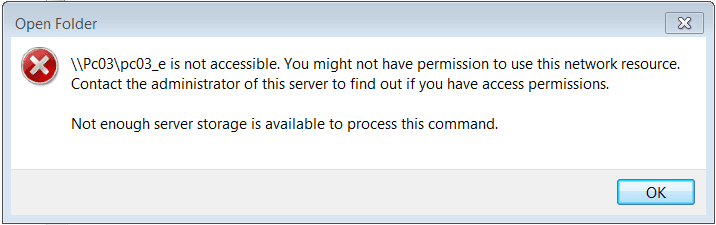
On the Win 7 machine I now get a slightly differnt error. See attached.

Trying to share files between two windows machines - all this trouble - what a joke! No wonder Apple is doing so well.
 

Attachments

  • WIN7_SHARE_ERROR.PNG
    WIN7_SHARE_ERROR.PNG
    5.8 KB · Views: 4

My Computer My Computer

At a glance

DELL Win 7 Home Premium 64 BitIntel Core i7-930 (8MB L2, 2.8GHz) // ntel Co...16GB // 18GB DDR3 SDRAM 1333Mhhz 6 DIMMS (3x2...AMD HD7570 // AMD Radeon HD6750 // ATI Radeon...
Computer type
PC/Desktop
Computer Manufacturer/Model Number
DELL XPS 8500 // DELL XPS Studio 9100 // DELL Dim 9200
OS
DELL Win 7 Home Premium 64 Bit
CPU
Intel Core i7-930 (8MB L2, 2.8GHz) // ntel Core 2 Quad Q6600
Motherboard
?? // Dell A02 BIOS // ??
Memory
16GB // 18GB DDR3 SDRAM 1333Mhhz 6 DIMMS (3x2, 3x4) //4 GB
Graphics Card(s)
AMD HD7570 // AMD Radeon HD6750 // ATI Radeon HD5670 1 GB GD
Sound Card
?? // THX TruStudio PC //?
Monitor(s) Displays
Dual Dell 2405 WFP-HC24 //SAmsung 27" // Triple 19" LCD
Screen Resolution
1900 x 1200
Hard Drives
Main :WD Caviar Black 1 TB SATA WD1002FAEX
Backup :WD Caviar Black 1 TB SATA WD1002FAEX
PSU
?? // Ultra 900W // ??
Did some searching on the last error message, and found a suggest registry fix for it ( but of course, why not): Suggested fix on the machine with the share is :

HKEY_LOCAL_MACHINE
\SYSTEM
\CurrentControlSet
\Services
\LanmanServer
\Parameters
IRPStackSize DWORD 0x0000000f (15)


Will try it out ........
 
Last edited:

My Computer My Computer

At a glance

DELL Win 7 Home Premium 64 BitIntel Core i7-930 (8MB L2, 2.8GHz) // ntel Co...16GB // 18GB DDR3 SDRAM 1333Mhhz 6 DIMMS (3x2...AMD HD7570 // AMD Radeon HD6750 // ATI Radeon...
Computer type
PC/Desktop
Computer Manufacturer/Model Number
DELL XPS 8500 // DELL XPS Studio 9100 // DELL Dim 9200
OS
DELL Win 7 Home Premium 64 Bit
CPU
Intel Core i7-930 (8MB L2, 2.8GHz) // ntel Core 2 Quad Q6600
Motherboard
?? // Dell A02 BIOS // ??
Memory
16GB // 18GB DDR3 SDRAM 1333Mhhz 6 DIMMS (3x2, 3x4) //4 GB
Graphics Card(s)
AMD HD7570 // AMD Radeon HD6750 // ATI Radeon HD5670 1 GB GD
Sound Card
?? // THX TruStudio PC //?
Monitor(s) Displays
Dual Dell 2405 WFP-HC24 //SAmsung 27" // Triple 19" LCD
Screen Resolution
1900 x 1200
Hard Drives
Main :WD Caviar Black 1 TB SATA WD1002FAEX
Backup :WD Caviar Black 1 TB SATA WD1002FAEX
PSU
?? // Ultra 900W // ??
I did some research too about the error and it all came out to what you have already found. Did it do the trick? :D
Did some searching on the last error message, and found a suggest registry fix for it ( but of course, why not): Suggested fix on the machine with the share is :

HKEY_LOCAL_MACHINE
\SYSTEM
\CurrentControlSet
\Services
\LanmanServer
\Parameters
IRPStackSize DWORD 0x0000000f (15)


Will try it out ........
 

My Computer My Computer

At a glance

Win7 & Win8 64bitIntel i5
Computer Manufacturer/Model Number
Lenovo Desktop/Samsung Laptop
OS
Win7 & Win8 64bit
CPU
Intel i5
Internet Speed
Charter-20 Mbps
Antivirus
Avast
Browser
FF, IE9 and Chrome
Likely to early to say, but seems to be working now.

All that should have been needed is to set file sharing on..and select the desired folders to be shared, but alas, this is Windows, so one needs to take these ridiculous actions to share files between two windows machines (Win 7 and XP) :

  1. Create idential user accounts in both systems (thanks 2xg) . This was not very convenient in my case but I thinki it turns out one does not have to be logged in to the account for the share to work)
  2. Optionally (might be needed on some machines, not others) set NETBIOS OVER TCP/IP to enabled - although all mine remained on disable/default. Impossible to find the setting as its buried under Start /ControlPanel/ Networks and Sharing / Local Connections /Properties /TCP/IP /Properties /Advanced /WINS
  3. Make a Regisrty fix under HKEY_LOCAL_MACHINE \SYSTEM \CurrentControlSet \Services \LanmanServer \Parameters \ IRPStackSize...but use 20 or higher, not 15.
  4. then delete and reset the share option on the folders to be shared
Simple. Very intuitive and user friendly even for the novice non-geek user. Not !! As I said, ridiculous.

Not even convinced yet it is working , but so far so good.
 

My Computer My Computer

At a glance

DELL Win 7 Home Premium 64 BitIntel Core i7-930 (8MB L2, 2.8GHz) // ntel Co...16GB // 18GB DDR3 SDRAM 1333Mhhz 6 DIMMS (3x2...AMD HD7570 // AMD Radeon HD6750 // ATI Radeon...
Computer type
PC/Desktop
Computer Manufacturer/Model Number
DELL XPS 8500 // DELL XPS Studio 9100 // DELL Dim 9200
OS
DELL Win 7 Home Premium 64 Bit
CPU
Intel Core i7-930 (8MB L2, 2.8GHz) // ntel Core 2 Quad Q6600
Motherboard
?? // Dell A02 BIOS // ??
Memory
16GB // 18GB DDR3 SDRAM 1333Mhhz 6 DIMMS (3x2, 3x4) //4 GB
Graphics Card(s)
AMD HD7570 // AMD Radeon HD6750 // ATI Radeon HD5670 1 GB GD
Sound Card
?? // THX TruStudio PC //?
Monitor(s) Displays
Dual Dell 2405 WFP-HC24 //SAmsung 27" // Triple 19" LCD
Screen Resolution
1900 x 1200
Hard Drives
Main :WD Caviar Black 1 TB SATA WD1002FAEX
Backup :WD Caviar Black 1 TB SATA WD1002FAEX
PSU
?? // Ultra 900W // ??
I was right, too soon .

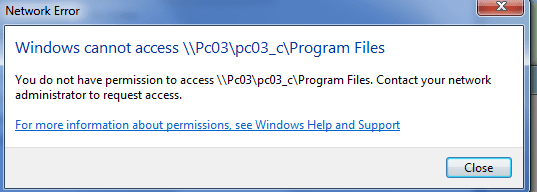
Still getting errors. This is hopeless.
 

Attachments

  • share_error.PNG
    share_error.PNG
    8.7 KB · Views: 2

My Computer My Computer

At a glance

DELL Win 7 Home Premium 64 BitIntel Core i7-930 (8MB L2, 2.8GHz) // ntel Co...16GB // 18GB DDR3 SDRAM 1333Mhhz 6 DIMMS (3x2...AMD HD7570 // AMD Radeon HD6750 // ATI Radeon...
Computer type
PC/Desktop
Computer Manufacturer/Model Number
DELL XPS 8500 // DELL XPS Studio 9100 // DELL Dim 9200
OS
DELL Win 7 Home Premium 64 Bit
CPU
Intel Core i7-930 (8MB L2, 2.8GHz) // ntel Core 2 Quad Q6600
Motherboard
?? // Dell A02 BIOS // ??
Memory
16GB // 18GB DDR3 SDRAM 1333Mhhz 6 DIMMS (3x2, 3x4) //4 GB
Graphics Card(s)
AMD HD7570 // AMD Radeon HD6750 // ATI Radeon HD5670 1 GB GD
Sound Card
?? // THX TruStudio PC //?
Monitor(s) Displays
Dual Dell 2405 WFP-HC24 //SAmsung 27" // Triple 19" LCD
Screen Resolution
1900 x 1200
Hard Drives
Main :WD Caviar Black 1 TB SATA WD1002FAEX
Backup :WD Caviar Black 1 TB SATA WD1002FAEX
PSU
?? // Ultra 900W // ??
No problem....Any Security of Firewall software installed from the Win7 computer? Completely disable it for now.

Also, try accessing the Win7 computer this way from the XP computer:
Click on start, type \\WinPC IPAddress\shared drive. The IP address can be obtained by doing ipconfig /all command from the Win7 PC.
I was right, too soon .

Still getting errors. This is hopeless.
Also, if the shared folders are in Local Disk 'C', go C drive in Disk Management, right-click on it => Properties => Security Tab => Edit => Add then type Everyone
and below it select your preferences either Read or Full Control. Click Ok.

How to access Disk Management:
Click Start => Run and type diskmgmt.msc in Run or Search field.
 
Last edited:

My Computer My Computer

At a glance

Win7 & Win8 64bitIntel i5
Computer Manufacturer/Model Number
Lenovo Desktop/Samsung Laptop
OS
Win7 & Win8 64bit
CPU
Intel i5
Internet Speed
Charter-20 Mbps
Antivirus
Avast
Browser
FF, IE9 and Chrome
Back
Top