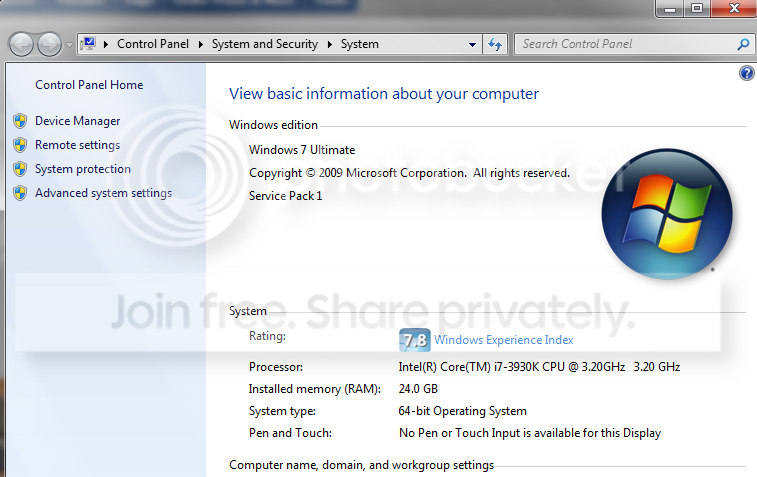
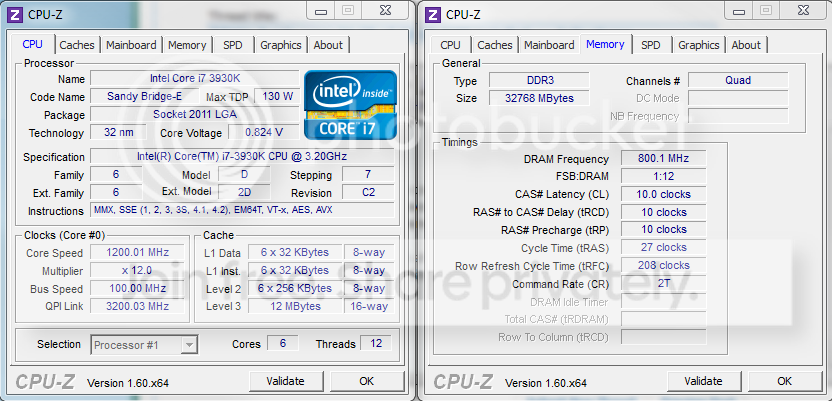
I have recently built a new computer, everything had been working perfectly however the ammount of RAM windows displays has dropped from 32 GB to 24 GB, also during POST it displays 24 GB, whereas it had previously been showing the correct 32 GB...
When I run CPU-Z and look at the memory tab it shows 32 GB, so I think Windows could be allocating part of the RAM to something without me knowing....????
Any help is much appreciated! Thank you
PC Spec:
OS: Win 7 64 bit ultimate
CPU: i7 3930k
Mobo: Asus Sabertooth x79
RAM: 32GB (4x8GB) Corsair Dominator 1600
SSD: OCZ V3 Max Iops 120GB
GPX: Geforce GTX 680
My Computer
At a glance
Windows 7 - 64 bit Ultimatei7 920 @ 4.00 ghz12 GB Corsair Dominator GT - 8-8-8-24ASUS EAH5970
Computer Manufacturer/Model Number
i built it :-)
OS
Windows 7 - 64 bit Ultimate
CPU
i7 920 @ 4.00 ghz
Motherboard
ASUS P6T7 WS SuperComputer
Memory
12 GB Corsair Dominator GT - 8-8-8-24
Graphics Card(s)
ASUS EAH5970
Sound Card
onboard
Monitor(s) Displays
LG W2486L-PF LED
Hard Drives
2x Corsair P128 SSD's - (RAID 0)
2x Western Digital Caviar Black 1TB - (RAID 1)
A quick google search told me your mobo supports a maximum of 64 gb ram.Windows 7 Ultimate supports a maximum of 192 gb.So the problem must be somewhere in the system.What's your bios ? is it up2date ?.Did you installed any new hardware recently ?.What does your bios say about the ram ? is your graphics card shared ?
I think some hardware device is reserving memory but i'm just guessing here
If the BIOS only sees 24 gig, Windows will only see 24 gig. Even if Windows was reserving some of it, that would not effect what the BIOS post screen reports. Your PC/motherboard is not detecting all your RAM. As suggested I would re-seat all your RAM modules. If you are overclocking I would go back to the default BIOS settings. It may be a good idea to reset the BIOS back to defaults anyway.
My Computer
At a glance
Windows 10 Education 64 bitAMD Phenom II X4 980 Black Edition Deneb 3.7GHz8GB 4GBx2 Kingston PC10600 DDR3 1333 MemoryZotac NVIDIA Geforce GT640 2 Gig DDR3 PCIe
Computer type
PC/Desktop
Computer Manufacturer/Model Number
Home Built
OS
Windows 10 Education 64 bit
CPU
AMD Phenom II X4 980 Black Edition Deneb 3.7GHz
Motherboard
Asus M4N68T-M V2 µATX Motherboard
Memory
8GB 4GBx2 Kingston PC10600 DDR3 1333 Memory
Graphics Card(s)
Zotac NVIDIA Geforce GT640 2 Gig DDR3 PCIe
Sound Card
VIA VT1708s High Definition Audio 8-channel Onboard
what happened was the ASUS AI Suite crashed when i was altering the CPU fan speed profile, it caused me to hard reboot as it crashed. When I booted the BIOS gave error message saying overclocking failed (i wasnt doing any overclocking), and from then on it only showed 24 GB of RAM.
What I did was remove 3 sticks leaving 1 stick to boot with, then loaded onto windows with just one 8GB stick, this made it reset some settings. Then i shut down and installed the full 32 Gb again, rebooted, and it now correctly shows all 32 GB in bios and in windows
I guess it was a bug with the ASUS AI Suite, afterall it is this program which made the PC crash then to lose the visability of all the RAM....
atleast the problem is solved
Thanks for your help
My Computer
At a glance
Windows 7 - 64 bit Ultimatei7 920 @ 4.00 ghz12 GB Corsair Dominator GT - 8-8-8-24ASUS EAH5970
Computer Manufacturer/Model Number
i built it :-)
OS
Windows 7 - 64 bit Ultimate
CPU
i7 920 @ 4.00 ghz
Motherboard
ASUS P6T7 WS SuperComputer
Memory
12 GB Corsair Dominator GT - 8-8-8-24
Graphics Card(s)
ASUS EAH5970
Sound Card
onboard
Monitor(s) Displays
LG W2486L-PF LED
Hard Drives
2x Corsair P128 SSD's - (RAID 0)
2x Western Digital Caviar Black 1TB - (RAID 1)