
Win 7 OS corrupted

redrooster01

New member
Member
VIP
Local time
6:36 AM
Messages
129
Hi all,this is my first post here. I didn't really know where to post this so I tried here? My O.S is messed up from a virus or Trojan or whatever it was? Ive run Malwarebytes,Spybot search and destroy,etc...etc...but its left me with altered settings so that my computer wont let me fix it?About an hour ago I was watching a video on Vimeo when I got a blue screen? That was the last straw,so I tried to set the O.S. back to factory default in Recovery but it just logged back onto windows again? Any ideas I could try to get out of this mess? I had better mention that Im 60+ y/o to give you an idea of my level of expertise on computers.:)
 

My Computer My Computer

Computer type
PC/Desktop
Computer Manufacturer/Model Number
HP P6-2203a
OS
Win 7 64 bit home premium
CPU
A8550
Motherboard
Gigabyte
Memory
8GB
Graphics Card(s)
HD7450
Sound Card
intergrated and Muse USB external DAC
Monitor(s) Displays
LG 22 inch Flatron W2242P
Screen Resolution
1960 x 1020
Hard Drives
C: Drive,1TB Hitachi. Backup Drive: 1TB Western Digital.
Mouse
Targus remote.
Internet Speed
Optical fibre.12mb download and 1mb upload
Antivirus
Microsoft Essentials.
Browser
Firefox 58.0.2
Other Info
Speccy,CCcleaner,Ultra-Defragmenter,Filehippo,ThunderBird.
1. Click Start
orb.png

2. In the search box, type cmd
3. In the list that appears, right-click on cmd.exe and choose Run as administrator
4. In the command window that opens, type sfc /scannow and hit enter.

Report the output from the command window once it finishes.

More detail: http://www.sevenforums.com/tutorials/1538-sfc-scannow-command-system-file-checker.html
 

My Computer My Computer

Computer type
PC/Desktop
Computer Manufacturer/Model Number
Golden Mk. I.4
OS
Windows 10 Pro x64 ; Xubuntu x64
CPU
Intel i7 860 @ 2.80 GHz O/C'ed to 4.0GHz
Motherboard
Gigabyte P55A-UD3R Rev.1. Award BIOS F13
Memory
16GB Corsair Vengance DDR3 @ 661 MHz Dual Channel (9-9-9-24)
Graphics Card(s)
EVGA NVidia GTX 560 1024MB
Sound Card
Realtek Integrated
Monitor(s) Displays
Dual Samsung SyncMaster 2494HS
Screen Resolution
1920*1080 and 1920*1080
Hard Drives
1*Samsung 840 EVO 120GB SSD;
1*OCZ Vertex 2 60GB SSD;
2*Samsung F3 SpinPoint 1TB in RAID0;
1*Samsung F1 SpinPoint 1TB;
2*Western Digital 1TB External USB 3.0
1*Western Digital 500GB External USB 3.0
1*Seagate 500GB External USB 2.0
PSU
Thermaltake ToughPower QFan 750W
Case
Thermaltake Element S VK60001W2Z
Cooling
Corsair H60 Water Cooling, 2*230mm and 2*80mm case fans
Keyboard
Logitech G110
Mouse
Logitech MX518
1. Click Start
orb.png

2. In the search box, type cmd
3. In the list that appears, right-click on cmd.exe and choose Run as administrator
4. In the command window that opens, type sfc /scannow and hit enter.

Report the output from the command window once it finishes.

More detail: http://www.sevenforums.com/tutorials/1538-sfc-scannow-command-system-file-checker.html
sfc /scannow said it didn't find any integrity violations? Ive turned on services that have been stopped but they get turned off again and I cant get error reports sent either?
 

My Computer My Computer

Computer type
PC/Desktop
Computer Manufacturer/Model Number
HP P6-2203a
OS
Win 7 64 bit home premium
CPU
A8550
Motherboard
Gigabyte
Memory
8GB
Graphics Card(s)
HD7450
Sound Card
intergrated and Muse USB external DAC
Monitor(s) Displays
LG 22 inch Flatron W2242P
Screen Resolution
1960 x 1020
Hard Drives
C: Drive,1TB Hitachi. Backup Drive: 1TB Western Digital.
Mouse
Targus remote.
Internet Speed
Optical fibre.12mb download and 1mb upload
Antivirus
Microsoft Essentials.
Browser
Firefox 58.0.2
Other Info
Speccy,CCcleaner,Ultra-Defragmenter,Filehippo,ThunderBird.
1. Download the DM Log Collector application to your desktop by clicking the link below

DM Log Collector.exe

2. Run it by double-clicking the icon on your desktop, and follow the prompts.
3. Locate the .ZIP file that is created on your desktop, and upload it here in your next reply.

picture.php
 

My Computer My Computer

Computer type
PC/Desktop
Computer Manufacturer/Model Number
Golden Mk. I.4
OS
Windows 10 Pro x64 ; Xubuntu x64
CPU
Intel i7 860 @ 2.80 GHz O/C'ed to 4.0GHz
Motherboard
Gigabyte P55A-UD3R Rev.1. Award BIOS F13
Memory
16GB Corsair Vengance DDR3 @ 661 MHz Dual Channel (9-9-9-24)
Graphics Card(s)
EVGA NVidia GTX 560 1024MB
Sound Card
Realtek Integrated
Monitor(s) Displays
Dual Samsung SyncMaster 2494HS
Screen Resolution
1920*1080 and 1920*1080
Hard Drives
1*Samsung 840 EVO 120GB SSD;
1*OCZ Vertex 2 60GB SSD;
2*Samsung F3 SpinPoint 1TB in RAID0;
1*Samsung F1 SpinPoint 1TB;
2*Western Digital 1TB External USB 3.0
1*Western Digital 500GB External USB 3.0
1*Seagate 500GB External USB 2.0
PSU
Thermaltake ToughPower QFan 750W
Case
Thermaltake Element S VK60001W2Z
Cooling
Corsair H60 Water Cooling, 2*230mm and 2*80mm case fans
Keyboard
Logitech G110
Mouse
Logitech MX518
A message said that it would send the log file to my desktop but it didn't? Ive run it twice and looked in downloads and documents as well? This is the sort of thing that's been happening to stop me fixing it?
 

My Computer My Computer

Computer type
PC/Desktop
Computer Manufacturer/Model Number
HP P6-2203a
OS
Win 7 64 bit home premium
CPU
A8550
Motherboard
Gigabyte
Memory
8GB
Graphics Card(s)
HD7450
Sound Card
intergrated and Muse USB external DAC
Monitor(s) Displays
LG 22 inch Flatron W2242P
Screen Resolution
1960 x 1020
Hard Drives
C: Drive,1TB Hitachi. Backup Drive: 1TB Western Digital.
Mouse
Targus remote.
Internet Speed
Optical fibre.12mb download and 1mb upload
Antivirus
Microsoft Essentials.
Browser
Firefox 58.0.2
Other Info
Speccy,CCcleaner,Ultra-Defragmenter,Filehippo,ThunderBird.
What about this one? I did it yesterday or the day before.I think it was called Farbar.
 

Attachments

My Computer My Computer

Computer type
PC/Desktop
Computer Manufacturer/Model Number
HP P6-2203a
OS
Win 7 64 bit home premium
CPU
A8550
Motherboard
Gigabyte
Memory
8GB
Graphics Card(s)
HD7450
Sound Card
intergrated and Muse USB external DAC
Monitor(s) Displays
LG 22 inch Flatron W2242P
Screen Resolution
1960 x 1020
Hard Drives
C: Drive,1TB Hitachi. Backup Drive: 1TB Western Digital.
Mouse
Targus remote.
Internet Speed
Optical fibre.12mb download and 1mb upload
Antivirus
Microsoft Essentials.
Browser
Firefox 58.0.2
Other Info
Speccy,CCcleaner,Ultra-Defragmenter,Filehippo,ThunderBird.
Thats for a different purpose, and isn't of any use for the blue screen. Try run DM Log Collector a administrator.
 

My Computer My Computer

Computer type
PC/Desktop
Computer Manufacturer/Model Number
Golden Mk. I.4
OS
Windows 10 Pro x64 ; Xubuntu x64
CPU
Intel i7 860 @ 2.80 GHz O/C'ed to 4.0GHz
Motherboard
Gigabyte P55A-UD3R Rev.1. Award BIOS F13
Memory
16GB Corsair Vengance DDR3 @ 661 MHz Dual Channel (9-9-9-24)
Graphics Card(s)
EVGA NVidia GTX 560 1024MB
Sound Card
Realtek Integrated
Monitor(s) Displays
Dual Samsung SyncMaster 2494HS
Screen Resolution
1920*1080 and 1920*1080
Hard Drives
1*Samsung 840 EVO 120GB SSD;
1*OCZ Vertex 2 60GB SSD;
2*Samsung F3 SpinPoint 1TB in RAID0;
1*Samsung F1 SpinPoint 1TB;
2*Western Digital 1TB External USB 3.0
1*Western Digital 500GB External USB 3.0
1*Seagate 500GB External USB 2.0
PSU
Thermaltake ToughPower QFan 750W
Case
Thermaltake Element S VK60001W2Z
Cooling
Corsair H60 Water Cooling, 2*230mm and 2*80mm case fans
Keyboard
Logitech G110
Mouse
Logitech MX518
That didn't work either? (administrator)I have no idea how to download this file directly to the desktop? My downloads go to downloads and I cant find any way to change it to desktop? Ive sent the files from downloads to desktop, maybe it wont work with the DM shortcut or its the virus stopping it? Ive just had another look at it and the file says that it takes a few minutes to run but it doesn't run at all?
 

My Computer My Computer

Computer type
PC/Desktop
Computer Manufacturer/Model Number
HP P6-2203a
OS
Win 7 64 bit home premium
CPU
A8550
Motherboard
Gigabyte
Memory
8GB
Graphics Card(s)
HD7450
Sound Card
intergrated and Muse USB external DAC
Monitor(s) Displays
LG 22 inch Flatron W2242P
Screen Resolution
1960 x 1020
Hard Drives
C: Drive,1TB Hitachi. Backup Drive: 1TB Western Digital.
Mouse
Targus remote.
Internet Speed
Optical fibre.12mb download and 1mb upload
Antivirus
Microsoft Essentials.
Browser
Firefox 58.0.2
Other Info
Speccy,CCcleaner,Ultra-Defragmenter,Filehippo,ThunderBird.
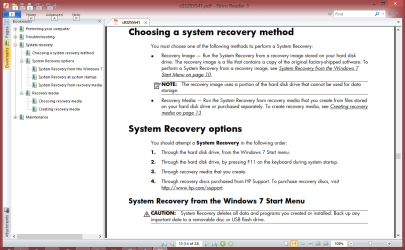
To me it sounds like you have multiple issues ...
In post #1 you stated
"so I tried to set the O.S. back to factory default in Recovery but it just logged back onto windows again"

What did you do to try and recover and set back to the factory default ?

Below is a screen print of the HP help for this
Get the Troubleshooting & Maintenance Guide from here:
HP Pavilion p6-2203a Desktop PC Manuals | HP® Support

HPRecovery_01.PNG
 

My Computer My Computer

Computer type
PC/Desktop
Computer Manufacturer/Model Number
home built
OS
Multi-Boot W7_Pro_x64 W8.1_Pro_x64 W10_Pro_x64 +Linux_VMs +Chromium_VM
CPU
AMD Athlon II x4 620
Motherboard
Gigabyte GA-MA785G-UD3H
Memory
6GB GSkill DDR2 800
Graphics Card(s)
AMD 4670 GPU + AMD 4200 IGP
Sound Card
on board Realtek ALC889A
Monitor(s) Displays
RCA 40" LCD TV, Insignia 32" LCD TV, HP 15" LCD monitor
Screen Resolution
1680 x 1050
Hard Drives
OCZ Vertex 3 120GB,
Samsung F3 1TB (3),
Several others - WD, Seagate, Hitachi, ...
PSU
Corsair 500 W
Case
Rosewill mid tower
Cooling
CM 90mm rifle
Keyboard
Gyration wireless, Logitech wireless, Dell USB wired
Mouse
Gyration wireless, Logitech wireless, V7 USB wired
Internet Speed
Spectrum - 100Mbps D / 10Mbps U
Antivirus
Avast, MBAM3, EMET, WinPatrol
Browser
Pale Moon, Firefox, IE
Other Info
2 multi-boot PC's
Mainly HTPC/Office/Gen purpose (no gaming).
Trendnet USB KVM.
LG DVD burner/Blue Ray Player.
Tray system for removable SATA backup drives.

Not currently OCd, under-volted.
I use Hybrid sleep, rarely re-boot or shutdown.

Hauppauge HD-PVR, Avermedia PCIe TV Tuner, Hauppauge PCI TV Tuner.
I went to start/ Recovery,clicked on replace operating system and it logged off and restarted without doing anything? Ive read the instructions but its that confusing I don't know what to do? I have burnt a repair disk and Ive done a system image but its 172GB so Im a bit wary of it plus Ive got no idea? After having this virus and the problems its caused me Im more confused than ever!
 

My Computer My Computer

Computer type
PC/Desktop
Computer Manufacturer/Model Number
HP P6-2203a
OS
Win 7 64 bit home premium
CPU
A8550
Motherboard
Gigabyte
Memory
8GB
Graphics Card(s)
HD7450
Sound Card
intergrated and Muse USB external DAC
Monitor(s) Displays
LG 22 inch Flatron W2242P
Screen Resolution
1960 x 1020
Hard Drives
C: Drive,1TB Hitachi. Backup Drive: 1TB Western Digital.
Mouse
Targus remote.
Internet Speed
Optical fibre.12mb download and 1mb upload
Antivirus
Microsoft Essentials.
Browser
Firefox 58.0.2
Other Info
Speccy,CCcleaner,Ultra-Defragmenter,Filehippo,ThunderBird.
Did you try the 2nd HP suggestion by using F11 on startup ?
Did you create the recovery media needed for option 3 ?
 

My Computer My Computer

Computer type
PC/Desktop
Computer Manufacturer/Model Number
home built
OS
Multi-Boot W7_Pro_x64 W8.1_Pro_x64 W10_Pro_x64 +Linux_VMs +Chromium_VM
CPU
AMD Athlon II x4 620
Motherboard
Gigabyte GA-MA785G-UD3H
Memory
6GB GSkill DDR2 800
Graphics Card(s)
AMD 4670 GPU + AMD 4200 IGP
Sound Card
on board Realtek ALC889A
Monitor(s) Displays
RCA 40" LCD TV, Insignia 32" LCD TV, HP 15" LCD monitor
Screen Resolution
1680 x 1050
Hard Drives
OCZ Vertex 3 120GB,
Samsung F3 1TB (3),
Several others - WD, Seagate, Hitachi, ...
PSU
Corsair 500 W
Case
Rosewill mid tower
Cooling
CM 90mm rifle
Keyboard
Gyration wireless, Logitech wireless, Dell USB wired
Mouse
Gyration wireless, Logitech wireless, V7 USB wired
Internet Speed
Spectrum - 100Mbps D / 10Mbps U
Antivirus
Avast, MBAM3, EMET, WinPatrol
Browser
Pale Moon, Firefox, IE
Other Info
2 multi-boot PC's
Mainly HTPC/Office/Gen purpose (no gaming).
Trendnet USB KVM.
LG DVD burner/Blue Ray Player.
Tray system for removable SATA backup drives.

Not currently OCd, under-volted.
I use Hybrid sleep, rarely re-boot or shutdown.

Hauppauge HD-PVR, Avermedia PCIe TV Tuner, Hauppauge PCI TV Tuner.
Did you try the 2nd HP suggestion by using F11 on startup ?
Did you create the recovery media needed for option 3 ?
I don't know whats going on anymore, this computer changes its mind every 5 minutes! All I want to do is set the O.S back to factory default to get rid of this virus. I cant make any sense of the instruction manual when it comes to doing anything on this computer because everything I do according to the instructions is wrong,it doesn't work? I cant remember what option 3 is but Ive previously burnt a repair disk and a system image.I cant remember the 2 option either? Im stressed to the max and Im going to have to take a break from this before I smash it.
 

My Computer My Computer

Computer type
PC/Desktop
Computer Manufacturer/Model Number
HP P6-2203a
OS
Win 7 64 bit home premium
CPU
A8550
Motherboard
Gigabyte
Memory
8GB
Graphics Card(s)
HD7450
Sound Card
intergrated and Muse USB external DAC
Monitor(s) Displays
LG 22 inch Flatron W2242P
Screen Resolution
1960 x 1020
Hard Drives
C: Drive,1TB Hitachi. Backup Drive: 1TB Western Digital.
Mouse
Targus remote.
Internet Speed
Optical fibre.12mb download and 1mb upload
Antivirus
Microsoft Essentials.
Browser
Firefox 58.0.2
Other Info
Speccy,CCcleaner,Ultra-Defragmenter,Filehippo,ThunderBird.
Back
Top