Win 7 Pro 64bit sp1 - not updating - just the green moving bar

Tomatoes

New member
Local time
1:01 PM
Messages
6
Yep, another thread with the so familiar problem I guess.

I almost hate to post the thread since there are so many of them already. But here it goes - I think I actually might have the worst problem of all. And I hope that it really isn't a problem with the installation disc.

This is for my Toshiba Satellite laptop, previously running fine, just had Vista on it and I was ready to use win 7 on it since I love it. I followed the clean install directions from this website - which were great! And I installed my Windows 7 pro 64bt sp1 software.

The first thing I did was go into my windows update. And it won't update, I just get the moving green bar.

Over the past days I have reformatted my HD twice and did clean installs again, just in case there might have been an issue during install.

I did initially get the message that windows needed to update the windows updater before I could check for updates. I left it running for about 12 hours (over night) and nothing, just the green moving bar. I have rebooted of course, and tried to update again for hours and hours and nothing.

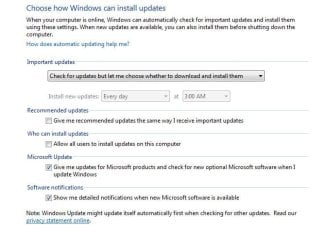
I have downloaded the system readiness tool, I've tried changing the settings in my control panel, from update never to update automatic with the usual reboot and that didn't work...I've tried the windows update stand alone with no luck that (actually as I type this thread) is hanging showing "searching for updates on this computer" with the moving green bar - I can't even cancel and get out of that dialog box. I've tried plugging it straight into my router (I have FIOS) instead of using my wifi, I've tried the "find and fix" troubleshoot in my control panel for the Windows update which actually goes into "detecting problems" and says "checking for updates online" and just hangs with the green bar again never ending.

During these long green bar update attempts my hard drive light is not running at all, and I've opened up my resource monitor during these periods and it pretty much has nothing going on.

If anyone has any ideas for me to try, it would be greatly appreciated.

And thanks in advance.
 

My Computer My Computer

At a glance

win 7 pro 64bit
Computer type
PC/Desktop
OS
win 7 pro 64bit
BTW - not sure if any of this helps.

After the first time I did my clean install I thought it was working for a couple minutes, so I popped in a CD and went to copy a few files from the CD on to my laptop. The transfer began to hang - and then I eventually got an error message. I don't remember it exactly but it said something along the lines of - your system does not have the multilanguage to support this. And at the time I thought that was odd since I am in the US and assumed that the language packs were installed with the installation disks. Then of course I went to update windows and all the I don't know if that gives anyone a hint as to what might be happening. But even after that I did a clean install again a couple times and still had the updating issue.
 

My Computer My Computer

At a glance

win 7 pro 64bit
Computer type
PC/Desktop
OS
win 7 pro 64bit
Hi Tomatoes:), I am not knowledgeable enough to help you, but I hope someone will soon.

I am also going to preform a clean install of Windows 7 SP 1 Professional on an old HP and don't want do get in the same problems as you.
It is all around known that windows updates are hanging for ages and are giving problems. There are some special ones you have to do first, and never more than about 10 a the time, that is all I know
 

My Computer My Computer

At a glance

windows 7 professional 64 bitCPU Genuine Intel (R) CPU [email protected]RAM 3 GBToshiba MK2555 GSX ATA
Computer type
Laptop
Computer Manufacturer/Model Number
HP Presario CQ70
OS
windows 7 professional 64 bit
CPU
CPU Genuine Intel (R) CPU [email protected]
Motherboard
APCI x 64 - based PC
Memory
RAM 3 GB
Graphics Card(s)
Toshiba MK2555 GSX ATA
Sound Card
Conexant High Def Smart Audio 221,
Monitor(s) Displays
monitor Generic PnP.
Screen Resolution
?
Hard Drives
HDAUDIO Soft Data Fax Modern with smart CP
PSU
?
Keyboard
Standard PS/2 keyboard
Mouse
PS/2 Compatible mouse
Antivirus
Hyjackthis and Superanti spyware, Mamb Ccleaner
Browser
Google Chrome
Ok - thought I would post an update.

At this point I have been able to update my windows. I kept playing with it, restarting and so on. Evidently it finally clicked after I stop the WUAUSERV within the task manager (no idea why it didn't before), and redownloaded the windows update client from 2/16.

I clicked the windows update in control panel and noticed this time it took only about 10 minutes and listed about 200+ downloads. So at this point I downloaded all except optional (I don't have time to read what they are yet), to start the actual download it took about 20 minutes of it saying 0%....then it finally started to show progress. That process did take about 12 hours and a couple times looked like it might hang, but I held my breath and it did progress - so I left it on to run yet again all night. Woke this morning and it had installed, so I restarted. Noticed right away I had no wifi connection and it was stating that there were none found, restarted yet again and so far all is running normally.


Now all I need to figure out is why I can't install my MS office 2007 (error says the language of this package is not supported by your system) another headache and another thread.

tomatoes
 

My Computer My Computer

At a glance

win 7 pro 64bit
Computer type
PC/Desktop
OS
win 7 pro 64bit
Thanks Tomatoes for your update, I am glad you managed in the end to down load all the important updates. I know that you don't need to get the optional updates, and some members here don't even update at all any more ( like me. )

Windows Professional is a beast with language packages, it does not do them. For MS office 2007 I think you can get stand alone language packages. You have to google for them, but they are there .....
 

My Computer My Computer

At a glance

windows 7 professional 64 bitCPU Genuine Intel (R) CPU [email protected]RAM 3 GBToshiba MK2555 GSX ATA
Computer type
Laptop
Computer Manufacturer/Model Number
HP Presario CQ70
OS
windows 7 professional 64 bit
CPU
CPU Genuine Intel (R) CPU [email protected]
Motherboard
APCI x 64 - based PC
Memory
RAM 3 GB
Graphics Card(s)
Toshiba MK2555 GSX ATA
Sound Card
Conexant High Def Smart Audio 221,
Monitor(s) Displays
monitor Generic PnP.
Screen Resolution
?
Hard Drives
HDAUDIO Soft Data Fax Modern with smart CP
PSU
?
Keyboard
Standard PS/2 keyboard
Mouse
PS/2 Compatible mouse
Antivirus
Hyjackthis and Superanti spyware, Mamb Ccleaner
Browser
Google Chrome
Yea - I am one of those people that turns off ALL updates after my new install and set up ;) seems that they have always caused me grief in the past - so I am better off actually not updating because it just isn't worth it.

Good luck with your install!
 

My Computer My Computer

At a glance

win 7 pro 64bit
Computer type
PC/Desktop
OS
win 7 pro 64bit
Hi Tomatoes,
The office 2007 has to be the same language as your install.
As you only have Pro, you dont get to install other languages.

Roy
 

My Computer My Computer

At a glance

W7 home premium 32bit/W7HP 64bit/w10 tp insid...E5300 dual core3gbNvidia Geforce 7100 Nforce 630i
Computer type
PC/Desktop
Computer Manufacturer/Model Number
medionl/Aspire 6930G/acer x55a
OS
W7 home premium 32bit/W7HP 64bit/w10 tp insider ring
CPU
E5300 dual core
Motherboard
medion MS7366
Memory
3gb
Graphics Card(s)
Nvidia Geforce 7100 Nforce 630i
Monitor(s) Displays
avixc
Internet Speed
n (isp resticted to 72)
Antivirus
mse/pands
Browser
palemoon
Other Info
Belkin Fd7050 n USB using Railink RT2870 drivers, more upto date
Just let windows update run, it could take over 8 hours, but they will all eventually come up, have patience, there is no rush :)

Updates not to Install

KB2876229 SKYPE, If you want Skype then install it.
KB2923545 RDP
KB2970228
KB3035583 W10
KB2990214
KB3021917
KB3068708 Telemetry
KB2592687
KB2660075
KB2506928
KB2952664 x2 W10
KB3050265
KB2726535
KB2994023
KB3022345 Replaced by KB3068708 Telemetry

KB3022345 Caused false sfc result
KB2545698 (IE9)
KB3065987
KB3077715
KB3078667
KB3080149 Telemetry
KB3075249 Telemetry
KB2999226
KB3083710
KB3097966
KB3095649
KB3102810 Fixes slow Windows update, I don`t need it.
KB3107998
KB3097877 Cause sidebar to stop working
KB3102429 Foreign Currency update (Useless)
KB3112343 Windows Update Client

KB3135445 Windows Update Client

KB3123862 Windows 10

KB3138612 Windows update Client
 

Attachments

  • WUS.JPG
    WUS.JPG
    48.4 KB · Views: 13

My Computer My Computer

At a glance

Windows 10 Pro x64Intel Core i7 6700KGSkill TridentZ RGB 16GB 3600 16-16-16-36EVGA GTX 980 Ti SC x2
Computer type
PC/Desktop
Computer Manufacturer/Model Number
Skylake Special #666
OS
Windows 10 Pro x64
CPU
Intel Core i7 6700K
Motherboard
Asus Sabertooth Z170 Mark 1
Memory
GSkill TridentZ RGB 16GB 3600 16-16-16-36
Graphics Card(s)
EVGA GTX 980 Ti SC x2
Sound Card
Realtek High Definition
Monitor(s) Displays
AOC G2460PG
Screen Resolution
1920 x 1080 144Hz
Hard Drives
Samsung 860 Pro 256GB, Seagate Barracuda 4TB x2
PSU
EVGA 1000 P2, EVGA White Custom Braided Cables
Case
Corsair Vengeance C70 Gunmetal Black
Cooling
Corsair H100i v2, Corsair ML120 x2, Thermal Grizzly Kryonaut
Keyboard
Logitech G910 Orion Spectrum
Mouse
Logitech G700s
Internet Speed
Verizon Fios Quantum Gateway 75/75
Antivirus
Windows Defender, Malwarebytes Free 3.8.3
Browser
Chrome
Other Info
Corsair SP120 x4, LG Blu-ray Drive, Durabrand HT-395 100 Watt Dolby Digital Amp, Corsair H2100 Wireless 7.1 Headset
Just let windows update run, it could take over 8 hours, but they will all eventually come up, have patience, there is no rush :)

Updates not to Install

KB2876229 SKYPE, If you want Skype then install it.
KB2923545 RDP
KB2970228
KB3035583 W10
KB2990214
KB3021917
KB3068708 Telemetry
KB2592687
KB2660075
KB2506928
KB2952664 x2 W10
KB3050265
KB2726535
KB2994023
KB3022345 Replaced by KB3068708 Telemetry

KB3022345 Caused false sfc result
KB2545698 (IE9)
KB3065987
KB3077715
KB3078667
KB3080149 Telemetry
KB3075249 Telemetry
KB2999226
KB3083710
KB3097966
KB3095649
KB3102810 Fixes slow Windows update, I don`t need it.
KB3107998
KB3097877 Cause sidebar to stop working
KB3102429 Foreign Currency update (Useless)
KB3112343 Windows Update Client

KB3135445 Windows Update Client

KB3123862 Windows 10

KB3138612 Windows update Client

Very, very usefull, good work, have copy'ed :D
 

My Computer My Computer

At a glance

windows 7 professional 64 bitCPU Genuine Intel (R) CPU [email protected]RAM 3 GBToshiba MK2555 GSX ATA
Computer type
Laptop
Computer Manufacturer/Model Number
HP Presario CQ70
OS
windows 7 professional 64 bit
CPU
CPU Genuine Intel (R) CPU [email protected]
Motherboard
APCI x 64 - based PC
Memory
RAM 3 GB
Graphics Card(s)
Toshiba MK2555 GSX ATA
Sound Card
Conexant High Def Smart Audio 221,
Monitor(s) Displays
monitor Generic PnP.
Screen Resolution
?
Hard Drives
HDAUDIO Soft Data Fax Modern with smart CP
PSU
?
Keyboard
Standard PS/2 keyboard
Mouse
PS/2 Compatible mouse
Antivirus
Hyjackthis and Superanti spyware, Mamb Ccleaner
Browser
Google Chrome
Back
Top