Win 7 Pro won't boot after RAM upgrade, common fixes not working

ttruex

New member
Local time
8:38 AM
Messages
8
Hi All,

First post, and my apologies as this is surely a common topic, although my searches here came up empty.

I have a Toshiba Satellite A505-S6020 running Win 7 Pro which has 2X2Gb RAM sticks, which I tried to update to 2x4Gb. I purchased the RAM off the Toshiba website, which matches it to this specific model.

When putting in the new RAM, Windows refuses to boot, I get the recovery screen. It won't load into safe mode, or any other mode.

When I switch back to the old RAM, it boots as usual. I can go into system configuration, and click the max memory box in the advanced boot tab, set it to 8192 bytes, and it will then boot with the 2x4Gb sticks.

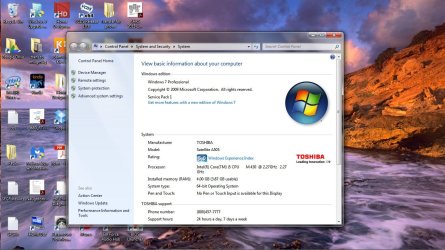
Unfortunately, Windows will only use 3Gb of the 8Gb installed in this configuration. The BIOS shows 8192 bytes of RAM, Windows shows 8 Gb installed, but only 2.97Gb usable. ~5100 bytes are hardware reserved.

If I uncheck the Max memory box and restart, windows again will not boot. I have to swap RAM again to get it running.

My Bios version is 1.40, the latest Toshiba says is available for this machine. It does not have any provision for memory remapping that I can find.

Any ideas?
 

My Computer My Computer

At a glance

Win7 Pro 64 bitIntel i58Gb
Computer type
Laptop
Computer Manufacturer/Model Number
Toshiba Satellite A505-S6020
OS
Win7 Pro 64 bit
CPU
Intel i5
Memory
8Gb
Antivirus
pamda
When you put the new RAM in do you get any beeping on bootup? Can you get into BIOS? If you can, can you see the full 8 GB of RAM there?

ALso, you shouldn't have to go into system configuration for the lappy to boot. That's usually only used for testing and debugging.
 

My Computer My Computer

At a glance

Win 7 Pro x64/Win 10 Pro x64 dual bootAMD FX 8350 Vishera @ 420016 GB Mushkin Blackline DDR3-2400 @ 1866 (9-1...XFX Radeon R9 280 Double D Black Edition
Computer type
PC/Desktop
Computer Manufacturer/Model Number
Mellon Labs (custom build)
OS
Win 7 Pro x64/Win 10 Pro x64 dual boot
CPU
AMD FX 8350 Vishera @ 4200
Motherboard
ASUS M5A97 R2.0
Memory
16 GB Mushkin Blackline DDR3-2400 @ 1866 (9-10-10-10-31)
Graphics Card(s)
XFX Radeon R9 280 Double D Black Edition
Sound Card
Realtek HD Audio on MB. Sounds great.
Monitor(s) Displays
Acer 24", Acer 22"
Screen Resolution
3840 x 1080
Hard Drives
1 x Mushkin Chronos 120 GB SSD (Win 10)
1 x Samsung 850 EVO 250 GB SSD (Win 7)
1 x WD 1TB SATA Blue
1 x WD 1TB SATA Green
PSU
Corsair TX-750
Case
CoolerMaster HAF 912+
Cooling
Coolermaster Seidon 240M Liquid AIO. 6 case fans
Keyboard
Logitech G710+
Mouse
Logitech G500s
Internet Speed
Much better since I got fiber, but still way overpriced.
Antivirus
MSE, Malware Bytes for scanning
Browser
Firefox
Other Info
Corsair VOID USB headphones.

A Mellon Labs X-1 - LCD Smartie driven system status display.

Brought to you by the letter E
Yes, I can catch the config menu on startup, and the BIOS shows all 8 Gb of Ram. After I exit the setup menu, windows tries to start, and gives me the "failed to start" menu, asking for safe mode, etc. Any selection from there yields an endless loop back to that menu.

Unchecking the "max memory button in the system configuration menu was the most common suggested fix, and it seems to work for many, however, in my case, it just fails the safe mode start menu again.

ETA- Beeping, Not sure, will have to reactivate the beep setting in BIOS.
 
Last edited:

My Computer My Computer

At a glance

Win7 Pro 64 bitIntel i58Gb
Computer type
Laptop
Computer Manufacturer/Model Number
Toshiba Satellite A505-S6020
OS
Win7 Pro 64 bit
CPU
Intel i5
Memory
8Gb
Antivirus
pamda
That is really peculiar. Maybe we'll get a beep code when you enable beeping again. That would at least give us something to work with.

So if I read you right, you can get into safe mode with the new RAM?
 

My Computer My Computer

At a glance

Win 7 Pro x64/Win 10 Pro x64 dual bootAMD FX 8350 Vishera @ 420016 GB Mushkin Blackline DDR3-2400 @ 1866 (9-1...XFX Radeon R9 280 Double D Black Edition
Computer type
PC/Desktop
Computer Manufacturer/Model Number
Mellon Labs (custom build)
OS
Win 7 Pro x64/Win 10 Pro x64 dual boot
CPU
AMD FX 8350 Vishera @ 4200
Motherboard
ASUS M5A97 R2.0
Memory
16 GB Mushkin Blackline DDR3-2400 @ 1866 (9-10-10-10-31)
Graphics Card(s)
XFX Radeon R9 280 Double D Black Edition
Sound Card
Realtek HD Audio on MB. Sounds great.
Monitor(s) Displays
Acer 24", Acer 22"
Screen Resolution
3840 x 1080
Hard Drives
1 x Mushkin Chronos 120 GB SSD (Win 10)
1 x Samsung 850 EVO 250 GB SSD (Win 7)
1 x WD 1TB SATA Blue
1 x WD 1TB SATA Green
PSU
Corsair TX-750
Case
CoolerMaster HAF 912+
Cooling
Coolermaster Seidon 240M Liquid AIO. 6 case fans
Keyboard
Logitech G710+
Mouse
Logitech G500s
Internet Speed
Much better since I got fiber, but still way overpriced.
Antivirus
MSE, Malware Bytes for scanning
Browser
Firefox
Other Info
Corsair VOID USB headphones.

A Mellon Labs X-1 - LCD Smartie driven system status display.

Brought to you by the letter E
No, haven't tried that. Using old RAM, I run Configsys, and go the boot tab, then advanced, then select the "max Memory" box, then set it to 8192. Shut down, swap RAM, it fires up, but only uses 2.97Gb of the 8Gb it says is installed.

So long as I leave the box checked, I can do anything I could do with the old 2x2Gb RAM, (expect use the other 5Gb). Uncheck it, and it's a goof loop to the unsafe shutdown menu (asks if I want safe mode on restart). Still can access the BIOS on startup, but any selection on the windows recovery menu results in fail and restart
 

My Computer My Computer

At a glance

Win7 Pro 64 bitIntel i58Gb
Computer type
Laptop
Computer Manufacturer/Model Number
Toshiba Satellite A505-S6020
OS
Win7 Pro 64 bit
CPU
Intel i5
Memory
8Gb
Antivirus
pamda
If it matters, this was originally a windows Home edition, which I upgraded to Pro as I need theXP VM capabilities for some other programs I run.
 

My Computer My Computer

At a glance

Win7 Pro 64 bitIntel i58Gb
Computer type
Laptop
Computer Manufacturer/Model Number
Toshiba Satellite A505-S6020
OS
Win7 Pro 64 bit
CPU
Intel i5
Memory
8Gb
Antivirus
pamda
OK, turned the beeper back on, shut down, installed 2x4G RAM, and got nothing. I get the black "starting windows" page, then before the 4 little colored squares appear, the restore menu appears. Hit any selection, it goes through the same loop, back to the restore menu. hitting power button shuts it down instantly, instead of having to hold it 5 secs.

shut it down, put the 2x 4 G back in, and it fires back up just fine.
 

My Computer My Computer

At a glance

Win7 Pro 64 bitIntel i58Gb
Computer type
Laptop
Computer Manufacturer/Model Number
Toshiba Satellite A505-S6020
OS
Win7 Pro 64 bit
CPU
Intel i5
Memory
8Gb
Antivirus
pamda
Are you 100% sure you have 64bit OS installed as 3GB usable ram is not uncommon on a 32bit system
 

My Computer My Computer

At a glance

Win7 Ultimate X64Intel i5 3570K8GB DDR3 1600Onboard
Computer type
PC/Desktop
Computer Manufacturer/Model Number
Pauly Special
OS
Win7 Ultimate X64
CPU
Intel i5 3570K
Motherboard
Gigabyte Z77X-DS3H
Memory
8GB DDR3 1600
Graphics Card(s)
Onboard
Sound Card
Onboard
Screen Resolution
1280x1024
Hard Drives
Samsung 840 Evo SSD (OS)
1TB Spinner (Data)
PSU
800W Arctic
Case
Cooler Master
Cooling
3x120mm Fans
Keyboard
MS Wireless
Mouse
MS Wireless
Internet Speed
20M
Well, it says it's a 64 bit OS....
 

Attachments

  • osconfig.jpg
    osconfig.jpg
    157 KB · Views: 6

My Computer My Computer

At a glance

Win7 Pro 64 bitIntel i58Gb
Computer type
Laptop
Computer Manufacturer/Model Number
Toshiba Satellite A505-S6020
OS
Win7 Pro 64 bit
CPU
Intel i5
Memory
8Gb
Antivirus
pamda
I'm starting to wonder if you have a bad stick of RAM. Maybe try the 4GB sticks one at a time and see if it will boot. I checked and the laptop is supposed to support up to 8GB. It only has two memory slots, right? Not four? I ask because some newer laptops have four RAM slots, and two of them are located deep inside the machine, under the keyboard. The would mean that each slot can only handle a 2 GB RAM stick.

I don't know, it's a bit of a guess at this point.
 

My Computer My Computer

At a glance

Win 7 Pro x64/Win 10 Pro x64 dual bootAMD FX 8350 Vishera @ 420016 GB Mushkin Blackline DDR3-2400 @ 1866 (9-1...XFX Radeon R9 280 Double D Black Edition
Computer type
PC/Desktop
Computer Manufacturer/Model Number
Mellon Labs (custom build)
OS
Win 7 Pro x64/Win 10 Pro x64 dual boot
CPU
AMD FX 8350 Vishera @ 4200
Motherboard
ASUS M5A97 R2.0
Memory
16 GB Mushkin Blackline DDR3-2400 @ 1866 (9-10-10-10-31)
Graphics Card(s)
XFX Radeon R9 280 Double D Black Edition
Sound Card
Realtek HD Audio on MB. Sounds great.
Monitor(s) Displays
Acer 24", Acer 22"
Screen Resolution
3840 x 1080
Hard Drives
1 x Mushkin Chronos 120 GB SSD (Win 10)
1 x Samsung 850 EVO 250 GB SSD (Win 7)
1 x WD 1TB SATA Blue
1 x WD 1TB SATA Green
PSU
Corsair TX-750
Case
CoolerMaster HAF 912+
Cooling
Coolermaster Seidon 240M Liquid AIO. 6 case fans
Keyboard
Logitech G710+
Mouse
Logitech G500s
Internet Speed
Much better since I got fiber, but still way overpriced.
Antivirus
MSE, Malware Bytes for scanning
Browser
Firefox
Other Info
Corsair VOID USB headphones.

A Mellon Labs X-1 - LCD Smartie driven system status display.

Brought to you by the letter E
Yes, two RAM slots, underneath a cover on the bottom of the Laptop.

As I've said, if I set max memory in the system configuration, Both Windows and BIOS see all 8Gb, but it seems Windows reserves 5Gb for hardware.

I'll see if just one stick will work, and report back. Have not tried that yet. Thanks for the suggestions.
 

My Computer My Computer

At a glance

Win7 Pro 64 bitIntel i58Gb
Computer type
Laptop
Computer Manufacturer/Model Number
Toshiba Satellite A505-S6020
OS
Win7 Pro 64 bit
CPU
Intel i5
Memory
8Gb
Antivirus
pamda
To be sure your system should look like this.

Boot Advanced Options.PNG
 

My Computer My Computer

At a glance

Windows 10 Pro. 64/ version 1709 Windows 7 Pr...Intel i7-6800K @ 4.3Corsair Platinum 16 gig @2400EVGA GTX 1070 OC
Computer type
PC/Desktop
Computer Manufacturer/Model Number
Home made Desktop
OS
Windows 10 Pro. 64/ version 1709 Windows 7 Pro/64
CPU
Intel i7-6800K @ 4.3
Motherboard
ASUS X-99 Deluxe II
Memory
Corsair Platinum 16 gig @2400
Graphics Card(s)
EVGA GTX 1070 OC
Monitor(s) Displays
Asus 27" LED LCD/VE278Q
Screen Resolution
1920-1080 or 1280-720 HDMI
Hard Drives
INTEL SSD 730-240 Gb Sata 3.0/
PSU
EVGA Platium 1200W
Case
Phanteks Luxe Tempered Glass 8 fans/ one radiator
Cooling
XSPC/ Water Cooled CPU
Keyboard
Das 4 Professional
Mouse
Logitech M705/MX Anywhere 2-S
Internet Speed
100 mbits
Antivirus
Microsoft Security Essentials/ Malwarebytes Premium 3.0/ SAS
Browser
I.E. 11 default/Firefox/ ISP Time Warner Cable/Spectrum
Other Info
LG BluRay Burner/
Sound system-KLipsch-THX/
Icy Dock ssd Hot Swap bays.
Yes, that's what's unique about my problem. If I do what you just described, Windows won't start, looping me back to the recovery menu endlessly. I can access system setup, note that the BIOS sees 8Gb installed, and will continually get the recovery menu.

I can check that box, set a value of 8192, put in the 8Gb of RAM, and Windows will start, and tell me I have 8Gb of ram, 2.97 usable. BIOS still sees 8Gb, too. Uncheck it and restart, and back to recovery menu loop again.
 

My Computer My Computer

At a glance

Win7 Pro 64 bitIntel i58Gb
Computer type
Laptop
Computer Manufacturer/Model Number
Toshiba Satellite A505-S6020
OS
Win7 Pro 64 bit
CPU
Intel i5
Memory
8Gb
Antivirus
pamda
I can't tell you why that happens to you with your system.

The picture I showed you in my post #12 is the proper settings and works on million of computers.

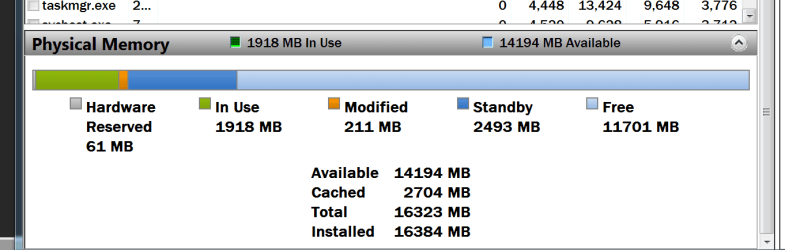
When you system boots show us one of these from Resource Monitor.

Memory.PNG
 

My Computer My Computer

At a glance

Windows 10 Pro. 64/ version 1709 Windows 7 Pr...Intel i7-6800K @ 4.3Corsair Platinum 16 gig @2400EVGA GTX 1070 OC
Computer type
PC/Desktop
Computer Manufacturer/Model Number
Home made Desktop
OS
Windows 10 Pro. 64/ version 1709 Windows 7 Pro/64
CPU
Intel i7-6800K @ 4.3
Motherboard
ASUS X-99 Deluxe II
Memory
Corsair Platinum 16 gig @2400
Graphics Card(s)
EVGA GTX 1070 OC
Monitor(s) Displays
Asus 27" LED LCD/VE278Q
Screen Resolution
1920-1080 or 1280-720 HDMI
Hard Drives
INTEL SSD 730-240 Gb Sata 3.0/
PSU
EVGA Platium 1200W
Case
Phanteks Luxe Tempered Glass 8 fans/ one radiator
Cooling
XSPC/ Water Cooled CPU
Keyboard
Das 4 Professional
Mouse
Logitech M705/MX Anywhere 2-S
Internet Speed
100 mbits
Antivirus
Microsoft Security Essentials/ Malwarebytes Premium 3.0/ SAS
Browser
I.E. 11 default/Firefox/ ISP Time Warner Cable/Spectrum
Other Info
LG BluRay Burner/
Sound system-KLipsch-THX/
Icy Dock ssd Hot Swap bays.
Back
Top