win 7 question

johnnyreno

New member
Local time
10:10 AM
Messages
10
i bought a toshiba sattellite 675 and have got the microsoft up dates because im running very slow when i open more than 1 window any suggestions thx in advance, :cry:
 

My Computer

OS
1111111111111111
Brand new??

Try the following to speed up the laptop:
Remove extraneous preloaded software (bloatware): most of the Toshiba software & any trialware such as Microsoft Office or anti-virus software: Revo Uninstaller - Free software downloads and software reviews - CNET Download.com
Defrag the system hard drive: Auslogics Disk Defrag - Reviews and free Auslogics Disk Defrag downloads at Download.com
Clean out junk files/registry errors/ disable startup entries with: CCleaner - Standard
Remove any antivirus such as Norton or McAfee and use Microsoft Security Essentials (available from Microsoft website) http://www.microsoft.com/security_essentials/


Any questions, let me know
 

My Computer

Computer Manufacturer/Model Number
ATX Custom Build 2012
OS
Windows 7 Enterprise x64 SP1
CPU
Intel Core i3-2100 @ 3.10GHz
Motherboard
Intel DH67CL desktop ATX
Memory
10 GB DDR3
Graphics Card(s)
Asus EAH5450 series (Radeon)
Monitor(s) Displays
Samsung SyncMaster 226BW, Samsung Syncmaster P2450H
Screen Resolution
226BW: 1680 x 1050 & P2450H: 1920 x 1080
Hard Drives
Western Digital 320 GB sata (boot), Samsung 640 GB sata, Seagate 2 TB sata (data)
PSU
Cooler Master Extreme Power Plus 500W
Case
Thermaltake V3 Black Edition
Cooling
stock cooling with added intake fan
Keyboard
HP Wireless Elite Keyboard Wireless Keyboard
Mouse
Microsoft Touch
Internet Speed
Comcast Cable business class <=18Mb {averages 12Mb}
Other Info
Optical drives: LG SuperMulti Blue, HP DVD 1260T
Other: Kensington Bluetooth Receiver
Network: Buffalo Wireless N USB, DLink N router/DLink Ethernet Switch/DLink Xtreme N wireless bridge
Printer: HP Photosmart Plus, HP Officejet Pro 8600 Plus
PCs: HP dv6-3040us (7 x64 SP1), HP DM4-2165dx (7 x64 SP1), HP Pavilion zv6130us (7 x86), Apple Macbook Air (Lion)
************

My Computer

Computer Manufacturer/Model Number
* BFK Customs *
OS
W 7 64-bit Ultimate
CPU
Intel Q9550 Yorkfield
Motherboard
ASUS P5Q Pro
Memory
8GB Dominator 8500C5D
Graphics Card(s)
ATI : XFX 5870
Sound Card
Realtek HD Audio 7-1
Monitor(s) Displays
1x 47" LCD HDMI & 3x 26" LCD HDMI
Screen Resolution
1920x1080P & 1920x1200
Hard Drives
1x 80GB Intel X25-M G2 SSD : 1x 500GB & 1x 640GB WD Caviar Black(s)
PSU
Corsair 620HX
Case
Cooler Master RC-690
Cooling
Tuniq Tower 120, 2x 140mm and 3x 120mm case fans
Keyboard
Microsoft 500
Mouse
Razer Diamondback 3G
Internet Speed
14 Mb/s
Other Info
1x Koutech 3Gb/s SATA HDD Hot Swap Rack
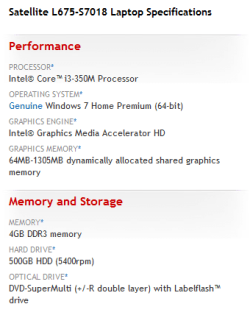
If this is your spec's, I would return to retail check out.

Capture.PNG
 

My Computer

OS
ME/XP/Vista/Win7
What's eating your resources. Check the Resource Monitor to find out what's going on.
 

My Computer

Computer Manufacturer/Model Number
HP, Dell, Gateway, Toshiba - 4 laptops and 2 desktops
OS
Vista, Windows7, Mint Mate, Zorin, Windows 8
CPU
from 1.6GHz Duo to i7
Monitor(s) Displays
2x HP w2207
Hard Drives
5x HDD, 7x SSD, 12x Externals
Keyboard
with trackball - no mices
Mouse
Trackball mice
Internet Speed
DSL 6000
Brand new??

Try the following to speed up the laptop:
Remove extraneous preloaded software (bloatware): most of the Toshiba software & any trialware such as Microsoft Office or anti-virus software: Revo Uninstaller - Free software downloads and software reviews - CNET Download.com
Defrag the system hard drive: Auslogics Disk Defrag - Reviews and free Auslogics Disk Defrag downloads at Download.com
Clean out junk files/registry errors/ disable startup entries with: CCleaner - Standard
Remove any antivirus such as Norton or McAfee and use Microsoft Security Essentials (available from Microsoft website) http://www.microsoft.com/security_essentials/

Any questions, let me know

In addition to these excellent suggestions I would uncheck all startup freeloaders in msconfig>Startup except AV and gadgets.

When using Revo, use Advanced Mode, select Uninstall for each unwanted bloatware program, then allow it to run Windows uninstaller, however DO NOT RESTART when prompted, instead click Next on Revo to Delete all of the bolded Registry keys and files leftover from normal uninstall. This gets all shreds of the offending programs out.

I would also run CCleaner ("Run CLeaner" and REgistry tab) before running Auslogics Disk Defragger.

Once you have completed these most basic steps for optimizing a new factory install, let us know how performance has improved.
 
Here is another suggestion:

Soluto – Anti-Frustration Software

This program will allow you to remove or delay programs from "Startup". If finds things that startup that msconfig does NOT find.

I used Soluto for my XP pc and it cut the boot time by nearly half. It is an excellent program and it is free.
 

My Computer

OS
Windows 7 Pro
CPU
Intel(R) Pentium(R) Duel CPU E2200 2.20 Ghz
Motherboard
GA-G41M-ES2L
Memory
4 gb 2.96 Usable
Graphics Card(s)
Onboard
Sound Card
Onboard
Hard Drives
2 - 1TB WD Sata Drives
Thx im thinking the same about returning this unit.
 

My Computer

OS
1111111111111111
Back
Top