Win 7 running slow after logon for over 5 minutes

Not really

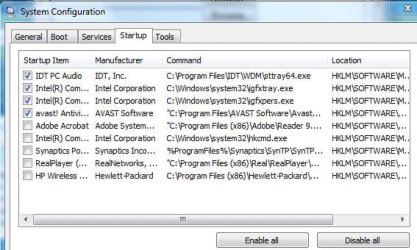
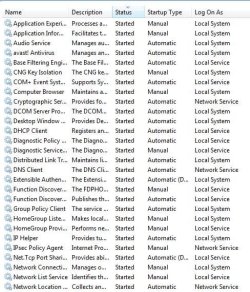
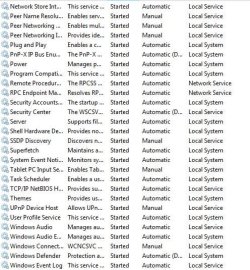
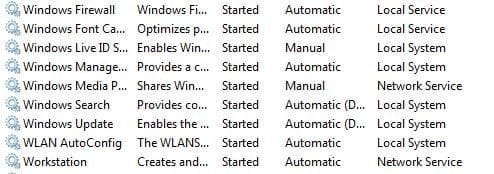
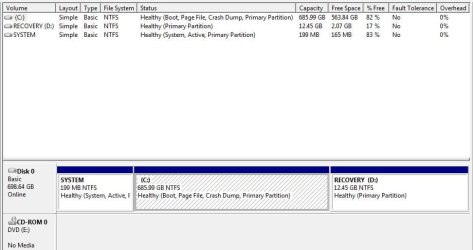
No I installed Windows over the existing installation by running a Win 7 install disc and selecting upgrade. That way it saves me the hassle of doing dozens of software installs especially Cubase with it's tedious E Licensing system. I did do some preparation in case I had to go back to Compaq/HQ factory initial build, I've attached the disk management capture and I'll do one so that you can see what is set to start and which services are running too with the re install of Windows
 

Attachments
  • Capture.JPG
    Capture.JPG
    49.8 KB · Views: 5
  • Capture2.JPG
    Capture2.JPG
    49.8 KB · Views: 2
  • Capture3.JPG
    Capture3.JPG
    79.1 KB · Views: 3
  • Capture4.JPG
    Capture4.JPG
    77 KB · Views: 2
  • Capture5.JPG
    Capture5.JPG
    29.6 KB · Views: 0

My Computer My Computer

At a glance

Windows 7 Home Premium 64 bit.Celeron Dual Core T3100 1.9 Ghz4 Gb
Computer Manufacturer/Model Number
Compaq Presario CQ61
OS
Windows 7 Home Premium 64 bit.
CPU
Celeron Dual Core T3100 1.9 Ghz
Memory
4 Gb
Monitor(s) Displays
HP
Hard Drives
Samsung 2.5 0.75 tB
Looks like your must have previously done a Clean Reinstall since the only HP bloatware showing is the crappy wireless which isn't checked - I would still uninstall it. You don't need any of the others checked either except Avast. Also check Services tab after unchecking MS Services.

Did the Repair Install resolve your issue?

How is performance?
 
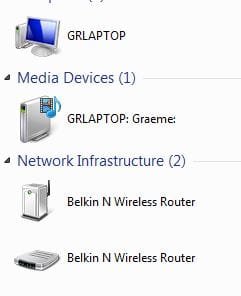
Yes it was a repair install - prior to doing it yesterday, I had spent time de installing and or removing HP bloatware from startup and the registry. Performance is quicker, less than one min from power on to Win 7 logon screen, it used to be 2, and the disc activity stops 3 mins after power up instead of 5 mins. Still on issue though, my Router appears twice in the Network ?
 

Attachments

  • Capture.JPG
    Capture.JPG
    15.2 KB · Views: 28
  • Capture2.JPG
    Capture2.JPG
    67.2 KB · Views: 4

My Computer My Computer

At a glance

Windows 7 Home Premium 64 bit.Celeron Dual Core T3100 1.9 Ghz4 Gb
Computer Manufacturer/Model Number
Compaq Presario CQ61
OS
Windows 7 Home Premium 64 bit.
CPU
Celeron Dual Core T3100 1.9 Ghz
Memory
4 Gb
Monitor(s) Displays
HP
Hard Drives
Samsung 2.5 0.75 tB
You can safely remove the router listing which isn't broadcasting an IP address.

It's good that Repair Install apparently resolved the issues but it can't be said it is anywhere near Win7 native performance because a factory preinstall never is no matter how much you Clean Up Factory Bloatware - and HP's are the worst of all.

My only point in emphasizing this is so no one with preinstalled Win7 thinks they are getting Win7's native perfect performance with any less than a Clean Reinstall - Factory OEM Windows 7.
 
More problems

I can't remove the Router as there is no delete facilty. If I remove the profile and reinstall, the two come back. I've just discovered something else: If I crtl alt delete before the desktop is drawn, a message "Preparing security options" appears briefly> Could this be a virus?
 

My Computer My Computer

At a glance

Windows 7 Home Premium 64 bit.Celeron Dual Core T3100 1.9 Ghz4 Gb
Computer Manufacturer/Model Number
Compaq Presario CQ61
OS
Windows 7 Home Premium 64 bit.
CPU
Celeron Dual Core T3100 1.9 Ghz
Memory
4 Gb
Monitor(s) Displays
HP
Hard Drives
Samsung 2.5 0.75 tB
What are the security choices set in BIOS setup? It may relate to that if it happens during POST before Win7 boot. What AV are you using?

Your router may have some mode that makes it show up twice like that. Does it seem to cause any problems? How is overall performance otherwise?

Run a full Malwarebytes and SUPERAntiSpyware.com scan? Afterwards in SAS Preferences turn it off at Startup and auto-Updating.
 
Update

I removed Avast and reinstalled it as it didn't seem to know if it was the free or trial version. Having re installed the free version, the disc activity is now stopping about 120 secs after power up. A big improvement. The disc activity now seems to be partly due to avast updating it's definition files. I am going to try autoruns now to see if I can reduce the time it takes to get to the logon screen (about 55 seconds).
 

My Computer My Computer

At a glance

Windows 7 Home Premium 64 bit.Celeron Dual Core T3100 1.9 Ghz4 Gb
Computer Manufacturer/Model Number
Compaq Presario CQ61
OS
Windows 7 Home Premium 64 bit.
CPU
Celeron Dual Core T3100 1.9 Ghz
Memory
4 Gb
Monitor(s) Displays
HP
Hard Drives
Samsung 2.5 0.75 tB
Back
Top