
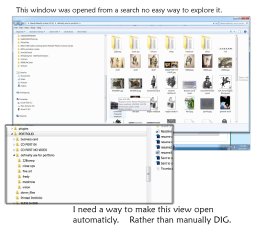
I do a search, then I find the folder I want. Then I open it in a new window. The title bar only shows part of the address as to the location of the folder. The folder I am accessing have sub folders. I want to drill through them with the left pain. I have to manually open each folder until I get to it so then I can explore the folder properly.
I have to right click on a folder and go to properties and get it to expose the address copy and paste it to note pad and manual drill through the folders tell I get to a place where I can properly look at the folder with "windows explorer"
The goal is to get to the place where the folders on the left have the arrows indicating that I can open them and see more.
I have to right click on a folder and go to properties and get it to expose the address copy and paste it to note pad and manual drill through the folders tell I get to a place where I can properly look at the folder with "windows explorer"
The goal is to get to the place where the folders on the left have the arrows indicating that I can open them and see more.
Attachments
My Computer
At a glance
win7proi716GTX 980 TI
- Computer type
- PC/Desktop
- Computer Manufacturer/Model Number
- Gigibyte Custom build
- OS
- win7pro
- CPU
- i7
- Memory
- 16
- Graphics Card(s)
- GTX 980 TI
- Hard Drives
- ssd 4t 750gig
- Antivirus
- norton pain

