Is Win 7 Search serious ?

theShiZa

New member
Local time
6:38 PM
Messages
3
Hi all. I have moved on to Windows 7 Ultimate x64 from Windows Vista Ultimate x64 and I need help using the built-in windows Search to find specific folder/files etc.

I mean is this some sort of joke ? Am I missing something ?? Please tell me how to find a specific file or folder using Windows 7 Search. Where are the "advanced search options" ??

In Vista it's simple, I click on search files or folders, type exactly what I'm looking for OR part of the name, I click on "advanced search" tell it where to search and it never fails.

Did we just go backwards ??
Please let me know so I can totally disable the Windows 7 search altogether and install a 3rd party Search program.


Thanks,
Ash.
 

My Computer

OS
Windows 7 Ultimate x64
CPU
Intel Core i7 920 @2.67 GHz
Motherboard
ASUS P6T-Deluxe
Memory
Corsair 6GB 1333 Mhz
Graphics Card(s)
ASUS Radeon TOP 4870X2 2GB
Sound Card
Sound Blaster Audigy 4
Monitor(s) Displays
Fujitsu 50" plasma P50XHA40US
Hard Drives
Western Digital 2 x 160GB drives in RAID-0 (Windows drive)
Western Digital 1TB storage drive
Western Digital 1.5TB storage drive
PSU
Thermaltake Truepower 750W
Case
Thermaltake Shark

My Computer

Computer type
PC/Desktop
Computer Manufacturer/Model Number
Alienware Aurora ALX R4
OS
Windows 10 Pro (x64)
CPU
Intel Core i7-3930K (3.2GHz - 4.5GHz)
Motherboard
Alienware Aurora-R4 x79
Memory
4x Samsung 4GB PC3-12800 DDR3 (16GB 1600MHz)
Graphics Card(s)
Nvidia Geforce GTX 690
Sound Card
SteelSeries Siberia Elite
Monitor(s) Displays
Dell UltraSharp U3011
Screen Resolution
2560x1600
Hard Drives
Samsung 850 Pro 256 GB, Seagate 1TB Desktop Hybrid HDD, 2x Western Digital 4TB Green HDD
PSU
875W Some Dell PSU <.<
Case
Alienware Aurora ALX
Cooling
Custom Liquid Cooling (EK CPU & GPU blocks) dual EK 480RAD
Keyboard
Logitech G710+ Mechanical
Mouse
Logitech G700s
Internet Speed
Verizon Fios (50 mbps average)
Other Info
Server: Intel NUC D54250WYK: i5-4250U, 16GB, 256 GB mSATA, Windows Server 2012 R2

My Computer

Computer type
PC/Desktop
Computer Manufacturer/Model Number
ASUSTeK COMPUTER INC.
OS
Windows 7 Home Prem x32
CPU
Intel(R) Core(TM) i5-2400 CPU @ 3.10GHz
Motherboard
P8Z68-V LE
Memory
4.00 GB (3.25 GB usable)
Graphics Card(s)
NVIDIA GeForce GTX 460 1GB
Sound Card
Creative SB X-Fi TiTanium Fatality
Monitor(s) Displays
HP 2159m
Screen Resolution
1920 x 1080
Hard Drives
WDC WD5000AAKX-003CA0 ATA Device
Maxtor OneTouch II USB Device 300 GB
Seagate FreeAgentDesktop USB Device 1 TB
WD 15EADS External USB Device 1.5 TB
WD My Book 1110 USB Device 1.5 TB
Maxtor OneTouch II USB Device 200 GB (not in use)
PSU
Thermaltake TR2-600
Case
Thermaltake
Cooling
3 fans
Keyboard
Microsoft Natural Ergonomic 4000
Mouse
Microsoft wheel mouse optical USB
Internet Speed
COX Digital
logicearth thanks for the link, however I did come across that page while searching on the net and thought there's got to be an easier way as with Vista it was much less hassles.

Why doesn't it mention Windows 7 on the page ?? Only mentions "Once you have Windows Search for Windows Vista or Windows XP, you might be wondering how you can be even more efficient when it comes to finding files...."

So if I want to search for exactly "asacpi.sys" and I want to include only the C: drive and it's System files, Hidden files/folders, what is the easiest way to do this on Windows 7 ??

On Vista I just click Advanced Search (with System hidden files/folders enabled), highlight my C: drive, type the exact name and BANG.

Thanx for your replies,
Ash.
 

My Computer

OS
Windows 7 Ultimate x64
CPU
Intel Core i7 920 @2.67 GHz
Motherboard
ASUS P6T-Deluxe
Memory
Corsair 6GB 1333 Mhz
Graphics Card(s)
ASUS Radeon TOP 4870X2 2GB
Sound Card
Sound Blaster Audigy 4
Monitor(s) Displays
Fujitsu 50" plasma P50XHA40US
Hard Drives
Western Digital 2 x 160GB drives in RAID-0 (Windows drive)
Western Digital 1TB storage drive
Western Digital 1.5TB storage drive
PSU
Thermaltake Truepower 750W
Case
Thermaltake Shark
im sorry if im missing the point here, but supersearch doesnt need that... as logic earth said, if you type c:\asacpi.sys it will find it....
 

My Computer

Computer type
PC/Desktop
Computer Manufacturer/Model Number
Medion Erazer (note to self: insert model number) - with custom additions
OS
Windows 10 Pro x64
CPU
Intel Core i5 7400 @ 3.00GHz
Motherboard
OEM supllied with PC
Memory
8GB 2133Mhz DDR4 (OEM supplied)
Graphics Card(s)
Gygabyte Windforce GTX 1050Ti (Factory Overclocked)
Sound Card
Realtek
Monitor(s) Displays
Acer Al1980 + HKC
Screen Resolution
1360*768(HKC) / 1280*1024(Acer)
Hard Drives
1TB Toshiba
1TB WD Caviar Green
120GB Samsung Evo 840
PSU
OEM supplied (no power rating on case)
Case
OEM Supplied
Cooling
Stock
Keyboard
Logitech Wireless
Mouse
Logitect Wireless
Internet Speed
40Mb/s Down 10Mb/s Up
Antivirus
Defender
Browser
Firefox
I still dislike the fact that as far as I can tell you cannot search for all file types.
I had a picture somewhere on my pc that I could not find ( not in the pictures library. In xp I would
just search for all pics. It would bring them all up and I could look through the thumbnails until I found what
I was looking for . No way to do that in 7 from what I can see. correct me if I am wrong though
 

My Computer

OS
Windows 7 64 bit
CPU
Intel Core i5 661
Motherboard
Intel DP55WB
Memory
4 GB
Graphics Card(s)
Nvidia 8800 GTS
Monitor(s) Displays
Benq 22"
Hard Drives
WDC WD5000AAKS-OOATB0
PSU
420w
Case
Coolermaster
Cooling
PSU fan, cpu fan 3 x 10 cm case fans gpu heatsink and fan
...I was looking for . No way to do that in 7 from what I can see. correct me if I am wrong though
"kind:picture" or "type:image" or "ext:jpg OR ext:png"

Do it at My Computer, if you do it from within a drive "C:" it will limit the scope to that drive.
 

My Computer

Computer type
PC/Desktop
Computer Manufacturer/Model Number
Alienware Aurora ALX R4
OS
Windows 10 Pro (x64)
CPU
Intel Core i7-3930K (3.2GHz - 4.5GHz)
Motherboard
Alienware Aurora-R4 x79
Memory
4x Samsung 4GB PC3-12800 DDR3 (16GB 1600MHz)
Graphics Card(s)
Nvidia Geforce GTX 690
Sound Card
SteelSeries Siberia Elite
Monitor(s) Displays
Dell UltraSharp U3011
Screen Resolution
2560x1600
Hard Drives
Samsung 850 Pro 256 GB, Seagate 1TB Desktop Hybrid HDD, 2x Western Digital 4TB Green HDD
PSU
875W Some Dell PSU <.<
Case
Alienware Aurora ALX
Cooling
Custom Liquid Cooling (EK CPU & GPU blocks) dual EK 480RAD
Keyboard
Logitech G710+ Mechanical
Mouse
Logitech G700s
Internet Speed
Verizon Fios (50 mbps average)
Other Info
Server: Intel NUC D54250WYK: i5-4250U, 16GB, 256 GB mSATA, Windows Server 2012 R2

My Computer

Computer Manufacturer/Model Number
Home built
OS
Windows 7 Ultimate 32 bit
CPU
Intel(R) Pentium(R) 4 CPU 3.00GHz
Motherboard
ASUS P4P800-VM Motherboard Chipset: Intel 865G + ICH5
Memory
2.50 GB RAM
Graphics Card(s)
NVIDIA GeForce 7600 GS
Sound Card
SoundMax Integrated Digital Audio (Chip)
Monitor(s) Displays
ViewSonic VX 1962 wm
Screen Resolution
1680 X 1050
Hard Drives
Seagate Barracuda 7200.10 80 GB
ST380215A ATA Device 18.6 GB
Western Digital "My Book" external hard drive 750 GB
Cooling
Fan based
Keyboard
Microsoft Comfort Curve Keyboard 2000 v10 USB
Mouse
Logitec optic USB
Internet Speed
3.01 Mb/s download 0.64 Mb/s upload

Attachments

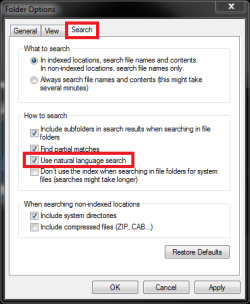
  • Natural_lang_search.png
    Natural_lang_search.png
    11.2 KB · Views: 29

My Computer

Computer type
Laptop
Computer Manufacturer/Model Number
HP ENVY 17-1150eg
OS
Windows 10 Pro x64 EN-GB
CPU
1.6 GHz Intel Core i7-720QM Processor
Memory
6 GB
Graphics Card(s)
ATI Mobility Radeon HD 5850 Graphics
Sound Card
Beats sound system with integrated subwoofer
Monitor(s) Displays
17" laptop display, 22" LED and 32" Full HD TV through HDMI
Screen Resolution
1600*900 (1), 1920*1080 (2&3)
Hard Drives
Internal: 2 x 500 GB SATA Hard Disk Drive 7200 rpm
External: 2TB for backups, 3TB USB3 network drive for media
Cooling
As Envy runs a bit warm, I have it on a Cooler Master pad
Keyboard
Logitech diNovo Media Desktop Laser (bluetooth)
Mouse
Logitech Performance Mouse MX
Internet Speed
50/10 Mbps VDSL
Antivirus
Windows Defender 4.3.9431.0
Browser
Maxthon 3.5.2., IE11
In order to find the "advanced search" similar to what you are used to in Vista or XP, just go ahead and type your query in the search window in the Start menu. If such file exists in indexed locations, then of course the results would just pop-up right away, but we're assuming you're searching for something else. Then after you type your query, you hit enter and an Explorer-like window will appear with the statement "No items match your results". But right under it will give you some options to search again. What you are looking for is "Custom". Click on that and you will see a small window which will allow you to select locations to search. This will then search everything you point it to. It will at some point suggest you include these locations in the index, but you don't have to do that.
 

My Computer

Computer Manufacturer/Model Number
Dell Inspiron 530
OS
Windows 7 Ultimate (x64)
CPU
Q6600
Memory
8 GB
Graphics Card(s)
ATI Radeon HD 2600 XT
Monitor(s) Displays
Samsung Syncmaster P2450
Screen Resolution
1920x1080
Hard Drives
Samsung HD103UJ
Samsung HD501LJ
Internet Speed
25 Mb/s
If you want to see the thumbnails of all pics, why not use the age-old favorite of *.jpg?
 

My Computer

OS
Windows 7 Ultimate x64 SP1
CPU
Intel Core i7-2600
Motherboard
Gigabyte GA-P67A-UD3P-B3
Memory
12 GB Patriot Extreme DDR3-1333
Graphics Card(s)
Nvidia GTX 470
Monitor(s) Displays
Dell UltraSharp 2209WA
Hard Drives
OCZ Agility3 240 GB, WD5001AALS, WD7501AALS
PSU
OCZ ModStream 700W
Case
CoolerMaster HAF 912 Advanced
Cooling
CoolerMaster Hyper 212 Plus
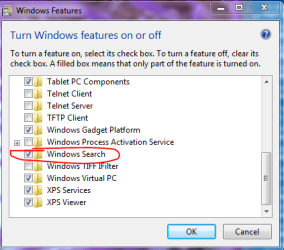
Make sure search is enabled. Go to Control Panel>Programs and Features, and you will see Turn Windows Features on or off in the left pane.

Capture.PNG
 

My Computer

Computer Manufacturer/Model Number
Custom
OS
Windows 7 Professional x64
CPU
Intel i7 2600K OC'd @ 4620 MHz
Motherboard
Asus P8Z68-V Pro
Memory
16GB GSkill Sniper 2133 Mhz (4x4GB)
Graphics Card(s)
EVGA GeForce GTX 480 SuperClocked+
Sound Card
Realtek High Definition Audio
Monitor(s) Displays
2x Acer S273HLbmii 27"
Screen Resolution
2 x 1920x1080
Hard Drives
64GB Crucial M4 SSD

Storage: Hitachi 1TB 5400RPM, Samsung 1.5TB 5400RPM
PSU
Corsair HW Series 750w (modular)
Case
Cooler Master HAF 932 Advanced Blue Edition
Cooling
CM Hyper 212+ CPU cooler, 3x 230mm + 1x 140mm case fans
Keyboard
Logitech MK320 (wireless)
Mouse
Logitech MK320 (wireless)
Internet Speed
30 Mb/s : 2 Mb/s
Kari
Your screenshot above. Did you use the Snippet tool to get the "Search box" screenshot as I was trying to do this but couln't get the "Start Window" to stay open and get the Snippet to work at the same time. I was fiddling with Alt + Print Screen when you beat me to it. Didn't want to start another thread on such a small point.
 

My Computer

Computer type
PC/Desktop
OS
Microsoft Windows 7 Home Premium 64-bit 7601 Multiprocessor Free Service Pack 1
CPU
Intel(R) Core(TM) i7-3770 CPU @ 3.40GHz
Motherboard
ASUSTeK COMPUTER INC. P8H77-M
Memory
8.00 GB
Graphics Card(s)
Intel(R) HD Graphics 4000
Sound Card
On Board
Monitor(s) Displays
Dell 24"
Screen Resolution
1920 x 1080
Hard Drives
(1) INTEL SSDSC2CT180A3 ATA Device (2) ST500DM002-1BD142 ATA Device (3) WDC WD3200AAKS-75L9A0 ATA Device (4) Generic- Compact Flash USB Device (5) Generic- MS/MS-Pro USB Device (6) Generic- SD/MMC USB Device (7) Generic- SM/xD-Picture USB
PSU
500w Corsair
Case
Cooler Master
Cooling
3 Fans
Keyboard
Logitech MK300
Mouse
Logitech WOM
Internet Speed
75Mb
Antivirus
Norton 360
Browser
Firefox, Opera, IE
Kari
Your screenshot above. Did you use the Snippet tool to get the "Search box" screenshot as I was trying to do this but couln't get the "Start Window" to stay open and get the Snippet to work at the same time. I was fiddling with Alt + Print Screen when you beat me to it. Didn't want to start another thread on such a small point.
Yes, he used the snipping tool, but he had to take the snip from a virtual machine.

That's the only way to take a screenshot including a menu, without using third-party tools.

Edit: let me clarify: he was running a virtual machine, and took a snip from his host OS.
 

My Computer

Computer Manufacturer/Model Number
Custom
OS
Windows 7 Professional x64
CPU
Intel i7 2600K OC'd @ 4620 MHz
Motherboard
Asus P8Z68-V Pro
Memory
16GB GSkill Sniper 2133 Mhz (4x4GB)
Graphics Card(s)
EVGA GeForce GTX 480 SuperClocked+
Sound Card
Realtek High Definition Audio
Monitor(s) Displays
2x Acer S273HLbmii 27"
Screen Resolution
2 x 1920x1080
Hard Drives
64GB Crucial M4 SSD

Storage: Hitachi 1TB 5400RPM, Samsung 1.5TB 5400RPM
PSU
Corsair HW Series 750w (modular)
Case
Cooler Master HAF 932 Advanced Blue Edition
Cooling
CM Hyper 212+ CPU cooler, 3x 230mm + 1x 140mm case fans
Keyboard
Logitech MK320 (wireless)
Mouse
Logitech MK320 (wireless)
Internet Speed
30 Mb/s : 2 Mb/s
Mitchell, the post is already deleted by mods (good so, I lost it a bit).

But to answer your question, I'm currently using a virtual machine to surf (read here why), so I just opened the start menu in virtual machine, and used host's Snipping Tool.

Another method is to make screenshot with PrintScreen button for as you mentioned, activating Snipping Tool closes the menus. Then paste the screenshot to Paint, select the area and click Crop and save it.

Kari

EDIT: Jonathan, I knew you'd figure it out!
 

Attachments

  • search.png
    search.png
    5 KB · Views: 85

My Computer

Computer type
Laptop
Computer Manufacturer/Model Number
HP ENVY 17-1150eg
OS
Windows 10 Pro x64 EN-GB
CPU
1.6 GHz Intel Core i7-720QM Processor
Memory
6 GB
Graphics Card(s)
ATI Mobility Radeon HD 5850 Graphics
Sound Card
Beats sound system with integrated subwoofer
Monitor(s) Displays
17" laptop display, 22" LED and 32" Full HD TV through HDMI
Screen Resolution
1600*900 (1), 1920*1080 (2&3)
Hard Drives
Internal: 2 x 500 GB SATA Hard Disk Drive 7200 rpm
External: 2TB for backups, 3TB USB3 network drive for media
Cooling
As Envy runs a bit warm, I have it on a Cooler Master pad
Keyboard
Logitech diNovo Media Desktop Laser (bluetooth)
Mouse
Logitech Performance Mouse MX
Internet Speed
50/10 Mbps VDSL
Antivirus
Windows Defender 4.3.9431.0
Browser
Maxthon 3.5.2., IE11
Mitchell, the post is already deleted by mods (good so, I lost it a bit).

But to answer your question, I'm currently using a virtual machine to surf (read here why), so I just opened the start menu in virtual machine, and used host's Snipping Tool.

Another method is to make screenshot with PrintScreen button for as you mentioned, activating Snipping Tool closes the menus. Then paste the screenshot to Paint, select the area and click Crop and save it.

Kari

EDIT: Jonathan, I knew you'd figure it out!
Hi Kari
Thanks for that. Yes using Alt + Print screen is what I was doing. When you post disappeared I thought I was going dotty. I closed and opened the Forum half a dozen times till I realised that some of the Thread had been deleted. Well done whoever was responsible.
P.S. Dont' worry if I go dotty, my wife says nobody will notice anyway :cry:

P.P.S. I can't open your link, I do not have the necessary permissions (yet)
 

My Computer

Computer type
PC/Desktop
OS
Microsoft Windows 7 Home Premium 64-bit 7601 Multiprocessor Free Service Pack 1
CPU
Intel(R) Core(TM) i7-3770 CPU @ 3.40GHz
Motherboard
ASUSTeK COMPUTER INC. P8H77-M
Memory
8.00 GB
Graphics Card(s)
Intel(R) HD Graphics 4000
Sound Card
On Board
Monitor(s) Displays
Dell 24"
Screen Resolution
1920 x 1080
Hard Drives
(1) INTEL SSDSC2CT180A3 ATA Device (2) ST500DM002-1BD142 ATA Device (3) WDC WD3200AAKS-75L9A0 ATA Device (4) Generic- Compact Flash USB Device (5) Generic- MS/MS-Pro USB Device (6) Generic- SD/MMC USB Device (7) Generic- SM/xD-Picture USB
PSU
500w Corsair
Case
Cooler Master
Cooling
3 Fans
Keyboard
Logitech MK300
Mouse
Logitech WOM
Internet Speed
75Mb
Antivirus
Norton 360
Browser
Firefox, Opera, IE

My Computer

Computer type
PC/Desktop
Computer Manufacturer/Model Number
Custom Build
OS
Windows 7 Professional SP1 - x64 [Non-UEFI Boot]
CPU
Ivy Bridge Core i5 3570K (Delidded)
Motherboard
Asus P8Z77-V LE PLUS
Memory
G.Skill "Ares" DDR3 PC3-12800 - 1600MHz (16Gb)
Graphics Card(s)
Asus Dual-RX480-O4G
Sound Card
Creative Sound Blaster Z w/5.1 sound system
Monitor(s) Displays
Asus IPS 23"
Screen Resolution
16/9
Hard Drives
Internal:
500Go Sata 6Gb/s (x2)
500Go Sata 3Gb/s (x2)
SSD 60Go Sata 6Gb/s
PSU
In Win C 900W Series 80+ Platinum
Case
Thermaltake Chaser A71
Cooling
Custom Water Cooling Loop
Keyboard
Cooler Master QuickFire XTi
Mouse
Razer Imperator 2012 (4G)
Antivirus
MSE
Browser
IE 11.0.xxx Rtm
Other Info
"Raid0" with Intel Smart Response Technology (HDD/SSD)
Don't forget to click on the SEE MORE RESULTS link in the search box. It will take you to a page with more information and listings.

windsorlady
 

My Computer

Computer Manufacturer/Model Number
Dell Intel Core 2 Duo Processor E7500 Computer
OS
Windows 7
Memory
6GB
Back
Top