WIN 7 search - programs are not showing

LUBLIG

New member
Local time
5:54 PM
Messages
7
Hello

My Win 7 search and files does not show programs. It shows ALL others files and folders.
There is not even the title of category - programs .
I mean programs like RUN, CALC, SKYPE etc.
Here is what I tried , no luck :
- Restart
- Rebuild Index
- Check all file extensions

Thanks in advance
 

My Computer My Computer

Computer type
Laptop
Computer Manufacturer/Model Number
HP
OS
WIN 7 , x64
I have read your post two or three times and still cannot quite understand what your problem is! What does "My Win 7 search and files does not show programs" mean. Perhaps if you rephrased the post it might elicit a better response.
 

My Computer My Computer

Computer type
PC/Desktop
OS
Microsoft Windows 7 Home Premium 64-bit 7601 Multiprocessor Free Service Pack 1
CPU
Intel(R) Core(TM) i7-3770 CPU @ 3.40GHz
Motherboard
ASUSTeK COMPUTER INC. P8H77-M
Memory
8.00 GB
Graphics Card(s)
Intel(R) HD Graphics 4000
Sound Card
On Board
Monitor(s) Displays
Dell 24"
Screen Resolution
1920 x 1080
Hard Drives
(1) INTEL SSDSC2CT180A3 ATA Device (2) ST500DM002-1BD142 ATA Device (3) WDC WD3200AAKS-75L9A0 ATA Device (4) Generic- Compact Flash USB Device (5) Generic- MS/MS-Pro USB Device (6) Generic- SD/MMC USB Device (7) Generic- SM/xD-Picture USB
PSU
500w Corsair
Case
Cooler Master
Cooling
3 Fans
Keyboard
Logitech MK300
Mouse
Logitech WOM
Internet Speed
75Mb
Antivirus
Norton 360
Browser
Firefox, Opera, IE
Thank you.

When I use Windows Search (search box above the start button) for searching programs , it shows no results. Example for searches : RUN, SKYPE, EXCEL etc.
On the other hand , I get search results for files and folders
here is what I tried , no luck :
- Restart
- Rebuild Index
- Check all file extensions

Thanks in advance
 

My Computer My Computer

Computer type
Laptop
Computer Manufacturer/Model Number
HP
OS
WIN 7 , x64
Not sure if this will work as I haven't been able to replicate the problem. My system returns a number of files for each of my installed programs.
However here's my best shot:
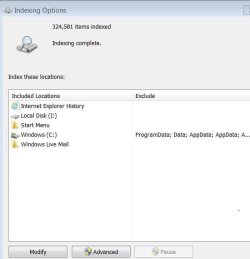
Press "Start" button then click "Control Panel" then click on "Indexing Options". That should open a window like this:
Capture.JPG
Are all the entries on your window the same as my image?
 

My Computer My Computer

Computer type
PC/Desktop
OS
Microsoft Windows 7 Home Premium 64-bit 7601 Multiprocessor Free Service Pack 1
CPU
Intel(R) Core(TM) i7-3770 CPU @ 3.40GHz
Motherboard
ASUSTeK COMPUTER INC. P8H77-M
Memory
8.00 GB
Graphics Card(s)
Intel(R) HD Graphics 4000
Sound Card
On Board
Monitor(s) Displays
Dell 24"
Screen Resolution
1920 x 1080
Hard Drives
(1) INTEL SSDSC2CT180A3 ATA Device (2) ST500DM002-1BD142 ATA Device (3) WDC WD3200AAKS-75L9A0 ATA Device (4) Generic- Compact Flash USB Device (5) Generic- MS/MS-Pro USB Device (6) Generic- SD/MMC USB Device (7) Generic- SM/xD-Picture USB
PSU
500w Corsair
Case
Cooler Master
Cooling
3 Fans
Keyboard
Logitech MK300
Mouse
Logitech WOM
Internet Speed
75Mb
Antivirus
Norton 360
Browser
Firefox, Opera, IE
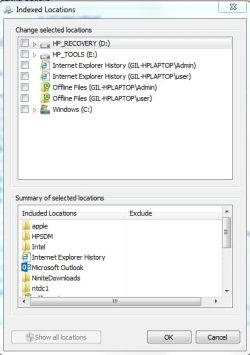
It is strange, I can not modify search locations, and "show all locations" is grayed out Image 1.jpg
 

My Computer My Computer

Computer type
Laptop
Computer Manufacturer/Model Number
HP
OS
WIN 7 , x64
Check the Windows search service that is enabled and started
 

My Computer My Computer

Computer type
Laptop
Computer Manufacturer/Model Number
VIC
OS
Windows 7 Ultimate 32bit
CPU
IntelCore I3 380M
Motherboard
Micro Star
Memory
DDR3 3gb
Are you sure you are logged in as an Administrator as this appears to be a permission problem. That's why I think certain areas are greyed out! Have you got User Account Control disabled?
 

My Computer My Computer

Computer type
PC/Desktop
OS
Microsoft Windows 7 Home Premium 64-bit 7601 Multiprocessor Free Service Pack 1
CPU
Intel(R) Core(TM) i7-3770 CPU @ 3.40GHz
Motherboard
ASUSTeK COMPUTER INC. P8H77-M
Memory
8.00 GB
Graphics Card(s)
Intel(R) HD Graphics 4000
Sound Card
On Board
Monitor(s) Displays
Dell 24"
Screen Resolution
1920 x 1080
Hard Drives
(1) INTEL SSDSC2CT180A3 ATA Device (2) ST500DM002-1BD142 ATA Device (3) WDC WD3200AAKS-75L9A0 ATA Device (4) Generic- Compact Flash USB Device (5) Generic- MS/MS-Pro USB Device (6) Generic- SD/MMC USB Device (7) Generic- SM/xD-Picture USB
PSU
500w Corsair
Case
Cooler Master
Cooling
3 Fans
Keyboard
Logitech MK300
Mouse
Logitech WOM
Internet Speed
75Mb
Antivirus
Norton 360
Browser
Firefox, Opera, IE
UAC is disabled, I am an administrator . I turned off Windows Search service and than on again, nothing works, I also rebuilt the index over and over again.
 

My Computer My Computer

Computer type
Laptop
Computer Manufacturer/Model Number
HP
OS
WIN 7 , x64
I have searched and searched for an answer to this problem and every "solution" offered says "Right Click the Start button and choose "Properties" but of course you don't see "Properties". Exactly what do you see when you right click the Start Button?
Have you ever edited your registry? As you have a laptop I assume you have mouse plugged in? If so unplug the mouse and see if right clicking the touchpad works.

As an extra you might find this interesting:
Why You Shouldnt Disable User Account Control (UAC) in Windows
 

My Computer My Computer

Computer type
PC/Desktop
OS
Microsoft Windows 7 Home Premium 64-bit 7601 Multiprocessor Free Service Pack 1
CPU
Intel(R) Core(TM) i7-3770 CPU @ 3.40GHz
Motherboard
ASUSTeK COMPUTER INC. P8H77-M
Memory
8.00 GB
Graphics Card(s)
Intel(R) HD Graphics 4000
Sound Card
On Board
Monitor(s) Displays
Dell 24"
Screen Resolution
1920 x 1080
Hard Drives
(1) INTEL SSDSC2CT180A3 ATA Device (2) ST500DM002-1BD142 ATA Device (3) WDC WD3200AAKS-75L9A0 ATA Device (4) Generic- Compact Flash USB Device (5) Generic- MS/MS-Pro USB Device (6) Generic- SD/MMC USB Device (7) Generic- SM/xD-Picture USB
PSU
500w Corsair
Case
Cooler Master
Cooling
3 Fans
Keyboard
Logitech MK300
Mouse
Logitech WOM
Internet Speed
75Mb
Antivirus
Norton 360
Browser
Firefox, Opera, IE
Back
Top