Solved win 7 start up

eilwah

New member
Local time
2:11 AM
Messages
9
Location
manchester uk
hi every one im a new member so go easy on me my pc runs win 7 64 home premium and over the last few days will only boot into windows when i insert the win 7 disk can anybody help me please tia
 

My Computer

Computer Manufacturer/Model Number
acer m3201
OS
WIN 7 64 BIT
CPU
amd quad core
Memory
6gb
Monitor(s) Displays
23" widescreen
Screen Resolution
1920*1080
Internet Speed
bt infinity up to 36 meg
For starters, try this tutorial on startup repair. Also, can you tell us what other symptoms you are having and what might have caused the problem.
 

My Computers

System One System Two

  • Computer type
    PC/Desktop
    Computer Manufacturer/Model Number
    ALWAYS UNDER CONSTRUCTION
    OS
    Windows 11 Pro
    CPU
    Ryzen 9 5900X
    Motherboard
    Asus X570 Crosshair Viii Hero
    Memory
    32GB G Skill DDR4-3600
    Graphics Card(s)
    EVGA RTX 3080 FTW 3 Ultra
    Sound Card
    On Board/Sennheiser PC37X Headset
    Monitor(s) Displays
    3 X Asus 27"
    Screen Resolution
    2560x1440
    Hard Drives
    2 X 1 TB NVME drives
    PSU
    EVGA 850
    Case
    Phanteks Eclipse P400A
    Cooling
    EVGA 280 AIO
    Keyboard
    Logitech G510s/ Logitech G13
    Mouse
    Logitech G502
    Internet Speed
    24/1
    Antivirus
    ESET/MBAM Pro/SAS Pro
    Browser
    Chrome/ Firefox/ Edge
  • Computer type
    Laptop
    System Manufacturer/Model Number
    Dell 16 Plus
    OS
    Windows 11 Pro
    CPU
    Intel Ultra 9 288V
    Memory
    32 GB LPDDR5X 8533
    Monitor(s) Displays
    16" Mini-LED HDR600 Touch 90 Hz
    Screen Resolution
    2560X1600
    Hard Drives
    1 TB NVME
Hello Eilwah, and welcome to Seven Forums.

Running a startup repair may be able to fix this for you. Sometimes it may take running it a few times though.

Hope this helps,
Shawn
 

My Computer

Computer type
PC/Desktop
Computer Manufacturer/Model Number
Self built custom
OS
64-bit Windows 11 Pro for Workstations
CPU
Intel i7-8700K OC'd to 5 GHz
Motherboard
ASUS ROG Maximus XI Formula Z390
Memory
64 GB (4x16GB) G.SKILL TridentZ RGB DDR4 3600 MHz
Graphics Card(s)
ASUS ROG-STRIX-GTX1080TI-O11G-GAMING
Sound Card
Integrated
Monitor(s) Displays
2 x Samsung Odyssey G7 27"
Screen Resolution
2560x1440
Hard Drives
1TB Samsung 990 PRO M.2,
4TB Samsung 990 PRO PRO M.2,
TerraMaster F8 SSD Plus NAS
PSU
Seasonic Prime Titanium 850W
Case
Thermaltake Core P3
Cooling
Corsair Hydro H115i
Keyboard
Logitech wireless K800
Mouse
Logitech MX Master 4
Internet Speed
2 Gb/s Download and 100 Mb/s Upload
Antivirus
Malwarebyte Anti-Malware Premium
Browser
Google Chrome
Other Info
Logitech Z625 speaker system,
Logitech BRIO 4K Pro webcam,
HP Color LaserJet Pro MFP M477fdn,
APC SMART-UPS RT 1000 XL - SURT1000XLI,
Galaxy S23 Plus phone
Welcome to Windows Seven Forums.

You haven't given us much to work on other than the fact you have an Acer M3201.

It sounds as though there's something wrong with your BIOS settings.

If you can't boot your Acer computer or you wish to restore the BIOS back to its default settings, press and hold the F10 key as you turn on the computer.

While continuing to hold the F10 key, you should hear two beeps indicating that the settings have been restored.

Remove the Windows DVD, restart your computer and all being well it should boot into Windows from your hard drive.
 

My Computer

Computer Manufacturer/Model Number
HP Pavilion Elite 495UK
OS
Windows 7 Ultimate SP1 64-Bit
CPU
Intel Core i7 870 @ 2.93GHz
Motherboard
MSI 2A9C (CPU1)
Memory
8Gb Dual-Channel DDR3 @ 664MHz
Graphics Card(s)
nVidia GeForce GTX 460 1024MB dedicated RAM
Sound Card
Realtek HD Audio
Monitor(s) Displays
HP2310i
Screen Resolution
1920 x 1080
Hard Drives
1x1954GB Hitachi HDS22020ALA 330 (RAID), 1x1954GB Hitachi External for backup and storage
PSU
460W
Case
HP Elite
Cooling
Air cooled
Keyboard
Logitech K750 solar-powered keyboard
Mouse
Logitech Wireless M180 mouse
Internet Speed
2Mb
Other Info
Pure Avanti Flow Internet Radio with iPod Dock, 64Gb iPod, HP USB Speakers, Sony MDR-V500 Headphones, Sony Vaio F-Series Laptop
hi guys have run the start up repair routine several times no joy,checked the bios settings loaded default seems ok, still wont boot unless i have win 7 disk in and i configure pct to boot from cd via f12 when screen says press any key i do nothing and after about 5 secs the option to load my win 7 comes on and i can start my pc up as normal any additional help would be appreciated
 
Last edited:

My Computer

Computer Manufacturer/Model Number
acer m3201
OS
WIN 7 64 BIT
CPU
amd quad core
Memory
6gb
Monitor(s) Displays
23" widescreen
Screen Resolution
1920*1080
Internet Speed
bt infinity up to 36 meg
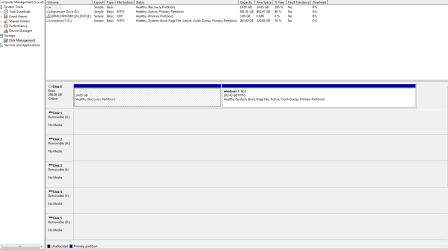
Boot into windows and post a screenshot of Disk Management fully expanded so we can see the top and bottom sections. You can right click computer, select manage, in the left column select disk management.
 

My Computers

System One System Two

  • Computer type
    PC/Desktop
    Computer Manufacturer/Model Number
    ALWAYS UNDER CONSTRUCTION
    OS
    Windows 11 Pro
    CPU
    Ryzen 9 5900X
    Motherboard
    Asus X570 Crosshair Viii Hero
    Memory
    32GB G Skill DDR4-3600
    Graphics Card(s)
    EVGA RTX 3080 FTW 3 Ultra
    Sound Card
    On Board/Sennheiser PC37X Headset
    Monitor(s) Displays
    3 X Asus 27"
    Screen Resolution
    2560x1440
    Hard Drives
    2 X 1 TB NVME drives
    PSU
    EVGA 850
    Case
    Phanteks Eclipse P400A
    Cooling
    EVGA 280 AIO
    Keyboard
    Logitech G510s/ Logitech G13
    Mouse
    Logitech G502
    Internet Speed
    24/1
    Antivirus
    ESET/MBAM Pro/SAS Pro
    Browser
    Chrome/ Firefox/ Edge
  • Computer type
    Laptop
    System Manufacturer/Model Number
    Dell 16 Plus
    OS
    Windows 11 Pro
    CPU
    Intel Ultra 9 288V
    Memory
    32 GB LPDDR5X 8533
    Monitor(s) Displays
    16" Mini-LED HDR600 Touch 90 Hz
    Screen Resolution
    2560X1600
    Hard Drives
    1 TB NVME
You may need to mark the Win7 System Reserved (preferred) or OS partition Active and run Startup Repairs up to 3 separate times with reboots until Win7 starts on its own.
Partition - Mark as Active
 
here is screen shot Capture.PNG
 

My Computer

Computer Manufacturer/Model Number
acer m3201
OS
WIN 7 64 BIT
CPU
amd quad core
Memory
6gb
Monitor(s) Displays
23" widescreen
Screen Resolution
1920*1080
Internet Speed
bt infinity up to 36 meg
You have an "Expansion drive" K which is incorrectly marked Active and may be interfering with the boot so unplug it to see if Win7 boots correctly.

If not unplug K, boot into DVD Repair console or Repair CD to run Startup Repair up to 3 separate times with reboots to repair or rewrite the System Boot files to C.

Then after WIn7 starts on its own follow the tutorial I posted earlier to mark K Inactive from DVD/Repair CD command line.
 
hi me again made expansion drive inactive no difference,ran start up repair via dvd 3 times no difference im stuck chcked C drive active still only boots with dvd in boot on pc
 
Last edited:

My Computer

Computer Manufacturer/Model Number
acer m3201
OS
WIN 7 64 BIT
CPU
amd quad core
Memory
6gb
Monitor(s) Displays
23" widescreen
Screen Resolution
1920*1080
Internet Speed
bt infinity up to 36 meg
If you haven't done this, boot to your BIOS and make sure your Hard Drive or HDD group is set up in the boot sequence. It should be something like this:
1ST Device CD/DVD drive
2ND Device Floppy or USB Device
3RD Device Hard Drive
 

My Computer

Computer type
PC/Desktop
Computer Manufacturer/Model Number
Home Built Desktop By DataTech
OS
Windows 7 Ultimate X64 SP1
CPU
Intel i5-2550K, Differing ~4.4-4.8GHz No built in GPU
Motherboard
ASUS P8Z68-V PRO/GEN3
Memory
16GB G.Skill Sniper 1866MHz @ 2133MHz 2x8GB
Graphics Card(s)
ASUS GTX650TIB-DC2OC-2GD5, (650TI Boost)
Sound Card
Onboard Realtek 5-1
Monitor(s) Displays
Samsung P2570HD
Screen Resolution
1920x1080
Hard Drives
Samsung 840 Pro 256GB SSD for OS, 500GB Seagate Constellation (Enterprise drive) for Data
PSU
Corsair HX650W
Case
Inwin Dragon Rider
Cooling
Hyper 212 EVO w/two Noctua fans, push-pull, @1300 RPM
Keyboard
E-Z Eyes, bright yellow keys with large characters
Mouse
steelseries SENSEI Laser Pro Gaming
Internet Speed
48-51Mbs Mbs down, 11 Mbs up Xfinity Cable
Antivirus
Norton Internet Security 2013
Browser
IE 10, Opera, Pale Moon if needed
Other Info
4 case fans, LG BluRay-RE, ASUS DVD-RW, Mr. Fusion power supply, 1.21 gigawatts.
After you have done as Britton30 asks, take a look at this tutorial and see if you think you can do it. You will have to type the commands in exactly and space them correctly.
 

My Computers

System One System Two

  • Computer type
    PC/Desktop
    Computer Manufacturer/Model Number
    ALWAYS UNDER CONSTRUCTION
    OS
    Windows 11 Pro
    CPU
    Ryzen 9 5900X
    Motherboard
    Asus X570 Crosshair Viii Hero
    Memory
    32GB G Skill DDR4-3600
    Graphics Card(s)
    EVGA RTX 3080 FTW 3 Ultra
    Sound Card
    On Board/Sennheiser PC37X Headset
    Monitor(s) Displays
    3 X Asus 27"
    Screen Resolution
    2560x1440
    Hard Drives
    2 X 1 TB NVME drives
    PSU
    EVGA 850
    Case
    Phanteks Eclipse P400A
    Cooling
    EVGA 280 AIO
    Keyboard
    Logitech G510s/ Logitech G13
    Mouse
    Logitech G502
    Internet Speed
    24/1
    Antivirus
    ESET/MBAM Pro/SAS Pro
    Browser
    Chrome/ Firefox/ Edge
  • Computer type
    Laptop
    System Manufacturer/Model Number
    Dell 16 Plus
    OS
    Windows 11 Pro
    CPU
    Intel Ultra 9 288V
    Memory
    32 GB LPDDR5X 8533
    Monitor(s) Displays
    16" Mini-LED HDR600 Touch 90 Hz
    Screen Resolution
    2560X1600
    Hard Drives
    1 TB NVME
I would also try setting HD first to boot in BIOS setup to see what happens when you startup.

Next try triggering the DVD to run Startup Repair using Acer F12 one-time BIOS Boot Menu key.

Disable any floppy drive in BIOS and physically unplug it.
 
in response to britton 30 i have checked my boot sequence and it is different order i have hard drive then usb then dvd drive does this matter , i have also found out by accident that when i am in this menu with hard drive selected if i press enter pc boots straight into win 7
 

My Computer

Computer Manufacturer/Model Number
acer m3201
OS
WIN 7 64 BIT
CPU
amd quad core
Memory
6gb
Monitor(s) Displays
23" widescreen
Screen Resolution
1920*1080
Internet Speed
bt infinity up to 36 meg
Will it start Win7 without DVD in drive, with HD set first to boot in BIOS?
 
if i press f12 to highlight boot options my hard drive being the first option and press enter pc starts up no problem , if i just start up pc it just hangs on screen with cursor
 

My Computer

Computer Manufacturer/Model Number
acer m3201
OS
WIN 7 64 BIT
CPU
amd quad core
Memory
6gb
Monitor(s) Displays
23" widescreen
Screen Resolution
1920*1080
Internet Speed
bt infinity up to 36 meg
Download the diagnostic program for you brand of hard drive and run it to test the hard drive. Did you try the bootrec.exe tool? It is seeming to me that it is a bios problem. The drive will boot, but only if you do it in a particular way. I would just like to rule out a hard drive problem although I don't think that is the problem. If you don't know the make and model of your hard drive, go to device manager and expand disk drives.
 

My Computers

System One System Two

  • Computer type
    PC/Desktop
    Computer Manufacturer/Model Number
    ALWAYS UNDER CONSTRUCTION
    OS
    Windows 11 Pro
    CPU
    Ryzen 9 5900X
    Motherboard
    Asus X570 Crosshair Viii Hero
    Memory
    32GB G Skill DDR4-3600
    Graphics Card(s)
    EVGA RTX 3080 FTW 3 Ultra
    Sound Card
    On Board/Sennheiser PC37X Headset
    Monitor(s) Displays
    3 X Asus 27"
    Screen Resolution
    2560x1440
    Hard Drives
    2 X 1 TB NVME drives
    PSU
    EVGA 850
    Case
    Phanteks Eclipse P400A
    Cooling
    EVGA 280 AIO
    Keyboard
    Logitech G510s/ Logitech G13
    Mouse
    Logitech G502
    Internet Speed
    24/1
    Antivirus
    ESET/MBAM Pro/SAS Pro
    Browser
    Chrome/ Firefox/ Edge
  • Computer type
    Laptop
    System Manufacturer/Model Number
    Dell 16 Plus
    OS
    Windows 11 Pro
    CPU
    Intel Ultra 9 288V
    Memory
    32 GB LPDDR5X 8533
    Monitor(s) Displays
    16" Mini-LED HDR600 Touch 90 Hz
    Screen Resolution
    2560X1600
    Hard Drives
    1 TB NVME
in response to britton 30 i have checked my boot sequence and it is different order i have hard drive then usb then dvd drive does this matter , i have also found out by accident that when i am in this menu with hard drive selected if i press enter pc boots straight into win 7
Until we get this sorted out, having the HDD first is fine. Normally the CD/DVD would be first if you were installing or running a program from CD that is bootable.

Perhaps it is time to back up your data and do a clean install?
http://www.sevenforums.com/tutorials/174907-clean-install-factory-coa-activation-key.html OR..
http://www.sevenforums.com/tutorials/1649-clean-install-windows-7-a.html#post16008
 

My Computer

Computer type
PC/Desktop
Computer Manufacturer/Model Number
Home Built Desktop By DataTech
OS
Windows 7 Ultimate X64 SP1
CPU
Intel i5-2550K, Differing ~4.4-4.8GHz No built in GPU
Motherboard
ASUS P8Z68-V PRO/GEN3
Memory
16GB G.Skill Sniper 1866MHz @ 2133MHz 2x8GB
Graphics Card(s)
ASUS GTX650TIB-DC2OC-2GD5, (650TI Boost)
Sound Card
Onboard Realtek 5-1
Monitor(s) Displays
Samsung P2570HD
Screen Resolution
1920x1080
Hard Drives
Samsung 840 Pro 256GB SSD for OS, 500GB Seagate Constellation (Enterprise drive) for Data
PSU
Corsair HX650W
Case
Inwin Dragon Rider
Cooling
Hyper 212 EVO w/two Noctua fans, push-pull, @1300 RPM
Keyboard
E-Z Eyes, bright yellow keys with large characters
Mouse
steelseries SENSEI Laser Pro Gaming
Internet Speed
48-51Mbs Mbs down, 11 Mbs up Xfinity Cable
Antivirus
Norton Internet Security 2013
Browser
IE 10, Opera, Pale Moon if needed
Other Info
4 case fans, LG BluRay-RE, ASUS DVD-RW, Mr. Fusion power supply, 1.21 gigawatts.
thanks for all your help so far guys i have changed boot order dvd then usb then hdd run all suggested checks incl wd hd checks nothing found ,tried to rebuild mbr etc ihave backed up win 7 partition ,backed up my data ,and am going to reload win 7 home premium 64 bit retail full version which is what is on drive now any tips to help make it smooth thanks in advance guys
 

My Computer

Computer Manufacturer/Model Number
acer m3201
OS
WIN 7 64 BIT
CPU
amd quad core
Memory
6gb
Monitor(s) Displays
23" widescreen
Screen Resolution
1920*1080
Internet Speed
bt infinity up to 36 meg
Back
Top