Win 7 System Reserved partition smaller than 100MB?

Raillex

New member
Member
Local time
4:21 AM
Messages
66
I'm in the process of swapping out an HDD boot drive for a new Crucial M4 SSD, and discovered that a 100MB partition I created for "system reserved" files got squeezed down to 79MB by the Acronis cloning software I used. The SSD booted just fine with the smaller partition, and my offset is set to the recommended 1024. Is there any reason I need to be worried about a system reserved partition that isn't exactly 100MB?

Thanks.
 

My Computer My Computer

At a glance

Windows 7 Home 64bitIntel Core i7-2600K16GB CORSAIR Vengeance DDR3 RAMMSI Twin Frozr II Radeon HD 6870
OS
Windows 7 Home 64bit
CPU
Intel Core i7-2600K
Motherboard
ASUS P8Z68-V PRO
Memory
16GB CORSAIR Vengeance DDR3 RAM
Graphics Card(s)
MSI Twin Frozr II Radeon HD 6870
Sound Card
Creative X-Fi XtremeMusic
Monitor(s) Displays
ASUS VE276Q
Hard Drives
Crucial M4 CT128M4SSD2 SSD /
Western Digital Caviar Black WD2002FAEX
PSU
CORSAIR HX850 PSU
Case
LIAN LI PC-K9B
Cooling
ZALMAN CNPS9900MAX
Short version, no.

Does no harm to the system, but please post a screenshot of you partition manager open.

Here is an earlier thread about the same case, if your partition is unassigned as well than you can 'remove' it or just leave it alone.
 

My Computer My Computer

At a glance

Windows 7 Ultimate 64 bit SP1Intel(R) Core(TM) i5-2500K12GB Kingston Hyperx 1600MHzAsus GTS 450
Computer type
PC/Desktop
Computer Manufacturer/Model Number
Custom Built PC
OS
Windows 7 Ultimate 64 bit SP1
CPU
Intel(R) Core(TM) i5-2500K
Motherboard
Gigabyte Technology Co., Ltd. Z68X-UD3-B3
Memory
12GB Kingston Hyperx 1600MHz
Graphics Card(s)
Asus GTS 450
PSU
500W Coolink
Other Info
Genius G-Pen F610 (PenPad)
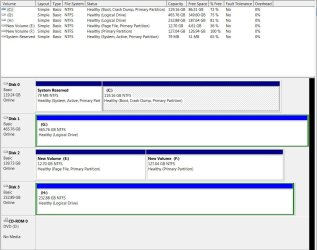
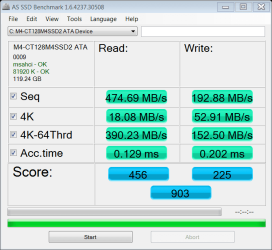
Here's a partition manager screenshot, along with an AS-SSD benchmark. No unallocated space on Disk 0, and the SSD seems to be working just fine.

Can't believe I'm using my 150GB Raptor as a storage drive now.
 

Attachments

  • Capture.JPG
    Capture.JPG
    122.1 KB · Views: 60
  • as-ssd-bench M4-CT128M4SSD2 A 12.27.2011 6-42-11 PM.png
    as-ssd-bench M4-CT128M4SSD2 A 12.27.2011 6-42-11 PM.png
    17.7 KB · Views: 7

My Computer My Computer

At a glance

Windows 7 Home 64bitIntel Core i7-2600K16GB CORSAIR Vengeance DDR3 RAMMSI Twin Frozr II Radeon HD 6870
OS
Windows 7 Home 64bit
CPU
Intel Core i7-2600K
Motherboard
ASUS P8Z68-V PRO
Memory
16GB CORSAIR Vengeance DDR3 RAM
Graphics Card(s)
MSI Twin Frozr II Radeon HD 6870
Sound Card
Creative X-Fi XtremeMusic
Monitor(s) Displays
ASUS VE276Q
Hard Drives
Crucial M4 CT128M4SSD2 SSD /
Western Digital Caviar Black WD2002FAEX
PSU
CORSAIR HX850 PSU
Case
LIAN LI PC-K9B
Cooling
ZALMAN CNPS9900MAX
No reason to worry. There is plenty of free space on the little system partition. It may only get tight when you make a double boot.

I am amazed that the Acronis tool even allocated the little system partition. The Paragon migration tool eliminates it and moves the bootmgr to C:

The M4 looks good. Just today I installed an M4 on my new system. But I have not yet wired it up (maybe tomorrow). Once running, I will compare with your nums. The 4K nums seem to be a bit low. The Vertex2 on my laptop is faster. But those are only nums anyhow.
 

My Computer My Computer

At a glance

Vista, Windows7, Mint Mate, Zorin, Windows 8from 1.6GHz Duo to i7
Computer Manufacturer/Model Number
HP, Dell, Gateway, Toshiba - 4 laptops and 2 desktops

OS
Vista, Windows7, Mint Mate, Zorin, Windows 8
CPU
from 1.6GHz Duo to i7
Monitor(s) Displays
2x HP w2207
Hard Drives
5x HDD, 7x SSD, 12x Externals
Keyboard
with trackball - no mices
Mouse
Trackball mice
Internet Speed
DSL 6000
Back
Top