win 7 system reserved

panais

New member
Guru
Gold Member
VIP
Local time
2:41 AM
Messages
4,725
Is there any trick to increase the size of system reserved in win 7?
 

My Computer

Computer Manufacturer/Model Number
Custom Built by me.
OS
Windows 7 Ultimate 64bit SP1
CPU
Intel Core 2 Quad Q6600
Motherboard
Gigabyte GA-X38-DS4
Memory
2X2GB DDR2 PC6400 800MHZ DUAL CHANNEL
Graphics Card(s)
XFX RADEON HD 6850 1GB GDDR5
Sound Card
2/4/5.1/7.1-channel Realtek High Definition
Monitor(s) Displays
Samsung LE40A656F1 1080p 100Hz LCD HD TV 50,000:1
Screen Resolution
1366x768 in Desktop,1920x1080p in gaming and video
Hard Drives
C:\WD VelociRaptor 150 GB,10,000 RPM
E:\WESTERN DIGITAL WD15EADS 1.5TB CAVIAR GREEN SATA2 F:\WESTERN DIGITAL WD15EADS 1.5TB CAVIAR GREEN SATA2
PSU
THERMALTAKE W0229 TOUGHPOWER XT 750W
Case
A-Case Twin Engine BB
Cooling
3 x thermaltake smart case fan II + 1 arctic cooling fan
Keyboard
Wireless Logitech LX710
Mouse
Logitech Wireless Gaming Mouse G700
Internet Speed
ADSL 12000 plus
Other Info
Mouse Logitech G700,with 13 buttons who needs keyboard in RPG?

D:\Sony high speed sata Dvd Rewriter
Logitech Cordless Rumblepad 2
Is there any trick to increase the size of system reserved in win 7?

The system reserved partition is used by WIndows for recovery. It is created and managed by the OS, and you cannot add or delete files from it, nor can you expand it.

Why are you looking to expand it?
 

My Computer

Computer Manufacturer/Model Number
Gateway, Toshiba Laptop, and Home Brew
OS
Windows 7 x64 HP, Windows 7 HP, Windows 7 Ult
CPU
Intel I3, Cerelon, Pentium 4 @ 3Ghz
Motherboard
Intel, Intel, Asus
Memory
8G, 3G, 3G
Graphics Card(s)
On-board Intel, On-board nVidia, nVIDIA card
Sound Card
on-board, on-board, SoundBlaster
Monitor(s) Displays
Hannspree HF237, Toshiba, SyncMaster 931B
Screen Resolution
default (all)
Hard Drives
1T internal, 320G internal, 160G internal, 1T networked
PSU
300w, unk, 650w
Case
black, black, grey
Cooling
air (all)
Keyboard
standard wired (all)
Mouse
standard wired (all)
Internet Speed
6M down, 768K up
Other Info
Home LAN through Linksys hub to 4 port and wireless switch/router. Networked HP 2600n. Wife's computer running Windows 7, and spare laptop running Ubuntu "Karmic Kola" (9.10).
There isn't a way to expand it because directly to the right of the reserved partition is your operating system partition. It is possible to expand it, only if you delete your os partition and use the new space for that reserved one. Why you would want to do this....:D I dunno. But good luck...:p
 

My Computer

Computer Manufacturer/Model Number
Dell Studio XPS 8000
OS
Windows 7 Home Premium
Is there any trick to increase the size of system reserved in win 7?

May I please ask you why are you trying to do it ? I have seen a lot of people wanting to get rid of the system reserved partition ; but , frankly speaking, you are the first person in my notice who want to expand it.

Windows 7 puts its boot information in this partition. You cannot see it in your explorer, because there is no drive letter assigned with it. You can see it in your Disk Management.

There is a software named EasyBCD that can put and/or delete the boot information of other OSs in that 100 (or sometimes 200) MB partition, and usually there is no alternative way to access it. Better you let it stay in peace. ;)
 

My Computer

Computer type
PC/Desktop
Computer Manufacturer/Model Number
Self Assembled
OS
Microsoft Windows 10 Pro Insider Preview 64-bit
CPU
Intel(R) Core(TM) i3-4130 CPU @ 3.40GHz
Motherboard
Gigabyte Technology Co., Ltd. B85M-D3H
Memory
Corsair Vengence 4GB x2 (8.00GB Dual-Channel DDR3 @ 798MHz)
Graphics Card(s)
2047MB GeForce GTS 450 (ZOTAC International)
Sound Card
Onboard (Realtek High Definition Audio)
Monitor(s) Displays
LG Flatron E2040T
Screen Resolution
1600x900
Hard Drives
Western Digital 1 TB
Seagate 500 GB
PSU
Corsair VS550
Case
Cooler Master K380
Cooling
Cooler Master Seidon 120V Plus
Keyboard
Logitech MK260r
Mouse
Logitech MK260r
Internet Speed
PMPL Broadband
Antivirus
Windows Defender + MBAM
Browser
Firefox
Other Info
Dell Studio 15" Laptop
The full story is...
I tried to create a system image....read this>---> http://www.sevenforums.com/performance-maintenance/68745-0x80780119-error.html
So i starrted to look what was the problem....
And i found this....
Windows need to have 40mb size system reserved for backup,but my system reserved is only 32mb because i installed bitdefender (this is bitdefender issue and i will contact the company)anyway...
Thats why i will like to increase the size of my system reserved if that possible.
For now i use norton ghost but i prefer windows backup.
Btw is there any trick to completely remove system reserved?
 

My Computer

Computer Manufacturer/Model Number
Custom Built by me.
OS
Windows 7 Ultimate 64bit SP1
CPU
Intel Core 2 Quad Q6600
Motherboard
Gigabyte GA-X38-DS4
Memory
2X2GB DDR2 PC6400 800MHZ DUAL CHANNEL
Graphics Card(s)
XFX RADEON HD 6850 1GB GDDR5
Sound Card
2/4/5.1/7.1-channel Realtek High Definition
Monitor(s) Displays
Samsung LE40A656F1 1080p 100Hz LCD HD TV 50,000:1
Screen Resolution
1366x768 in Desktop,1920x1080p in gaming and video
Hard Drives
C:\WD VelociRaptor 150 GB,10,000 RPM
E:\WESTERN DIGITAL WD15EADS 1.5TB CAVIAR GREEN SATA2 F:\WESTERN DIGITAL WD15EADS 1.5TB CAVIAR GREEN SATA2
PSU
THERMALTAKE W0229 TOUGHPOWER XT 750W
Case
A-Case Twin Engine BB
Cooling
3 x thermaltake smart case fan II + 1 arctic cooling fan
Keyboard
Wireless Logitech LX710
Mouse
Logitech Wireless Gaming Mouse G700
Internet Speed
ADSL 12000 plus
Other Info
Mouse Logitech G700,with 13 buttons who needs keyboard in RPG?

D:\Sony high speed sata Dvd Rewriter
Logitech Cordless Rumblepad 2
"Windows need to have 40mb size system reserved for backup,but my system reserved is only 32mb" ------
not clear. The system reserved partition is usually of 100 mb, and out of which 32 mb is merely used. the rest remains unused.

If you want to have a backup, you may http://www.sevenforums.com/tutorials/663-backup-complete-computer-create-image-backup.html , hope the system reserved or anything will not come in your way.

Btw, you may read this : How to Delete Windows 7 System Reserved Partition | BizzNtech ; but hope you will not apply that trick :)
 

My Computer

Computer type
PC/Desktop
Computer Manufacturer/Model Number
Self Assembled
OS
Microsoft Windows 10 Pro Insider Preview 64-bit
CPU
Intel(R) Core(TM) i3-4130 CPU @ 3.40GHz
Motherboard
Gigabyte Technology Co., Ltd. B85M-D3H
Memory
Corsair Vengence 4GB x2 (8.00GB Dual-Channel DDR3 @ 798MHz)
Graphics Card(s)
2047MB GeForce GTS 450 (ZOTAC International)
Sound Card
Onboard (Realtek High Definition Audio)
Monitor(s) Displays
LG Flatron E2040T
Screen Resolution
1600x900
Hard Drives
Western Digital 1 TB
Seagate 500 GB
PSU
Corsair VS550
Case
Cooler Master K380
Cooling
Cooler Master Seidon 120V Plus
Keyboard
Logitech MK260r
Mouse
Logitech MK260r
Internet Speed
PMPL Broadband
Antivirus
Windows Defender + MBAM
Browser
Firefox
Other Info
Dell Studio 15" Laptop
The full story is...
I tried to create a system image....read this>---> http://www.sevenforums.com/performance-maintenance/68745-0x80780119-error.html
So i starrted to look what was the problem....
And i found this....
Windows need to have 40mb size system reserved for backup,but my system reserved is only 32mb because i installed bitdefender (this is bitdefender issue and i will contact the company)anyway...
Thats why i will like to increase the size of my system reserved if that possible.
For now i use norton ghost but i prefer windows backup.
Btw is there any trick to completely remove system reserved?
Hello panais;

The simple answer is the "System Reserved" partition is not a necessity. You can do without it.

However, in your quote above, I believe you are confusing MB to GB. The "Reserved Partition" is only 100MB in size, that is only 0.10GB. You need 20 to 30 times that to give you the room to create your backup and image, so removing the "System Reserved" partition is not going to help you there at all.

If you would do as theog suggested and post a screen shot of your drive map, perhaps we can suggest a way to give you the room for your image?

Cheers!
Robert
 

My Computer

OS
...
The full story is...
I tried to create a system image....read this>---> http://www.sevenforums.com/performance-maintenance/68745-0x80780119-error.html
So i starrted to look what was the problem....
And i found this....
Windows need to have 40mb size system reserved for backup,but my system reserved is only 32mb because i installed bitdefender (this is bitdefender issue and i will contact the company)anyway...
Thats why i will like to increase the size of my system reserved if that possible.
For now i use norton ghost but i prefer windows backup.
Btw is there any trick to completely remove system reserved?
If you have Norton Ghost, use it. It beats the Windows imaging hands down. I only use Ghost (on Vista) and free Macrium on Win7. I have seen people with too many problems using the Windows imaging so I prefer not to use it. Just scroll the forums and you will find what I am talking about. Windows imaging is not yet ready for prima time - nor is Windows file backup. Too much hassle.
I know I will get some fan mail because some people use it successfully. But there are always exceptions.
 

My Computer

Computer Manufacturer/Model Number
HP, Dell, Gateway, Toshiba - 4 laptops and 2 desktops
OS
Vista, Windows7, Mint Mate, Zorin, Windows 8
CPU
from 1.6GHz Duo to i7
Monitor(s) Displays
2x HP w2207
Hard Drives
5x HDD, 7x SSD, 12x Externals
Keyboard
with trackball - no mices
Mouse
Trackball mice
Internet Speed
DSL 6000
The full story is...
I tried to create a system image....read this>---> http://www.sevenforums.com/performance-maintenance/68745-0x80780119-error.html
So i starrted to look what was the problem....
And i found this....
Windows need to have 40mb size system reserved for backup,but my system reserved is only 32mb because i installed bitdefender (this is bitdefender issue and i will contact the company)anyway...
Thats why i will like to increase the size of my system reserved if that possible.
For now i use norton ghost but i prefer windows backup.
Btw is there any trick to completely remove system reserved?
If you have Norton Ghost, use it. It beats the Windows imaging hands down. I only use Ghost (on Vista) and free Macrium on Win7. I have seen people with too many problems using the Windows imaging so I prefer not to use it. Just scroll the forums and you will find what I am talking about. Windows imaging is not yet ready for prima time - nor is Windows file backup. Too much hassle.
I know I will get some fan mail because some people use it successfully. But there are always exceptions.
Is there any trick to restore/recover using Norton Ghost Without the CD?
 

My Computer

Computer Manufacturer/Model Number
Custom Built by me.
OS
Windows 7 Ultimate 64bit SP1
CPU
Intel Core 2 Quad Q6600
Motherboard
Gigabyte GA-X38-DS4
Memory
2X2GB DDR2 PC6400 800MHZ DUAL CHANNEL
Graphics Card(s)
XFX RADEON HD 6850 1GB GDDR5
Sound Card
2/4/5.1/7.1-channel Realtek High Definition
Monitor(s) Displays
Samsung LE40A656F1 1080p 100Hz LCD HD TV 50,000:1
Screen Resolution
1366x768 in Desktop,1920x1080p in gaming and video
Hard Drives
C:\WD VelociRaptor 150 GB,10,000 RPM
E:\WESTERN DIGITAL WD15EADS 1.5TB CAVIAR GREEN SATA2 F:\WESTERN DIGITAL WD15EADS 1.5TB CAVIAR GREEN SATA2
PSU
THERMALTAKE W0229 TOUGHPOWER XT 750W
Case
A-Case Twin Engine BB
Cooling
3 x thermaltake smart case fan II + 1 arctic cooling fan
Keyboard
Wireless Logitech LX710
Mouse
Logitech Wireless Gaming Mouse G700
Internet Speed
ADSL 12000 plus
Other Info
Mouse Logitech G700,with 13 buttons who needs keyboard in RPG?

D:\Sony high speed sata Dvd Rewriter
Logitech Cordless Rumblepad 2

My Computer

Computer Manufacturer/Model Number
HP d4996t (upgraded)
OS
XP MCE .... XP Pro 64 .... W7 U x64
CPU
E6750, 2.67GHz C2D
Memory
4GB, PC2 6400
Graphics Card(s)
GeForce 9400GT
Monitor(s) Displays
Twin Samsung 2443BWT
Screen Resolution
1920x1200
Hard Drives
Many .. 3 Installed
PSU
460W
Internet Speed
Cable
The full story is...
I tried to create a system image....read this>---> http://www.sevenforums.com/performance-maintenance/68745-0x80780119-error.html
So i starrted to look what was the problem....
And i found this....
Windows need to have 40mb size system reserved for backup,but my system reserved is only 32mb because i installed bitdefender (this is bitdefender issue and i will contact the company)anyway...
Thats why i will like to increase the size of my system reserved if that possible.
For now i use norton ghost but i prefer windows backup.
Btw is there any trick to completely remove system reserved?
Hello panais;

The simple answer is the "System Reserved" partition is not a necessity. You can do without it.

However, in your quote above, I believe you are confusing MB to GB. The "Reserved Partition" is only 100MB in size, that is only 0.10GB. You need 20 to 30 times that to give you the room to create your backup and image, so removing the "System Reserved" partition is not going to help you there at all.

If you would do as theog suggested and post a screen shot of your drive map, perhaps we can suggest a way to give you the room for your image?

Cheers!
Robert
I insist,for some reason its necessary to have 40mb system reserved to START the backup NOT to save the backup.For saving the backup i have 2 hard disk 1.5TB each.
I have test it 3 times when my system reserved has free space 40mb and more the backup started and finish properly.And another 3 times when system reserved free space was below 40mb the backup gave me the http://www.sevenforums.com/performance-maintenance/68745-0x80780119-error.html
 

My Computer

Computer Manufacturer/Model Number
Custom Built by me.
OS
Windows 7 Ultimate 64bit SP1
CPU
Intel Core 2 Quad Q6600
Motherboard
Gigabyte GA-X38-DS4
Memory
2X2GB DDR2 PC6400 800MHZ DUAL CHANNEL
Graphics Card(s)
XFX RADEON HD 6850 1GB GDDR5
Sound Card
2/4/5.1/7.1-channel Realtek High Definition
Monitor(s) Displays
Samsung LE40A656F1 1080p 100Hz LCD HD TV 50,000:1
Screen Resolution
1366x768 in Desktop,1920x1080p in gaming and video
Hard Drives
C:\WD VelociRaptor 150 GB,10,000 RPM
E:\WESTERN DIGITAL WD15EADS 1.5TB CAVIAR GREEN SATA2 F:\WESTERN DIGITAL WD15EADS 1.5TB CAVIAR GREEN SATA2
PSU
THERMALTAKE W0229 TOUGHPOWER XT 750W
Case
A-Case Twin Engine BB
Cooling
3 x thermaltake smart case fan II + 1 arctic cooling fan
Keyboard
Wireless Logitech LX710
Mouse
Logitech Wireless Gaming Mouse G700
Internet Speed
ADSL 12000 plus
Other Info
Mouse Logitech G700,with 13 buttons who needs keyboard in RPG?

D:\Sony high speed sata Dvd Rewriter
Logitech Cordless Rumblepad 2
The full story is...
I tried to create a system image....read this>---> http://www.sevenforums.com/performance-maintenance/68745-0x80780119-error.html
So i starrted to look what was the problem....
And i found this....
Windows need to have 40mb size system reserved for backup,but my system reserved is only 32mb because i installed bitdefender (this is bitdefender issue and i will contact the company)anyway...
Thats why i will like to increase the size of my system reserved if that possible.
For now i use norton ghost but i prefer windows backup.
Btw is there any trick to completely remove system reserved?
If you have Norton Ghost, use it. It beats the Windows imaging hands down. I only use Ghost (on Vista) and free Macrium on Win7. I have seen people with too many problems using the Windows imaging so I prefer not to use it. Just scroll the forums and you will find what I am talking about. Windows imaging is not yet ready for prima time - nor is Windows file backup. Too much hassle.
I know I will get some fan mail because some people use it successfully. But there are always exceptions.
Is there any trick to restore/recover using Norton Ghost Without the CD?

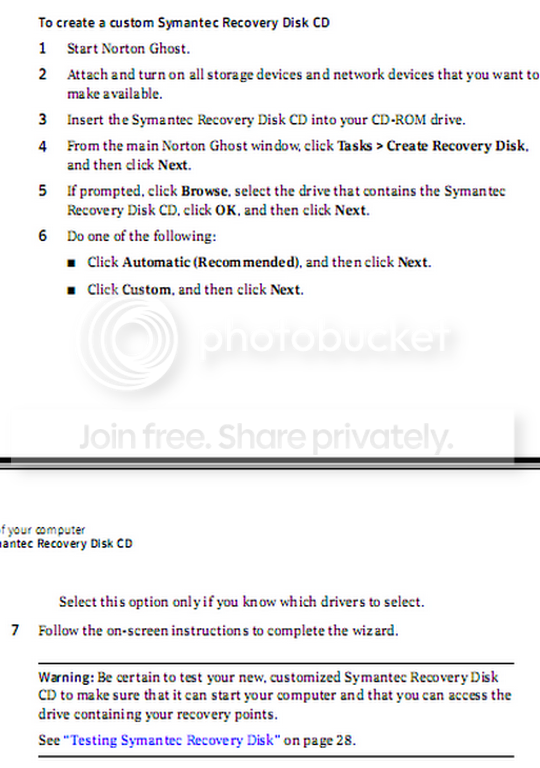
No!! You need the recovery CD for any/all imaging programs. That is the only way to start the recovery process. But in Ghost, you can burn one yourself. i have snipped the instructions from pages 29/30 of the Ghost User Guide. I hope you can read it.

2010-03-06_163656.png
 

My Computer

Computer Manufacturer/Model Number
HP, Dell, Gateway, Toshiba - 4 laptops and 2 desktops
OS
Vista, Windows7, Mint Mate, Zorin, Windows 8
CPU
from 1.6GHz Duo to i7
Monitor(s) Displays
2x HP w2207
Hard Drives
5x HDD, 7x SSD, 12x Externals
Keyboard
with trackball - no mices
Mouse
Trackball mice
Internet Speed
DSL 6000
I insist,for some reason its necessary to have 40mb system reserved to START the backup NOT to save the backup.For saving the backup i have 2 hard disk 1.5TB each.
I have test it 3 times when my system reserved has free space 40mb and more the backup started and finish properly.And another 3 times when system reserved free space was below 40mb the backup gave me the 0x80780119 error
 

My Computer

Computer Manufacturer/Model Number
Custom Built by me.
OS
Windows 7 Ultimate 64bit SP1
CPU
Intel Core 2 Quad Q6600
Motherboard
Gigabyte GA-X38-DS4
Memory
2X2GB DDR2 PC6400 800MHZ DUAL CHANNEL
Graphics Card(s)
XFX RADEON HD 6850 1GB GDDR5
Sound Card
2/4/5.1/7.1-channel Realtek High Definition
Monitor(s) Displays
Samsung LE40A656F1 1080p 100Hz LCD HD TV 50,000:1
Screen Resolution
1366x768 in Desktop,1920x1080p in gaming and video
Hard Drives
C:\WD VelociRaptor 150 GB,10,000 RPM
E:\WESTERN DIGITAL WD15EADS 1.5TB CAVIAR GREEN SATA2 F:\WESTERN DIGITAL WD15EADS 1.5TB CAVIAR GREEN SATA2
PSU
THERMALTAKE W0229 TOUGHPOWER XT 750W
Case
A-Case Twin Engine BB
Cooling
3 x thermaltake smart case fan II + 1 arctic cooling fan
Keyboard
Wireless Logitech LX710
Mouse
Logitech Wireless Gaming Mouse G700
Internet Speed
ADSL 12000 plus
Other Info
Mouse Logitech G700,with 13 buttons who needs keyboard in RPG?

D:\Sony high speed sata Dvd Rewriter
Logitech Cordless Rumblepad 2
Just remove it then. I assume you aren't using bitlocker.

It's not hard , first make your main windows partition ( probabaly C ) into the "system" partition.

View attachment sisparV5.zip

Right click sispar.cmd and Run As Admin.


Then delete the 100mb partition.

You can leave it as unallocated space, or extend the main partition left to include it, using any decent 3rd party partition manager.

Paragon Pro can do just about anything.

Partition Wizard (free) does a lot for a freebie - certainly capable of this job.

Free Download Partition Wizard
 

My Computers

System One System Two

  • Computer type
    PC/Desktop
    OS
    7 X64
    CPU
    i5 8400
    Motherboard
    gigabyte b365m ds3h
    Memory
    2x8gb 3200mhz
    Hard Drives
    various
    PSU
    pure power 11 400w cm
    Case
    Coolermaster
    Cooling
    cryorig m9i
  • Computer type
    PC/Desktop
    OS
    7x64
    CPU
    g5400
    Motherboard
    ga b365m ds3h
    Memory
    8gb ddr4 2400
    PSU
    xfx pro 450w
I insist,for some reason its necessary to have 40mb system reserved to START the backup NOT to save the backup.For saving the backup i have 2 hard disk 1.5TB each.
I have test it 3 times when my system reserved has free space 40mb and more the backup started and finish properly.And another 3 times when system reserved free space was below 40mb the backup gave me the 0x80780119 error
OK Then here is a MS link that says: "
System Partition Requirements

Basic system partition requirements are:

  • Must have at least 100 megabytes (MB) of hard drive space.
  • Must have enough free space to create shadow copies of the partition.

    • If the partition is less than 500 MB, it must have at least 50 MB of free space."
Understanding Disk Partitions

So basically, the "Reserved System" can be 100MB or larger, even a GB!

Since the built-in Windows 7 Disk Management Utility is not capable of doing this, I would recommend you try the free Partition Wizard Utility. Down load the iso file, use Windows 7 to "burn the disc image" (so it is bootable), boot to the CD and shrink the second partition (say 100MB) and then extend the "System Reserved" partition to 200MB. Vista and the 7 Beta used a 200MB partition, so there is no reason you can't use a 200MB partition.

Hope this helps!
Robert
 

My Computer

OS
...

Attachments

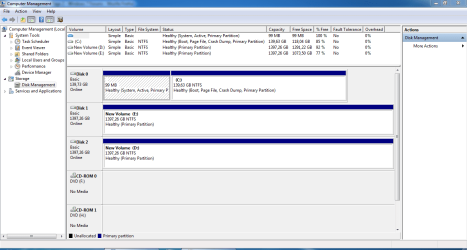
  • Capture A.PNG
    Capture A.PNG
    33.5 KB · Views: 141
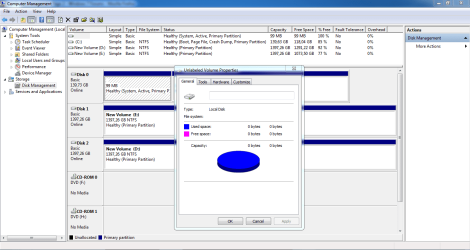
  • Capture B.PNG
    Capture B.PNG
    42 KB · Views: 134

My Computer

Computer Manufacturer/Model Number
Custom Built by me.
OS
Windows 7 Ultimate 64bit SP1
CPU
Intel Core 2 Quad Q6600
Motherboard
Gigabyte GA-X38-DS4
Memory
2X2GB DDR2 PC6400 800MHZ DUAL CHANNEL
Graphics Card(s)
XFX RADEON HD 6850 1GB GDDR5
Sound Card
2/4/5.1/7.1-channel Realtek High Definition
Monitor(s) Displays
Samsung LE40A656F1 1080p 100Hz LCD HD TV 50,000:1
Screen Resolution
1366x768 in Desktop,1920x1080p in gaming and video
Hard Drives
C:\WD VelociRaptor 150 GB,10,000 RPM
E:\WESTERN DIGITAL WD15EADS 1.5TB CAVIAR GREEN SATA2 F:\WESTERN DIGITAL WD15EADS 1.5TB CAVIAR GREEN SATA2
PSU
THERMALTAKE W0229 TOUGHPOWER XT 750W
Case
A-Case Twin Engine BB
Cooling
3 x thermaltake smart case fan II + 1 arctic cooling fan
Keyboard
Wireless Logitech LX710
Mouse
Logitech Wireless Gaming Mouse G700
Internet Speed
ADSL 12000 plus
Other Info
Mouse Logitech G700,with 13 buttons who needs keyboard in RPG?

D:\Sony high speed sata Dvd Rewriter
Logitech Cordless Rumblepad 2
Just go back one page to this post -15
 

My Computers

System One System Two

  • Computer type
    PC/Desktop
    OS
    7 X64
    CPU
    i5 8400
    Motherboard
    gigabyte b365m ds3h
    Memory
    2x8gb 3200mhz
    Hard Drives
    various
    PSU
    pure power 11 400w cm
    Case
    Coolermaster
    Cooling
    cryorig m9i
  • Computer type
    PC/Desktop
    OS
    7x64
    CPU
    g5400
    Motherboard
    ga b365m ds3h
    Memory
    8gb ddr4 2400
    PSU
    xfx pro 450w

My Computer

Computer Manufacturer/Model Number
Keeps changing - (Custom)
OS
Windows 7 Professional x64
CPU
Intel Core i7 860
Motherboard
Gigabyte GA-P55-UD4P
Memory
4GB DDR3 Mushkin 1600Mhz @ 7-8-7-20
Graphics Card(s)
MSI GTS250 1GB DDR3 Twin Frozr
Sound Card
Onboard realtek
Monitor(s) Displays
Samsung SyncMaster 24" P2450 + Samsung 20" 2033
Screen Resolution
1920 X 1080 and 1600 X 900 (#2 system 1440 X 900)
Hard Drives
Patriot Inferno 120GB SSD + 3 WD Blue 640GB drives
PSU
Corsair 750 HX Modular
Case
Lancool PC-K62
Cooling
Cooler Master TX3 CPU cooler and 4-140mm and 1-120mm case
Keyboard
Gigabyte USB keyboard
Mouse
Microsoft wireless laser mouse 5000
Internet Speed
7 Mb down 1.5 up
Other Info
System #2: AMD Phenom II X6 1055T (Freezer 7 Pro cooler) - Gigabyte 880GMA-UD2H - WD 500GB Black - 9500GT (1GB) 500W OCZ modular PSU - Antec 200 case. System #3 (LapTop) Core 2 Duo T6670 - 320GB 7200RPM HD - 4GB DDR3 RAM.
Back
Top