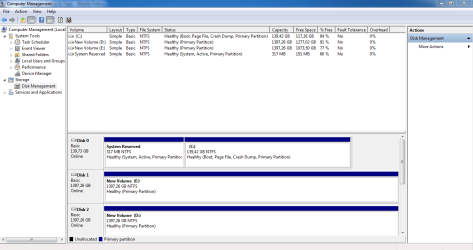
win 7 system reserved

My Computer

Computer Manufacturer/Model Number
Custom Built by me.
OS
Windows 7 Ultimate 64bit SP1
CPU
Intel Core 2 Quad Q6600
Motherboard
Gigabyte GA-X38-DS4
Memory
2X2GB DDR2 PC6400 800MHZ DUAL CHANNEL
Graphics Card(s)
XFX RADEON HD 6850 1GB GDDR5
Sound Card
2/4/5.1/7.1-channel Realtek High Definition
Monitor(s) Displays
Samsung LE40A656F1 1080p 100Hz LCD HD TV 50,000:1
Screen Resolution
1366x768 in Desktop,1920x1080p in gaming and video
Hard Drives
C:\WD VelociRaptor 150 GB,10,000 RPM
E:\WESTERN DIGITAL WD15EADS 1.5TB CAVIAR GREEN SATA2 F:\WESTERN DIGITAL WD15EADS 1.5TB CAVIAR GREEN SATA2
PSU
THERMALTAKE W0229 TOUGHPOWER XT 750W
Case
A-Case Twin Engine BB
Cooling
3 x thermaltake smart case fan II + 1 arctic cooling fan
Keyboard
Wireless Logitech LX710
Mouse
Logitech Wireless Gaming Mouse G700
Internet Speed
ADSL 12000 plus
Other Info
Mouse Logitech G700,with 13 buttons who needs keyboard in RPG?

D:\Sony high speed sata Dvd Rewriter
Logitech Cordless Rumblepad 2
No Problem if you're using Acronis ..
With or without the reserved Partition .. of any size.
 

My Computer

Computer Manufacturer/Model Number
HP d4996t (upgraded)
OS
XP MCE .... XP Pro 64 .... W7 U x64
CPU
E6750, 2.67GHz C2D
Memory
4GB, PC2 6400
Graphics Card(s)
GeForce 9400GT
Monitor(s) Displays
Twin Samsung 2443BWT
Screen Resolution
1920x1200
Hard Drives
Many .. 3 Installed
PSU
460W
Internet Speed
Cable
I insist,for some reason its necessary to have 40mb system reserved to START the backup NOT to save the backup.For saving the backup i have 2 hard disk 1.5TB each.
I have test it 3 times when my system reserved has free space 40mb and more the backup started and finish properly.And another 3 times when system reserved free space was below 40mb the backup gave me the 0x80780119 error
OK Then here is a MS link that says: "
System Partition Requirements

Basic system partition requirements are:

  • Must have at least 100 megabytes (MB) of hard drive space.
  • Must have enough free space to create shadow copies of the partition.
    • If the partition is less than 500 MB, it must have at least 50 MB of free space."
Understanding Disk Partitions

So basically, the "Reserved System" can be 100MB or larger, even a GB!

Since the built-in Windows 7 Disk Management Utility is not capable of doing this, I would recommend you try the free Partition Wizard Utility. Down load the iso file, use Windows 7 to "burn the disc image" (so it is bootable), boot to the CD and shrink the second partition (say 100MB) and then extend the "System Reserved" partition to 200MB. Vista and the 7 Beta used a 200MB partition, so there is no reason you can't use a 200MB partition.

Hope this helps!
Robert
Yeeeessss!!! The partition wizard is GREAT!
Not only increase the system reserved but has made it healthy again(was damaged).
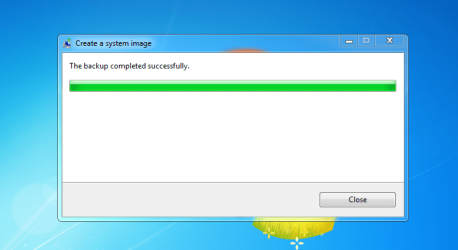
The backup now start and completed normaly.
Thanks iseeuu!!
I just install the partition wizard,made some changes,and then restart,i dident use the cd.
 

Attachments

  • Capture A.PNG
    Capture A.PNG
    31.1 KB · Views: 153
  • Capture B.PNG
    Capture B.PNG
    41.9 KB · Views: 62

My Computer

Computer Manufacturer/Model Number
Custom Built by me.
OS
Windows 7 Ultimate 64bit SP1
CPU
Intel Core 2 Quad Q6600
Motherboard
Gigabyte GA-X38-DS4
Memory
2X2GB DDR2 PC6400 800MHZ DUAL CHANNEL
Graphics Card(s)
XFX RADEON HD 6850 1GB GDDR5
Sound Card
2/4/5.1/7.1-channel Realtek High Definition
Monitor(s) Displays
Samsung LE40A656F1 1080p 100Hz LCD HD TV 50,000:1
Screen Resolution
1366x768 in Desktop,1920x1080p in gaming and video
Hard Drives
C:\WD VelociRaptor 150 GB,10,000 RPM
E:\WESTERN DIGITAL WD15EADS 1.5TB CAVIAR GREEN SATA2 F:\WESTERN DIGITAL WD15EADS 1.5TB CAVIAR GREEN SATA2
PSU
THERMALTAKE W0229 TOUGHPOWER XT 750W
Case
A-Case Twin Engine BB
Cooling
3 x thermaltake smart case fan II + 1 arctic cooling fan
Keyboard
Wireless Logitech LX710
Mouse
Logitech Wireless Gaming Mouse G700
Internet Speed
ADSL 12000 plus
Other Info
Mouse Logitech G700,with 13 buttons who needs keyboard in RPG?

D:\Sony high speed sata Dvd Rewriter
Logitech Cordless Rumblepad 2
If noyb would stop banging on about his beloved app. for a minute... LOL

Yes, you can use any backup app. including Windows system backup ( if you must ) without the 100mb partition.

I agree with noyb - there are much better apps. out there.

As well as Acronis ( not free ), there are some great FREE ones:

Macrium is very small and fast - but you have to use the boot disc to restore with the free version.

Macrium Reflect FREE Edition - Information and download

Paragon Backup and Recovery 10 Free has the most functions of any free back up app. You can restore from within Windows with it, tho. always make aboot disc in case you can't get into Windows at all.

Backup & Recovery Free Edition

It isn't especially fast ( just a bit quicker than than windows system backup - tho. the image size is considerably smaller). It is also vastly more flexible than Windows system backup.
 

My Computers

System One System Two

  • Computer type
    PC/Desktop
    OS
    7 X64
    CPU
    i5 8400
    Motherboard
    gigabyte b365m ds3h
    Memory
    2x8gb 3200mhz
    Hard Drives
    various
    PSU
    pure power 11 400w cm
    Case
    Coolermaster
    Cooling
    cryorig m9i
  • Computer type
    PC/Desktop
    OS
    7x64
    CPU
    g5400
    Motherboard
    ga b365m ds3h
    Memory
    8gb ddr4 2400
    PSU
    xfx pro 450w
A!Btw i was write then,the system reserved is necessary if you want to use the win 7 back up>--->Control Panel\All Control Panel Items\Backup and Restore....
Problem Solved.
Thanks EVERYBODY for helping!
 

My Computer

Computer Manufacturer/Model Number
Custom Built by me.
OS
Windows 7 Ultimate 64bit SP1
CPU
Intel Core 2 Quad Q6600
Motherboard
Gigabyte GA-X38-DS4
Memory
2X2GB DDR2 PC6400 800MHZ DUAL CHANNEL
Graphics Card(s)
XFX RADEON HD 6850 1GB GDDR5
Sound Card
2/4/5.1/7.1-channel Realtek High Definition
Monitor(s) Displays
Samsung LE40A656F1 1080p 100Hz LCD HD TV 50,000:1
Screen Resolution
1366x768 in Desktop,1920x1080p in gaming and video
Hard Drives
C:\WD VelociRaptor 150 GB,10,000 RPM
E:\WESTERN DIGITAL WD15EADS 1.5TB CAVIAR GREEN SATA2 F:\WESTERN DIGITAL WD15EADS 1.5TB CAVIAR GREEN SATA2
PSU
THERMALTAKE W0229 TOUGHPOWER XT 750W
Case
A-Case Twin Engine BB
Cooling
3 x thermaltake smart case fan II + 1 arctic cooling fan
Keyboard
Wireless Logitech LX710
Mouse
Logitech Wireless Gaming Mouse G700
Internet Speed
ADSL 12000 plus
Other Info
Mouse Logitech G700,with 13 buttons who needs keyboard in RPG?

D:\Sony high speed sata Dvd Rewriter
Logitech Cordless Rumblepad 2
Yeeeessss!!! The partition wizard is GREAT!
Its not only increase the system reserved but has made it healthy again(was damaged).
The backup now start and completed normaly.
Thanks iseeuu!!
I just install the partition wizard,made some changes,and then restart,i dident use the cd.
Yes, you are right, there is a Partition Wizard version you can install, instead of using the CD. I am glad that worked for you.

As the minimum size is 100MB, your 99MB just didn't work.

Keeping the "System Reserved" partition offers you some advantages:
You have a separate boot partition
You have some repair utilities available at boot
You can avoid the 4 Primary Partition limitation because the rest of your hard drive can be an extended partition with as many logical drives as there are letters left in the alphabet. This may become more popular as more 2TB + hard drives are used in home computers?
...just to name a few.

We all are glad you got your system sorted out.

Happy surfing!
Robert

 

My Computer

OS
...
Yeeeessss!!! The partition wizard is GREAT!
Its not only increase the system reserved but has made it healthy again(was damaged).
The backup now start and completed normaly.
Thanks iseeuu!!
I just install the partition wizard,made some changes,and then restart,i dident use the cd.
Yes, you are right, there is a Partition Wizard version you can install, instead of using the CD. I am glad that worked for you.

As the minimum size is 100MB, your 99MB just didn't work.

Keeping the "System Reserved" partition offers you some advantages:
You have a separate boot partition
You have some repair utilities available at boot
You can avoid the 4 Primary Partition limitation because the rest of your hard drive can be an extended partition with as many logical drives as there are letters left in the alphabet. This may become more popular as more 2TB + hard drives are used in home computers?
...just to name a few.

We all are glad you got your system sorted out.

Happy surfing!
Robert
Which size is the maximum for system reserved?
I i increase it to 300mb,is that enough?
 

My Computer

Computer Manufacturer/Model Number
Custom Built by me.
OS
Windows 7 Ultimate 64bit SP1
CPU
Intel Core 2 Quad Q6600
Motherboard
Gigabyte GA-X38-DS4
Memory
2X2GB DDR2 PC6400 800MHZ DUAL CHANNEL
Graphics Card(s)
XFX RADEON HD 6850 1GB GDDR5
Sound Card
2/4/5.1/7.1-channel Realtek High Definition
Monitor(s) Displays
Samsung LE40A656F1 1080p 100Hz LCD HD TV 50,000:1
Screen Resolution
1366x768 in Desktop,1920x1080p in gaming and video
Hard Drives
C:\WD VelociRaptor 150 GB,10,000 RPM
E:\WESTERN DIGITAL WD15EADS 1.5TB CAVIAR GREEN SATA2 F:\WESTERN DIGITAL WD15EADS 1.5TB CAVIAR GREEN SATA2
PSU
THERMALTAKE W0229 TOUGHPOWER XT 750W
Case
A-Case Twin Engine BB
Cooling
3 x thermaltake smart case fan II + 1 arctic cooling fan
Keyboard
Wireless Logitech LX710
Mouse
Logitech Wireless Gaming Mouse G700
Internet Speed
ADSL 12000 plus
Other Info
Mouse Logitech G700,with 13 buttons who needs keyboard in RPG?

D:\Sony high speed sata Dvd Rewriter
Logitech Cordless Rumblepad 2
No, it is not necessary to have the separate system reserved partition to use any backup imaging app. If you want to restore from within Windows and you want Windows Sys backup to boot up the recovery environment automatically , then having the separate sys reserved partition will do that.

You can easily add the windows recovery environment to your boot menu , if you wish . You don't need the separate sys reserved partition to do that.
 

My Computers

System One System Two

  • Computer type
    PC/Desktop
    OS
    7 X64
    CPU
    i5 8400
    Motherboard
    gigabyte b365m ds3h
    Memory
    2x8gb 3200mhz
    Hard Drives
    various
    PSU
    pure power 11 400w cm
    Case
    Coolermaster
    Cooling
    cryorig m9i
  • Computer type
    PC/Desktop
    OS
    7x64
    CPU
    g5400
    Motherboard
    ga b365m ds3h
    Memory
    8gb ddr4 2400
    PSU
    xfx pro 450w
No, it is not necessary to have the separate system reserved partition to use any backup imaging app. If you want to restore from within Windows and you want Windows Sys backup to boot up the recovery environment automatically , then having the separate sys reserved partition will do that.

You can easily add the windows recovery environment to your boot menu , if you wish . You don't need the separate sys reserved partition to do that.
SIW2
We talk for the win7 internal backup (Control Panel\All Control Panel Items\Backup and Restore) not for any third party back up software.Win 7 back up needs the system reserved to work.
Thanks.
 

My Computer

Computer Manufacturer/Model Number
Custom Built by me.
OS
Windows 7 Ultimate 64bit SP1
CPU
Intel Core 2 Quad Q6600
Motherboard
Gigabyte GA-X38-DS4
Memory
2X2GB DDR2 PC6400 800MHZ DUAL CHANNEL
Graphics Card(s)
XFX RADEON HD 6850 1GB GDDR5
Sound Card
2/4/5.1/7.1-channel Realtek High Definition
Monitor(s) Displays
Samsung LE40A656F1 1080p 100Hz LCD HD TV 50,000:1
Screen Resolution
1366x768 in Desktop,1920x1080p in gaming and video
Hard Drives
C:\WD VelociRaptor 150 GB,10,000 RPM
E:\WESTERN DIGITAL WD15EADS 1.5TB CAVIAR GREEN SATA2 F:\WESTERN DIGITAL WD15EADS 1.5TB CAVIAR GREEN SATA2
PSU
THERMALTAKE W0229 TOUGHPOWER XT 750W
Case
A-Case Twin Engine BB
Cooling
3 x thermaltake smart case fan II + 1 arctic cooling fan
Keyboard
Wireless Logitech LX710
Mouse
Logitech Wireless Gaming Mouse G700
Internet Speed
ADSL 12000 plus
Other Info
Mouse Logitech G700,with 13 buttons who needs keyboard in RPG?

D:\Sony high speed sata Dvd Rewriter
Logitech Cordless Rumblepad 2
NO. If you want to do the control panel thing to automatically boot the recovery environment from within windows - then , yes , it will do that if you have the sys reserved partition.

However, if you don't have the sys reserved partition , you can easily add the recovery environment to your boot menu - just select it from there, instead of via the control panel.
 

My Computers

System One System Two

  • Computer type
    PC/Desktop
    OS
    7 X64
    CPU
    i5 8400
    Motherboard
    gigabyte b365m ds3h
    Memory
    2x8gb 3200mhz
    Hard Drives
    various
    PSU
    pure power 11 400w cm
    Case
    Coolermaster
    Cooling
    cryorig m9i
  • Computer type
    PC/Desktop
    OS
    7x64
    CPU
    g5400
    Motherboard
    ga b365m ds3h
    Memory
    8gb ddr4 2400
    PSU
    xfx pro 450w
Solved!
 

My Computer

Computer Manufacturer/Model Number
Custom Built by me.
OS
Windows 7 Ultimate 64bit SP1
CPU
Intel Core 2 Quad Q6600
Motherboard
Gigabyte GA-X38-DS4
Memory
2X2GB DDR2 PC6400 800MHZ DUAL CHANNEL
Graphics Card(s)
XFX RADEON HD 6850 1GB GDDR5
Sound Card
2/4/5.1/7.1-channel Realtek High Definition
Monitor(s) Displays
Samsung LE40A656F1 1080p 100Hz LCD HD TV 50,000:1
Screen Resolution
1366x768 in Desktop,1920x1080p in gaming and video
Hard Drives
C:\WD VelociRaptor 150 GB,10,000 RPM
E:\WESTERN DIGITAL WD15EADS 1.5TB CAVIAR GREEN SATA2 F:\WESTERN DIGITAL WD15EADS 1.5TB CAVIAR GREEN SATA2
PSU
THERMALTAKE W0229 TOUGHPOWER XT 750W
Case
A-Case Twin Engine BB
Cooling
3 x thermaltake smart case fan II + 1 arctic cooling fan
Keyboard
Wireless Logitech LX710
Mouse
Logitech Wireless Gaming Mouse G700
Internet Speed
ADSL 12000 plus
Other Info
Mouse Logitech G700,with 13 buttons who needs keyboard in RPG?

D:\Sony high speed sata Dvd Rewriter
Logitech Cordless Rumblepad 2
Simple Steps

Solved!!!
Still for Newbies

1.Boot with Win7 Disk
2.Delete C: partition
3.[Your System might be having 100MB Reserved partition]
4.Select the reserved partition
5.Extend the partition to 1024MB = 1GB
6.Create New partition for C:
7.Install Win7

[Donot touch other partitions if you have something important in there]
 

My Computer

Computer Manufacturer/Model Number
Custom
OS
Windows 8 Alpha
CPU
Xeon
Memory
8GB
Graphics Card(s)
Nvidia
Sound Card
Audigy
Monitor(s) Displays
21" Dual
Hard Drives
250GB SSD - C: D:
500GB Sata
i reply this from : Mancer Blackshear replied on


A Workaround Without Repartitioning:

When trying to make a system image of Windows 7, I got error 0x80780119. After searching this thread (plus others), I found my 100 MB System Reserved partition had grown a large USN journal. I assigned it drive letter F:\.

Fsutil usn queryjournal F:

Then I ran this command to clear and disable the USN journal on my System Reserved partition:

fsutil usn deletejournal /N /D F:

This freed 48 MB. The USN journal on my System Reserved partition remained disabled after a reboot, which I verified by re-running the query. Subsequently, I was able to make a system image without error.

Look here for details on FSUtil: http://technet.microsoft.com/en-us/library/cc788042(WS.10).aspx

Mancer, MCITP-EA
 

My Computer

OS
win7 32 bit
Solved!!!
Still for Newbies

1.Boot with Win7 Disk
2.Delete C: partition
3.[Your System might be having 100MB Reserved partition]
4.Select the reserved partition
5.Extend the partition to 1024MB = 1GB
6.Create New partition for C:
7.Install Win7

[Donot touch other partitions if you have something important in there]

This entire thread is hilarious, I just love step 2 of this.
Bye Bye windows.
:roflmao:
 

My Computer

Computer type
PC/Desktop
Computer Manufacturer/Model Number
Skylake Special #666
OS
Windows 10 Pro x64
CPU
Intel Core i7 6700K
Motherboard
Asus Sabertooth Z170 Mark 1
Memory
GSkill TridentZ RGB 16GB 3600 16-16-16-36
Graphics Card(s)
EVGA GTX 980 Ti SC x2
Sound Card
Realtek High Definition
Monitor(s) Displays
AOC G2460PG
Screen Resolution
1920 x 1080 144Hz
Hard Drives
Samsung 860 Pro 256GB, Seagate Barracuda 4TB x2
PSU
EVGA 1000 P2, EVGA White Custom Braided Cables
Case
Corsair Vengeance C70 Gunmetal Black
Cooling
Corsair H100i v2, Corsair ML120 x2, Thermal Grizzly Kryonaut
Keyboard
Logitech G910 Orion Spectrum
Mouse
Logitech G700s
Internet Speed
Verizon Fios Quantum Gateway 75/75
Antivirus
Windows Defender, Malwarebytes Free 3.8.3
Browser
Chrome
Other Info
Corsair SP120 x4, LG Blu-ray Drive, Durabrand HT-395 100 Watt Dolby Digital Amp, Corsair H2100 Wireless 7.1 Headset
There are many other threads that actually explain how to use free Partition Wizard bootable CD to shrink the left side of C to extend System Reserved if needed.

However the only reason I can think of this is needed is if not enough space is available on Sys Reserved to create the needed SysVolInfo file when imaging using Win7 backup imaging. But those threads are searchable by the related error code.

We still get threads on the merits of having or not the System Reserved partition. I can take it or leave it and wouldn't waste a second thought on either unless it was required for BitLocker or I planned to Dual Boot.
 
Ya, I have tested windows 7 imaging WITHOUT the SR partition and it works perfectly, but this is an old thread.

Step 2) delete C: partiton :roflmao::doh:
 

My Computer

Computer type
PC/Desktop
Computer Manufacturer/Model Number
Skylake Special #666
OS
Windows 10 Pro x64
CPU
Intel Core i7 6700K
Motherboard
Asus Sabertooth Z170 Mark 1
Memory
GSkill TridentZ RGB 16GB 3600 16-16-16-36
Graphics Card(s)
EVGA GTX 980 Ti SC x2
Sound Card
Realtek High Definition
Monitor(s) Displays
AOC G2460PG
Screen Resolution
1920 x 1080 144Hz
Hard Drives
Samsung 860 Pro 256GB, Seagate Barracuda 4TB x2
PSU
EVGA 1000 P2, EVGA White Custom Braided Cables
Case
Corsair Vengeance C70 Gunmetal Black
Cooling
Corsair H100i v2, Corsair ML120 x2, Thermal Grizzly Kryonaut
Keyboard
Logitech G910 Orion Spectrum
Mouse
Logitech G700s
Internet Speed
Verizon Fios Quantum Gateway 75/75
Antivirus
Windows Defender, Malwarebytes Free 3.8.3
Browser
Chrome
Other Info
Corsair SP120 x4, LG Blu-ray Drive, Durabrand HT-395 100 Watt Dolby Digital Amp, Corsair H2100 Wireless 7.1 Headset
Windows update, KB3033929 on SOME systems, causes a re-update loop, which continually fails to install the update, thus preventing "get Windows 10" from working. SOME users who have dual-boot systems have fixed the problem in various ways. Other users, like me, who do NOT have dual-boot systems have discovered that a System Reserved Partition smaller than 100 MB causes the problem. Mine is 55MB. MS states that the SRP is required to support some Windows features (see MS for a list). This update is still a problem.

So there IS a valid reason for keeping (and expanding) the SRP. Many users have stated that Partition Wizard (bootable) can do it.

My only concern is that shrinking the Windows ptn (C: in the front may cause the system to become un-bootable, or that there is a step required that no one is mentioning. Does anyone have first-hand knowledge that shrinking in front not a problem and there are no other steps needed to make room for expanding the SRP?
 
Last edited:

My Computer

Computer type
PC/Desktop
Computer Manufacturer/Model Number
Home built
OS
Windows 7 Pro 64-bit
CPU
Core I7-940 at 3.25 GHz
Motherboard
MSI Eclipse
Memory
12GB
Graphics Card(s)
ATI 6700
Sound Card
SB
Monitor(s) Displays
LG E2241
Screen Resolution
1920x1080
Hard Drives
Apricorn SOLO X2 PCIE2 adapter + Samsung 840 PRO 256GB drive
Seagate External (firewire)
WD 750GB external
WD 500 GB internal(7200 RPM)
WD 80GB internal (pagefile) (7200 RPM)
Case
Antec Sonata III
Antivirus
McAfee
The installer always creates a 100 MB SR partition, if it`s smaller then something`s wrong, the only reason to have a SR partition is for Bitlocker, if you don`t use it, you don`t need a SR partition.

PW will do whatever you want, but better to just mark C active, put the system files on C and loose the SR partition, but the decision is yours.
 

My Computer

Computer type
PC/Desktop
Computer Manufacturer/Model Number
Skylake Special #666
OS
Windows 10 Pro x64
CPU
Intel Core i7 6700K
Motherboard
Asus Sabertooth Z170 Mark 1
Memory
GSkill TridentZ RGB 16GB 3600 16-16-16-36
Graphics Card(s)
EVGA GTX 980 Ti SC x2
Sound Card
Realtek High Definition
Monitor(s) Displays
AOC G2460PG
Screen Resolution
1920 x 1080 144Hz
Hard Drives
Samsung 860 Pro 256GB, Seagate Barracuda 4TB x2
PSU
EVGA 1000 P2, EVGA White Custom Braided Cables
Case
Corsair Vengeance C70 Gunmetal Black
Cooling
Corsair H100i v2, Corsair ML120 x2, Thermal Grizzly Kryonaut
Keyboard
Logitech G910 Orion Spectrum
Mouse
Logitech G700s
Internet Speed
Verizon Fios Quantum Gateway 75/75
Antivirus
Windows Defender, Malwarebytes Free 3.8.3
Browser
Chrome
Other Info
Corsair SP120 x4, LG Blu-ray Drive, Durabrand HT-395 100 Watt Dolby Digital Amp, Corsair H2100 Wireless 7.1 Headset
There are no reasons I know of not to have System Reserved. But if you think you've found one then you can move the Bootmgr - Move to C with EasyBCD - Windows 7 Forums.

Once C is marked System Active Boot in Disk Mgmt (System means its booting the OS, Active points to the partition you want to do that, Boot means what's presently booted) you can delete System Reserved partition in Disk Mgmt. It's too small to bother recovering the space but if you wanted to use How to extend partition easily with Partition Wizard - video help
 
The installer always creates a 100 MB SR partition, if it`s smaller then something`s wrong, the only reason to have a SR partition is for Bitlocker, if you don`t use it, you don`t need a SR partition.

PW will do whatever you want, but better to just mark C active, put the system files on C and loose the SR partition, but the decision is yours.

The SRP is used for the BCD store (for booting), Windows Recovery Environment, and for Bitlocker for those editions that support it.

Yes, Windows WILL work w/o it, but since it's only 100MB, why mess with the overall system design?

And I still want to know if there are any pitfalls to shrinking the C partition on the left end to make room for fixing the SRP.
 

My Computer

Computer type
PC/Desktop
Computer Manufacturer/Model Number
Home built
OS
Windows 7 Pro 64-bit
CPU
Core I7-940 at 3.25 GHz
Motherboard
MSI Eclipse
Memory
12GB
Graphics Card(s)
ATI 6700
Sound Card
SB
Monitor(s) Displays
LG E2241
Screen Resolution
1920x1080
Hard Drives
Apricorn SOLO X2 PCIE2 adapter + Samsung 840 PRO 256GB drive
Seagate External (firewire)
WD 750GB external
WD 500 GB internal(7200 RPM)
WD 80GB internal (pagefile) (7200 RPM)
Case
Antec Sonata III
Antivirus
McAfee
Back
Top