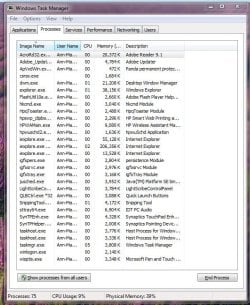
Win 7 Task Manager Process ID problem

jpwilli3

New member
Local time
8:41 AM
Messages
3
I'm running Windows 7 on both a laptop (Home Edition) and desktop (Pro Edition) and have noticed that when I open Task Manager that there a a couple of processes (csrss.exe, winlogon.exe) that don't have an identifiable User Name or Description. Also, if I right click to locate the path or open the properties window, nothing happens. Is is possible that these have been infected by a virus or trojan? Both PCs seem to be running fine with no performance issues, but I'm nervous that these processes can't be identified.
 

My Computer

OS
windows 7
Welcome,

You can be pretty certain of your situation, based upon running a through anti virus scan and downloading and runining malwarebytes.

http://www.malwarebytes.org/mbam.php

I, for one, based upon your explanation think that you are ok.

Let us know your results
 

My Computer

Computer type
PC/Desktop
Computer Manufacturer/Model Number
Dell XPS 420
OS
Windows 10, Home Clean Install
CPU
Intel Core2 processsor Q8200(2.33Ghz 1333FSB) Quad Core Tech
Motherboard
Dell
Memory
6 gb
Graphics Card(s)
ATI Radeon 256MB HD3650
Sound Card
Intergrated 7.1 Channel Audio
Monitor(s) Displays
Dell SP2009W 20"
Hard Drives
640 GB Serial ATA Hard drive
Cooling
Fan
Keyboard
Dell USB Keyboard
Mouse
Dell Premium Optical USB
Internet Speed
DSL 2.85
I'm running Windows 7 on both a laptop (Home Edition) and desktop (Pro Edition) and have noticed that when I open Task Manager that there a a couple of processes (csrss.exe, winlogon.exe) that don't have an identifiable User Name or Description. Also, if I right click to locate the path or open the properties window, nothing happens. Is is possible that these have been infected by a virus or trojan? Both PCs seem to be running fine with no performance issues, but I'm nervous that these processes can't be identified.

What do you mean they can't be identified? Do you mean they just don't have a username associated with them?

Could you post a screenshot to show us exactly what you're seeing?
 

My Computer

OS
XP / Win7 x64 Pro
CPU
Intel Quad-Core Q9450 @ 3.2GHz
Motherboard
Asus P5-E
Memory
2x2GB GSkill DDR2
Graphics Card(s)
NVIDIA GeForce 8600 GTS (EVGA)
Monitor(s) Displays
Dell 2408WFP
Screen Resolution
1920x1200
See attachment of screen capture. My anti-virus and spyware software is Panda AVPro and it hasn't identified a problem.
 

Attachments

  • TM Capture.JPG
    TM Capture.JPG
    95.7 KB · Views: 163

My Computer

OS
windows 7
Click the button on the bottom that says "show processes from all users". I think you'll find that you have a lot of processes like that without a particular username associated, which doesn't necessarily mean it's malware.

This doesn't rule out malware, but doesn't immediately insinuate it is either. You might want to just boot into safe-mode and do a virus-scan in case.
 

My Computer

OS
XP / Win7 x64 Pro
CPU
Intel Quad-Core Q9450 @ 3.2GHz
Motherboard
Asus P5-E
Memory
2x2GB GSkill DDR2
Graphics Card(s)
NVIDIA GeForce 8600 GTS (EVGA)
Monitor(s) Displays
Dell 2408WFP
Screen Resolution
1920x1200
worked, thanks!!

Thanks, FliGi7, your suggestion worked! Still not sure why all the info wasn't listed for the processes on the short list, but now all the column info is showing and for many more processes. I see there's a lot of seeming redundacies; e.g. csrss.exe is listed twice and svchost about 16 times. But at least the ones I checked all seem to have legitimate file locations so I feel better. Also, running malwarebytes didn't indicate any problems with these processes.
 

My Computer

OS
windows 7
Glad to help.
 

My Computer

OS
XP / Win7 x64 Pro
CPU
Intel Quad-Core Q9450 @ 3.2GHz
Motherboard
Asus P5-E
Memory
2x2GB GSkill DDR2
Graphics Card(s)
NVIDIA GeForce 8600 GTS (EVGA)
Monitor(s) Displays
Dell 2408WFP
Screen Resolution
1920x1200
I know it might be a bit late, but I have the same problem as jpwilli3. I have Windows Task Manager start minimized when Windows start (using WinPatrol), but some processes are missing their Description (and presumably Usernames, but I removed that column). This is on a new and clean Windows 7 Professional 64-bit installation. I am 99% sure that this isn't virus related, since it has been this way from the beginning.
I previously had Windows 7 Pro 32-bit on my old laptop, but I never had this problem.
I did notice that if I exit the task manager and reopen it, all the descriptions are loaded. This led me to believe that perhaps a Windows service has not started yet, so on a new restart I opened services.msc immediately to see which services have not started yet. However, when I opened services.msc, all the descriptions in task manager show, once I opened it.

So, in conclusion, when task manager is started for the first time, the process descriptions aren't showing. When I close and reopen it, they show. If I open services.msc and then start task manager, they show.

Does anyone have any suggestions whatsoever? Do any other people have this problem?

Also, sorry for the long post.

 

My Computer

OS
Windows 7 64-bit
CPU
Intel i5-760
Motherboard
Asrock P55 Pro
Memory
4GB
Graphics Card(s)
Nvidia GTX 460 1GB
bump
 

My Computer

OS
Windows 7 64-bit
CPU
Intel i5-760
Motherboard
Asrock P55 Pro
Memory
4GB
Graphics Card(s)
Nvidia GTX 460 1GB
Back
Top