Win 7 Ult. 32 + XP Mode

AstaLaVista

Lost in Cyberspace
Guru
Local time
1:12 AM
Messages
1,962
Location
Miami, Florida
I recently found XP Mode and I want to try it on one of my Office PCs. We run an application from the server that runs on Windows 2000 server and my question is as follows.

Windows 7 does not have to be on the network since it will only be use for internet browsing, MS Office, etc but XP mode does need to use the server application... how do I have to install windows seven and XP mode virtualization?

I was trying it today but I was unable to see the server while in Virtual XP Mode. Do I have to threat it as a new install? meaning, I have to give it a name that the server will see and it can not be the same name that Win 7 has?

Sorry, I think I am making this more confusing that it need to be but networking is kinda Greek to me :p :shock:
 

My Computer

Computer type
PC/Desktop
Computer Manufacturer/Model Number
Custom Built... Intel/Nvidia/ASRock
OS
Windows 7 x64 (Ultimate)
CPU
Intel i5-4670K
Motherboard
ASRock Z87 Extreme 6
Memory
8GBs Ripjaws 2133Mhz
Graphics Card(s)
Asus GTX660 (2GBs)
Sound Card
Onboard Realtek HD
Monitor(s) Displays
Acer AL2216W
Screen Resolution
1680 x 1050
Hard Drives
Samsung 840 SSD 120GBs
Samsung 750GB 32MB cache
1.5 TB
PSU
PC Cooling 750w Silencer
Case
Thermaltake Spedo Advance
Cooling
Std Cooler
Keyboard
Logitech G15
Mouse
Logitech G9
Internet Speed
Comcast 20Mbit
Antivirus
Avast
Browser
Firefox
Yes maybe.
The biggest problem with XP mode is that by default it sets up a virtual network card on a different subnet then the host PC acting as a router with NAT.

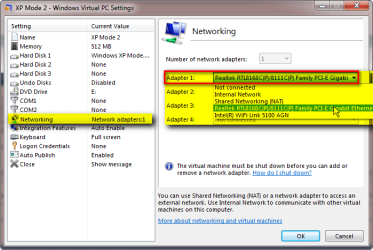
What you first need to do is when XP mode is shut down, not hibernated, go into the settings and change the network interface to use the host network card.

Once that is done you may be able to connect to the server and or add to the server that the username for XP mode to allow it access.

Not certain if you can run that program from the server in the XP mode. But once you can see the server in networking you'll find that out.
 

My Computer

Computer Manufacturer/Model Number
Built be Me
OS
Windows 7 Pro x64
CPU
i5 760
Motherboard
Asus P7P55D-E Pro
Memory
16GB
Graphics Card(s)
Nvidia GTS450
Sound Card
On board
Monitor(s) Displays
Dell 2007WFP Dell 1800FP
Screen Resolution
1680x1050 1280x1024
Hard Drives
Seagate 250GB & 750GB
WD 1TB
PSU
Antec 750
Case
In Win
Cooling
Cooler Master Hyper 212+
Keyboard
IBM
Mouse
MS
Yes maybe.
The biggest problem with XP mode is that by default it sets up a virtual network card on a different subnet then the host PC acting as a router with NAT.

What you first need to do is when XP mode is shut down, not hibernated, go into the settings and change the network interface to use the host network card.

Once that is done you may be able to connect to the server and or add to the server that the username for XP mode to allow it access.

Not certain if you can run that program from the server in the XP mode. But once you can see the server in networking you'll find that out.

Thanks a lot Shootist, I will try that tomorrow and see if I can make heads or tails of it. I have seen something about "Hibernating " when I exit from XP Mode but it was brief so I don't know whether y shut down or just hibernated... I gotta check that out.
 

My Computer

Computer type
PC/Desktop
Computer Manufacturer/Model Number
Custom Built... Intel/Nvidia/ASRock
OS
Windows 7 x64 (Ultimate)
CPU
Intel i5-4670K
Motherboard
ASRock Z87 Extreme 6
Memory
8GBs Ripjaws 2133Mhz
Graphics Card(s)
Asus GTX660 (2GBs)
Sound Card
Onboard Realtek HD
Monitor(s) Displays
Acer AL2216W
Screen Resolution
1680 x 1050
Hard Drives
Samsung 840 SSD 120GBs
Samsung 750GB 32MB cache
1.5 TB
PSU
PC Cooling 750w Silencer
Case
Thermaltake Spedo Advance
Cooling
Std Cooler
Keyboard
Logitech G15
Mouse
Logitech G9
Internet Speed
Comcast 20Mbit
Antivirus
Avast
Browser
Firefox
Thanks a lot Shootist, I will try that tomorrow and see if I can make heads or tails of it. I have seen something about "Hibernating " when I exit from XP Mode but it was brief so I don't know whether y shut down or just hibernated... I gotta check that out.

By default XP Mode is set to go into Hibernation when exiting from it. So you have to specifically tell it to Shut down.
A google search will turn up all of this.
 

My Computer

Computer Manufacturer/Model Number
Built be Me
OS
Windows 7 Pro x64
CPU
i5 760
Motherboard
Asus P7P55D-E Pro
Memory
16GB
Graphics Card(s)
Nvidia GTS450
Sound Card
On board
Monitor(s) Displays
Dell 2007WFP Dell 1800FP
Screen Resolution
1680x1050 1280x1024
Hard Drives
Seagate 250GB & 750GB
WD 1TB
PSU
Antec 750
Case
In Win
Cooling
Cooler Master Hyper 212+
Keyboard
IBM
Mouse
MS
There's absolutely no need to shut down XP Mode only to change the NIC. You can do it when hibernated and even when XP Mode is running. Just open XP Mode settings, click Networking on the left pane and select your host system's NIC from drop down list on the right.

XPM_NIC.png

Only when adding or removing NIC's must XP Mode be shut down.

Kari
 

My Computer

Computer type
Laptop
Computer Manufacturer/Model Number
HP ENVY 17-1150eg
OS
Windows 10 Pro x64 EN-GB
CPU
1.6 GHz Intel Core i7-720QM Processor
Memory
6 GB
Graphics Card(s)
ATI Mobility Radeon HD 5850 Graphics
Sound Card
Beats sound system with integrated subwoofer
Monitor(s) Displays
17" laptop display, 22" LED and 32" Full HD TV through HDMI
Screen Resolution
1600*900 (1), 1920*1080 (2&3)
Hard Drives
Internal: 2 x 500 GB SATA Hard Disk Drive 7200 rpm
External: 2TB for backups, 3TB USB3 network drive for media
Cooling
As Envy runs a bit warm, I have it on a Cooler Master pad
Keyboard
Logitech diNovo Media Desktop Laser (bluetooth)
Mouse
Logitech Performance Mouse MX
Internet Speed
50/10 Mbps VDSL
Antivirus
Windows Defender 4.3.9431.0
Browser
Maxthon 3.5.2., IE11
Thanks for that Kari.
I didn't realize that the network setting, and a few others, were available while XP mode was running or in hibernation. Some of the other options are not available while it is active, running or hibernating.
 

My Computer

Computer Manufacturer/Model Number
Built be Me
OS
Windows 7 Pro x64
CPU
i5 760
Motherboard
Asus P7P55D-E Pro
Memory
16GB
Graphics Card(s)
Nvidia GTS450
Sound Card
On board
Monitor(s) Displays
Dell 2007WFP Dell 1800FP
Screen Resolution
1680x1050 1280x1024
Hard Drives
Seagate 250GB & 750GB
WD 1TB
PSU
Antec 750
Case
In Win
Cooling
Cooler Master Hyper 212+
Keyboard
IBM
Mouse
MS
It's a quite simple principle. Think XP Mode, or any other Virtual PC vm, as a real computer. You need to shut down the computer when you add or remove hardware, like adding a HD or RAM. But if you want to connect an external CD/DVD, or use another NIC already installed, or connect something to a COM port, you can do this when computer is running.

Same with Virtual PC vm's. Add RAM or a HD, you need to shut down. Add an external DVD player, use another NIC, connect a COM port, no need to shut down.

Kari
 

My Computer

Computer type
Laptop
Computer Manufacturer/Model Number
HP ENVY 17-1150eg
OS
Windows 10 Pro x64 EN-GB
CPU
1.6 GHz Intel Core i7-720QM Processor
Memory
6 GB
Graphics Card(s)
ATI Mobility Radeon HD 5850 Graphics
Sound Card
Beats sound system with integrated subwoofer
Monitor(s) Displays
17" laptop display, 22" LED and 32" Full HD TV through HDMI
Screen Resolution
1600*900 (1), 1920*1080 (2&3)
Hard Drives
Internal: 2 x 500 GB SATA Hard Disk Drive 7200 rpm
External: 2TB for backups, 3TB USB3 network drive for media
Cooling
As Envy runs a bit warm, I have it on a Cooler Master pad
Keyboard
Logitech diNovo Media Desktop Laser (bluetooth)
Mouse
Logitech Performance Mouse MX
Internet Speed
50/10 Mbps VDSL
Antivirus
Windows Defender 4.3.9431.0
Browser
Maxthon 3.5.2., IE11
I recently found XP Mode and I want to try it on one of my Office PCs. We run an application from the server that runs on Windows 2000 server and my question is as follows.

Windows 7 does not have to be on the network since it will only be use for internet browsing, MS Office, etc but XP mode does need to use the server application... how do I have to install windows seven and XP mode virtualization?

I was trying it today but I was unable to see the server while in Virtual XP Mode. Do I have to threat it as a new install? meaning, I have to give it a name that the server will see and it can not be the same name that Win 7 has?

Sorry, I think I am making this more confusing that it need to be but networking is kinda Greek to me :p :shock:

On the XP Mode VMs that I have built, I have found that if I joined them to the domain, I had no issue seeing the network - regardless of which NIC it was using. If I left them off the domain, I could not browse the rest of the network but I was able to map a drive. When they were configured this way, the VM did seem to run much slower. When the system was joined to the domain, everything ran nice & fast and there were no networking issues.

Hope that helps.
Kevin
 

My Computer

Computer Manufacturer/Model Number
Dell 230 Vostro
OS
Windows 7 Professional
CPU
Quad Core
Memory
4 gigs
Other Info
I am a network admin so I have several systems. Most of our Win 7 systems are running Win 7 Pro 64bit on Dell Vostros.
Back
Top