Win 7 ultimate clean install on new computer w/2 WD 1TB HDD

jasco999

New member
Local time
12:14 PM
Messages
1
I am planning to install linux ubuntu V.10.10 on the second drive but I see that during the clean install of win 7 it reserved 100mb on drive 0 and left the rest of that drive unformatted and put everything else on drive 1 which is now the "c" drive. Perhaps I should have left one drive unconnected during install process. Additionally, windows rates my system 5.9 due to hard drive disk performance- are there special settings for WD caviar Black drives w/64meg cache that should operate at 6mb/sec or is that the foreseeable performance rating for those drives? All of the other performance ratings are above 7. Thanks for any help.
 

My Computer My Computer

At a glance

windows 7 ultimate x64I7 930OCZ 6GB DDR-3-1600 GOLDDIAMOND HD5670 GDDR5 1GB PCIE
Computer Manufacturer/Model Number
Home built
OS
windows 7 ultimate x64
CPU
I7 930
Motherboard
Gigabyte X58A-UD3R
Memory
OCZ 6GB DDR-3-1600 GOLD
Graphics Card(s)
DIAMOND HD5670 GDDR5 1GB PCIE
Sound Card
MB
Monitor(s) Displays
HANNS-G HG281D
Hard Drives
2- WD OEM BLACK 1TB SATA 6.0 HDD
PSU
COOLERMASTER SILENTPRO GOLD 800W
Case
COOLERMASTER CM690 II ADVANCED ATX
Cooling
RETAIL COOLER
Hello jasco999, welcome to Seven Forums!


As you say, multi booting Windows and Linux is best done on separate Hard Disk Drives (HDD) have a look at the info below to see the best way to go about it and be sure to post back with any further questions you may have and to keep us informed.
   Information

The easiest way to do away with boot issues between separate Operating Systems (OS) is to use the BIOS one time boot menu to select which OS to boot at system startup, each motherboard has an individual hot-key to tap during system start-up to access this menu.

If you have 2 separate Hard Disk Drives (HDD) and have one OS installed to one HDD and you want to install another OS to the second HDD, disconnect the HDD with the first OS installed on it and leave only the HDD you want to install the second OS to connected.

Just be sure not to change where the original HDD SATA cable was connected, it has to be re-connected to the exact same port to avoid boot issues.

Install the second OS to the connected HDD and when complete and the system is booting good, power down and reconnect the first HDD with the first OS on it.

This way the OSs will boot independently of each other and there will be no boot conflicts between the 2 separate OSs to have to sort later.

Then set the BIOS to boot the HDD / OS you want as default and if you want to start the other (new) OS you use the BIOS one-time boot menu to select that HDD / OS to start when the PC is started.


My Computer My Computer

At a glance

W 7 64-bit UltimateIntel Q9550 Yorkfield8GB Dominator 8500C5DATI : XFX 5870
Computer Manufacturer/Model Number
* BFK Customs *
OS
W 7 64-bit Ultimate
CPU
Intel Q9550 Yorkfield
Motherboard
ASUS P5Q Pro
Memory
8GB Dominator 8500C5D
Graphics Card(s)
ATI : XFX 5870
Sound Card
Realtek HD Audio 7-1
Monitor(s) Displays
1x 47" LCD HDMI & 3x 26" LCD HDMI
Screen Resolution
1920x1080P & 1920x1200
Hard Drives
1x 80GB Intel X25-M G2 SSD : 1x 500GB & 1x 640GB WD Caviar Black(s)
PSU
Corsair 620HX
Case
Cooler Master RC-690
Cooling
Tuniq Tower 120, 2x 140mm and 3x 120mm case fans
Keyboard
Microsoft 500
Mouse
Razer Diamondback 3G
Internet Speed
14 Mb/s
Other Info
1x Koutech 3Gb/s SATA HDD Hot Swap Rack
Hello jasco999 Welcome to the Seven Forums!

You may not be inclined to continue pressing an F key if that option is available for selecting which drive you will want to boot into and still want the 7 HD set as the default boot device. How to Dual Boot Windows 7 and Linux using BCDEdit

September 16th, 2009 by iceflatline

(6.30.10 – This post has been amended to address changes in recent versions of Fedora, GParted and Ubuntu — iceflatline)

This post will describe how to set up a system that can boot into Windows 7 or a Linux distribution. The Window 7 Boot Configuration Data Editor (BCDEdit) will be used to configure Windows 7 to display a menu at boot time that will allow the user to choose between Windows 7 and a Linux distribution of their choice. The steps described in this post assume that Windows 7 and the Linux distribution will occupy the same physical hard drive. Configuring BCDEdit to recognize and boot a Linux distribution located on a second physical hard drive is beyond the scope of this post.

To help explain the steps involved, we’ll use an 80 GB PATA hard drive with Windows 7 already installed. We’ll then re-partition the drive using Gnome Partition Editor (GParted) in order to add Ubuntu or Fedora. We’ll then use BCDedit to add a Windows boot menu option for our Linux distribution. All steps involved assume you have a functioning CD drive (or USB drive if you’d prefer) that the system can boot from. The software versions used in this post were as follows:

Fedora v13
GParted v0.5.2-9
Ubuntu v10.04 LTS
Windows 7 Professional (64-bit)

Oh… and while I’ve never encountered a situation where GParted destroyed existing disk data, make sure you backup any critical files before you proceed.

Sound advice before beginning for part of the guide seen there. Another alternative is the use of the free program EasyBCD which includes a form of NeoGrub to replace the default Grub loader and can be set up without trashing the Windows mbr. Wubi will work as well but you will want to point the Grub installer at the drive ubuntu will be on seeing that made the mount point "/".

From there you can add the new entry into the 7 BCD store using the "Grub isn't installed in bootsector" option to simply load the distro when selected from the 7 boot options.

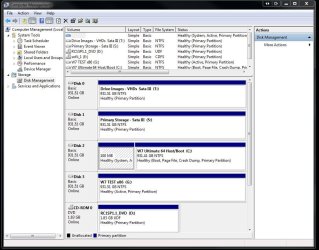
As for the 6.0Gb/s transfer rate that is seen under ideal conditions being the maximum transfer rate not the constant rate. The 100mb system reserved partition is created when using the 7 installer's drive tools during the installation on a drive found "raw" being not having been previously partitioned and formatted. If you had previous seen to that with GParted for example you would simply end up with the single large C primary.

The image attached here shows a two OS drives with a temp install of 7 on the second without the 100mb present having already been previously partitioned and formatted for use. GParted live saw to that. For Sata III drives the options for prepartioning and formatting ahead can be performed with the drive tools on the 7 dvd or with GParted since other programs may not be able to see any Sata III drives.
 

Attachments

  • W7 64Bit Host with Test and Storage.jpg
    W7 64Bit Host with Test and Storage.jpg
    107.1 KB · Views: 34

My Computers My Computers

  • At a glance

    W7 Ultimate x64/W10 Pro x64/W11 Pro Triple Bo...AMD Phenom II X4 975 Deneb 3.6ghz - 965 2nd r...Kingston Hyper X DDR3 1600 1.5v 16gb - Hyper ...MSI HD Radeon 5750 1gb - MSI HD Radeon 6450 o...
    Computer type
    PC/Desktop
    Computer Manufacturer/Model Number
    Custom builds = 2
    OS
    W7 Ultimate x64/W10 Pro x64/W11 Pro Triple Boot - Main PC W7 Remote PC Micro ATX W7 Pro x64/W11 Pro
    CPU
    AMD Phenom II X4 975 Deneb 3.6ghz - 965 2nd remote pc
    Motherboard
    Gigabyte GA-790XTA-UD4-Gigabyte GA-880GM-D2H remote pc
    Memory
    Kingston Hyper X DDR3 1600 1.5v 16gb - Hyper X Fury 8gb 2nd
    Graphics Card(s)
    MSI HD Radeon 5750 1gb - MSI HD Radeon 6450 on mini tower
    Sound Card
    Creative Labs X-Fi Xtreme Audio P - Realtek onooard 2nd case
    Monitor(s) Displays
    ASUS VW199T-P 19" HP 2082a Main-HP 2082a 20" remote pc
    Screen Resolution
    Asus 1440x900 - HP 1600x900
    Hard Drives
    WD Black 1TB HD per OS W7, W10, and pending W11 presently on 500gb OS Drive - Pending Triple 1TB HDs for Spanned Storage/backup volume
    Single 2TB external USB enclosure, single 1TB System 7 Host/Boot drive, Pending 8TB external HD for system image b
    PSU
    Corsair 750TX - primary / Corsair CX600 - second
    Case
    Antec 900-2 - SSD compatible / NZXT Vulcan mini tower
    Cooling
    Zalman CNPS9900A
    Keyboard
    AZIO L70 Backlit Letters Gaming - ONN Cordless/USB
    Mouse
    MSI DS200 Programmable, Logitech Cordless
    Internet Speed
    30mbps upgrade - primary hard wired - mini tower usb WiFi
    Antivirus
    GFI VIPRE Internet Security 2014 on W7 2016 beta on W10,
    Browser
    Cyberfox, WaterFox 64bit FF variants, FireFox x64, Pale Moon
    Other Info
    Accomdata fan cooled usb 2.0 PIDE/Sata II, III external enclosure.
    Sambient usb/eSata PATA/Sata II, III external enclosure.
  • At a glance

    W7 Pro x64/W11 ProAMD Deneb 3.6ghz - 965Kingston Hyper X Fury 8gbMSI HD Radeon 6450 DVI Output
    Computer type
    PC/Desktop
    System Manufacturer/Model Number
    CUSTOM ASSEMBLY
    OS
    W7 Pro x64/W11 Pro
    CPU
    AMD Deneb 3.6ghz - 965
    Motherboard
    Gigabyte GA-880GM-D2H remote pc
    Memory
    Kingston Hyper X Fury 8gb
    Graphics Card(s)
    MSI HD Radeon 6450 DVI Output
    Sound Card
    Realtek onooard Creative or Other separate PENDING
    Monitor(s) Displays
    VIZIO 32" LCD TV Separate LCD Pending
    Screen Resolution
    1600x1080
    Hard Drives
    WD 500GB OS Host/Boot WD Green 1TB Storage/Backup
    PSU
    Corsair 600W - THERMALTAKE 600W spare case
    Case
    NZXT Vulcan mini tower
    Cooling
    Twin 120mm Top Fans - 240mm Side Cover
    Keyboard
    ONN Cordless/USB Logitech Cordless
    Mouse
    ONN USB/Cordless - Logitech Cordless
    Internet Speed
    DSL 5G
    Browser
    MS Edge, FireFox, WaterFox x64, FireFox Nightly
    Other Info
    OS Testing-Remote Access to Main TeamViewer
Back
Top