win 7 ultimate cpu usage issues

ahmerkhan

New member
Local time
5:41 PM
Messages
8
Hey guys,

I recently installed win 7 ultimate on my notebook..
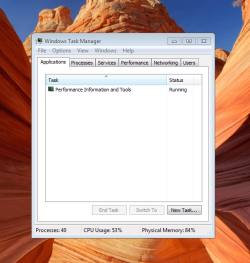
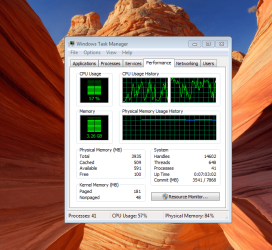
it has a performace score of 3.4, core 2 duo processor 4 gb ram ect. I havent installed much onto it, its still fresh and my problem is that right off the bat the cpu usuage is at 50 percent and ram at 85, thats with no programs running. I am well above the minimun requirement so did I do something wrong? Should i have a diff version of 7 such as home prem? also, if i connect to the pc through my 360, then the cpu usage is at 100 percent and I can not do anything else. please advise
 

My Computer

Computer Manufacturer/Model Number
sony vaio nw120j
OS
windows 7 ultimate
CPU
Core 2 duo
Memory
4gb
Hard Drives
300 gb
Case
notebook
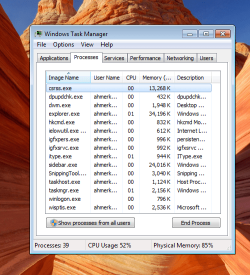
could you provide a screen shot of your process list in task manager? maybe a few of them, one sorted for highest mem and one for highest cpu useage. and a second set for when the 360 connects.

Also while the 360 is connected does the 100% CPU happen all the time or just when your streaming(video,music, pictures).
 

My Computer

Computer Manufacturer/Model Number
Custom Built
OS
Windows 7 Ultimate 64bit
CPU
Phenom II 1055T @ 3.1 Ghz (+.3 Ghz OC)
Motherboard
Asus
Memory
8GB
Graphics Card(s)
2x Nvidia GTX 260 core 216
Sound Card
Intergrated 7.1
Monitor(s) Displays
dual 23"
Screen Resolution
3840x1080
Hard Drives
C: 30GB intel ssd
D: 2x 500GB WD black raid 0
NAS: 6TB WB green raid 5
PSU
750w
Case
Black
Cooling
Oxygen, Nitrogen, other various gases.
Keyboard
QWERTY and clicky
Mouse
logitech wireless
Internet Speed
12Mbit down; 4Mbit up | 6Mbit down; 1Mbit up (Both DSL)
Other Info
blue led fans look nice
i will post the screen shots in a min, but when im streaming videos
 

My Computer

Computer Manufacturer/Model Number
sony vaio nw120j
OS
windows 7 ultimate
CPU
Core 2 duo
Memory
4gb
Hard Drives
300 gb
Case
notebook
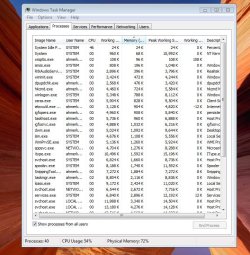
oh and here are the pics, this is with nothing running fresh restart
 

Attachments

  • Capture 1.PNG
    Capture 1.PNG
    83.2 KB · Views: 62
  • Capture.PNG
    Capture.PNG
    59.1 KB · Views: 117
  • Capture 2.PNG
    Capture 2.PNG
    125.2 KB · Views: 101

My Computer

Computer Manufacturer/Model Number
sony vaio nw120j
OS
windows 7 ultimate
CPU
Core 2 duo
Memory
4gb
Hard Drives
300 gb
Case
notebook
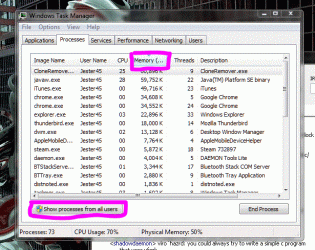
Click on "show processes from all users" without anything running show the processes tab, sorted by memory (click Memory, under the tabs but above the process list)
 

My Computer

Computer Manufacturer/Model Number
Custom Built
OS
Windows 7 Ultimate 64bit
CPU
Phenom II 1055T @ 3.1 Ghz (+.3 Ghz OC)
Motherboard
Asus
Memory
8GB
Graphics Card(s)
2x Nvidia GTX 260 core 216
Sound Card
Intergrated 7.1
Monitor(s) Displays
dual 23"
Screen Resolution
3840x1080
Hard Drives
C: 30GB intel ssd
D: 2x 500GB WD black raid 0
NAS: 6TB WB green raid 5
PSU
750w
Case
Black
Cooling
Oxygen, Nitrogen, other various gases.
Keyboard
QWERTY and clicky
Mouse
logitech wireless
Internet Speed
12Mbit down; 4Mbit up | 6Mbit down; 1Mbit up (Both DSL)
Other Info
blue led fans look nice
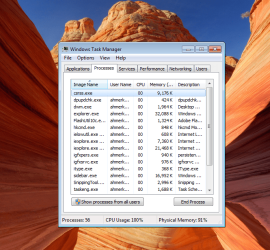
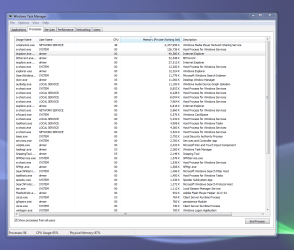
and this is with wmc streaming
 

Attachments

  • wmc.PNG
    wmc.PNG
    125.4 KB · Views: 539

My Computer

Computer Manufacturer/Model Number
sony vaio nw120j
OS
windows 7 ultimate
CPU
Core 2 duo
Memory
4gb
Hard Drives
300 gb
Case
notebook
click these buttons
 

Attachments

  • Capture.GIF
    Capture.GIF
    80.3 KB · Views: 171

My Computer

Computer Manufacturer/Model Number
Custom Built
OS
Windows 7 Ultimate 64bit
CPU
Phenom II 1055T @ 3.1 Ghz (+.3 Ghz OC)
Motherboard
Asus
Memory
8GB
Graphics Card(s)
2x Nvidia GTX 260 core 216
Sound Card
Intergrated 7.1
Monitor(s) Displays
dual 23"
Screen Resolution
3840x1080
Hard Drives
C: 30GB intel ssd
D: 2x 500GB WD black raid 0
NAS: 6TB WB green raid 5
PSU
750w
Case
Black
Cooling
Oxygen, Nitrogen, other various gases.
Keyboard
QWERTY and clicky
Mouse
logitech wireless
Internet Speed
12Mbit down; 4Mbit up | 6Mbit down; 1Mbit up (Both DSL)
Other Info
blue led fans look nice
here is the other jpeg showing the requested information
 

Attachments

  • Capture.JPG
    Capture.JPG
    109.7 KB · Views: 149

My Computer

Computer Manufacturer/Model Number
sony vaio nw120j
OS
windows 7 ultimate
CPU
Core 2 duo
Memory
4gb
Hard Drives
300 gb
Case
notebook
here is the other jpeg showing the requested information


Could you do that again but re-sort the memory section so we can see what is using the most memory? The current view is showing what's using the least amount...
 

My Computer

Computer type
PC/Desktop
Computer Manufacturer/Model Number
Custom Desktop PC
OS
Windows 7 / Windows 8.1
CPU
Devils Canyon i7-4790K @ 4.8 GHz ~ 1.33v
Motherboard
Asus Z97 Deluxe
Memory
Corsair Vengeance Pro PC3-19200 DDR3 2400MHz
Graphics Card(s)
EVGA GeForce GTX 980 SuperClocked ACX 2.0
Sound Card
Realtek ALC1150 8 channels
Monitor(s) Displays
BenQ XL2720Z 27"
Screen Resolution
1920 x 1080 @ 144Hz
Hard Drives
SSD1: 512GB Samsung 850 Pro
SSD2: 1TB Samsung 850 EVO
SSD3: 1TB Samsung 850 EVO
HDD: 4TB Western Digital Black
Backup: Western Digital My Book Duo 8TB
PSU
Corsair HX1000i / CyberPower CP1500PFCLCD PFC Sinewave UPS 1
Case
Corsair Graphite 780T
Cooling
Custom single loop liquid; CPU delidded; Aerocool DS Fans
Keyboard
Logitech G710 Cherry MX Blue
Mouse
LogitechG502 Proteus Core
Internet Speed
Download: 119MBs /Upload 39.12MBs via Optimum 101 Ultra
Antivirus
MYOB
Browser
Firefox
Other Info
Cooling: EK-Supremecy MX Waterblock, XSPC AX360 Radiator, Swiftech MCP655 Series 12VDC D5 Pump, EK-RES x3 250 Reservoir, Primochill Ice Intensified Coolant, 11x AerocoolDS fans, Primochill Primoflex Avanced LRT Tubing
Hey guys, still need help with this computer at 50/85 at idle, disabled hdmi audio among other things that I do not use. I installed various versions of 7, from ultimate to home, and also tried a clean install.. still no go..
 

Attachments

  • Capture.PNG
    Capture.PNG
    93.8 KB · Views: 251

My Computer

Computer Manufacturer/Model Number
sony vaio nw120j
OS
windows 7 ultimate
CPU
Core 2 duo
Memory
4gb
Hard Drives
300 gb
Case
notebook
How many computers do you have in your network? Do you have a Playstation 3 or a networked media device?

Or is it just one computer?

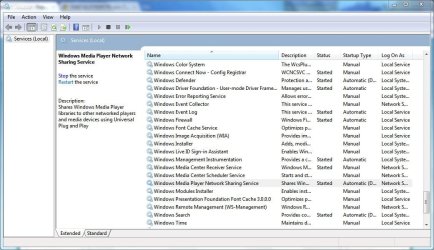
If it is just one computer, do this as an urgent cure. Type Services into the search box, click on it. When it opens, scroll down to the service shown in the picture. Click Stop. Then right click on its name in the list. A window will open. In the middle of it, you'll see Startup type. Click the Automatic (Delayed Start) button, scroll to Disabled and click on it.
 

Attachments

  • wmpnet.JPG
    wmpnet.JPG
    104.6 KB · Views: 447

My Computer

Computer Manufacturer/Model Number
Asus N73SV
OS
Windows 7 x64 Ultimate SP1
CPU
Core i7-2630QM
Motherboard
Intel HM 65
Memory
6 GB DDR3
Graphics Card(s)
Nvidia GT 540M / Intel HD 3000 - Optimus switching
Sound Card
HD Audio (Intel Azalia/Realtek) ALC269
Monitor(s) Displays
LED flat panel
Screen Resolution
1920 x 1080
Hard Drives
2x Seagate Momentus 640 GB - 1,28 TB in total
Internet Speed
4 MB/256 kbps
Other Info
External HDs

WD Elements 1,5 TB
WD MyBook 500 GB
bump, still need help please, it seems that wmpntwrk is using 50 percent of my cpu
 

My Computer

Computer Manufacturer/Model Number
sony vaio nw120j
OS
windows 7 ultimate
CPU
Core 2 duo
Memory
4gb
Hard Drives
300 gb
Case
notebook
i have one desktop on my network and my father connects through wifi when he gets home from work. I also have an xbox set up with media center
 

My Computer

Computer Manufacturer/Model Number
sony vaio nw120j
OS
windows 7 ultimate
CPU
Core 2 duo
Memory
4gb
Hard Drives
300 gb
Case
notebook
You have to do as I've written on top of this page if you want to stop this from happening.

It will disable media sharing though, but it will resolve your performance issue for the time being.

There is something wrong with your media sharing setup. I don't know what, we'll have to get more information. It is very likely that it will be impossible for us here to resolve it.

You should consider reconfiguring media sharing as a first measure. This issue could be caused by a faulty interaction between your PC and XBOX as a media center extender device.

If you can get support from Microsoft directly, try to reach them.
 

My Computer

Computer Manufacturer/Model Number
Asus N73SV
OS
Windows 7 x64 Ultimate SP1
CPU
Core i7-2630QM
Motherboard
Intel HM 65
Memory
6 GB DDR3
Graphics Card(s)
Nvidia GT 540M / Intel HD 3000 - Optimus switching
Sound Card
HD Audio (Intel Azalia/Realtek) ALC269
Monitor(s) Displays
LED flat panel
Screen Resolution
1920 x 1080
Hard Drives
2x Seagate Momentus 640 GB - 1,28 TB in total
Internet Speed
4 MB/256 kbps
Other Info
External HDs

WD Elements 1,5 TB
WD MyBook 500 GB
Recently I installed Windows 7 ultimate 32bit on my laptop Acer Asprire 5100 (model 2 years old), with AMD Turion 2,2Ghz, 120GB HDD, ATI x1100, 1,5GB RAM (graphic card uses 256MB from that 1,5GB), along with some other programs Firefox, Office, Nero...also I've installed TP Link wireless router to my cable internet modem, and set WEP secured network (10 digit code). After that I installed Opera and Flash player, and USB wireless mouse Logitec.
Everything worked good for 3 days, and suddenly, when I start the system, CPU usage is from 75 to 100% all the time. When I go to task manager, I don't see processes that are using CPU. When I installed process manager, I see that DPCs are using around 50% of CPU. It takes normal time to start windows, but shutting down thakes around 10 minutes.
The funny thing is that my touchpad is not working nor my keyboard (they work, but very strange - only few keys work, and touchpad glithces) on laptop, but I can use wireless mouse normaly and start programs (Total Commader, whatch videos...)
When I start windows in safe mode, everything is ok.

I used system restore on day of instalation, but same system presists.

Anyone have a clue?
 

My Computer

Computer Manufacturer/Model Number
Acer Aspire 5100 series
OS
Windows 7 ultimate
CPU
Turion 2,2GHz
Memory
1,5GB
Graphics Card(s)
ATI x1100
Hard Drives
120GB
same problem solved

try reset your cmos...if using laptop, remove battery and plug out power adapter..under no power supply condition, press the power button and hold for 5 second,,after that done n_n works for me at least.
 

My Computer

OS
windows 7
@Kypck try the way as vince8864 said you.If not solved, uninstall Nero (if you cant uninstall from CP, try to use any 3rd party software like Windows 7 manager). Nero gave me trouble like you in some RC version (forgot the ver)--last of all I had to Format.
 

My Computer

Computer Manufacturer/Model Number
COMPAQ Presario Laptop
OS
Windows 7 Ultimate 64 bit, Mac OS X 10.6
CPU
Intel Pentium Dual Core @2.0GHz
Motherboard
Compaq Generic
Memory
12GB
Graphics Card(s)
NVIDIA Graphics For Mobile 512MB VRAM
Sound Card
IDT High definition Audio
Monitor(s) Displays
Laptop LCD Display
Screen Resolution
1280*800 Bright View Widescreen
Hard Drives
500 GB Primary Master@7200rpm + 1 TB External HDD
Cooling
Direct ; generic fan
Keyboard
Generic Laptop Keyboard
Mouse
Touch Pad
Internet Speed
3.1 Mbps wireless Broadband
Other Info
Generic Dock
I can do new install, but I want to find out the solution...because it could happen again (and I want to know what will cause it again). So, I whink it might not be software, because system restore did not help...I think it might be a driver...
but I will try the advices...
 

My Computer

Computer Manufacturer/Model Number
Acer Aspire 5100 series
OS
Windows 7 ultimate
CPU
Turion 2,2GHz
Memory
1,5GB
Graphics Card(s)
ATI x1100
Hard Drives
120GB
How many computers do you have in your network? Do you have a Playstation 3 or a networked media device?

Or is it just one computer?

If it is just one computer, do this as an urgent cure. Type Services into the search box, click on it. When it opens, scroll down to the service shown in the picture. Click Stop. Then right click on its name in the list. A window will open. In the middle of it, you'll see Startup type. Click the Automatic (Delayed Start) button, scroll to Disabled and click on it.

Spot on dude. I thank you with the bottom of my heart. Keep it up!! :) I hope this solution goes permanently ..
 
Last edited:

My Computer

OS
Windows 7 Ultimate x86
CPU usage

Hello guys

I encounter the same problem when i install the windows 7 from my vista version. But I came to know that why this is happening. This is due to the audio driver install in our computers.
If u disable your audio driver the computer will run smoothly wihtout any problem.
For this go to services through msconfig and disable the POWER option in the services and your problem will resolve. By further updating your sound and power driver this problem will completely resolve.
Hope my this post will help you tackling this shit problem.

Vivek Shahi
 

My Computer

OS
Windows 7 Professonal 32 bit
Back
Top