
Solved Win 7 Ultimate Exporer - How to Truncate File Names

incurablegeek

As requested
Local time
11:23 AM
Messages
180
First of all, I requested reinstatement in SevenForums and apologize if I stepped on anyone's toes.

I started the thread "Porn in Your Registry" with all the best intentions. Please understand that I cannot and will not bridle my sense of humor, because quite frankly it's the only tool that I have to cope with all that life has "given" me.

Most people get me. Some don't. At all times my humor is self-deprecatory, as the title of my post "Porn in Your Registry" should have indicated.

Anyway good to be back with all you guys.

Oh, and regarding the Registry and the perceived danger of manual adjustments to it, I must confess with some degree of enthusiasm that I was indeed correct. ;)
.........................

Btw, Some folks have commented that I can be "useful" in that I ask questions no one has ever asked before, but the answers to which seem to be appreciated by all. At least, for the most part.

OK, that was my disclaimer. Now here's my question:

1) I have every file sorter, music and general file, known to man
-but-
2) I do not know how to lop off all the numbers, etc. of my many music files so I can eliminate the duplicates. For example, on the attachment I want to lop of the 01 - of the entire directory of FLAC files, I am left with the Name Only.
 

Attachments
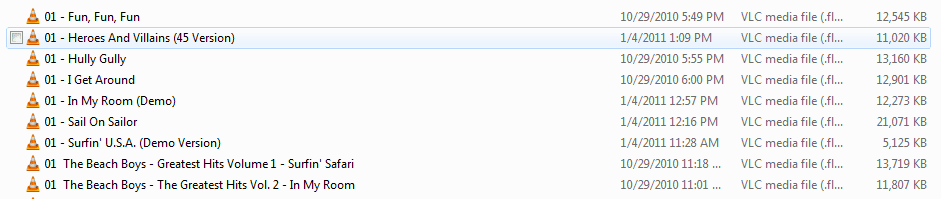
  • Lop off front of files.PNG
    Lop off front of files.PNG
    8.9 KB · Views: 10

My Computer My Computer

At a glance

Win 7-64
OS
Win 7-64

My Computer My Computer

At a glance

Windows 10 Pro x64 ; Xubuntu x64Intel i7 860 @ 2.80 GHz O/C'ed to 4.0GHz16GB Corsair Vengance DDR3 @ 661 MHz Dual Cha...EVGA NVidia GTX 560 1024MB
Computer type
PC/Desktop
Computer Manufacturer/Model Number
Golden Mk. I.4
OS
Windows 10 Pro x64 ; Xubuntu x64
CPU
Intel i7 860 @ 2.80 GHz O/C'ed to 4.0GHz
Motherboard
Gigabyte P55A-UD3R Rev.1. Award BIOS F13
Memory
16GB Corsair Vengance DDR3 @ 661 MHz Dual Channel (9-9-9-24)
Graphics Card(s)
EVGA NVidia GTX 560 1024MB
Sound Card
Realtek Integrated
Monitor(s) Displays
Dual Samsung SyncMaster 2494HS
Screen Resolution
1920*1080 and 1920*1080
Hard Drives
1*Samsung 840 EVO 120GB SSD;
1*OCZ Vertex 2 60GB SSD;
2*Samsung F3 SpinPoint 1TB in RAID0;
1*Samsung F1 SpinPoint 1TB;
2*Western Digital 1TB External USB 3.0
1*Western Digital 500GB External USB 3.0
1*Seagate 500GB External USB 2.0
PSU
Thermaltake ToughPower QFan 750W
Case
Thermaltake Element S VK60001W2Z
Cooling
Corsair H60 Water Cooling, 2*230mm and 2*80mm case fans
Keyboard
Logitech G110
Mouse
Logitech MX518
Use this free bulk file rename utility. It will allow you to trim off the leading 01-. Its very easy to use.

Are you serious? That fast an answer? And that easy?

Geez, I thought I'd have to write a special script or something which would end up consuming lots and lots of time.

I do thank you and will give that freeware a try. I sure like the sound of "free". :D
 

My Computer My Computer

At a glance

Win 7-64
OS
Win 7-64

My Computer My Computer

At a glance

Windows 10 Pro x64 ; Xubuntu x64Intel i7 860 @ 2.80 GHz O/C'ed to 4.0GHz16GB Corsair Vengance DDR3 @ 661 MHz Dual Cha...EVGA NVidia GTX 560 1024MB
Computer type
PC/Desktop
Computer Manufacturer/Model Number
Golden Mk. I.4
OS
Windows 10 Pro x64 ; Xubuntu x64
CPU
Intel i7 860 @ 2.80 GHz O/C'ed to 4.0GHz
Motherboard
Gigabyte P55A-UD3R Rev.1. Award BIOS F13
Memory
16GB Corsair Vengance DDR3 @ 661 MHz Dual Channel (9-9-9-24)
Graphics Card(s)
EVGA NVidia GTX 560 1024MB
Sound Card
Realtek Integrated
Monitor(s) Displays
Dual Samsung SyncMaster 2494HS
Screen Resolution
1920*1080 and 1920*1080
Hard Drives
1*Samsung 840 EVO 120GB SSD;
1*OCZ Vertex 2 60GB SSD;
2*Samsung F3 SpinPoint 1TB in RAID0;
1*Samsung F1 SpinPoint 1TB;
2*Western Digital 1TB External USB 3.0
1*Western Digital 500GB External USB 3.0
1*Seagate 500GB External USB 2.0
PSU
Thermaltake ToughPower QFan 750W
Case
Thermaltake Element S VK60001W2Z
Cooling
Corsair H60 Water Cooling, 2*230mm and 2*80mm case fans
Keyboard
Logitech G110
Mouse
Logitech MX518
Hey, I wasn't doubting you. Just surprised, make that shocked, at how fast you answered the question and found a way to sort files.

You know I used to be able to on WinWord truncate a column of unwanted information (numbers, etc.) with I think it was Cntrl/Shift/F6, holding down all three keys or hitting all 3 and then holding down the Shift key while scrolling down from top to bottom - might only have worked with Word '97. I dunno. But it sure was convenient in my work.
 

My Computer My Computer

At a glance

Win 7-64
OS
Win 7-64
Results:

1) CK Rename: I could not get it to install or even open properly. Actually had to use "Unlocker" to remove it from my system. Don't know why. Tried several times. (My system: Win 7 64 bit Ultimate)

2) Found "Better File Rename". Brain-dead easy to use, lots of functions but you gotta be careful because it doesn't appear to have a "Restore" function. But super easy to use.

What I do is the obvious: I copy the folders I want to modify and use Better File Rename there. If I mess up, I still have the original copy.

Better File Rename 5 - the better batch file renamer for Windows: Downloads
 

My Computer My Computer

At a glance

Win 7-64
OS
Win 7-64

My Computer My Computer

At a glance

Windows 8 Pro (32-bit)1.83GHz Intel Core Duo2GB 667MHz DDR2 SDRAM (PC2-5300) (upgrade)ATI Radeon X1600 with 128MB GDDR3 memory
Computer type
PC/Desktop
Computer Manufacturer/Model Number
Apple 17" iMac MA199LL (Early 2006)
OS
Windows 8 Pro (32-bit)
CPU
1.83GHz Intel Core Duo
Memory
2GB 667MHz DDR2 SDRAM (PC2-5300) (upgrade)
Graphics Card(s)
ATI Radeon X1600 with 128MB GDDR3 memory
Monitor(s) Displays
17-inch TFT active-matrix LCD, millions of colors
Screen Resolution
1440 x 900
Hard Drives
Hitachi 320GB HDT721032SLA360 7200RPM SATA II (upgrade)
Keyboard
Microsoft Wired Keyboard 600
Mouse
Microsoft Basic Optical Mouse v2.0
Internet Speed
4 Mbps
Antivirus
Microsoft Security Essentials
Browser
Google Chrome
Other Info
WEI:
Base Score: 3.9 Processor: 4.4 Memory 4.7
Graphics: 3.9 Gaming Graphics: 4.1 Primary HD: 5.9
they don't have an undo. That's why they have the preview.

FuturDreamz, thanks for the heads-up on the preview. I tend to just start using stuff without going through the manual, so I overlooked that feature.
 

My Computer My Computer

At a glance

Win 7-64
OS
Win 7-64
CK Rename: I could not get it to install or even open properly. Actually had to use "Unlocker" to remove it from my system. Don't know why. Tried several times. (My system: Win 7 64 bit Ultimate)

:confused: Not sure what you did....I actually downloaded it, installed it and renamed some files, whilst you were replying to original suggestion.....all on my Windows 7 Ultimate x64 in 1 minute flat
 

My Computer My Computer

At a glance

Windows 10 Pro x64 ; Xubuntu x64Intel i7 860 @ 2.80 GHz O/C'ed to 4.0GHz16GB Corsair Vengance DDR3 @ 661 MHz Dual Cha...EVGA NVidia GTX 560 1024MB
Computer type
PC/Desktop
Computer Manufacturer/Model Number
Golden Mk. I.4
OS
Windows 10 Pro x64 ; Xubuntu x64
CPU
Intel i7 860 @ 2.80 GHz O/C'ed to 4.0GHz
Motherboard
Gigabyte P55A-UD3R Rev.1. Award BIOS F13
Memory
16GB Corsair Vengance DDR3 @ 661 MHz Dual Channel (9-9-9-24)
Graphics Card(s)
EVGA NVidia GTX 560 1024MB
Sound Card
Realtek Integrated
Monitor(s) Displays
Dual Samsung SyncMaster 2494HS
Screen Resolution
1920*1080 and 1920*1080
Hard Drives
1*Samsung 840 EVO 120GB SSD;
1*OCZ Vertex 2 60GB SSD;
2*Samsung F3 SpinPoint 1TB in RAID0;
1*Samsung F1 SpinPoint 1TB;
2*Western Digital 1TB External USB 3.0
1*Western Digital 500GB External USB 3.0
1*Seagate 500GB External USB 2.0
PSU
Thermaltake ToughPower QFan 750W
Case
Thermaltake Element S VK60001W2Z
Cooling
Corsair H60 Water Cooling, 2*230mm and 2*80mm case fans
Keyboard
Logitech G110
Mouse
Logitech MX518
It can also done in Windows PowerShell I think.

The command for it is something like

Code:
Dir | Rename-Item –NewName { $_.name –replace “01-“,” ” }

for what you wanted to do.
 

My Computer My Computer

At a glance

Windows 8.1 Pro x64Intel Core i7 4790k8GB Corsair Dominator 1600MHzMSI TwinFrozr GeForce GTX770
Computer type
PC/Desktop
Computer Manufacturer/Model Number
Custom Built
OS
Windows 8.1 Pro x64
CPU
Intel Core i7 4790k
Motherboard
MSI Z97S Krait Edition
Memory
8GB Corsair Dominator 1600MHz
Graphics Card(s)
MSI TwinFrozr GeForce GTX770
Sound Card
ASUS Xonar DX/XD 7.1
Monitor(s) Displays
Dell 24" S2409W + Dell 20" E207WFP
Screen Resolution
1920x1080 + 1680x1050
Hard Drives
1x 120GB OCZ Agility 3, 1x 750GB Western Digital Caviar Black, 1x 1TB Western Digital Caviar Blue
PSU
Corsair HX850 modular
Case
Fractal Design Define R4
Cooling
Corsair H60 w/ twin Corsair SP120 fans
Keyboard
Logitech G510S Keyboard
Mouse
Logitech G500S Laser Mouse
Internet Speed
40Mbps
Antivirus
Microsoft Security Essentials
Browser
Google Chrome
Other Info
LG Blu-Ray player
Back
Top