Win 7 upgrade strategy

BillS22

New member
Member
Local time
11:35 PM
Messages
70
I'm running Vista 64 and plan to do a clean Win 7 install 10/22.
I've upgrade before, but always manually backing up up the necessary files and settings. I have an external drive.

But what about Easy File Transfer?
Could I install Win 7 over Vista and use Easy File Transfer?

1. Install Win 7 as an upgrade

2. Do an Easy File Transfer to my external drive (to take advantage of Win 7's more robust Easy File Transfer)

3. Format C and do an Clean Install

4. Use Easy File Transfer to restore my previous files and settings off my external drive.

Think it will work?
 

My Computer

Computer Manufacturer/Model Number
Intel
OS
Windows 7 64bit
CPU
Itel Dual 6600
Motherboard
DG33BU
Memory
8 GB
Graphics Card(s)
nVidia 9600
Sound Card
Logitech Z-10
Monitor(s) Displays
Dell
Hard Drives
Dual 500GB WD not Raid
PSU
Thermaltake 420W
Case
Thermaltake
Cooling
Fans

My Computer

Computer type
PC/Desktop
Computer Manufacturer/Model Number
Built them myself, Science Experiments !
OS
Win7 Enterprise, Win7 x86 (Ult 7600), Win7 x64 Ult 7600, TechNet RTM on AMD x64 (2.8Ghz)
CPU
AMD fx8350 4ghz, AMD-32 2400mhz, AMD-64 3200mhz, AMDx64 2.8G
Motherboard
SIS 755, ECS-K8M890M-M (Ult 7600), GigaByte & others
Memory
2gb, 4gb on the Ult 7600, 4gb on Technet RTM, 32gb on FX8350
Graphics Card(s)
Draw my own Graphics, several nVidia cards
Sound Card
on motherboard
Monitor(s) Displays
19" flat scr, 28" I-Inc widescr,22" Emprex Widescr, 23" Acer
Screen Resolution
1280 x 1024, 1440 x 900, 1920 x 1080
Hard Drives
6 pata Ide HD's & 2 Sata HD's
added 80gb external on Ult 7600 computer,
numerous extra 1tb, 2TB, 3Tb SATA HD's
A collection of ext HD Docks w/ HDs
PSU
430w, 550w, 600w, 700, 800, etc
Case
All Generic Full Towers
Cooling
Open Air & a few fans, some w/ colored LEDs
Keyboard
Compaq & Dell recycled from GoodWill
Mouse
Made in China Optical Wired Mouse
Internet Speed
Fast Cable InterNet
Antivirus
AVG Free on 24 different Desktops, NO Problems!
Browser
IE 8 is preferred, but use FireFox sometimes
Other Info
Linksys Routers, switches, & Hubs
Too Many USB Flash Drives to count, Biggest is 64GB !
Eight computers in my home network.
Sixteen computers at my business network.
Linked via TeamViewer !
Lots of old used spare computer parts everywhere!
Bill, your idea sounds good and logical. I myself have no experience with EFT and I am seeking advice. Please let me know if it works well. Tks
 

My Computer

Computer Manufacturer/Model Number
Wally, Innc.
OS
Windows 7 x64 finally!
CPU
AMD Athlon II X2 240
Motherboard
Biostar TA790GX XE
Memory
OCZ Platinum 4GB DDR2 1066 (will not work past 800MHz)
Graphics Card(s)
MSI R4670-MD1G Radeon HD 4670 1GB 128-bit GDDR3
Sound Card
ATI High Definition Audio Device Realtek ALC888
Monitor(s) Displays
HP w19e
Screen Resolution
1440x900
Hard Drives
Western Digital Caviar Green WD5000AADS 500GB SATA
Western Digital Caviar Blue WD5000AAKS 500GB SATA
PSU
Athena Power Micro ATX 400W
Case
HEC 6T 6T10BB Black MicroATX Mini Tower
Cooling
stock
Keyboard
wired, many keys
Mouse
HP wireless, 2 buttons, 1 wheel
Internet Speed
DSL 2Mb (recently getting 1.65M!)
The tutorial makes it look easy. My computer has two user accounts, mine and my wife's.
Do I have to do the file transfer under each account?

I want to say that one of Win 7's EFT features is that it does all accounts at once. But I'm not sure...I'll search the web..

Thanks,
Bill
 

My Computer

Computer Manufacturer/Model Number
Intel
OS
Windows 7 64bit
CPU
Itel Dual 6600
Motherboard
DG33BU
Memory
8 GB
Graphics Card(s)
nVidia 9600
Sound Card
Logitech Z-10
Monitor(s) Displays
Dell
Hard Drives
Dual 500GB WD not Raid
PSU
Thermaltake 420W
Case
Thermaltake
Cooling
Fans

My Computer

Computer Manufacturer/Model Number
Intel
OS
Windows 7 64bit
CPU
Itel Dual 6600
Motherboard
DG33BU
Memory
8 GB
Graphics Card(s)
nVidia 9600
Sound Card
Logitech Z-10
Monitor(s) Displays
Dell
Hard Drives
Dual 500GB WD not Raid
PSU
Thermaltake 420W
Case
Thermaltake
Cooling
Fans

Attachments

  • win_EFT.JPG
    win_EFT.JPG
    13.2 KB · Views: 6

My Computer

Computer type
PC/Desktop
Computer Manufacturer/Model Number
Built them myself, Science Experiments !
OS
Win7 Enterprise, Win7 x86 (Ult 7600), Win7 x64 Ult 7600, TechNet RTM on AMD x64 (2.8Ghz)
CPU
AMD fx8350 4ghz, AMD-32 2400mhz, AMD-64 3200mhz, AMDx64 2.8G
Motherboard
SIS 755, ECS-K8M890M-M (Ult 7600), GigaByte & others
Memory
2gb, 4gb on the Ult 7600, 4gb on Technet RTM, 32gb on FX8350
Graphics Card(s)
Draw my own Graphics, several nVidia cards
Sound Card
on motherboard
Monitor(s) Displays
19" flat scr, 28" I-Inc widescr,22" Emprex Widescr, 23" Acer
Screen Resolution
1280 x 1024, 1440 x 900, 1920 x 1080
Hard Drives
6 pata Ide HD's & 2 Sata HD's
added 80gb external on Ult 7600 computer,
numerous extra 1tb, 2TB, 3Tb SATA HD's
A collection of ext HD Docks w/ HDs
PSU
430w, 550w, 600w, 700, 800, etc
Case
All Generic Full Towers
Cooling
Open Air & a few fans, some w/ colored LEDs
Keyboard
Compaq & Dell recycled from GoodWill
Mouse
Made in China Optical Wired Mouse
Internet Speed
Fast Cable InterNet
Antivirus
AVG Free on 24 different Desktops, NO Problems!
Browser
IE 8 is preferred, but use FireFox sometimes
Other Info
Linksys Routers, switches, & Hubs
Too Many USB Flash Drives to count, Biggest is 64GB !
Eight computers in my home network.
Sixteen computers at my business network.
Linked via TeamViewer !
Lots of old used spare computer parts everywhere!
Hello, Bill.

Not wanting to tell you how you should do the migration, I just want to tell you how I've done it already a couple of times and with a couple of computers. My method is maybe a little bit unconventional, but it is a easy, reliable way to assure you can transfer absolutely everything to your new OS. It takes just a few clicks:

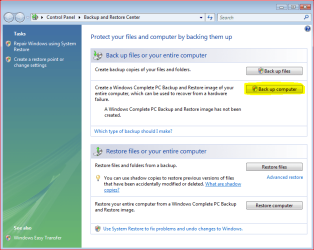
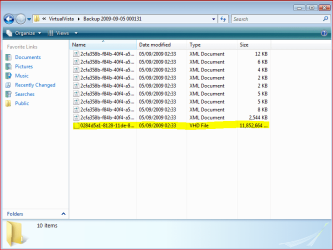
First, I create a full System Image of my Vista system using Vista Backup and Restore. It creates a virtual hard disk file plus some xml-catalog files to X:\WindowsImageBackup\Y\Backup Z , where X: is the drive where I save the backup image, Y is the name of my computer and Z is the date backup image was created.

See the images:

Backup_image.PNG
Backup_image2.PNG

When I've done with Windows 7 installation, the first thing I install after virus protection and firewall is Virtual PC and Virtual XP (free download here). Using Virtual XP or any other virtual machine, I then mount the Vista System Image (a vhd-file, virtual hard disk) as a second hard drive to this virtual machine. This tutorial explains how to do that.

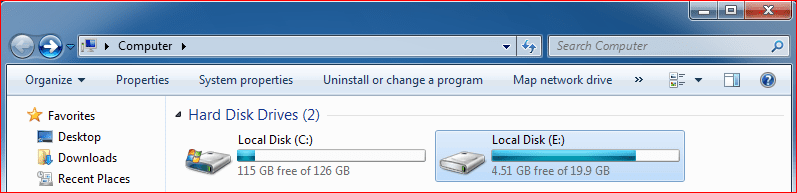
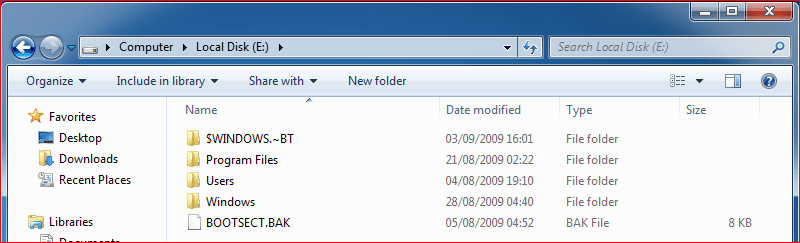
After that, I have access to everything I had on my Vista. The Vista backup image is now shown as a hard drive on the virtual machine:

Backup_image3.PNG
Backup_image4.PNG

Every file and folder. I like to do it this way because doing so I have no need to think what to transfer; it saves absolutely everything from the Vista system, I can always retrieve any file or folder I need. In worst case scenario I can also use this system backup image to restore Vista.

Notice please: also some applications can be transferred this way, but mostly only portable ones which don't write anything to the registry.

Good luck with migration!

Kari
 
Last edited:

My Computer

Computer type
Laptop
Computer Manufacturer/Model Number
HP ENVY 17-1150eg
OS
Windows 10 Pro x64 EN-GB
CPU
1.6 GHz Intel Core i7-720QM Processor
Memory
6 GB
Graphics Card(s)
ATI Mobility Radeon HD 5850 Graphics
Sound Card
Beats sound system with integrated subwoofer
Monitor(s) Displays
17" laptop display, 22" LED and 32" Full HD TV through HDMI
Screen Resolution
1600*900 (1), 1920*1080 (2&3)
Hard Drives
Internal: 2 x 500 GB SATA Hard Disk Drive 7200 rpm
External: 2TB for backups, 3TB USB3 network drive for media
Cooling
As Envy runs a bit warm, I have it on a Cooler Master pad
Keyboard
Logitech diNovo Media Desktop Laser (bluetooth)
Mouse
Logitech Performance Mouse MX
Internet Speed
50/10 Mbps VDSL
Antivirus
Windows Defender 4.3.9431.0
Browser
Maxthon 3.5.2., IE11
Back
Top