Win 7 very slow performance after rebuilding the bcd(Urgent)

spidey88

New member
Local time
6:12 AM
Messages
3
Hi all..My problem is that currently my windows 7 Professional performance was very slow..It happens after I rebuild the bcd because previously I was unable to boot into windows because of the winload.exe error 0x00000428 (digital signature issue)..And then I try to google it and found several solutions which are :
1. go into cmd using the win 7 DVD and type (bcdboot c:\windows/s c:)
2. go into cmd using the win 7 DVD and rebuild the bcd
"bcdedit /export C:\BCD_Backup"
"c:"
"cd boot"
"attrib bcd -s -h -r"
"ren c:\boot\bcd bcd.old"
"bootrec /RebuildBcd"

and then after that I was able to boot to my windows 7 but then I found that my laptop performance was so slow comparing to previosuly (starting from the log on as well as after I have successfully log on to windows)..and also when I try to open the disk management there is no disk shown..Please help me out..Thanks alot
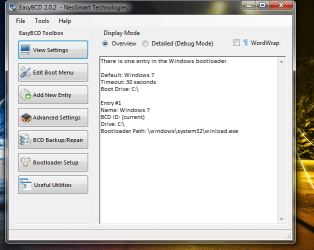
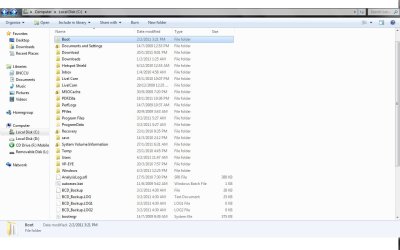
Below is the out put print screen from EasyBCD, Disk Management which might help you guys in solving my problems
dddd | Flickr - Photo Sharing!
aaab | Flickr - Photo Sharing!
cccc | Flickr - Photo Sharing!
 

Attachments
  • aaab.jpg
    aaab.jpg
    79.6 KB · Views: 20
  • cccc.png
    cccc.png
    32.9 KB · Views: 16
  • dddd.png
    dddd.png
    35.7 KB · Views: 19

My Computer My Computer

At a glance

windows 7 Professional 32bit
OS
windows 7 Professional 32bit
The slow performance is likely related to whatever issues caused the boot problem, not to the bcd rebuild. Looks like that system is super screwed-up. I wouldnt suggest even a repair install. Backup important data and either do a clean install or restore from a good image, if you have one.
 

My Computer My Computer

At a glance

Windows 7 x64 pro/ Windows 7 x86 Pro/ XP SP3 x86
Computer Manufacturer/Model Number
Too many to describe...
OS
Windows 7 x64 pro/ Windows 7 x86 Pro/ XP SP3 x86
The slow performance is likely related to whatever issues caused the boot problem, not to the bcd rebuild. Looks like that system is super screwed-up. I wouldnt suggest even a repair install. Backup important data and either do a clean install or restore from a good image, if you have one.

:cry:
So it means that there is no other way to save it except reinstall the windows?..
 

My Computer My Computer

At a glance

windows 7 Professional 32bit
OS
windows 7 Professional 32bit
You posted a Disk Management screenshot showing only your DVD drive.

Where is your C drive on map?

If it isn't here then I would make sure you have the latest BIOS update; if so, reset the CMOS: http://pcsupport.about.com/od/fixtheproblem/tp/clearcmos.htm

Then verify the HD registers correctly in BIOS setup, set it's SATA controller to AHCI first to try install, then IDE mode if necessary.

Next wipe the HD first off all boot sector corruption before reinstalling: http://www.sevenforums.com/tutorials/91339-ssd-hdd-optimize-windows-reinstallation.html

Tips for getting a purrfect reinstall - use those which apply to you: http://www.sevenforums.com/installation-setup/125874-re-install-windows-7-a.html#post1086729
 

My Computer My Computer

At a glance

Windows 7 x64 pro/ Windows 7 x86 Pro/ XP SP3 x86
Computer Manufacturer/Model Number
Too many to describe...
OS
Windows 7 x64 pro/ Windows 7 x86 Pro/ XP SP3 x86
Bill and I were posting at the same time.

I'd try Bill's approach first as Repair Install will reconfigure the boot as well as reinstall the OS, but if problems persist focus on BIOS then wiping the HD of possible bad boot code.
 
Ok Bill and Greg..I'll try the repair install after I get back my Win 7 Professional DVD..Btw,is the repair install same with upgrade?cause when I looked at the steps it looks like upgrade for me..
 

My Computer My Computer

At a glance

windows 7 Professional 32bit
OS
windows 7 Professional 32bit
Repair is an in-place upgrade.
 

My Computer My Computer

At a glance

Windows 7 x64 pro/ Windows 7 x86 Pro/ XP SP3 x86
Computer Manufacturer/Model Number
Too many to describe...
OS
Windows 7 x64 pro/ Windows 7 x86 Pro/ XP SP3 x86
Go with Bill2 Repair install.

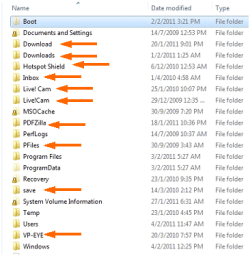
You do have a Security Problem , there are folders on the root C: that should not be there.

Captureaaaaa.PNG
 

My Computer My Computer

At a glance

ME/XP/Vista/Win7
OS
ME/XP/Vista/Win7
Back
Top