Win 7 winpemaker

1gb of portable apps?
What on earth do you need those for?
 

My Computers

System One System Two

  • Computer type
    PC/Desktop
    OS
    7 X64
    CPU
    i5 8400
    Motherboard
    gigabyte b365m ds3h
    Memory
    2x8gb 3200mhz
    Hard Drives
    various
    PSU
    pure power 11 400w cm
    Case
    Coolermaster
    Cooling
    cryorig m9i
  • Computer type
    PC/Desktop
    OS
    7x64
    CPU
    g5400
    Motherboard
    ga b365m ds3h
    Memory
    8gb ddr4 2400
    PSU
    xfx pro 450w
Unknown Error

Something went wrong.
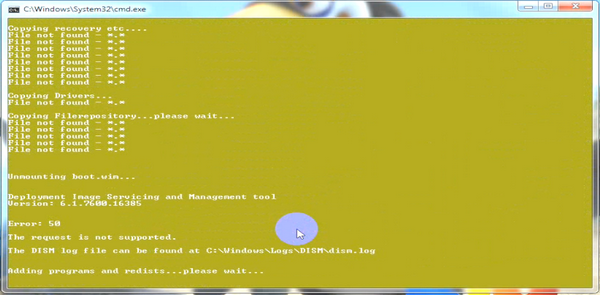
I saw the word error in the Command window, but the window closed before I could read what it said. :eek:

It occurred after the drivers were installed and the message about unmounting image(?).
It didn't ask me if I wanted to create an ISO.
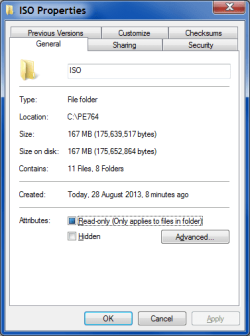
I have an ISO folder though.
ISO Properties.png
 

My Computer

Computer type
PC/Desktop
Computer Manufacturer/Model Number
n/a
OS
W7 Ultimate SP1, LM19.2 MATE, W10 Home 1703, W10 Pro 1703 VM, #All 64 bit
CPU
AMD Phenom II x6 1100T, 3.3 GHz
Motherboard
ASUS M4A88T-M/USB3 (AM3)
Memory
12GB DDR3 1333 G-Skill (4GB x 2), G-Skill (2GB x 2)
Graphics Card(s)
NVIDIA GeForce GTX 660
Sound Card
Realtek?
Monitor(s) Displays
Samsung S23B350
Screen Resolution
1920x1080
Hard Drives
WD Green 2TB (SATA), WD Green 3TB (SATA), WD Blue 4TB (SATA), WD Blue 6TB (SATA)
PSU
Cooler Master
Case
Antec GX300 Tower
Cooling
3x Antec TRICOOL 120mm Fans
Mouse
Wired Optical
Internet Speed
DSL
Antivirus
Avast
Browser
Pale Moon (64 bit)
Other Info
2018-12-27 Upgraded HDDs
2015-12-10 Upgraded case, graphics card, storage
2015-08-15 Upgraded motherboard & RAM
2015-07-15 Upgraded LM17.1 to LM17.2
It should copy some stuff out of the mounted wim, then unmount it. Next it copies the contents of PE764v2\BIN\W764 into the folder called PE764v2\4.


See if that stuff has copied over. Will test it again here.
 

My Computers

System One System Two

  • Computer type
    PC/Desktop
    OS
    7 X64
    CPU
    i5 8400
    Motherboard
    gigabyte b365m ds3h
    Memory
    2x8gb 3200mhz
    Hard Drives
    various
    PSU
    pure power 11 400w cm
    Case
    Coolermaster
    Cooling
    cryorig m9i
  • Computer type
    PC/Desktop
    OS
    7x64
    CPU
    g5400
    Motherboard
    ga b365m ds3h
    Memory
    8gb ddr4 2400
    PSU
    xfx pro 450w
It should copy some stuff out of the mounted wim, then unmount it. Are you using pe764v2?

Maybe not.
I downloaded PE764.zip on 2013-08-08.
 

My Computer

Computer type
PC/Desktop
Computer Manufacturer/Model Number
n/a
OS
W7 Ultimate SP1, LM19.2 MATE, W10 Home 1703, W10 Pro 1703 VM, #All 64 bit
CPU
AMD Phenom II x6 1100T, 3.3 GHz
Motherboard
ASUS M4A88T-M/USB3 (AM3)
Memory
12GB DDR3 1333 G-Skill (4GB x 2), G-Skill (2GB x 2)
Graphics Card(s)
NVIDIA GeForce GTX 660
Sound Card
Realtek?
Monitor(s) Displays
Samsung S23B350
Screen Resolution
1920x1080
Hard Drives
WD Green 2TB (SATA), WD Green 3TB (SATA), WD Blue 4TB (SATA), WD Blue 6TB (SATA)
PSU
Cooler Master
Case
Antec GX300 Tower
Cooling
3x Antec TRICOOL 120mm Fans
Mouse
Wired Optical
Internet Speed
DSL
Antivirus
Avast
Browser
Pale Moon (64 bit)
Other Info
2018-12-27 Upgraded HDDs
2015-12-10 Upgraded case, graphics card, storage
2015-08-15 Upgraded motherboard & RAM
2015-07-15 Upgraded LM17.1 to LM17.2
Try v2 then. There is a lot of copying, maybe also turn off your a/v to stop it interfering.
 

My Computers

System One System Two

  • Computer type
    PC/Desktop
    OS
    7 X64
    CPU
    i5 8400
    Motherboard
    gigabyte b365m ds3h
    Memory
    2x8gb 3200mhz
    Hard Drives
    various
    PSU
    pure power 11 400w cm
    Case
    Coolermaster
    Cooling
    cryorig m9i
  • Computer type
    PC/Desktop
    OS
    7x64
    CPU
    g5400
    Motherboard
    ga b365m ds3h
    Memory
    8gb ddr4 2400
    PSU
    xfx pro 450w
Try v2 then. There is a lot of copying, maybe also turn off your a/v to stop it interfering.

The original link has been updated?

I did disable the AV (you recommended that in an earlier post). :)

Will I need to delete all of the old files and start again from scratch, or can I just run the new "7PEx64.cmd" file?
 

My Computer

Computer type
PC/Desktop
Computer Manufacturer/Model Number
n/a
OS
W7 Ultimate SP1, LM19.2 MATE, W10 Home 1703, W10 Pro 1703 VM, #All 64 bit
CPU
AMD Phenom II x6 1100T, 3.3 GHz
Motherboard
ASUS M4A88T-M/USB3 (AM3)
Memory
12GB DDR3 1333 G-Skill (4GB x 2), G-Skill (2GB x 2)
Graphics Card(s)
NVIDIA GeForce GTX 660
Sound Card
Realtek?
Monitor(s) Displays
Samsung S23B350
Screen Resolution
1920x1080
Hard Drives
WD Green 2TB (SATA), WD Green 3TB (SATA), WD Blue 4TB (SATA), WD Blue 6TB (SATA)
PSU
Cooler Master
Case
Antec GX300 Tower
Cooling
3x Antec TRICOOL 120mm Fans
Mouse
Wired Optical
Internet Speed
DSL
Antivirus
Avast
Browser
Pale Moon (64 bit)
Other Info
2018-12-27 Upgraded HDDs
2015-12-10 Upgraded case, graphics card, storage
2015-08-15 Upgraded motherboard & RAM
2015-07-15 Upgraded LM17.1 to LM17.2
Delete the PE764 folder and extract the new PE764v2.

Just tested here, working great.

I am posting from it now.

2013-08-28_040619.jpg
 

My Computers

System One System Two

  • Computer type
    PC/Desktop
    OS
    7 X64
    CPU
    i5 8400
    Motherboard
    gigabyte b365m ds3h
    Memory
    2x8gb 3200mhz
    Hard Drives
    various
    PSU
    pure power 11 400w cm
    Case
    Coolermaster
    Cooling
    cryorig m9i
  • Computer type
    PC/Desktop
    OS
    7x64
    CPU
    g5400
    Motherboard
    ga b365m ds3h
    Memory
    8gb ddr4 2400
    PSU
    xfx pro 450w
well, I test out alot of 'em, what can i say, I gotta see if they all suite me :) lol
 

My Computer

Computer type
PC/Desktop
OS
.
No Luck

I can't get it to install my USB 3 driver.
I noticed various messages about items not unmounting.
It drops out before asking me about creating an ISO.

I created a new VM from the W7 SP1 ISO and tried running it in there (just in case there was something it didn't like about my PC) but that didn't work either.
 

My Computer

Computer type
PC/Desktop
Computer Manufacturer/Model Number
n/a
OS
W7 Ultimate SP1, LM19.2 MATE, W10 Home 1703, W10 Pro 1703 VM, #All 64 bit
CPU
AMD Phenom II x6 1100T, 3.3 GHz
Motherboard
ASUS M4A88T-M/USB3 (AM3)
Memory
12GB DDR3 1333 G-Skill (4GB x 2), G-Skill (2GB x 2)
Graphics Card(s)
NVIDIA GeForce GTX 660
Sound Card
Realtek?
Monitor(s) Displays
Samsung S23B350
Screen Resolution
1920x1080
Hard Drives
WD Green 2TB (SATA), WD Green 3TB (SATA), WD Blue 4TB (SATA), WD Blue 6TB (SATA)
PSU
Cooler Master
Case
Antec GX300 Tower
Cooling
3x Antec TRICOOL 120mm Fans
Mouse
Wired Optical
Internet Speed
DSL
Antivirus
Avast
Browser
Pale Moon (64 bit)
Other Info
2018-12-27 Upgraded HDDs
2015-12-10 Upgraded case, graphics card, storage
2015-08-15 Upgraded motherboard & RAM
2015-07-15 Upgraded LM17.1 to LM17.2
I can't get it to install my USB 3 driver.

Dism does the driver installation. If Dism cannot install the driver, might be because the driver is not 64 bit, or is not in .inf format. Dism can't install driver exes.

I noticed various messages about items not unmounting

Dism also does the mounting/unmounting. If you have any of the mounted folders open in explorer, it will give you messages like that. It is usually fine, though.
 

My Computers

System One System Two

  • Computer type
    PC/Desktop
    OS
    7 X64
    CPU
    i5 8400
    Motherboard
    gigabyte b365m ds3h
    Memory
    2x8gb 3200mhz
    Hard Drives
    various
    PSU
    pure power 11 400w cm
    Case
    Coolermaster
    Cooling
    cryorig m9i
  • Computer type
    PC/Desktop
    OS
    7x64
    CPU
    g5400
    Motherboard
    ga b365m ds3h
    Memory
    8gb ddr4 2400
    PSU
    xfx pro 450w
C'est la vie

I can't get it to install my USB 3 driver.
Dism does the driver installation. If Dism cannot install the driver, might be because the driver is not 64 bit, or is not in .inf format. Dism can't install driver exes.

I hate drivers.
The USB 3 driver on my friend's laptop always self-destructs after a few days of use.

USB 3 drivers seem to be tied with video drivers in a battle for the title of "worst of the worst". :(

What files should a driver have?
I used the files that were discovered using Glary Utilities Driver Backup function (i.e. inf and ini).
BTW, shouldn't the set include a sys file?

Dism had a dummy spit about them being unsigned.
They were originally installed from a MSI file on my motherboard's install disc.

I added the /forceunsigned switch to the script.
That fixed the unsigned driver issue, but they still wouldn't install.

As a longshot I also tried the MSI file (of course that didn't work either).

C'est la vie.
The USB 3 driver would have been a bonus.

I think that the VM made it further than my PC before failing.
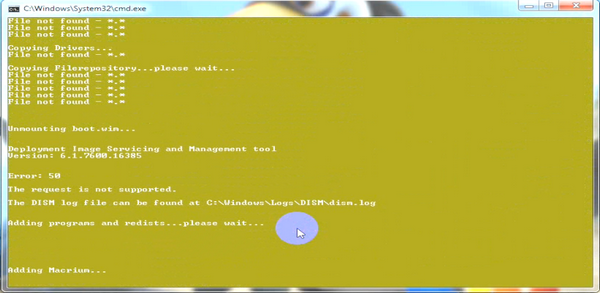
I noticed messages about Macrium and EasyBCD before the command window disappeared.

I also tried creating an ISO without adding anything, but I still had no luck.
I guess I'll add this to my pile of unfinished projects.

Thanks for trying to help. :)
 

My Computer

Computer type
PC/Desktop
Computer Manufacturer/Model Number
n/a
OS
W7 Ultimate SP1, LM19.2 MATE, W10 Home 1703, W10 Pro 1703 VM, #All 64 bit
CPU
AMD Phenom II x6 1100T, 3.3 GHz
Motherboard
ASUS M4A88T-M/USB3 (AM3)
Memory
12GB DDR3 1333 G-Skill (4GB x 2), G-Skill (2GB x 2)
Graphics Card(s)
NVIDIA GeForce GTX 660
Sound Card
Realtek?
Monitor(s) Displays
Samsung S23B350
Screen Resolution
1920x1080
Hard Drives
WD Green 2TB (SATA), WD Green 3TB (SATA), WD Blue 4TB (SATA), WD Blue 6TB (SATA)
PSU
Cooler Master
Case
Antec GX300 Tower
Cooling
3x Antec TRICOOL 120mm Fans
Mouse
Wired Optical
Internet Speed
DSL
Antivirus
Avast
Browser
Pale Moon (64 bit)
Other Info
2018-12-27 Upgraded HDDs
2015-12-10 Upgraded case, graphics card, storage
2015-08-15 Upgraded motherboard & RAM
2015-07-15 Upgraded LM17.1 to LM17.2
There should be a .sys file or dism will complain.

If you have macrium and/or Easybcd, it will add them in and the message is simply Adding macrium...Adding Easybcd. If you don't have them installed already, you won't see that.

Otherwise, I have no idea what you are doing wrong. The script is just copying and using dism. It works perfectly here.

See if we can get a few others to run it. I expect it will work fine for them too.
 

My Computers

System One System Two

  • Computer type
    PC/Desktop
    OS
    7 X64
    CPU
    i5 8400
    Motherboard
    gigabyte b365m ds3h
    Memory
    2x8gb 3200mhz
    Hard Drives
    various
    PSU
    pure power 11 400w cm
    Case
    Coolermaster
    Cooling
    cryorig m9i
  • Computer type
    PC/Desktop
    OS
    7x64
    CPU
    g5400
    Motherboard
    ga b365m ds3h
    Memory
    8gb ddr4 2400
    PSU
    xfx pro 450w
I suspected that ...

There should be a .sys file or dism will complain.

I suspected that might be the case.
It would explain why the driver backup tools I've tried (Glary Utilities and others) have never been of any use (i.e. it is not possible to restore drivers using those files).

If you have macrium and/or Easybcd, it will add them in and the message is simply Adding macrium...Adding Easybcd. If you don't have them installed already, you won't see that.

Those programs are in custom locations on my PC:
C:\Program Files\Macrium Reflect
C:\Program Files (x86)\EasyBCD
Could that be screwing things up?
It failed after I saw those messages (on my last attempt).

The W7 ISO burner has never functioned on my PC (on any of the installs I've done).
One of the very first programs that I always install is ImgBurn.

Also, does the script change the "Internet Options"?
I noticed yesterday (after I had run the script) that "ielowutil.exe" had started.
I could kill it, but it would return when I wasn't looking.
I ran Avast and Malwarebytes, but they reported nothing unusual.

I've killed it in the "Internet Options" settings and it hasn't reappeared since.
Does the script start "ielowutil.exe"?
 

My Computer

Computer type
PC/Desktop
Computer Manufacturer/Model Number
n/a
OS
W7 Ultimate SP1, LM19.2 MATE, W10 Home 1703, W10 Pro 1703 VM, #All 64 bit
CPU
AMD Phenom II x6 1100T, 3.3 GHz
Motherboard
ASUS M4A88T-M/USB3 (AM3)
Memory
12GB DDR3 1333 G-Skill (4GB x 2), G-Skill (2GB x 2)
Graphics Card(s)
NVIDIA GeForce GTX 660
Sound Card
Realtek?
Monitor(s) Displays
Samsung S23B350
Screen Resolution
1920x1080
Hard Drives
WD Green 2TB (SATA), WD Green 3TB (SATA), WD Blue 4TB (SATA), WD Blue 6TB (SATA)
PSU
Cooler Master
Case
Antec GX300 Tower
Cooling
3x Antec TRICOOL 120mm Fans
Mouse
Wired Optical
Internet Speed
DSL
Antivirus
Avast
Browser
Pale Moon (64 bit)
Other Info
2018-12-27 Upgraded HDDs
2015-12-10 Upgraded case, graphics card, storage
2015-08-15 Upgraded motherboard & RAM
2015-07-15 Upgraded LM17.1 to LM17.2
Those programs are in custom locations on my PC:

C:\Program Files\Macrium Reflect
C:\Program Files (x86)\EasyBCD

Could that be screwing things up?
It failed after I saw those messages (on my last attempt)

It will only find them if they are in the default locations. If it doesn't find them , you shouldn't be getting any messages at all.

IF EXIST "%systemdrive%\PROGRAM FILES\MACRIUM\REFLECT\REFLECT.EXE"
and
IF EXIST "%systemdrive%\Program Files (x86)\NeoSmart Technologies\EasyBCD\easybcd.exe"


The Windows 7 ISO burner has never functioned on my PC (on any of the installs I've done)
Does the script start "ielowutil.exe"?

No. Is there something odd about your system?
 

My Computers

System One System Two

  • Computer type
    PC/Desktop
    OS
    7 X64
    CPU
    i5 8400
    Motherboard
    gigabyte b365m ds3h
    Memory
    2x8gb 3200mhz
    Hard Drives
    various
    PSU
    pure power 11 400w cm
    Case
    Coolermaster
    Cooling
    cryorig m9i
  • Computer type
    PC/Desktop
    OS
    7x64
    CPU
    g5400
    Motherboard
    ga b365m ds3h
    Memory
    8gb ddr4 2400
    PSU
    xfx pro 450w
Weird

It will only find them if they are in the default locations. If it doesn't find them , you shouldn't be getting any messages at all.

IF EXIST "%systemdrive%\PROGRAM FILES\MACRIUM\REFLECT\REFLECT.EXE"
and
IF EXIST "%systemdrive%\Program Files (x86)\NeoSmart Technologies\EasyBCD\easybcd.exe"
I must have seen those when I was using the VM.
I installed Aoemi PAPE, Macrium Reflect and EasyBCD, using the default settings in the VM.

The Windows 7 ISO burner has never functioned on my PC (on any of the installs I've done)
Does the script start "ielowutil.exe"?
No. Is there something odd about your system?
I guess there must be. :D

That's weird.
I almost never use IE10 and I've never used "Feeds and Web Slices".
Something changed my "Internet Options".
Maybe one of the installers did it ... Aoemi, EasyBCD?

It hasn't come back and Avast still hasn't reported anything unusual.
 

My Computer

Computer type
PC/Desktop
Computer Manufacturer/Model Number
n/a
OS
W7 Ultimate SP1, LM19.2 MATE, W10 Home 1703, W10 Pro 1703 VM, #All 64 bit
CPU
AMD Phenom II x6 1100T, 3.3 GHz
Motherboard
ASUS M4A88T-M/USB3 (AM3)
Memory
12GB DDR3 1333 G-Skill (4GB x 2), G-Skill (2GB x 2)
Graphics Card(s)
NVIDIA GeForce GTX 660
Sound Card
Realtek?
Monitor(s) Displays
Samsung S23B350
Screen Resolution
1920x1080
Hard Drives
WD Green 2TB (SATA), WD Green 3TB (SATA), WD Blue 4TB (SATA), WD Blue 6TB (SATA)
PSU
Cooler Master
Case
Antec GX300 Tower
Cooling
3x Antec TRICOOL 120mm Fans
Mouse
Wired Optical
Internet Speed
DSL
Antivirus
Avast
Browser
Pale Moon (64 bit)
Other Info
2018-12-27 Upgraded HDDs
2015-12-10 Upgraded case, graphics card, storage
2015-08-15 Upgraded motherboard & RAM
2015-07-15 Upgraded LM17.1 to LM17.2
This is an interesting here :) If I might add, I have Paragon Hard Disk Manager 12 Suite and I also use Acronis True Image 2011 (which I have an winpe iso file) how can it be added to the Win7 winpemaker? Currently downloading the app from SkyDrive and will be checking it out later.
 

My Computer

Computer type
PC/Desktop
Computer Manufacturer/Model Number
Custom Build
OS
Win7 Ultimate 64bit
CPU
AMD A8 5600K APU
Motherboard
Gigabyte F2A75MD3H
Memory
16gb DDR3
Graphics Card(s)
Radeon 7560
Sound Card
onboard
Monitor(s) Displays
kingston lcd 23inch wide
Hard Drives
WD 500gb (2)
WD 1TB
Antivirus
EAM + Online Armor Premium -- desktop
If you are using 64 bit winpe, you can add paragon bmb or rmb (separate download from your paragon account, install it , then point at it when the pemaker asks. ). I don't think Acronis do 64 bit pe, as far as I know their pe stuff is all 32 bit coded. It might be possible to get Acronis running similar to the installed version, but it would be absolutely enormous.
 

My Computers

System One System Two

  • Computer type
    PC/Desktop
    OS
    7 X64
    CPU
    i5 8400
    Motherboard
    gigabyte b365m ds3h
    Memory
    2x8gb 3200mhz
    Hard Drives
    various
    PSU
    pure power 11 400w cm
    Case
    Coolermaster
    Cooling
    cryorig m9i
  • Computer type
    PC/Desktop
    OS
    7x64
    CPU
    g5400
    Motherboard
    ga b365m ds3h
    Memory
    8gb ddr4 2400
    PSU
    xfx pro 450w
If you are using 64 bit winpe, you can add paragon bmb or rmb (separate download from your paragon account, install it , then point at it when the pemaker asks. ). I don't think Acronis do 64 bit pe, as far as I know their pe stuff is all 32 bit coded. It might be possible to get Acronis running similar to the installed version, but it would be absolutely enormous.

Thanks for the reply and sorry for my late reply.

I have SP1 through the update. Do I need to download the ISO file for Win7 SP1 x64..? If so where can I download it?

On Acronis, I saw in the web that there is an issue in x64 about an error users are reporting a certain "Snapman_sys error" so I'll let it slide for now. On the BMB/RMB I have them installed now and I'check it out. Will get back here :) Thanks again :)

Edit:

Spoke too soon. I do need to download the iso file. Is there a location link that I can use...I am currently on a slow connection here :(

Thanks again.
 

My Computer

Computer type
PC/Desktop
Computer Manufacturer/Model Number
Custom Build
OS
Win7 Ultimate 64bit
CPU
AMD A8 5600K APU
Motherboard
Gigabyte F2A75MD3H
Memory
16gb DDR3
Graphics Card(s)
Radeon 7560
Sound Card
onboard
Monitor(s) Displays
kingston lcd 23inch wide
Hard Drives
WD 500gb (2)
WD 1TB
Antivirus
EAM + Online Armor Premium -- desktop
Hello,

Sorry for the late reply.

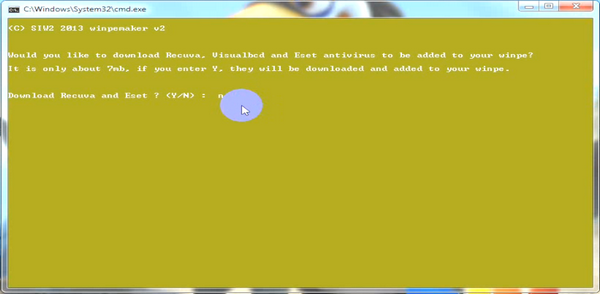
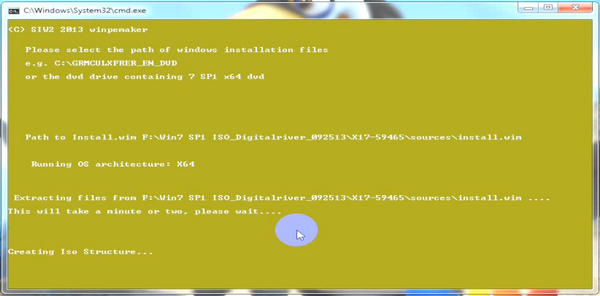
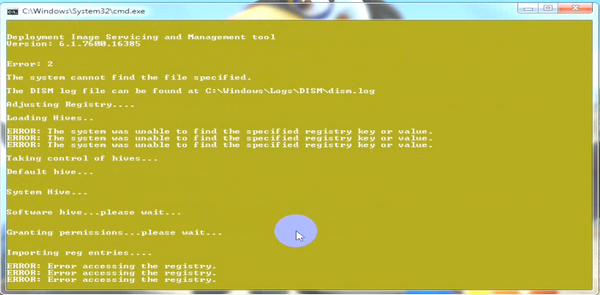
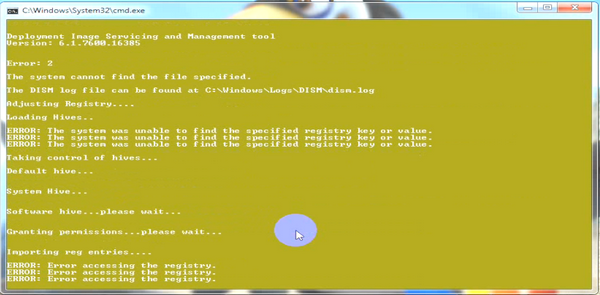
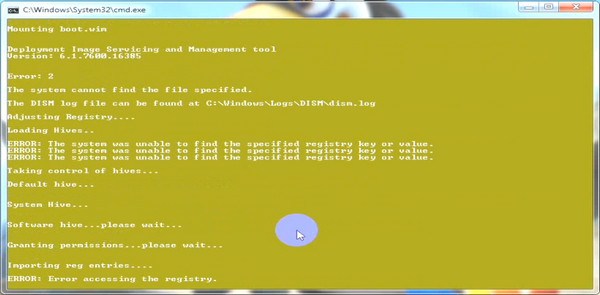
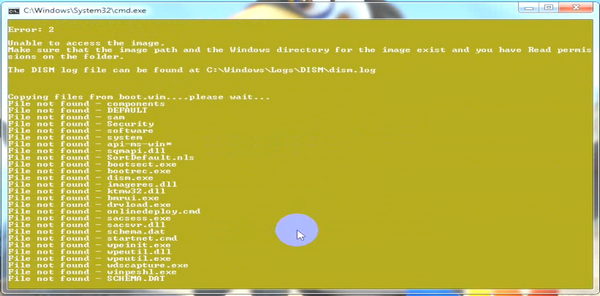
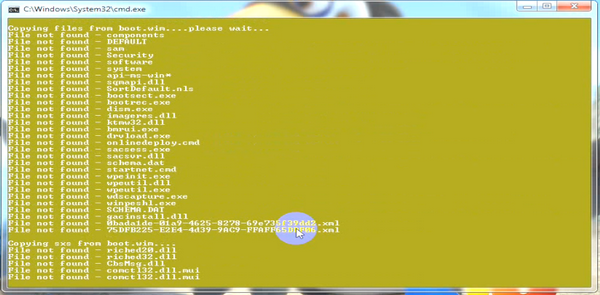
I have downloaded the ISO file for Win7 Ultimate SP1 and have extracted it to a folder "F:\Win7 SP1 ISO_xxxxxxxxxx_092513\X17-59465". Now I did instructions 1 to 4 but I saw a lot of errors and then I saw "Adding Macrium" Adding EasyBCD" and then after a while the window closed down. Please see attached images I managed to get. I see there are a lot of errors there...Am I doing it wrong? What can I do/check further?

Regards,

damien76

QNvr6pq.png


Weky8Wa.png


pi76c46.png


pwdos15.png


BFzSQyp.png


l5mumLU.png


GcdE25Z.png


yj8TSdU.png


gjrfGAU.png


bMPtNLZ.png


PS:

Sorry for the images as it was supposed to be a video but I tried to get the images as the recording of the video was fast even I could not see what happened.
 

My Computer

Computer type
PC/Desktop
Computer Manufacturer/Model Number
Custom Build
OS
Win7 Ultimate 64bit
CPU
AMD A8 5600K APU
Motherboard
Gigabyte F2A75MD3H
Memory
16gb DDR3
Graphics Card(s)
Radeon 7560
Sound Card
onboard
Monitor(s) Displays
kingston lcd 23inch wide
Hard Drives
WD 500gb (2)
WD 1TB
Antivirus
EAM + Online Armor Premium -- desktop
"F:\Win7 SP1 ISO_xxxxxxxxxx_092513\X17-59465". Is very, very long with spaces.

You are better putting the win7sp1dvd in the drive and point it at the drive.
 

My Computers

System One System Two

  • Computer type
    PC/Desktop
    OS
    7 X64
    CPU
    i5 8400
    Motherboard
    gigabyte b365m ds3h
    Memory
    2x8gb 3200mhz
    Hard Drives
    various
    PSU
    pure power 11 400w cm
    Case
    Coolermaster
    Cooling
    cryorig m9i
  • Computer type
    PC/Desktop
    OS
    7x64
    CPU
    g5400
    Motherboard
    ga b365m ds3h
    Memory
    8gb ddr4 2400
    PSU
    xfx pro 450w
Back
Top