Win 7 Wireless Issue - Can we combine the posts?

Skibumtx

New member
Member
Local time
8:36 AM
Messages
56
All,
I've seen an explosion of posts regarding wireless connectivity while utilizing Windows 7. Instead of having to read through 20 different threads on the same subject to see if anyone has figured it out I'd like to propose a Sticky where we can explore possible solutions. There seems to be a common issue that I will summarize as:

Problem Statement
---------------------------
My wireless connection continues to drop periodically. It is most noticeable when I'm downloading a large file. The download will proceed for a while and then the connection drops and I see the Exclamation point on my wireless connection status indicator. The connection will often reset itself but if I run diagnostics on it I get notification that the "Default Gateway is Unavailable", my adapter resets and the connection will work for a while before the entire cycle starts again.
---------------------------------
Some have reported similar issues with hard-wired connections but I would like to leave those discussions for a different thread.
From what I can see the problem happens on many different adapters (Intel, Linksys, Marvel, etc.) and many different Access Points (Linksys, Belkin, etc.) so it does not appear to be a hardware issue that is specific to any one manufacturer. The only commonality appears to be Win 7, people that have reverted to XP or Vista have stated that the problem goes away when they have "downgraded".

In an attempt to get this herd of cats under control I will attempt to post some of the proposed solutions as replies to this Problem Statement and ask others to try and respond with their thoughts/success/failures to the individual solutions.
 

My Computer

Computer Manufacturer/Model Number
Hp Pavillion Dv9500t
OS
Windows 7 Professional
CPU
Intel Core Duo T7500 @ 2.2GHz
Memory
4Gb
Graphics Card(s)
Nvidia 8600m
Solution #1 - Disable IPv6 protocol on wireless adapter

Many of the existing routers on the market do not support the IPv6 protocol and some have reported success with disabling this protocol in the properties dialog for their wireless adapter.

Unfortunately, this easy fix did not work in my case. I have a Linksys WRT110 wireless router. I have chatted with support at Linksys and they have verified that this router does not support IPv6. They also provided me with a list of their routers that DO support IPv6:

WRT320N, WRT610N V2, WRT54GS2, WRT160N V2, V3, WRT310N V1, V2, WRT120N and WRT54G2 V1.5 and WRT160NL.

I'm not saying that these routers will work, only that Linksys claims they support IPv6.

Ski
 

My Computer

Computer Manufacturer/Model Number
Hp Pavillion Dv9500t
OS
Windows 7 Professional
CPU
Intel Core Duo T7500 @ 2.2GHz
Memory
4Gb
Graphics Card(s)
Nvidia 8600m
Possible Solution #2 - Up or Downgrade adapter drivers

Some have reported success in updating their wireless adapter drivers to the latest version. Some have reported success in downgrading to the Vista driver for their adapter. Some have reported success in using the built-in WIN 7 drivers.


Again, none of these options worked for me. In my case the manufacturer of my PC (HP dv9500t) has decided (so far) to not support Win 7 drivers for this PC, so there are no Win 7 compatible drivers available from HP. That being the case I went ahead and made sure that I had the latest drivers (Vista) from HP - no change.

Since my wireless adapter is fairly common (Intel Wireless WiFi Link 4965AGN) I went to the Intel site and d/l their Win7 drivers directly and applied them to my adapter - no change.

I then performed an uninstall/reinstall of my adapter. Win 7 correctly identified my adapter and installed its drivers - again no change

Ski
 

My Computer

Computer Manufacturer/Model Number
Hp Pavillion Dv9500t
OS
Windows 7 Professional
CPU
Intel Core Duo T7500 @ 2.2GHz
Memory
4Gb
Graphics Card(s)
Nvidia 8600m
Possible Solution #3 - Disable/Eliminate Bonjour

Some, including those on the APPLE forums, have stated that Bonjour does not "play well" with Win 7 and there appears to be some indication that the Bonjour application may be being revised but a release date is murky, at best.

Some have indicated that going to Control Panel>Administrative Services>Services and setting the Bonjour service to "Automatic (Delayed Start)" has solved their issue. Some claim that setting it to "Disable) also works. Neither worked in my case.

Some have advocated removing the service entirely.
Completly Uninstall and Remove Bonjour Service and Files (mDNSResponder.exe, mdnsNSP.dll) for Windows « Amarjeet Rai’s Blog
Either way - no change in my case.

Ski
 

My Computer

Computer Manufacturer/Model Number
Hp Pavillion Dv9500t
OS
Windows 7 Professional
CPU
Intel Core Duo T7500 @ 2.2GHz
Memory
4Gb
Graphics Card(s)
Nvidia 8600m
Possible Solution #4 - Disable Power Save on Adapter

Again, some have claimed that this has helped but it made no difference in my case

Ski
 

My Computer

Computer Manufacturer/Model Number
Hp Pavillion Dv9500t
OS
Windows 7 Professional
CPU
Intel Core Duo T7500 @ 2.2GHz
Memory
4Gb
Graphics Card(s)
Nvidia 8600m
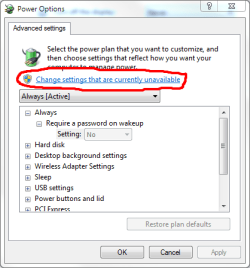
First of all, let me say thank you for your efforts and I should probably warn you, that no good deed goes unpunished. Having said that, I will add my two cents. We should probably add the power management tab in the properties of their wireless device in device manager as well as, if it is a usb device, the power management tab for their usb root hubs...it seems that Win7 likes to be able to turn off these devices in order to save power, probably not a good thing for insuring availability of a network. Also in the Control Panel under whatever particular power scheme you might be using, there are some advanced setting about three clicks down, change settings, change advance settings, change settings that are currently unavailable. Handy huh?
 

My Computer

Computer Manufacturer/Model Number
PartsIsParts
OS
Windows 7 Ultimate 64bit
CPU
Intel Pentium D 3Ghz
Motherboard
ASRock G31M-S
Memory
4 Gigs PC 6400
Graphics Card(s)
Nvidia GeForce 8500 GT
Sound Card
Realtek High Definition Audio Integrated
Monitor(s) Displays
AOC 19inch X2
Screen Resolution
1024 X 768 (I'm Old)
Hard Drives
Segate ST3160815AS Serial ATAII
Western Digital WD1600AAJA-75PSA0 Serial ATAII
PSU
500 watt..don't know mfg.
Case
Giant Black 4u rackmount I've had for years
Cooling
Stock CPU extra 120s in case
Keyboard
Generic Made in China
Mouse
Logitech USB Optical Scroll
Internet Speed
What ever comcast decides to give me usually 21Mbps up/5mbps
Hopefully one thead will be able to help solve all this problems. I created a thead but got no replies. I'm tired of surfing the web then getting a blank page because my adapter gets a limited access error.
 

My Computer

Computer Manufacturer/Model Number
Acer Aspire AX1700
OS
Windows 7 Home Premium-64 bit
Memory
4gb
Graphics Card(s)
ATI Radeon 5450
Possible Solution #5 - Disable ALL windows firewalls

A member of this forum (Allo) mentioned that he had gotten rid of the problem by disabling the Windows Firewall in all three (Domain, Private, and Public) profiles.

Control Panel>Windows Firewall>Advanced Settings> Widows Firewall properties

Seemed like a reasonable idea - no change for me though.

Ski
 
Last edited:

My Computer

Computer Manufacturer/Model Number
Hp Pavillion Dv9500t
OS
Windows 7 Professional
CPU
Intel Core Duo T7500 @ 2.2GHz
Memory
4Gb
Graphics Card(s)
Nvidia 8600m
Would that setting be under windows firewall or the network settings? I will try that when I get home. That or getting a different adapter is my final straw before I downgrade to vista. Btw I don't know if this info is useful but in the event viewer its shows that my computer failed to get an ip address from the server (dchp) or something along those lines. that's what's causing me to get limited access.
 

My Computer

Computer Manufacturer/Model Number
Acer Aspire AX1700
OS
Windows 7 Home Premium-64 bit
Memory
4gb
Graphics Card(s)
ATI Radeon 5450
First of all, let me say thank you for your efforts and I should probably warn you, that no good deed goes unpunished. Having said that, I will add my two cents. We should probably add the power management tab in the properties of their wireless device in device manager as well as, if it is a usb device, the power management tab for their usb root hubs...it seems that Win7 likes to be able to turn off these devices in order to save power, probably not a good thing for insuring availability of a network. Also in the Control Panel under whatever particular power scheme you might be using, there are some advanced setting about three clicks down, change settings, change advance settings, change settings that are currently unavailable. Handy huh?

Thanks for the thanks - and the warning. This one is really pissing me off but at least the connection seems solid when I use a wired connection.

I tried your suggestion of disabling USB Suspend but couldn't see any improvement.

Control Panel>Power Options>Change Plan Settings>change Advnaced Power Settings>USB Settings> USB Selective Suspend Settings

Ski
 

My Computer

Computer Manufacturer/Model Number
Hp Pavillion Dv9500t
OS
Windows 7 Professional
CPU
Intel Core Duo T7500 @ 2.2GHz
Memory
4Gb
Graphics Card(s)
Nvidia 8600m
First of all, let me say thank you for your efforts and I should probably warn you, that no good deed goes unpunished. Having said that, I will add my two cents. We should probably add the power management tab in the properties of their wireless device in device manager as well as, if it is a usb device, the power management tab for their usb root hubs...it seems that Win7 likes to be able to turn off these devices in order to save power, probably not a good thing for insuring availability of a network. Also in the Control Panel under whatever particular power scheme you might be using, there are some advanced setting about three clicks down, change settings, change advance settings, change settings that are currently unavailable. Handy huh?

Thanks for the thanks - and the warning. This one is really pissing me off but at least the connection seems solid when I use a wired connection.

I tried your suggestion of disabling USB Suspend but couldn't see any improvement.

Control Panel>Power Options>Change Plan Settings>change Advnaced Power Settings>USB Settings> USB Selective Suspend Settings

Ski

Ski:
There is also the link at the top of the Advance settings dialog box that says "Change settings that are currently unavailable" which will sometimes expose additional settings, but not always. This also includes the "Wireless Adapter Setting" "Power Saving Mode" which should be set to "Maximum Performance".
And we should probably recommend a firmware update for indivduals wireless routers. It's easy to assume that it's Win7, and or the wireless adapter, but checking the forums for the various wireless router manufacturers is always a good idea.
 

My Computer

Computer Manufacturer/Model Number
PartsIsParts
OS
Windows 7 Ultimate 64bit
CPU
Intel Pentium D 3Ghz
Motherboard
ASRock G31M-S
Memory
4 Gigs PC 6400
Graphics Card(s)
Nvidia GeForce 8500 GT
Sound Card
Realtek High Definition Audio Integrated
Monitor(s) Displays
AOC 19inch X2
Screen Resolution
1024 X 768 (I'm Old)
Hard Drives
Segate ST3160815AS Serial ATAII
Western Digital WD1600AAJA-75PSA0 Serial ATAII
PSU
500 watt..don't know mfg.
Case
Giant Black 4u rackmount I've had for years
Cooling
Stock CPU extra 120s in case
Keyboard
Generic Made in China
Mouse
Logitech USB Optical Scroll
Internet Speed
What ever comcast decides to give me usually 21Mbps up/5mbps
Ski:
There is also the link at the top of the Advance settings dialog box that says "Change settings that are currently unavailable" which will sometimes expose additional settings, but not always. This also includes the "Wireless Adapter Setting" "Power Saving Mode" which should be set to "Maximum Performance".
And we should probably recommend a firmware update for indivduals wireless routers. It's easy to assume that it's Win7, and or the wireless adapter, but checking the forums for the various wireless router manufacturers is always a good idea.


Hmm, not seeing that link.

Based on the number of posts and the variation in h/w that appears to have issues I really feel that this problem is hardware agnostic. I have updated my wireless drivers, actually re-installed them since I was already running the latest, but no joy.

I do have a bit of trouble thinking it's a power related issue, at least in my case, because I often get failures within 1 to 2 minutes of a re-boot. I guess my PC is a good platform for testing because the error never takes longer than about 3 minutes to show up. If my wired connection wasn't so solid I'd have reverted to Vista by now.

Ski
 

My Computer

Computer Manufacturer/Model Number
Hp Pavillion Dv9500t
OS
Windows 7 Professional
CPU
Intel Core Duo T7500 @ 2.2GHz
Memory
4Gb
Graphics Card(s)
Nvidia 8600m
Feeling Guilty

I can understand the sentiments and am affraid that a lot of people may very well abandon Win7, rather than deal with these issues. I feel guilty since I have never experienced any of these issues. I have an older Linksys "Compact Wireless-G USB Network Adapter" "Model WUSB54GSC" that was manufactured in 09/2007 and it works flawlessly without issue first time everytime
 

Attachments

  • Capture.PNG
    Capture.PNG
    13.5 KB · Views: 3

My Computer

Computer Manufacturer/Model Number
PartsIsParts
OS
Windows 7 Ultimate 64bit
CPU
Intel Pentium D 3Ghz
Motherboard
ASRock G31M-S
Memory
4 Gigs PC 6400
Graphics Card(s)
Nvidia GeForce 8500 GT
Sound Card
Realtek High Definition Audio Integrated
Monitor(s) Displays
AOC 19inch X2
Screen Resolution
1024 X 768 (I'm Old)
Hard Drives
Segate ST3160815AS Serial ATAII
Western Digital WD1600AAJA-75PSA0 Serial ATAII
PSU
500 watt..don't know mfg.
Case
Giant Black 4u rackmount I've had for years
Cooling
Stock CPU extra 120s in case
Keyboard
Generic Made in China
Mouse
Logitech USB Optical Scroll
Internet Speed
What ever comcast decides to give me usually 21Mbps up/5mbps
I can understand the sentiments and am affraid that a lot of people may very well abandon Win7, rather than deal with these issues. I feel guilty since I have never experienced any of these issues. I have an older Linksys "Compact Wireless-G USB Network Adapter" "Model WUSB54GSC" that was manufactured in 09/2007 and it works flawlessly without issue first time everytime


Nope, not there on mine......
 

My Computer

Computer Manufacturer/Model Number
Hp Pavillion Dv9500t
OS
Windows 7 Professional
CPU
Intel Core Duo T7500 @ 2.2GHz
Memory
4Gb
Graphics Card(s)
Nvidia 8600m
Well, I think I may have finally made some headway. I went back and started trying every driver that i could for my adapter and I found one that has been screaming along for the last 1.5 hours with no drops (I used to be dropping every 2 minutes).

Intel Wireless WiFi Link 4965AGN adapter

The driver I'm using was and old one already on my PC so i don't know if it's still available but it's Intel 11.1.0.86 from 2007!!!

hopefully it will stay stable.......
 

My Computer

Computer Manufacturer/Model Number
Hp Pavillion Dv9500t
OS
Windows 7 Professional
CPU
Intel Core Duo T7500 @ 2.2GHz
Memory
4Gb
Graphics Card(s)
Nvidia 8600m
Back
Top