
Win 7 / XP on Separate HDD... No LAN connectivity

Skilz

Banned
Local time
10:41 AM
Messages
10
Location
USA - Michigan
Here's the situation:

Computer --> Modem --> Wonderful Internet

I originally had Windows XP Home (x86) on one HDD. I installed Windows 7 (x64) onto a separate HDD so that they wouldn't share the same MBR. So, in order to switch between them, I have to go into my BIOS and manually switch which HDD the system will boot to first.

My XP HDD seems to have absolutely no problem connecting to the Internet. I never have a problem.

However, when I switch to run the Windows 7 HDD, I seem to be having a problem with my DHCP server. When i run ipconfig /all from the command line, it's showing an address of 169.254.xxx.xxx - which would be an APIPA address.

IP Address: 169.254.xxx.xxx
Subnet: 255.255.xxx.xxx
Default Gateway:

I can't even run the /renew command.
I can ping the IP, so I know that my NIC is working properly.
The drivers on my NIC are up to date.

If you need anymore info, please feel free to ask.

Does anyone have a clue as to what I might be able to do to resolve this situation? I would really appreciate some input on this one.
 

My Computer My Computer

At a glance

Windows 7 (x64), Windows XP (x86), Backtrack 3Intel Q6600 @ 3.0GHz (Lapped)2 x 2 Corsair XMS3 DDR3EVGA GeForce GTX 260 (Core 216)
Computer Manufacturer/Model Number
Custom Build
OS
Windows 7 (x64), Windows XP (x86), Backtrack 3
CPU
Intel Q6600 @ 3.0GHz (Lapped)
Motherboard
Gigabyte EP45C-DS3R
Memory
2 x 2 Corsair XMS3 DDR3
Graphics Card(s)
EVGA GeForce GTX 260 (Core 216)
Sound Card
Creative Soundblaster X-Fi Titanium
Monitor(s) Displays
22" Acer
Screen Resolution
1440 x 900
Hard Drives
Samsung 320Gb 7,200RPM
Western Digital 160Gb 7,200RPM
PSU
Corsair TX750W
Case
Coolermaster 690
Cooling
5 Scythe 3000RPM, Thermalright Ultra Extreme 120 (Lapped)
Keyboard
Logitech G15
Mouse
Razer Deathadder
Internet Speed
19Mbps DL / 2Mbps UL
Other Info
Realtek RTL8168C(P)/8111C(P) PCI-E Gigabit Ethernet NIC
First, you should set up a proper dual boot. Boot into Win 7 and use bcdedit to add the XP home as a boot choice and save. You may have to first assign a drive letter to your XP partition from within 7 if you haven't done so already.

Now when you boot up, you will be presented a choice for which OS you want, provided you added the XP correctly. This is if you leave your bios boot to the 7 drive.

If after doing this, you boot to the XP drive, it will only load XP with no choices.

Now as far as your connection is concerned in Win 7. Disable IPv6 if you do not plan on using the Homegroup feature and do plan on sharing with the classic Windows' method. If you do disable IPv6, also disable the IP Helper service.

Set a manual ip for the nic.

IP = same as router config page, only changing the last part to any number between 1-255 that isn't being used by any devices.

Subnet mask = 255.255.255.0

Default gateway = router's config page ip address. Usually 192.168.0.1 or 192.168.1.1.

DNS Server = same as gateway

Scan your system with Malwarebytes to ensure it is clear of any funk. Also make sure the mdnsresponder.exe is not in task manager and the Bonjour service is not installed on your machine. You do not want Bonjour lol. Check in services and in program files.

You could either temporarily or permanently disable the DNS Client service.

Open you hosts file and make sure nothing weird is going on there.

C:\windows\system32\drivers\etc\hosts, <That's for x86. Not sure about x64.
 

My Computer My Computer

At a glance

7600.20510 x86P4 550 3.4 GHz HT running at 3.5 GHzOCZ 2 GB(2x1GB) DDR400mHz running @ 414 mHzHIS Radeon HD 3850 IceQ 3 Turbo HDMI Dual DL-...
Computer Manufacturer/Model Number
self built
OS
7600.20510 x86
CPU
P4 550 3.4 GHz HT running at 3.5 GHz
Motherboard
MSI PM8M3-V (MS-7211 v1.x) Micro-ATX mainboard
Memory
OCZ 2 GB(2x1GB) DDR400mHz running @ 414 mHz
Graphics Card(s)
HIS Radeon HD 3850 IceQ 3 Turbo HDMI Dual DL-DVI AGP
Sound Card
MOTU Traveler firewire studio interface 192 kHz 24 bit
Monitor(s) Displays
22" widescreen Acer X223W LCD, 17" Compaq P75 CRT
Screen Resolution
1680x1050 and 1280x1024
Hard Drives
SATA I x2 WD, 400 GB and 120 GB, SATA 2 WD Caviar Black 1 TB
PSU
350W generic
Case
Cybertronpc, it glows blue
Cooling
stock cpu fan, Ice-Q 3 gpu and system, many case fans
Keyboard
Logitch Classical Keyboard 200
Mouse
Logitech Mediaplay cordless
Internet Speed
1792/448 kbits/sec
Other Info
SATA II PCI fake RAID adapter, 1 GB Readyboost, original ATI Remote Wonder (even works with WMC perfectly), Logitech Rumblepad 2 game controller x2
Thank you for the reply.

Well, since I don't have a router, I'm not entirely sure what I would need to put as my IP address or the default gateway. Would I need to contact my ISP? I have scanned both my drives with Malwarebyte's and my current AV (NOD32). They both come up clean, so I'm sure it's not a malware issue.

If I remember correctly, the way you're telling me to set the OS's up is by putting them on the same MBR. I don't want that should one of them fail. Now, if that's my only option, well then I guess I have no choice.

I have disabled IPv6. Should I try renewing the ipconfig by 'running as administrator'? I've been doing some research, and I've noticed that in order to run things like that, you do have to run it as an admin. Windows won't set the main user as an admin.

Again, thanks for the help.
 

My Computer My Computer

At a glance

Windows 7 (x64), Windows XP (x86), Backtrack 3Intel Q6600 @ 3.0GHz (Lapped)2 x 2 Corsair XMS3 DDR3EVGA GeForce GTX 260 (Core 216)
Computer Manufacturer/Model Number
Custom Build
OS
Windows 7 (x64), Windows XP (x86), Backtrack 3
CPU
Intel Q6600 @ 3.0GHz (Lapped)
Motherboard
Gigabyte EP45C-DS3R
Memory
2 x 2 Corsair XMS3 DDR3
Graphics Card(s)
EVGA GeForce GTX 260 (Core 216)
Sound Card
Creative Soundblaster X-Fi Titanium
Monitor(s) Displays
22" Acer
Screen Resolution
1440 x 900
Hard Drives
Samsung 320Gb 7,200RPM
Western Digital 160Gb 7,200RPM
PSU
Corsair TX750W
Case
Coolermaster 690
Cooling
5 Scythe 3000RPM, Thermalright Ultra Extreme 120 (Lapped)
Keyboard
Logitech G15
Mouse
Razer Deathadder
Internet Speed
19Mbps DL / 2Mbps UL
Other Info
Realtek RTL8168C(P)/8111C(P) PCI-E Gigabit Ethernet NIC
You're welcome.

No, having the dual boot will not harm the other OS should one of the disks fail. If 7 disk fails, you can boot to XP as always previously by changing bios first boot. If XP disk fails, choosing XP at the startup screen will fail. 7 will not. You could then choose to figure out how to fix your XP or remove it from the boot menu using EasyBCD, should that ever happen.

Basically means that a dual boot menu will not "tie" the OSes together where they're codependent.

To attempt to fix your network problem:

Boot into XP. From command prompt, do

ipconfig, then hit enter. Write down the info there and use it to create a static ip address under IPv4 for Win 7. Make the preferred dns the same as default gateway.

Running as admin or using an elevated command prompt is always a good idea when trying to tweak or adjust settings.
 

My Computer My Computer

At a glance

7600.20510 x86P4 550 3.4 GHz HT running at 3.5 GHzOCZ 2 GB(2x1GB) DDR400mHz running @ 414 mHzHIS Radeon HD 3850 IceQ 3 Turbo HDMI Dual DL-...
Computer Manufacturer/Model Number
self built
OS
7600.20510 x86
CPU
P4 550 3.4 GHz HT running at 3.5 GHz
Motherboard
MSI PM8M3-V (MS-7211 v1.x) Micro-ATX mainboard
Memory
OCZ 2 GB(2x1GB) DDR400mHz running @ 414 mHz
Graphics Card(s)
HIS Radeon HD 3850 IceQ 3 Turbo HDMI Dual DL-DVI AGP
Sound Card
MOTU Traveler firewire studio interface 192 kHz 24 bit
Monitor(s) Displays
22" widescreen Acer X223W LCD, 17" Compaq P75 CRT
Screen Resolution
1680x1050 and 1280x1024
Hard Drives
SATA I x2 WD, 400 GB and 120 GB, SATA 2 WD Caviar Black 1 TB
PSU
350W generic
Case
Cybertronpc, it glows blue
Cooling
stock cpu fan, Ice-Q 3 gpu and system, many case fans
Keyboard
Logitch Classical Keyboard 200
Mouse
Logitech Mediaplay cordless
Internet Speed
1792/448 kbits/sec
Other Info
SATA II PCI fake RAID adapter, 1 GB Readyboost, original ATI Remote Wonder (even works with WMC perfectly), Logitech Rumblepad 2 game controller x2
Hey torrent,

So I did what you said and set my static IP to what my XP settings were... still nothing. I even tried to set the preferred DNS the same as what it was in XP. I ran as both the system admin and under my user name.

I did notice that my DHCP services were turned off. Is there a way in 7 to turn them back on? Or is that overridden when you set up a static IP?

Thanks again. I guess if this doesn't work, I'll just get rid of my XP HDD. Time to move on anyways. My RTM version should be here within a week or so.
 

My Computer My Computer

At a glance

Windows 7 (x64), Windows XP (x86), Backtrack 3Intel Q6600 @ 3.0GHz (Lapped)2 x 2 Corsair XMS3 DDR3EVGA GeForce GTX 260 (Core 216)
Computer Manufacturer/Model Number
Custom Build
OS
Windows 7 (x64), Windows XP (x86), Backtrack 3
CPU
Intel Q6600 @ 3.0GHz (Lapped)
Motherboard
Gigabyte EP45C-DS3R
Memory
2 x 2 Corsair XMS3 DDR3
Graphics Card(s)
EVGA GeForce GTX 260 (Core 216)
Sound Card
Creative Soundblaster X-Fi Titanium
Monitor(s) Displays
22" Acer
Screen Resolution
1440 x 900
Hard Drives
Samsung 320Gb 7,200RPM
Western Digital 160Gb 7,200RPM
PSU
Corsair TX750W
Case
Coolermaster 690
Cooling
5 Scythe 3000RPM, Thermalright Ultra Extreme 120 (Lapped)
Keyboard
Logitech G15
Mouse
Razer Deathadder
Internet Speed
19Mbps DL / 2Mbps UL
Other Info
Realtek RTL8168C(P)/8111C(P) PCI-E Gigabit Ethernet NIC
In start menu search box, type services.msc, hit enter. Go to DHCP client and make sure it is set to automatic. Also, start it up if it's stopped.

This setting is completely independent from setting a static (permanent) or dynamic (changing) ip.
 

My Computer My Computer

At a glance

7600.20510 x86P4 550 3.4 GHz HT running at 3.5 GHzOCZ 2 GB(2x1GB) DDR400mHz running @ 414 mHzHIS Radeon HD 3850 IceQ 3 Turbo HDMI Dual DL-...
Computer Manufacturer/Model Number
self built
OS
7600.20510 x86
CPU
P4 550 3.4 GHz HT running at 3.5 GHz
Motherboard
MSI PM8M3-V (MS-7211 v1.x) Micro-ATX mainboard
Memory
OCZ 2 GB(2x1GB) DDR400mHz running @ 414 mHz
Graphics Card(s)
HIS Radeon HD 3850 IceQ 3 Turbo HDMI Dual DL-DVI AGP
Sound Card
MOTU Traveler firewire studio interface 192 kHz 24 bit
Monitor(s) Displays
22" widescreen Acer X223W LCD, 17" Compaq P75 CRT
Screen Resolution
1680x1050 and 1280x1024
Hard Drives
SATA I x2 WD, 400 GB and 120 GB, SATA 2 WD Caviar Black 1 TB
PSU
350W generic
Case
Cybertronpc, it glows blue
Cooling
stock cpu fan, Ice-Q 3 gpu and system, many case fans
Keyboard
Logitch Classical Keyboard 200
Mouse
Logitech Mediaplay cordless
Internet Speed
1792/448 kbits/sec
Other Info
SATA II PCI fake RAID adapter, 1 GB Readyboost, original ATI Remote Wonder (even works with WMC perfectly), Logitech Rumblepad 2 game controller x2
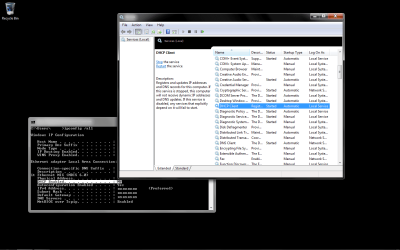
So, I ran services.msc and this is what it said:
Both my DNS client and DHCP Client are running, but according to the ipconfig command, DHCP isn't... Well, atleast is says that DHCP is not enabled.
 

Attachments

  • Win7Issues.png
    Win7Issues.png
    39.9 KB · Views: 106

My Computer My Computer

At a glance

Windows 7 (x64), Windows XP (x86), Backtrack 3Intel Q6600 @ 3.0GHz (Lapped)2 x 2 Corsair XMS3 DDR3EVGA GeForce GTX 260 (Core 216)
Computer Manufacturer/Model Number
Custom Build
OS
Windows 7 (x64), Windows XP (x86), Backtrack 3
CPU
Intel Q6600 @ 3.0GHz (Lapped)
Motherboard
Gigabyte EP45C-DS3R
Memory
2 x 2 Corsair XMS3 DDR3
Graphics Card(s)
EVGA GeForce GTX 260 (Core 216)
Sound Card
Creative Soundblaster X-Fi Titanium
Monitor(s) Displays
22" Acer
Screen Resolution
1440 x 900
Hard Drives
Samsung 320Gb 7,200RPM
Western Digital 160Gb 7,200RPM
PSU
Corsair TX750W
Case
Coolermaster 690
Cooling
5 Scythe 3000RPM, Thermalright Ultra Extreme 120 (Lapped)
Keyboard
Logitech G15
Mouse
Razer Deathadder
Internet Speed
19Mbps DL / 2Mbps UL
Other Info
Realtek RTL8168C(P)/8111C(P) PCI-E Gigabit Ethernet NIC
It sounds to me like you are having the same problem I am. There's alot of people having this issue. I hope this can be resolved.
 

My Computer My Computer

At a glance

Windows 7 Home Premium x64AMD Phenom II X4 9458 GB G-Skill 1.5v DDR 3 1333Mhz(2) MSI 512MB GTS 250 SLI
Computer Manufacturer/Model Number
Home built
OS
Windows 7 Home Premium x64
CPU
AMD Phenom II X4 945
Motherboard
ASUS M4N98TD EVO AM3 NVIDIA nForce 980a SLI
Memory
8 GB G-Skill 1.5v DDR 3 1333Mhz
Graphics Card(s)
(2) MSI 512MB GTS 250 SLI
Sound Card
Soundblaster Audigy 2 platinum
Monitor(s) Displays
Samsung 2255BW 22"
Screen Resolution
1650 x 1050
Hard Drives
2 WD 250GB 7500RPM
PSU
Antec TP-750. The ultimate bang for the buck PSU
Case
Raidmax
Cooling
Sycthe Slipstream cooling fans(4)
Keyboard
Zboard Merc
Mouse
Logitech MX-518
Internet Speed
3MB
Other Info
LG Blu-Ray/DVD combo drive/LG DVD-RW w/ lightscribe
I'm not completely sure, but I think DHCP enabled saying no means that your router (or since you don't have one, ISP or modem) does not have DHCP enabled. On my router, I specifically disable the DHCP server and I have that command saying no too.

Perhaps this is a driver issue. A driver found elsewhere like on your motherboard manufacturer's site or even from a different manufacturer that uses the same exact network device as yours, may work.

You can start with trying this if you'd like:

http://www.gigabyte.com.tw/Support/...?ProductID=2871&ost=windows+7+64bit#anchor_os

Considering the page has a flashing "compatible with Windows 7" advertisement on it, it really should be the fix I think. Good luck.
 

My Computer My Computer

At a glance

7600.20510 x86P4 550 3.4 GHz HT running at 3.5 GHzOCZ 2 GB(2x1GB) DDR400mHz running @ 414 mHzHIS Radeon HD 3850 IceQ 3 Turbo HDMI Dual DL-...
Computer Manufacturer/Model Number
self built
OS
7600.20510 x86
CPU
P4 550 3.4 GHz HT running at 3.5 GHz
Motherboard
MSI PM8M3-V (MS-7211 v1.x) Micro-ATX mainboard
Memory
OCZ 2 GB(2x1GB) DDR400mHz running @ 414 mHz
Graphics Card(s)
HIS Radeon HD 3850 IceQ 3 Turbo HDMI Dual DL-DVI AGP
Sound Card
MOTU Traveler firewire studio interface 192 kHz 24 bit
Monitor(s) Displays
22" widescreen Acer X223W LCD, 17" Compaq P75 CRT
Screen Resolution
1680x1050 and 1280x1024
Hard Drives
SATA I x2 WD, 400 GB and 120 GB, SATA 2 WD Caviar Black 1 TB
PSU
350W generic
Case
Cybertronpc, it glows blue
Cooling
stock cpu fan, Ice-Q 3 gpu and system, many case fans
Keyboard
Logitch Classical Keyboard 200
Mouse
Logitech Mediaplay cordless
Internet Speed
1792/448 kbits/sec
Other Info
SATA II PCI fake RAID adapter, 1 GB Readyboost, original ATI Remote Wonder (even works with WMC perfectly), Logitech Rumblepad 2 game controller x2
Well... my MB just died, so I guess I'll have to figure it out later. Thanks agaiun for all the help. I just got the EVGA 790i FTW MB... so I'll work on 7 later.
 

My Computer My Computer

At a glance

Windows 7 (x64), Windows XP (x86), Backtrack 3Intel Q6600 @ 3.0GHz (Lapped)2 x 2 Corsair XMS3 DDR3EVGA GeForce GTX 260 (Core 216)
Computer Manufacturer/Model Number
Custom Build
OS
Windows 7 (x64), Windows XP (x86), Backtrack 3
CPU
Intel Q6600 @ 3.0GHz (Lapped)
Motherboard
Gigabyte EP45C-DS3R
Memory
2 x 2 Corsair XMS3 DDR3
Graphics Card(s)
EVGA GeForce GTX 260 (Core 216)
Sound Card
Creative Soundblaster X-Fi Titanium
Monitor(s) Displays
22" Acer
Screen Resolution
1440 x 900
Hard Drives
Samsung 320Gb 7,200RPM
Western Digital 160Gb 7,200RPM
PSU
Corsair TX750W
Case
Coolermaster 690
Cooling
5 Scythe 3000RPM, Thermalright Ultra Extreme 120 (Lapped)
Keyboard
Logitech G15
Mouse
Razer Deathadder
Internet Speed
19Mbps DL / 2Mbps UL
Other Info
Realtek RTL8168C(P)/8111C(P) PCI-E Gigabit Ethernet NIC
Back
Top