Solved Dual Boot Windows 7 & XP on 2 separate drives on Acer laptop

Wow, Greg I did not mean to incur your disdain and displeasure. May I please respond? As I said up front, I bought this Acer laptop through an auction. It was a police seizure and had Vista on it and was password protected. Not knowing the password and not wanting Vista anyway, I took it to Futureshop and due to cost, I could only afford Windows 7 Upgrade Version so they reinstalled Vista and installed the Windows 7 Upgrade. It ran great but some of my games wouldn't launch after installing with errors popping up and sometimes games wouldn't install at all. I found your dual boot thread a loooooooong time ago but it took until just 3 weeks ago when I could afford a copy of Windows XP/SP3 and Windows 7 Home Premium. I have wanted XP on one harddrive and Windows 7 on the other for a very long time and finally I was about to make it happen.

I tried to follow the dual boot instructions but it wasn't working so I asked for help. We all went (and are still going through) an impossibly long thread at the end of which I did a clean install of XP with your and Kaktussoft's instructions and help. And then I did a clean install of Windows 7 with the disk I had of 48 - in - 1 where Windows 7 Home Premium is the only licensed version I can install. From what I understand, numerous versions are on that disk (MSDN types and OEM types and 32 bit types and 64 bit types) but I have only the license for Home Premium (and activated) that version as I understood your and Kaktussoft's instructions including removing the XP harddrive. As it turns out, I had followed to a "T" all the instructions for a clean install of Windows 7 (from the link of Step 8 of Clean Reinstall - Factory OEM Windows 7) minus the part of Refreshing my WEI score. I also kept the 100 MB partition assuming it important.

Yes, I did read the Clean Reinstall - Factory OEM Windows 7 and thought I understood them. It was like when someone tells you something and you understand it so you don't ask questions because you understand it. There aren't questions in your mind because you get it. You only find out you didn't get it afterall, when someone shows you you are incorrect. As I understood it and thought my understanding was sound, Step 1 is asking for an installer that will install for me my Windows 7. My understanding was that Step 1 depended on having an OEM disk with only 1 version while my disk has many. So I had no questions because I got it. I told you about my 48 - in - 1 because right off the bat, it's a lost cause because Step 1 is a bust (as I saw it).

After your last post I reread Clean Reinstall and saw the link in Step 8l and saw that I had "done it right" even if by fluke. All the instructions thus far for XP and Windows 7 I've done as I've been told or read here in other threads. Now granted I'm having Norton issues and we're working on that but as far as I see I've done it right. I don't really like how you are coming down on me.

I see that this has been a rambling defensive argument but your emoticon and your "did you even read..." phrasing stung. I hope we're good after this.
 
Last edited:

My Computer My Computer

At a glance

Windows 7 Home Premium 64 bitIntel(R) Core(TM)2 Duo CPU T6400 @ 2.00 GHz4.00 GBNVIDIA GeForce 9600M GT
Computer type
Laptop
Computer Manufacturer/Model Number
Acer Aspire 8730
OS
Windows 7 Home Premium 64 bit
CPU
Intel(R) Core(TM)2 Duo CPU T6400 @ 2.00 GHz
Motherboard
?
Memory
4.00 GB
Graphics Card(s)
NVIDIA GeForce 9600M GT
Hard Drives
Disk partition (C:) 282 GB
Disk partition (D:) 298 GB

these are separate disk drives and not a case of 1 drive being partitioned.
Antivirus
none yet
Browser
Internet Explorer 9
Let me explain why GREG was a little bit overreacting (of course I don't know for sure... I didn't talk to him).
We help a lot of people here on sevenforums for FREE. But
  • People often don't do what we advise
  • People don't read tutorials correctly... even if we link to them
  • People just don't post screenshots or results of requested actions
  • People just dissappear from thread when problem has been resolved. Not even say thank you, or "it worked".
  • et cetera
That frustrates many troubleshooters. I think that's what happened. But let GREG tell you what is the real argument. He's one of the best troubleshooters btw
 

My Computer My Computer

At a glance

Microsoft Windows 7 Home Premium 64-bits 7601...Intel(R) Core(TM) i3 CPU M 370 @ 2.40GHz4,00 GBATI Mobility Radeon HD 5400 Series
Computer type
Laptop
Computer Manufacturer/Model Number
ACER ASPIRE 5742G
OS
Microsoft Windows 7 Home Premium 64-bits 7601 Multiprocessor Free Service Pack 1
CPU
Intel(R) Core(TM) i3 CPU M 370 @ 2.40GHz
Motherboard
Acer Aspire 5742G
Memory
4,00 GB
Graphics Card(s)
ATI Mobility Radeon HD 5400 Series
Sound Card
(1) AMD High Definition Audio Device (2) Realtek High Defi
Screen Resolution
1366 x 768 x 32 bits (4294967296 colors) @ 60 Hz
Hard Drives
WDC WD5000BEVT-22ZAT0
To recap... NORTON is gone but NORTON removal tool thinks it's still on system? On winxp and win7?
MSE has already been installed succesfully?
 

My Computer My Computer

At a glance

Microsoft Windows 7 Home Premium 64-bits 7601...Intel(R) Core(TM) i3 CPU M 370 @ 2.40GHz4,00 GBATI Mobility Radeon HD 5400 Series
Computer type
Laptop
Computer Manufacturer/Model Number
ACER ASPIRE 5742G
OS
Microsoft Windows 7 Home Premium 64-bits 7601 Multiprocessor Free Service Pack 1
CPU
Intel(R) Core(TM) i3 CPU M 370 @ 2.40GHz
Motherboard
Acer Aspire 5742G
Memory
4,00 GB
Graphics Card(s)
ATI Mobility Radeon HD 5400 Series
Sound Card
(1) AMD High Definition Audio Device (2) Realtek High Defi
Screen Resolution
1366 x 768 x 32 bits (4294967296 colors) @ 60 Hz
Hard Drives
WDC WD5000BEVT-22ZAT0
Post screenshot of disk management please from within win7.
I saw a "OEM" and "RECOVERY" partition. But now you say you keep the "100MB" partition. I saw no 100MB partition in intial screenshot at all! Computer was originally delivered with VISTA so those 2 partitions have vista-stuff in it to recover. Totally useless now. Post screenshot
 

My Computer My Computer

At a glance

Microsoft Windows 7 Home Premium 64-bits 7601...Intel(R) Core(TM) i3 CPU M 370 @ 2.40GHz4,00 GBATI Mobility Radeon HD 5400 Series
Computer type
Laptop
Computer Manufacturer/Model Number
ACER ASPIRE 5742G
OS
Microsoft Windows 7 Home Premium 64-bits 7601 Multiprocessor Free Service Pack 1
CPU
Intel(R) Core(TM) i3 CPU M 370 @ 2.40GHz
Motherboard
Acer Aspire 5742G
Memory
4,00 GB
Graphics Card(s)
ATI Mobility Radeon HD 5400 Series
Sound Card
(1) AMD High Definition Audio Device (2) Realtek High Defi
Screen Resolution
1366 x 768 x 32 bits (4294967296 colors) @ 60 Hz
Hard Drives
WDC WD5000BEVT-22ZAT0
Sorry, one and all. Having read your post Kaktussoft, I totally see your point of frustrations for all you guys do. I understand that the lack of gratitude from folks hurts and can so easily cause resentment and bitteness to creeep in. I knew Greg must be one of the best with almost 40,000 posts!! I do hope he'll still talk to me. Here is my screenshot for Computer Management. I took a screenshot of the wrong thing. I took a multiple screenshot of Disk Manager which sounded closest to Disk Management. I had to go back to my first post to remind myself how to see that picture of drives. This is from within Windows 7.

Computer Management.PNG

There is no longer any Vista stuff on the Windows 7 hard drive. In the link to the Clean Reinstall - Factory OEM Windows 7 there are numerous other links. In step 8, one of those links is to Clean Install Windows 7. I did exactly what was written there minus the step of Refreshing My WEI Score (step 23 I think). And this I did AFTER unplugging the XP hard drive.

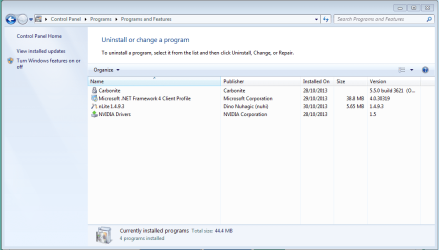
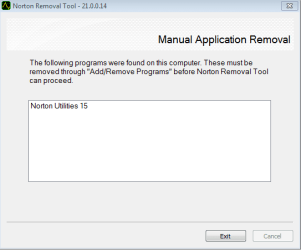
As for the Norton uninstall, here are 2 screenshots showing the situation right now. The first is in the Control Panel/Remove Programs to show what programs I have in Windows 7 thus far. The second screenshot is a window within the Norton Removal Tool Program showing what it detects on my computer (Norton 15) and notice it will go no further until it is uninstalled with the only option for me being to click "Finish".

uninstall screenshot.PNG

Norton Removal Tool.PNG

I haven't booted into XP yet this morning, to see if anything is different in that hard drive but as of the last thing yesterday afternoon when I signed off for the day, it was the exact same situation for the Norton Removal Tool.

No, I haven't yet installed MSE because your post laid out the plan in a very clear step - by - step manner. The 1st step was to use Control Panel Uninstall to remove Norton. Next was the Norton Removal Tool. Then was installing MSE. As I see it, Norton is still in Windows 7 (and XP) somewhere so I haven't moved on to the last step yet. I'm trying to follow all of your and Greg's instructions.

EDIT: after posting I booted into XP and sure enough the Norton Removal Tool gets to the exact same step and says the exact same thing as it does within Windows 7 regarding Norton Utilities 15.
 
Last edited:

My Computer My Computer

At a glance

Windows 7 Home Premium 64 bitIntel(R) Core(TM)2 Duo CPU T6400 @ 2.00 GHz4.00 GBNVIDIA GeForce 9600M GT
Computer type
Laptop
Computer Manufacturer/Model Number
Acer Aspire 8730
OS
Windows 7 Home Premium 64 bit
CPU
Intel(R) Core(TM)2 Duo CPU T6400 @ 2.00 GHz
Motherboard
?
Memory
4.00 GB
Graphics Card(s)
NVIDIA GeForce 9600M GT
Hard Drives
Disk partition (C:) 282 GB
Disk partition (D:) 298 GB

these are separate disk drives and not a case of 1 drive being partitioned.
Antivirus
none yet
Browser
Internet Explorer 9
Disk management screenshot... no remarks.
Norton is from computer... Norton isn't interfering with MSE anyway. Install MSE
 

My Computer My Computer

At a glance

Microsoft Windows 7 Home Premium 64-bits 7601...Intel(R) Core(TM) i3 CPU M 370 @ 2.40GHz4,00 GBATI Mobility Radeon HD 5400 Series
Computer type
Laptop
Computer Manufacturer/Model Number
ACER ASPIRE 5742G
OS
Microsoft Windows 7 Home Premium 64-bits 7601 Multiprocessor Free Service Pack 1
CPU
Intel(R) Core(TM) i3 CPU M 370 @ 2.40GHz
Motherboard
Acer Aspire 5742G
Memory
4,00 GB
Graphics Card(s)
ATI Mobility Radeon HD 5400 Series
Sound Card
(1) AMD High Definition Audio Device (2) Realtek High Defi
Screen Resolution
1366 x 768 x 32 bits (4294967296 colors) @ 60 Hz
Hard Drives
WDC WD5000BEVT-22ZAT0
You have no symantic software on machine anymore?

Navigate to HKEY_CURRENT_USER > SOFTWARE > Symantec > delete the folder or subkey called Norton Utilities 15.

Navigate to HKEY_LOCAL_MACHINE > SOFTWARE > Symantec > delete the folder or subkey called Norton Utilities 15.

Maybe better delete HKEY_LOCAL_MACHINE > SOFTWARE > Symantec and HKEY_CURRENT_USER > SOFTWARE > Symantec if you don't have any symantec software installed at all.

Rerun the norton removal tool afterwards
 

My Computer My Computer

At a glance

Microsoft Windows 7 Home Premium 64-bits 7601...Intel(R) Core(TM) i3 CPU M 370 @ 2.40GHz4,00 GBATI Mobility Radeon HD 5400 Series
Computer type
Laptop
Computer Manufacturer/Model Number
ACER ASPIRE 5742G
OS
Microsoft Windows 7 Home Premium 64-bits 7601 Multiprocessor Free Service Pack 1
CPU
Intel(R) Core(TM) i3 CPU M 370 @ 2.40GHz
Motherboard
Acer Aspire 5742G
Memory
4,00 GB
Graphics Card(s)
ATI Mobility Radeon HD 5400 Series
Sound Card
(1) AMD High Definition Audio Device (2) Realtek High Defi
Screen Resolution
1366 x 768 x 32 bits (4294967296 colors) @ 60 Hz
Hard Drives
WDC WD5000BEVT-22ZAT0
Or if still not working

I cannot uninstall Norton Utilities 15.0 from Control Panel

STEP 1
Delete the Norton Utilities folder


  1. Depending on your version of Windows, browse to the following folder:
    • For 64-bit Windows: C:\Program Files (x86)\Norton Utilities 15
    • For 32-bit Windows: C:\Program Files\Norton Utilities 15
  2. Right-click the Norton Utilities 15 folder and then click Delete
STEP 2
Delete Norton Utilities registry keys


  1. This section has steps to modify Windows registry. Incorrect changes to the registry can result in permanent data loss or corrupted files.
  2. In the Run dialog box, type the following:
    regedit
  3. Click OK.
    If the User Account Control window appears, click Continue.
  4. In the Registry Editor window, do one of the following:
    • For Windows 7/Vista 64-bit: browse and delete the following folders:
      HKEY_LOCAL_MACHINE\SOFTWARE\Symantec\Norton Utilities 15
      HKEY_LOCAL_MACHINE\SOFTWARE\Wow6432Node\Microsoft\Windows\CurrentVersion\Uninstall\Norton Utilities 15_is1
    • For Windows 7 or Vista or XP 32-bit: browse and delete the following folders:
      HKEY_CURRENT_USER\Software\Symantec
      HKEY_LOCAL_MACHINE\SOFTWARE\Symantec\Norton Utilities 15
      HKEY_LOCAL_MACHINE\SOFTWARE\Microsoft\Windows\CurrentVersion\Uninstall\Norton Utilities 15_is1
    To delete a folder, right-click the folder and then click Delete.
  5. Exit the Registry Editor window
 

My Computer My Computer

At a glance

Microsoft Windows 7 Home Premium 64-bits 7601...Intel(R) Core(TM) i3 CPU M 370 @ 2.40GHz4,00 GBATI Mobility Radeon HD 5400 Series
Computer type
Laptop
Computer Manufacturer/Model Number
ACER ASPIRE 5742G
OS
Microsoft Windows 7 Home Premium 64-bits 7601 Multiprocessor Free Service Pack 1
CPU
Intel(R) Core(TM) i3 CPU M 370 @ 2.40GHz
Motherboard
Acer Aspire 5742G
Memory
4,00 GB
Graphics Card(s)
ATI Mobility Radeon HD 5400 Series
Sound Card
(1) AMD High Definition Audio Device (2) Realtek High Defi
Screen Resolution
1366 x 768 x 32 bits (4294967296 colors) @ 60 Hz
Hard Drives
WDC WD5000BEVT-22ZAT0
Are you satisfied with your Win7 Clean Reinstall? Does it meet the standard for a perfect Win7 install which is that the OS never hangs or slows down at all?

If so and Microsoft Security Essentials works well for you I don't think you need to change anything. I was just blown away by your saying you only had a "48-in-1" installer of unknown origin when the very first step in Clean Reinstall - Factory OEM Windows 7 provides the latest official installer - something we had to fight to be able to do here and has benefited tens of thousands of users.

There is nothing even slightly over-reacting about slapping my hand to my forehead and asking if you'd even bothered to read the tutorial. That emoticon is designed to be humorous.

Are you booting XP on Disk1 via the BIOS Boot Menu key at boot, or is there now a Windows Boot Menu? If via the BIOS then there should be a System label on XP partition, not just Active flag. If a Windows Boot Menu it should not be Active. Will it boot if the Win7 HD is unplugged?
 
OH,oh! I read your post #87 and started doing what you said but sure enough I messed up but I didn't realize it at the time.
Inside XP - Your instructions said to go to HKEY_LOCAL_MACHINE > SOFTWARE > Symantec > delete the folder or subkey called Norton Utilities 15 first. But rather than deleting the Norton Utilities 15 folder level I deleted at the Symantec folder level. Next you said to go to HKEY_CURRENT_USER > SOFTWARE > Symantec > delete the folder or subkey called Norton Utilities 15. But there was no Symantec folder under SOFTWARE so I exited regedit. Then I restarted my computer but used F12 to boot into Windows 7 instead.

In Windows 7, you asked me to go to HKEY_LOCAL_MACHINE > SOFTWARE > Symantec > delete the folder or subkey called Norton Utilities 15. But there was no Symantec under SOFTWARE. So I next went looking for HKEY_LOCAL_MACHINE > SOFTWARE > Symantec > to delete the folder or subkey called Norton Utilities 15. I didn't find any Symantec under SOFTWARE but I did find a folder called Norton which like a dumbass I deleted.

Then I went to to the forum to confess my stupidity and saw post #88 for the first time and saw the scope of my misakes. I restarted into XP to see how bad it would be performing and it installed 20 updates and while doing that my signal for my home network was lost and reacquired over and over again. I tried to get to the forum from inside XP to report but it wouldn't hold a single long enough to post. So I went to Windows 7 and have just posted this. So how bad is it?
 

My Computer My Computer

At a glance

Windows 7 Home Premium 64 bitIntel(R) Core(TM)2 Duo CPU T6400 @ 2.00 GHz4.00 GBNVIDIA GeForce 9600M GT
Computer type
Laptop
Computer Manufacturer/Model Number
Acer Aspire 8730
OS
Windows 7 Home Premium 64 bit
CPU
Intel(R) Core(TM)2 Duo CPU T6400 @ 2.00 GHz
Motherboard
?
Memory
4.00 GB
Graphics Card(s)
NVIDIA GeForce 9600M GT
Hard Drives
Disk partition (C:) 282 GB
Disk partition (D:) 298 GB

these are separate disk drives and not a case of 1 drive being partitioned.
Antivirus
none yet
Browser
Internet Explorer 9
You can System Restore to before you deleted the Registry Key, even before you uninstalled Norton. Then uninstall Norton in Control Panel, followed by running it's uninstall tool.

Show all System Restore points to see if you still might have one before you installed Norton in the first place. This would be as if it was never installed in the first place.

Did you read in Clean Reinstall - Factory OEM Windows 7 the tools recommended which guarantee perfect Win7 performance? There is even a link to Microsoft Security Essentials. The reason I ask is that you say you followed all of those steps.
 
Hello, Greg. As I see it, I must have a misunderstanding of the specific word "Installer" in the link Clean Reinstall - Factory OEM Windows 7 instructions. As I understand it, I need 2 things. ONE-an OEM Windows 7 full version disk of whatever type (home, pro, ultimate) and TWO-this Installer who's function is to install what's on your OEM Windows 7 disk in some sort of different fashion than simply using the OEM Windows 7 disk all by itself.
Let me ask this instead, is the Installer the same as having an OEM Windows 7 full version disk and as such I don't even need the 48 - in 1 disk I bought?

As for am I happy with my clean install - yes I was until I loused up my regediting. It did afterall follow exactly the Clean Install Windows 7 tutorial found here (but I didn't refresh the WEI score). Does it hang or slow down at all?, I have to say yes but any slowing down I imagine is a result of an older CPU and not a state of the art one.

EDIT:

You said in post #91 - Did you read in Clean Reinstall - Factory OEM Windows 7 the tools recommended which guarantee perfect Windows 7 performance? There is even a link to Microsoft Security Essentials. The reason I ask is that you say you followed all of those steps. MY RESPONSE - I followed all the steps in the tutorial for Clean Install Windows 7 which was link in step 8 or the Clean Reinstall - Factory OEM Windows 7.

The same can be said of my XP install, it was perfect until the regedit disaster.

I am booting with the BIOS boot menu key (F12). I can't understand what you're seeing and talking about on the Computer Management screenshot. I followed the directions and the installs did what they did without any input from me. And way back when I did boot XP without Windows 7 hard drive plugged in and it did boot.
 

My Computer My Computer

At a glance

Windows 7 Home Premium 64 bitIntel(R) Core(TM)2 Duo CPU T6400 @ 2.00 GHz4.00 GBNVIDIA GeForce 9600M GT
Computer type
Laptop
Computer Manufacturer/Model Number
Acer Aspire 8730
OS
Windows 7 Home Premium 64 bit
CPU
Intel(R) Core(TM)2 Duo CPU T6400 @ 2.00 GHz
Motherboard
?
Memory
4.00 GB
Graphics Card(s)
NVIDIA GeForce 9600M GT
Hard Drives
Disk partition (C:) 282 GB
Disk partition (D:) 298 GB

these are separate disk drives and not a case of 1 drive being partitioned.
Antivirus
none yet
Browser
Internet Explorer 9
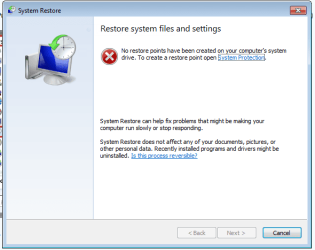
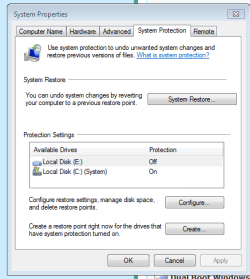
Great news, excellent news. From inside Window 7 took these 2 screenshots.

system restore.PNG

restore settings.PNG

Isn't that great?! Now is a perfect time for you to use the forehead slapping emoticon if you respond.
 

My Computer My Computer

At a glance

Windows 7 Home Premium 64 bitIntel(R) Core(TM)2 Duo CPU T6400 @ 2.00 GHz4.00 GBNVIDIA GeForce 9600M GT
Computer type
Laptop
Computer Manufacturer/Model Number
Acer Aspire 8730
OS
Windows 7 Home Premium 64 bit
CPU
Intel(R) Core(TM)2 Duo CPU T6400 @ 2.00 GHz
Motherboard
?
Memory
4.00 GB
Graphics Card(s)
NVIDIA GeForce 9600M GT
Hard Drives
Disk partition (C:) 282 GB
Disk partition (D:) 298 GB

these are separate disk drives and not a case of 1 drive being partitioned.
Antivirus
none yet
Browser
Internet Explorer 9
Okay, Greg I will totally do the Team installer thing in just a minute. I wanted to let you know that I was able to do a System Restore successfully in XP and it is just prior to installing Norton but I have not yet installed MSE. It will be next. Now I'm doing the Team Installer thingy inside Windows 7....
 

My Computer My Computer

At a glance

Windows 7 Home Premium 64 bitIntel(R) Core(TM)2 Duo CPU T6400 @ 2.00 GHz4.00 GBNVIDIA GeForce 9600M GT
Computer type
Laptop
Computer Manufacturer/Model Number
Acer Aspire 8730
OS
Windows 7 Home Premium 64 bit
CPU
Intel(R) Core(TM)2 Duo CPU T6400 @ 2.00 GHz
Motherboard
?
Memory
4.00 GB
Graphics Card(s)
NVIDIA GeForce 9600M GT
Hard Drives
Disk partition (C:) 282 GB
Disk partition (D:) 298 GB

these are separate disk drives and not a case of 1 drive being partitioned.
Antivirus
none yet
Browser
Internet Explorer 9
Connected to Win7 via Teamviewer with notes here:

Wasn't activated so activated successfully with COA key. No evidence of add-ins from dodgy installer.

System Protection on C was turned on but no disk space apportioned for it.

Successfully ran Norton Removal Tool which didn't appear to have been run.

Installed MSE, ran Quick Scan, clean.

A little sluggish with 4gb RAM older processor, so edited Visual Effects. Could be TVwr connection. I would probably try 32 bit.

Windows Updates were not run so helped with several rounds of those. Nothing from Clean Reinstall - Factory OEM Windows 7 had been followed as far as I can tell, even after asking about it several times.
 
Just want to add to the update Greg posted about Windows 7. Norton and Symantec were hunted down and zapped in the Registry by Greg when he was remotely fixing my Windows 7 install. Neither is anywhere on my Windows 7 hard drive anywhere. I am doing a clean install of XP with Wiindows 7 drive pulled out again because the System Restore I reset to before Norton was ever installed didn't fix a funny quirk that my registry screw possibly caused. I have to reinstall the drivers from Kaktussoft when the time comes. The quirk was that my internet connection to my WiFi network would come and go. For 1 or 2 minutes I would be connected to my network and then it would let go and go searching for other signals. I would ignore the popups saying that "there are other networks to connect to" and within 20 or 30 seconds it would reconnect with my own network again. This would go on over and over and over and over......

I hope you see this post Kaktussoft because you are still trying to help me with the Registry but Greg already dealt with that. Thanks ever so much!!!!
 

My Computer My Computer

At a glance

Windows 7 Home Premium 64 bitIntel(R) Core(TM)2 Duo CPU T6400 @ 2.00 GHz4.00 GBNVIDIA GeForce 9600M GT
Computer type
Laptop
Computer Manufacturer/Model Number
Acer Aspire 8730
OS
Windows 7 Home Premium 64 bit
CPU
Intel(R) Core(TM)2 Duo CPU T6400 @ 2.00 GHz
Motherboard
?
Memory
4.00 GB
Graphics Card(s)
NVIDIA GeForce 9600M GT
Hard Drives
Disk partition (C:) 282 GB
Disk partition (D:) 298 GB

these are separate disk drives and not a case of 1 drive being partitioned.
Antivirus
none yet
Browser
Internet Explorer 9
Thanks to Kaktussoft providing drivers for XP on my laptop and his enormous help throughout this task and of course Greg too for his hands on assistance to get Windows 7 cranking beautifully and suggestions, this machine is now a work of art. You guys are the best! I can't thank you enough. It's funny but get this; it's working so nicely that I almost don't want to put any games on it because I know there will be issues with Quicktime. Is there help here in Sevenforums for that program and what I'm in for?

But at this point, the only thing that seems to be a bit goofy, is that within Windows 7 my Volume Slide Control that's beside my numeric keypad cannot control the volume of anything playing. I have to use the volume within the speaker icon in the system tray (did I get the name right? - the icons on the bottom right). What might be the issue?

I can't remember if that Slide works within XP. I'll check that in the morning.

Other than getting the Volume Slide to work properly for both of the OSs, this case is solved. Yahooooooo!!!!
 

My Computer My Computer

At a glance

Windows 7 Home Premium 64 bitIntel(R) Core(TM)2 Duo CPU T6400 @ 2.00 GHz4.00 GBNVIDIA GeForce 9600M GT
Computer type
Laptop
Computer Manufacturer/Model Number
Acer Aspire 8730
OS
Windows 7 Home Premium 64 bit
CPU
Intel(R) Core(TM)2 Duo CPU T6400 @ 2.00 GHz
Motherboard
?
Memory
4.00 GB
Graphics Card(s)
NVIDIA GeForce 9600M GT
Hard Drives
Disk partition (C:) 282 GB
Disk partition (D:) 298 GB

these are separate disk drives and not a case of 1 drive being partitioned.
Antivirus
none yet
Browser
Internet Explorer 9
Thanks to Kaktussoft providing drivers for XP on my laptop and his enormous help throughout this task and of course Greg too for his hands on assistance to get Windows 7 cranking beautifully and suggestions, this machine is now a work of art. You guys are the best! I can't thank you enough. It's funny but get this; it's working so nicely that I almost don't want to put any games on it because I know there will be issues with Quicktime. Is there help here in Sevenforums for that program and what I'm in for?

But at this point, the only thing that seems to be a bit goofy, is that within Windows 7 my Volume Slide Control that's beside my numeric keypad cannot control the volume of anything playing. I have to use the volume within the speaker icon in the system tray (did I get the name right? - the icons on the bottom right). What might be the issue?

I can't remember if that Slide works within XP. I'll check that in the morning.

Other than getting the Volume Slide to work properly for both of the OSs, this case is solved. Yahooooooo!!!!
LaunchManagerDritekAcer LaunchManager Applicatie0.0.062.8 MB2009/01/15Downloaden

this solves the keyboard (volume control) issue in winxp?
 

My Computer My Computer

At a glance

Microsoft Windows 7 Home Premium 64-bits 7601...Intel(R) Core(TM) i3 CPU M 370 @ 2.40GHz4,00 GBATI Mobility Radeon HD 5400 Series
Computer type
Laptop
Computer Manufacturer/Model Number
ACER ASPIRE 5742G
OS
Microsoft Windows 7 Home Premium 64-bits 7601 Multiprocessor Free Service Pack 1
CPU
Intel(R) Core(TM) i3 CPU M 370 @ 2.40GHz
Motherboard
Acer Aspire 5742G
Memory
4,00 GB
Graphics Card(s)
ATI Mobility Radeon HD 5400 Series
Sound Card
(1) AMD High Definition Audio Device (2) Realtek High Defi
Screen Resolution
1366 x 768 x 32 bits (4294967296 colors) @ 60 Hz
Hard Drives
WDC WD5000BEVT-22ZAT0
I forgot to check XP this morning, but I will get to that as soon as I can. Sorry Kaktussoft.

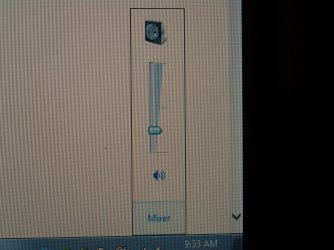
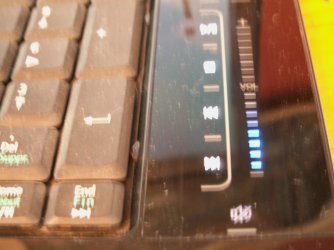
I have attached 2 screenshots. As all of you know I'm sure, on almost any youtube video, there is a volume control under the video clip. It's in the same part of the screen as the full screen toggle. This could change the volume of playback too on my machine. But there was also the 2 volume sliders my laptop has. One was in the System Tray and the other is on my keyboard next to my numeric keypad. They used to move together. In other words, when I used the slide on the keyboard it would adjust the volume of the slide that's in the system tray volume control accordingly so they'd be the same. They are no longer linked. At the moment the keyboard volume slide doesn't adjust anything. This is within Windows 7 mind you. And as I said at the very top of this post, like a dummy, I forgot to confirm this in XP this morning before I set my computer to Restoring files and don't want to interrupt that download process by rebooting into XP to check until it's done.
:doh:

PICT0305.jpg

PICT0306.JPG

Sorry for the fuzziness, I didn't want to use the flash as it ruined the picture. I couldn't keep the camera steady enough but you should get the idea of what my volume controls are.
 

My Computer My Computer

At a glance

Windows 7 Home Premium 64 bitIntel(R) Core(TM)2 Duo CPU T6400 @ 2.00 GHz4.00 GBNVIDIA GeForce 9600M GT
Computer type
Laptop
Computer Manufacturer/Model Number
Acer Aspire 8730
OS
Windows 7 Home Premium 64 bit
CPU
Intel(R) Core(TM)2 Duo CPU T6400 @ 2.00 GHz
Motherboard
?
Memory
4.00 GB
Graphics Card(s)
NVIDIA GeForce 9600M GT
Hard Drives
Disk partition (C:) 282 GB
Disk partition (D:) 298 GB

these are separate disk drives and not a case of 1 drive being partitioned.
Antivirus
none yet
Browser
Internet Explorer 9
Back
Top