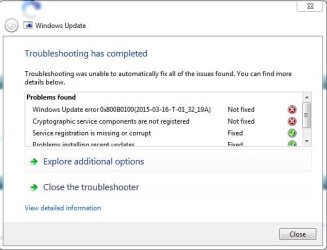
Win 7x64 update problem code 800B0100

christosgr

New member
Local time
4:37 PM
Messages
3
Hi, Windows update doesn't function and i haven't even installed SP1.
I have tried manual install for SP1, the system update readiness tool, the sfc /scannow and every recommended program from this forum that doesn't need SP1. I had deactivate my antivirus but the problem continued.
This is the log folder named CBS.
Please give me a specific individual solution , as none of the general solutions found in this forum is going to solve the problem, i had tried many times for months but now that i need to install a program that requires SP1 i have to put an end to this...
 

My Computer

Computer type
Laptop
Computer Manufacturer/Model Number
dell
OS
Windows 7 home premium 64-bit
CPU
i7 [email protected] GHz
Memory
6 Gb
Graphics Card(s)
ATI Mobility Radeon HD 5470
Antivirus
AVG 2013
Hello and welcome Christo mate your post begs the question why haven't you got SP1?? It comes with retail and OEM versions as a normal unless you have a very old installation media disk or ISO.
Now until you get that on board then unless I am terribly mistaken the updates will not flow on.

I suggest you read though this very carefully and get SP1 as soon as
Learn how to install Windows 7 Service Pack 1 (SP1)
 

My Computer

Computer type
PC/Desktop
Computer Manufacturer/Model Number
Own build (new) Desk1 / Asus ROG Win 7 / Desk2 1st build
OS
Desk1 7 Home Prem / Desk2 10 Pro / Main lap Asus ROG 10 Pro 2 laptop Toshiba 7 Pro Asus P2520 7 & 10
CPU
Desk1 i5 3750K / Laptop i7 GTX 860M / Desk2 i5 2500
Motherboard
Desk1 Asus P877-V / Desk2 Gigabyte H67 UD3H / Laptop ?
Memory
Desk1 8GB (1866) / Desk2 16GB (1333) / Laptop 8Gb DDR3
Graphics Card(s)
Desk 1& 2NVidia GTX 650 & Laptops on board Intel
Sound Card
Desk 1 & 2 -XONAR DG Realtek High Def audio Laptop
Monitor(s) Displays
Desk 1 Benq HD 2450 / Desk2 Philips 24" / Laptop 17.5"
Screen Resolution
1920x1080 D1 & D2 & Laptop 1
Hard Drives
Desk1 Samsung 120GB 830 SSD
Asus ROG 256GB 850 Pro SSD
Desk2 Samsung 840 256 SSD
Toshiba 120GB EVO
PSU
Desk 1 Corsair HX 1050/ Laptop ? / Desk 2 Corsair HX 650
Case
Desk 1 Cooler HAF XM ? Toshiba laptop / Desk2 Coolermaster
Cooling
Fans on all Desk1 -2 Desk2 - all Coolermasters 5 Laptop ?
Keyboard
Desk 1 MS Sidewinder X6 Desk 2 MS Sidewinder X 4
Mouse
Desk 1&2 - Gigabyte MS 900 gamer - laptop - Logitec wireless
Internet Speed
ADSL2+
Other Info
One other Desktop (tester) and spare Toshba laptop both with SSD's
Running Kaspersky 2016 ISS on all machines config'd identically
Logitec audio stereo systems on each machine (x3)
Canon MG5250MFC
Router/modem TP-Link running WPA2SK
The SP1 as i said can't be installed. The windows were pre installed in the laptop , which is a Dell studio 1558. I have an original copy of the win7 and i have a right to the solution of this problem without formating my disk. Please read the log files, in other forums i have read that there can be an individual solution according to your very personal errors written in the log files.
 

My Computer

Computer type
Laptop
Computer Manufacturer/Model Number
dell
OS
Windows 7 home premium 64-bit
CPU
i7 [email protected] GHz
Memory
6 Gb
Graphics Card(s)
ATI Mobility Radeon HD 5470
Antivirus
AVG 2013
This is a print screen from the WindowsUpdateDiagnostic that doesn't need the SP1 installed to operate
 

Attachments

  • fix1.JPG
    fix1.JPG
    36.3 KB · Views: 7

My Computer

Computer type
Laptop
Computer Manufacturer/Model Number
dell
OS
Windows 7 home premium 64-bit
CPU
i7 [email protected] GHz
Memory
6 Gb
Graphics Card(s)
ATI Mobility Radeon HD 5470
Antivirus
AVG 2013
Here's the CheckSUR error-list - which explains why nothing will install through Windows Update...#
Code:
Unavailable repair files:
 servicing\packages\WUClient-SelfUpdate-Aux-AuxComp~31bf3856ad364e35~amd64~en-US~7.6.7600.256.mum
 servicing\packages\WUClient-SelfUpdate-Aux-AuxComp~31bf3856ad364e35~amd64~en-US~7.6.7600.256.mum
 servicing\packages\WUClient-SelfUpdate-Aux~31bf3856ad364e35~amd64~en-US~7.6.7600.256.mum
 servicing\packages\WUClient-SelfUpdate-Aux~31bf3856ad364e35~amd64~en-US~7.6.7600.256.mum
 servicing\packages\WUClient-SelfUpdate-Aux-AuxComp~31bf3856ad364e35~amd64~en-US~7.6.7600.256.cat
 servicing\packages\WUClient-SelfUpdate-Aux-AuxComp~31bf3856ad364e35~amd64~en-US~7.6.7600.256.cat
 servicing\packages\WUClient-SelfUpdate-Aux~31bf3856ad364e35~amd64~en-US~7.6.7600.256.cat
 servicing\packages\WUClient-SelfUpdate-Aux~31bf3856ad364e35~amd64~en-US~7.6.7600.256.cat

All these files are part of the update Agent - and will also prevent SP1 from installing.
I'll post a fix protocol later.
 

My Computer

Computer type
Laptop
Computer Manufacturer/Model Number
Asus K52F or Lenovo B51-80
OS
Win 7 x64 Home Premium (and x86 VirtualBox VM)/Win10
CPU
i3 370M/i7 6500U
Motherboard
Asus/Lenovo
Memory
8GB - finally :)/8GB
Graphics Card(s)
it's an i3, dude!/dual Intel&nVidia
Sound Card
onboard
Monitor(s) Displays
15.6" built-in
Screen Resolution
1366x768/1920x1080
Hard Drives
750GB Seagate internal
Sundry external drives attached to other computers on the local network
1TB SSD on the Lenovo
PSU
n/a
Internet Speed
as much as I can get - usually on a dongle/phone, so <1MB/s
Antivirus
MSE/Defender
Browser
IE11/12/Edge/Chrome/FF(if I must)
I've uploaded a file - cgraa.zip - to my OneDrive at Noel's OneDrive
Please download and save it.
Right-click on the downloaded file, and select Extract all…
Extract to the default location - which will create a new folder cgraa in the same place.
Open this folder - there should be one folder inside it (Packages)

Copy the content of the Packages folder to the folder
C:\Windows\Temp\CheckSur\Servicing\Packages


Now run the CheckSUR tool again (it may take a while)

Post the new CheckSUR.log file, and the CheckSUR.persist.log file.
 

My Computer

Computer type
Laptop
Computer Manufacturer/Model Number
Asus K52F or Lenovo B51-80
OS
Win 7 x64 Home Premium (and x86 VirtualBox VM)/Win10
CPU
i3 370M/i7 6500U
Motherboard
Asus/Lenovo
Memory
8GB - finally :)/8GB
Graphics Card(s)
it's an i3, dude!/dual Intel&nVidia
Sound Card
onboard
Monitor(s) Displays
15.6" built-in
Screen Resolution
1366x768/1920x1080
Hard Drives
750GB Seagate internal
Sundry external drives attached to other computers on the local network
1TB SSD on the Lenovo
PSU
n/a
Internet Speed
as much as I can get - usually on a dongle/phone, so <1MB/s
Antivirus
MSE/Defender
Browser
IE11/12/Edge/Chrome/FF(if I must)
Back
Top