Solved Win Boot Mgr-windows failed to start!

PArtu

New member
Local time
9:33 AM
Messages
6
Hi,there

I'm having serious problem with booting my OS.
in Windows boot manager win7 fails to start.
(status:0x000000e)
repair the startup doens't help.

I have Vista 32bit installed on one drive/partition which works fine and win7 64bit on 2nd disk.Due to clean up and re-partition of the disk reasons I decided to do clean install of win7 64bit on a 3rd separate drive/partition.
Everything went smoothly and all 3 systems were visible on the boot screen and they worked fine.
The following step was to remove the win7 from the 2nd drive.
I couldn't format it in anyway (neither win7 install DVD disk nor disk menager).I managed to do it by external software for partitioning under Vista.(I'm writing it as this inability to format has something to do with booting problems now,I guess-removing MBR?)
After formating of 2nd disk I could not load win7 from 3rd drive (Vista works fine)!!
I installed again win7 on 2nd drive, but none of win7 systems are still accessible without startup repair (I did it 3 times)
both win7 and vista systems are visible in boot screen only when win7 installation disk is in DVD and booting order in BIOS is set to start from DVD first.(win7 and vista appears as recovered)
If I remove the DVD disk or change the order to boot from HDD only Vista and one win7 64bit from 2nd disk appear. I can start vista but not win7.

What do I want:keep VIsta and have win7 64bit on 3rd drive(all programes installed--I want to keep this system for win7)
What I did:
- chkdsk f/r on ---2nd and 3rd disk no errors
- startup repair doesn't help unless installation disk is in the drive (I did it 3x)(all 3 systems appear and I can lead them w/o problem)

Done in sequence on 3rd disk
bootrec.exe/ScanOS
total identified windows systems 0
operation completed succesfully
bootrec.exe/fixmbr
operation completed succesfully
bootrec.exe/fixboot,
operation completed succesfully
bootrec.exe/rebuildBcd
total identified windows systems 0
operation completed succesfully

I hope my explanation is rather clean.
Please help!!.I though I can fix it on my own,but unfortunately not. :confused:
Thanks,Art
 

My Computer

OS
Vista 32bit/ Win7 64bit
CPU
Intel Core 2 Quad Q9650 (OC to 4GHz)
Motherboard
DFI LanParty DK P45-T2RS
Memory
OCZ DDR2 4096 MB / 1066 (2x 2048 MB) - Platinum
Graphics Card(s)
Galaxy GeForce 9600GT
Monitor(s) Displays
Eizo LCD 19''
Hard Drives
Seagate 500 Mb-ST3500320AS
WD 1,5Tb
Seagate 1Tb - HD103UJ
PSU
CORSAIR 750W 750TXEU
Cooling
SCYTHE MUGEN
Hello PArtu, welcome to Seven Forums!


Before we make any specific recommendations will you please post a snip/screen-shot of the entire disk management drive map with a full description as to which drive/partition is which, so we can see what you have going on as there may be a fairly simple way to resolve the situation.

In the Windows start menu right click computer and click manage, in the left pane of the "Computer Management" window that opens click disk management and post a snip of that; taken from Vista will be fine.

How to Upload and Post a Screenshot and File in Seven Forums


Be sure to post back with any further questions you may have and to keep us informed.
 

My Computer

Computer Manufacturer/Model Number
* BFK Customs *
OS
W 7 64-bit Ultimate
CPU
Intel Q9550 Yorkfield
Motherboard
ASUS P5Q Pro
Memory
8GB Dominator 8500C5D
Graphics Card(s)
ATI : XFX 5870
Sound Card
Realtek HD Audio 7-1
Monitor(s) Displays
1x 47" LCD HDMI & 3x 26" LCD HDMI
Screen Resolution
1920x1080P & 1920x1200
Hard Drives
1x 80GB Intel X25-M G2 SSD : 1x 500GB & 1x 640GB WD Caviar Black(s)
PSU
Corsair 620HX
Case
Cooler Master RC-690
Cooling
Tuniq Tower 120, 2x 140mm and 3x 120mm case fans
Keyboard
Microsoft 500
Mouse
Razer Diamondback 3G
Internet Speed
14 Mb/s
Other Info
1x Koutech 3Gb/s SATA HDD Hot Swap Rack
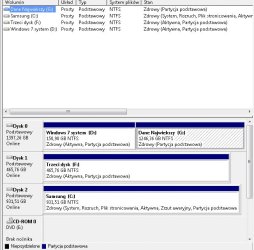
Here it comes:
Description:
Samsung (c: )= Vista 32bit - 1st disk in my description
windows 7 system (d: )= win7 64bit - system partition - 2nd disk in my description
trzeci dysk (f: )= win7 64bit - 3rd disk in my description

System is polish so I'll give the description just in case:
zdrowy = healthy
aktywna = active
partycja podstawowa = basic partition
 

Attachments

  • screen win7.jpg
    screen win7.jpg
    75 KB · Views: 223

My Computer

OS
Vista 32bit/ Win7 64bit
CPU
Intel Core 2 Quad Q9650 (OC to 4GHz)
Motherboard
DFI LanParty DK P45-T2RS
Memory
OCZ DDR2 4096 MB / 1066 (2x 2048 MB) - Platinum
Graphics Card(s)
Galaxy GeForce 9600GT
Monitor(s) Displays
Eizo LCD 19''
Hard Drives
Seagate 500 Mb-ST3500320AS
WD 1,5Tb
Seagate 1Tb - HD103UJ
PSU
CORSAIR 750W 750TXEU
Cooling
SCYTHE MUGEN
Which Windows 7 do you need/want to keep, D: or F:?
 

My Computer

Computer Manufacturer/Model Number
* BFK Customs *
OS
W 7 64-bit Ultimate
CPU
Intel Q9550 Yorkfield
Motherboard
ASUS P5Q Pro
Memory
8GB Dominator 8500C5D
Graphics Card(s)
ATI : XFX 5870
Sound Card
Realtek HD Audio 7-1
Monitor(s) Displays
1x 47" LCD HDMI & 3x 26" LCD HDMI
Screen Resolution
1920x1080P & 1920x1200
Hard Drives
1x 80GB Intel X25-M G2 SSD : 1x 500GB & 1x 640GB WD Caviar Black(s)
PSU
Corsair 620HX
Case
Cooler Master RC-690
Cooling
Tuniq Tower 120, 2x 140mm and 3x 120mm case fans
Keyboard
Microsoft 500
Mouse
Razer Diamondback 3G
Internet Speed
14 Mb/s
Other Info
1x Koutech 3Gb/s SATA HDD Hot Swap Rack
definitely F:
 

My Computer

OS
Vista 32bit/ Win7 64bit
CPU
Intel Core 2 Quad Q9650 (OC to 4GHz)
Motherboard
DFI LanParty DK P45-T2RS
Memory
OCZ DDR2 4096 MB / 1066 (2x 2048 MB) - Platinum
Graphics Card(s)
Galaxy GeForce 9600GT
Monitor(s) Displays
Eizo LCD 19''
Hard Drives
Seagate 500 Mb-ST3500320AS
WD 1,5Tb
Seagate 1Tb - HD103UJ
PSU
CORSAIR 750W 750TXEU
Cooling
SCYTHE MUGEN
OK in the BIOS set disk 1 F: as the first boot device, disconnect the other 2 (disk 0 and disk 2) Hard Disk Drives from the motherboard and then boot the Windows 7 install disk and do at least 3 separate startup repairs with a system restart between each repair to create a set of boot files to that Windows 7, after it is booting good on its own, power down and reconnect the other HDDs and use the BIOS one time boot menu to select which OS/HDD to boot.
 

My Computer

Computer Manufacturer/Model Number
* BFK Customs *
OS
W 7 64-bit Ultimate
CPU
Intel Q9550 Yorkfield
Motherboard
ASUS P5Q Pro
Memory
8GB Dominator 8500C5D
Graphics Card(s)
ATI : XFX 5870
Sound Card
Realtek HD Audio 7-1
Monitor(s) Displays
1x 47" LCD HDMI & 3x 26" LCD HDMI
Screen Resolution
1920x1080P & 1920x1200
Hard Drives
1x 80GB Intel X25-M G2 SSD : 1x 500GB & 1x 640GB WD Caviar Black(s)
PSU
Corsair 620HX
Case
Cooler Master RC-690
Cooling
Tuniq Tower 120, 2x 140mm and 3x 120mm case fans
Keyboard
Microsoft 500
Mouse
Razer Diamondback 3G
Internet Speed
14 Mb/s
Other Info
1x Koutech 3Gb/s SATA HDD Hot Swap Rack
Hi, Will I have the screen "choose which OS to boot" at start-up after the procedure you've posted?. Or will I have to go to BIOS with that. If there won't be a choose screen, that would be very inconvenient. Best,
 

My Computer

OS
Vista 32bit/ Win7 64bit
CPU
Intel Core 2 Quad Q9650 (OC to 4GHz)
Motherboard
DFI LanParty DK P45-T2RS
Memory
OCZ DDR2 4096 MB / 1066 (2x 2048 MB) - Platinum
Graphics Card(s)
Galaxy GeForce 9600GT
Monitor(s) Displays
Eizo LCD 19''
Hard Drives
Seagate 500 Mb-ST3500320AS
WD 1,5Tb
Seagate 1Tb - HD103UJ
PSU
CORSAIR 750W 750TXEU
Cooling
SCYTHE MUGEN
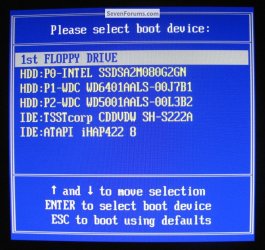
It's really the only way to fix it but you will get a one-time boot menu similar to the Windows boot manager; after the repairs when you start the PC start tapping the BIOS one-time hot-key to enter the one-time menu specific to your motherboard.

I'm not sure what it may be for DFI maybe someone here will be able to help with that.

For my Asus board it's F8 at start-up to get a boot menu like this.
click to enlarge
BIOS One_Time Boot Menu.jpg
 

My Computer

Computer Manufacturer/Model Number
* BFK Customs *
OS
W 7 64-bit Ultimate
CPU
Intel Q9550 Yorkfield
Motherboard
ASUS P5Q Pro
Memory
8GB Dominator 8500C5D
Graphics Card(s)
ATI : XFX 5870
Sound Card
Realtek HD Audio 7-1
Monitor(s) Displays
1x 47" LCD HDMI & 3x 26" LCD HDMI
Screen Resolution
1920x1080P & 1920x1200
Hard Drives
1x 80GB Intel X25-M G2 SSD : 1x 500GB & 1x 640GB WD Caviar Black(s)
PSU
Corsair 620HX
Case
Cooler Master RC-690
Cooling
Tuniq Tower 120, 2x 140mm and 3x 120mm case fans
Keyboard
Microsoft 500
Mouse
Razer Diamondback 3G
Internet Speed
14 Mb/s
Other Info
1x Koutech 3Gb/s SATA HDD Hot Swap Rack
The whole procedure went pretty smoothly, but Vista is not accessible :(
The F8 on DFI doesn't show the boot device screen. Only the safe mode, etc.
I've tried F11 nothing (I googled it might be the option), F1 gives me the system choose screen, but only Win7 (on F:drive) is present (as expected).
Del is the BIOS access.
I'm worried that DFI might not have this option
that's the only place I found someone having the same problem:
http://www.techimo.com/forum/motherboards/212970-dfi-simple-keyboard-shortcut-quesiton.html
I also wrote to DFI asking about the shortcut.

What would be other way to resurrect Vista?
Art
 
Last edited:

My Computer

OS
Vista 32bit/ Win7 64bit
CPU
Intel Core 2 Quad Q9650 (OC to 4GHz)
Motherboard
DFI LanParty DK P45-T2RS
Memory
OCZ DDR2 4096 MB / 1066 (2x 2048 MB) - Platinum
Graphics Card(s)
Galaxy GeForce 9600GT
Monitor(s) Displays
Eizo LCD 19''
Hard Drives
Seagate 500 Mb-ST3500320AS
WD 1,5Tb
Seagate 1Tb - HD103UJ
PSU
CORSAIR 750W 750TXEU
Cooling
SCYTHE MUGEN
I also searched for DFI shortcut key and found none.

In this case you may need to install EasyBCD 2.0 to Win7 to Add Vista on the Add OS tab. Let it autocomplete and then Save, restart to Dual Boot menu. Welcome to EasyBCD 2.0! — The NeoSmart Files

This should be all you need, but if there are any other hitches post back a screenshot of your Disk Mgmt drive map with full listings, and the EasyBCD listings page.
 
it worked like a charm.ThANK YOU both bare foot kid & gegrocker. Best
 

My Computer

OS
Vista 32bit/ Win7 64bit
CPU
Intel Core 2 Quad Q9650 (OC to 4GHz)
Motherboard
DFI LanParty DK P45-T2RS
Memory
OCZ DDR2 4096 MB / 1066 (2x 2048 MB) - Platinum
Graphics Card(s)
Galaxy GeForce 9600GT
Monitor(s) Displays
Eizo LCD 19''
Hard Drives
Seagate 500 Mb-ST3500320AS
WD 1,5Tb
Seagate 1Tb - HD103UJ
PSU
CORSAIR 750W 750TXEU
Cooling
SCYTHE MUGEN
Good to see you got it sorted and thanks for the update.
 

My Computer

Computer Manufacturer/Model Number
* BFK Customs *
OS
W 7 64-bit Ultimate
CPU
Intel Q9550 Yorkfield
Motherboard
ASUS P5Q Pro
Memory
8GB Dominator 8500C5D
Graphics Card(s)
ATI : XFX 5870
Sound Card
Realtek HD Audio 7-1
Monitor(s) Displays
1x 47" LCD HDMI & 3x 26" LCD HDMI
Screen Resolution
1920x1080P & 1920x1200
Hard Drives
1x 80GB Intel X25-M G2 SSD : 1x 500GB & 1x 640GB WD Caviar Black(s)
PSU
Corsair 620HX
Case
Cooler Master RC-690
Cooling
Tuniq Tower 120, 2x 140mm and 3x 120mm case fans
Keyboard
Microsoft 500
Mouse
Razer Diamondback 3G
Internet Speed
14 Mb/s
Other Info
1x Koutech 3Gb/s SATA HDD Hot Swap Rack
Back
Top