
You are using an out of date browser. It may not display this or other websites correctly.
You should upgrade or use an alternative browser.
You should upgrade or use an alternative browser.
Win command
- Thread starter Log veera
- Start date

mine says win doesn't exist. are you talking command prompt in 7 or a dos 6.0 install on something else? if you just type help you get all commands that it understands, if yours understands win then you have some other environment variable set up for it to understand that.
My Computer
- Computer type
- PC/Desktop
- Computer Manufacturer/Model Number
- Custom
- OS
- 10 Pro x64
- CPU
- Ryzen 9 3900X
- Motherboard
- Asrock x370 Tachi
- Memory
- 64GB(4x16GB) DDR4
- Graphics Card(s)
- EVGA 1080ti FTW3
- Sound Card
- ASUS Xonar Essence STX (V4 Bursons), ODAC rev B, NFB-11, O2
- Monitor(s) Displays
- 3xASUS PB278Q/R, Optoma HD142X
- Screen Resolution
- 3x1440p, 1080p
- Hard Drives
- 512GB 850 EVO(OS, Programs)
4TB (Movies)
3TB (Downloads)
3TB (Programs)
1TB HDD (Games)
2x6TB R1 (videos)
- PSU
- AX760
- Case
- Fractal Define R5
- Cooling
- NH-D15S
- Keyboard
- Massdrop Ctrl with Box Navy's
- Mouse
- G903, Alioth XXL Mat
- Internet Speed
- 280/40
- Antivirus
- MBAM, ESET
- Browser
- Canary 64 Bit
- Other Info
- I also own a Thinkpad P50 Xeon 4K, X220T, X1C5

I maybe wrong. But, I don't think there is "Win" command for DOS.
My Computer
- Computer type
- PC/Desktop
- Computer Manufacturer/Model Number
- Custom Bulid/Self made
- OS
- Windows 11 x64
- CPU
- i5 2500K @ 3.3 GHz
- Motherboard
- ASUS P8 Z77 V pro
- Memory
- 16 GB DDR 3 @ 1600Mhz
- Graphics Card(s)
- MSI 1050TI 4GB OC version
- Sound Card
- On Board (Realtek HD audio)
- Monitor(s) Displays
- Samsung 22" LCD
- Screen Resolution
- 1920*1080
- Hard Drives
- Seagate 1 TB, WD 1TB, Seagate 2 TB ( I use a lot of space)
- PSU
- coolermaster 750 W
- Case
- Coolermaster HAF912
- Cooling
- Coolermaster hyper 212 EVO
- Keyboard
- Samsung
- Mouse
- Dell Wireless
- Internet Speed
- Wireless 50 Mbps
- Antivirus
- AVG 2016 Internet Security
- Browser
- Google Chrome

What is the use of win command in command prompt. No action is done by that,but still dos accepts it. Have anyone tried it. Can anyone answer this.
Back when we had Windows 3.1, the system would initially boot to MSDOS and you had to type "WIN" to load Windows or you had to have the command in the autoexec.bat.
Never thought about the WIN command after that. Guess it should not do anything nowadays.
mine says win doesn't exist. are you talking command prompt in 7 or a dos 6.0 install on something else? if you just type help you get all commands that it understands, if yours understands win then you have some other environment variable set up for it to understand that.
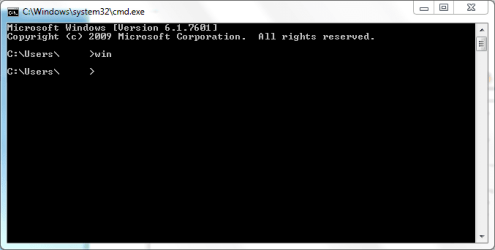
On my Windows 7 32bit SP1, it exists but does absolutely nothing.

My Computer
- Computer type
- Laptop
- Computer Manufacturer/Model Number
- HP EliteBook 8530w Mobile Workstation
- OS
- Windows 7 Ultimate x64 (XP, 98SE, 95, 3.11, DOS 7.10 on VM) + Ubuntu 10.04 LTS Lucid Lynx
- CPU
- Intel Core 2 Duo Processor P8600 (2.40 GHz, 3 MB L2 cache)
- Motherboard
- Mobile Intel PM45 Express Chipset ICH9M-Enhanced
- Memory
- 4GB 800 MHz DDR2 SDRAM
- Graphics Card(s)
- ATI Mobility FireGL V5700 with 256 MB
- Sound Card
- SoundMAX Integrated Digital HD Audio
- Monitor(s) Displays
- 15.4-inch WXGA anti-glare (1280 x 800 resolution)
- Screen Resolution
- 1280 x 800
- Hard Drives
- 500GB + 1TB
- Mouse
- Synaptics PS/2 Port Touchpad, USB Mouse
- Internet Speed
- 4 Mbps
- Antivirus
- MSE
- Browser
- Firefox, Chrome, IE
- Other Info
- Authentec AES2810 Fingerprint Reader
I have Win 7. It does not exists on mine.
My Computer
- Computer type
- PC/Desktop
- Computer Manufacturer/Model Number
- Custom Bulid/Self made
- OS
- Windows 11 x64
- CPU
- i5 2500K @ 3.3 GHz
- Motherboard
- ASUS P8 Z77 V pro
- Memory
- 16 GB DDR 3 @ 1600Mhz
- Graphics Card(s)
- MSI 1050TI 4GB OC version
- Sound Card
- On Board (Realtek HD audio)
- Monitor(s) Displays
- Samsung 22" LCD
- Screen Resolution
- 1920*1080
- Hard Drives
- Seagate 1 TB, WD 1TB, Seagate 2 TB ( I use a lot of space)
- PSU
- coolermaster 750 W
- Case
- Coolermaster HAF912
- Cooling
- Coolermaster hyper 212 EVO
- Keyboard
- Samsung
- Mouse
- Dell Wireless
- Internet Speed
- Wireless 50 Mbps
- Antivirus
- AVG 2016 Internet Security
- Browser
- Google Chrome
In old versions of Windows (Windows 98 and older) the win.com command would start Windows from the DOS prompt. In all NT platform systems it does nothing and exists only for compatibility with old batch files. As it is a 16 bit command it does not exist on 64 bit systems.
My Computer
- Computer type
- PC/Desktop
- Computer Manufacturer/Model Number
- HP
- OS
- Windows 7 Pro 64 bit
- CPU
- Xeon W3520
- Memory
- 8 GB
- Graphics Card(s)
- Nvidia Geforce 210
In old versions of Windows (Windows 98 and older) the win.com command would start Windows from the DOS prompt. In all NT platform systems it does nothing and exists only for compatibility with old batch files. As it is a 16 bit command it does not exist on 64 bit systems.
okay i figured it was as much explains why its not in our x64 win 7's but in the 32 bit ones. that's why i asked him if he was in a actual install of DOS 6.0 as it would have the command. I couldn't find info on what it did anymore.
My Computer
- Computer type
- PC/Desktop
- Computer Manufacturer/Model Number
- Custom
- OS
- 10 Pro x64
- CPU
- Ryzen 9 3900X
- Motherboard
- Asrock x370 Tachi
- Memory
- 64GB(4x16GB) DDR4
- Graphics Card(s)
- EVGA 1080ti FTW3
- Sound Card
- ASUS Xonar Essence STX (V4 Bursons), ODAC rev B, NFB-11, O2
- Monitor(s) Displays
- 3xASUS PB278Q/R, Optoma HD142X
- Screen Resolution
- 3x1440p, 1080p
- Hard Drives
- 512GB 850 EVO(OS, Programs)
4TB (Movies)
3TB (Downloads)
3TB (Programs)
1TB HDD (Games)
2x6TB R1 (videos)
- PSU
- AX760
- Case
- Fractal Define R5
- Cooling
- NH-D15S
- Keyboard
- Massdrop Ctrl with Box Navy's
- Mouse
- G903, Alioth XXL Mat
- Internet Speed
- 280/40
- Antivirus
- MBAM, ESET
- Browser
- Canary 64 Bit
- Other Info
- I also own a Thinkpad P50 Xeon 4K, X220T, X1C5