Win Explorer arrows missing, cursor spinning, libraries missing

gfinney

New member
Local time
4:26 PM
Messages
3
New laptop (Lenovo W510), but I swapped boot disk for an SSD and reinstalled Win 7 64bit from recovery disks. I moved My Documents to D: and when I open Windows Explorer all looks fine. When I click on an arrow beside My Documents (or Music or anything), the arrow selected disappears, folder disappears (sometimes), cursor spins (busy), and nothing appears in the right window. If I click on Documents, the right window shows the contents and I can navigate from there, but the folder window on left is useless. Sometimes the folders under Documents disappear all together. If I try real hard, I can render Explorer completely useless and have to reboot. Closing and opening Explorer does not solve problem.

Tried setting up a new user and problem occurred immediately - plus desktop icons appeared without icon images.

Tried SFC.exe to check system files - no problems found.

Any suggestions welcome.
Graham
 

My Computer

Computer Manufacturer/Model Number
Lenovo 431964U (W510)
OS
Win 7 Pro 64
CPU
Intel Core i7 720QM
Motherboard
Lenovo 431964U
Memory
10 GB Dual Channel DDR 3 @531MHz
Graphics Card(s)
Nvidia Quadro FX 880M
Monitor(s) Displays
Thinkpad 1600x900 / Nvidia Quadro FX 880M
Hard Drives
C: 156GB Intel SSDSA2M160G2GC
D: 313GB Hitachi HTS725032A9A364
Try editing your settings under control panel. I'm not sure what the problem you're experiencing is because I've never experienced it. Can your system run a 64-bit operating system? Play around with control panel, editing settings, see if that solves the issue.
 

My Computer

OS
Windows Xp with Windows 7 theme = Win
I don't see anything in CP that will help. I don't think it is a setting, since Explorer appears fine after reboot but then misbehaves when I try to use it. This is a 64 bit hardware and OS.
 

My Computer

Computer Manufacturer/Model Number
Lenovo 431964U (W510)
OS
Win 7 Pro 64
CPU
Intel Core i7 720QM
Motherboard
Lenovo 431964U
Memory
10 GB Dual Channel DDR 3 @531MHz
Graphics Card(s)
Nvidia Quadro FX 880M
Monitor(s) Displays
Thinkpad 1600x900 / Nvidia Quadro FX 880M
Hard Drives
C: 156GB Intel SSDSA2M160G2GC
D: 313GB Hitachi HTS725032A9A364

Attachments

  • fixwin.PNG
    fixwin.PNG
    47.6 KB · Views: 52
  • fixwin2.PNG
    fixwin2.PNG
    47.9 KB · Views: 127
Last edited:

My Computer

Computer Manufacturer/Model Number
packard bell IXTREME M5722
OS
Operating System : Windows 7 Home Premium Edition 6.01.7600 SP1 (x64)
CPU
Processor : Intel Core 2 Quad Q8300 @ 2500 MHz
Motherboard
Mainboard : Packard Bell (Acer EG43M )
Memory
Physical Memory :8GB Corsair4x 2GB 800MHz C5 DDR2
Graphics Card(s)
Video Card : XFX 6700 AMD
Monitor(s) Displays
Maestro 234DL - BenQ V2220 - BenQ VW2420H
Screen Resolution
Current Display :1920x1080p pixels at 60 Hz in HD LED
Hard Drives
Hard Disks : WDC (1000 GB)
Drive C: (Hard Disk) : 428 GB available on 491 GB
Drive D: (Hard Disk) : 426 GB available on 492 GB
SAMSUNG spinpoint HD103SJ 1000.2 GB
(X 2) KINGSTON SSD NOW V 30GB
PSU
XFX ProSeries 550W PSU
Case
PACKARD BELL IXTREME
Cooling
System Blower Current: 150mA Air Flow16CFM ;Akasa 90mm rear
Keyboard
Gigabyte Aivia K8100
Mouse
TRUST-Wireless Laser Mouse - Carbon edition MI-7770C
Internet Speed
TP-LINK > TL-WN951N / AV500 Gigabit Powerline Adapters
Browser
chrome dev
Other Info
EXTRA COOLING>(FAN CONTROLLER) PC Bay Cooler 3 x 40mm fans; Akasa AK-HD-BL Blue hard drive cooler 2 x 40 mm fan 4500 rpm 29.7 dBA
Bios> American Megatrends Inc.
Version : P01-A1
Date : 08/31/2009
I don't see anything in CP that will help. I don't think it is a setting, since Explorer appears fine after reboot but then misbehaves when I try to use it. This is a 64 bit hardware and OS.

Then it may be your internet explorer. If you don't want to download the software above then you should uninstalling internet explorer then install it again. That should solve the issue your experiencing and if it doesn't please reply so I can offer more suggestions!
 

My Computer

OS
Windows Xp with Windows 7 theme = Win
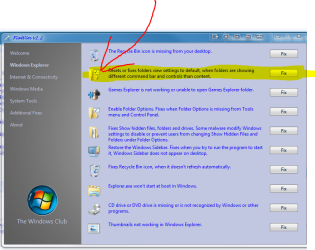
Thanks Brian, Fixwin did the trick!! Appreciate the help.
 

My Computer

Computer Manufacturer/Model Number
Lenovo 431964U (W510)
OS
Win 7 Pro 64
CPU
Intel Core i7 720QM
Motherboard
Lenovo 431964U
Memory
10 GB Dual Channel DDR 3 @531MHz
Graphics Card(s)
Nvidia Quadro FX 880M
Monitor(s) Displays
Thinkpad 1600x900 / Nvidia Quadro FX 880M
Hard Drives
C: 156GB Intel SSDSA2M160G2GC
D: 313GB Hitachi HTS725032A9A364
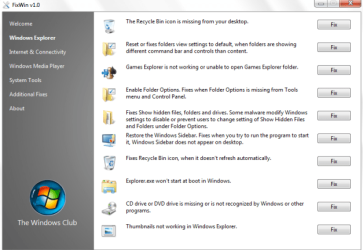
great its a handy program to have and keep my pleasure:)
 

My Computer

Computer Manufacturer/Model Number
packard bell IXTREME M5722
OS
Operating System : Windows 7 Home Premium Edition 6.01.7600 SP1 (x64)
CPU
Processor : Intel Core 2 Quad Q8300 @ 2500 MHz
Motherboard
Mainboard : Packard Bell (Acer EG43M )
Memory
Physical Memory :8GB Corsair4x 2GB 800MHz C5 DDR2
Graphics Card(s)
Video Card : XFX 6700 AMD
Monitor(s) Displays
Maestro 234DL - BenQ V2220 - BenQ VW2420H
Screen Resolution
Current Display :1920x1080p pixels at 60 Hz in HD LED
Hard Drives
Hard Disks : WDC (1000 GB)
Drive C: (Hard Disk) : 428 GB available on 491 GB
Drive D: (Hard Disk) : 426 GB available on 492 GB
SAMSUNG spinpoint HD103SJ 1000.2 GB
(X 2) KINGSTON SSD NOW V 30GB
PSU
XFX ProSeries 550W PSU
Case
PACKARD BELL IXTREME
Cooling
System Blower Current: 150mA Air Flow16CFM ;Akasa 90mm rear
Keyboard
Gigabyte Aivia K8100
Mouse
TRUST-Wireless Laser Mouse - Carbon edition MI-7770C
Internet Speed
TP-LINK > TL-WN951N / AV500 Gigabit Powerline Adapters
Browser
chrome dev
Other Info
EXTRA COOLING>(FAN CONTROLLER) PC Bay Cooler 3 x 40mm fans; Akasa AK-HD-BL Blue hard drive cooler 2 x 40 mm fan 4500 rpm 29.7 dBA
Bios> American Megatrends Inc.
Version : P01-A1
Date : 08/31/2009
Back
Top