Win + ... keyboard shortcuts

valera

New member
Local time
9:05 PM
Messages
5
Hello,

I've recently migrated from Windows XP Pro to Win 7 Ent and now I see that it's not possible to assign a shortcut to some Win + Key combinations, namely

Win + C
Win + Up arrow
Win + Down arrow
Win + Space

I've found a way to disable all the Win + ... shortcuts as described here: Disable Win+X Shortcut Keys on Windows 7 or Vista - How-To Geek

But I'd still like to use standard Win + D and Win + E, so disabling all is not a good option for me. Does any one know a more suitable solution?
 

My Computer

OS
Windows 7 Enterprise
Hello,

I've recently migrated from Windows XP Pro to Win 7 Ent and now I see that it's not possible to assign a shortcut to some Win + Key combinations, namely

Win + C
Win + Up arrow
Win + Down arrow
Win + Space

I've found a way to disable all the Win + ... shortcuts as described here: Disable Win+X Shortcut Keys on Windows 7 or Vista - How-To Geek

But I'd still like to use standard Win + D and Win + E, so disabling all is not a good option for me. Does any one know a more suitable solution?

Well, no, either you disable all <WINDOWS>+<KEY> combinations, or keep all of them.

Is there any particular reason why you need to re-assign <WINDOWS>+<C>, <WINDOWS>+<UP>, <WINDOWS>+<DOWN>, <WINDOWS>+<DOWN> and <WINDOWS>+<SPACE>?
 

My Computer

Computer type
PC/Desktop
Computer Manufacturer/Model Number
Virtual Machine
OS
Windows 7 Professional 32-bit SP1
CPU
AMD A4/A6
Motherboard
Intel Corporation 440BX Desktop Reference Platform
Memory
3.00GB EDO
Graphics Card(s)
VMware SVGA 3D
Sound Card
High Definition Audio Device
Monitor(s) Displays
Generic Non-PnP Monitor on VMware SVGA 3D
Screen Resolution
1440x900
Hard Drives
1 x 60GB VMware Virtual SATA Hard Drive ATA Device
Antivirus
Kaspersky Total Security
Is there any particular reason why you need to re-assign <WINDOWS>+<C>, <WINDOWS>+<UP>, <WINDOWS>+<DOWN>, <WINDOWS>+<DOWN> and <WINDOWS>+<SPACE>?

Well, I'm just used to have these shortcuts assigned to some of Winamp actions via Global Hotkeys plugin.
 

My Computer

OS
Windows 7 Enterprise
Is there any particular reason why you need to re-assign <WINDOWS>+<C>, <WINDOWS>+<UP>, <WINDOWS>+<DOWN>, <WINDOWS>+<DOWN> and <WINDOWS>+<SPACE>?

Well, I'm just used to have these shortcuts assigned to some of Winamp actions via Global Hotkeys plugin.

I see. I'm assuming you're using them to control WinAmp playback? Why not just get a keyboard with media control keys? A basic one will be about $10 - $20?

Sorry I can't help you with disablling specific WINDOWS_KEYS....:cry:
 

My Computer

Computer type
PC/Desktop
Computer Manufacturer/Model Number
Virtual Machine
OS
Windows 7 Professional 32-bit SP1
CPU
AMD A4/A6
Motherboard
Intel Corporation 440BX Desktop Reference Platform
Memory
3.00GB EDO
Graphics Card(s)
VMware SVGA 3D
Sound Card
High Definition Audio Device
Monitor(s) Displays
Generic Non-PnP Monitor on VMware SVGA 3D
Screen Resolution
1440x900
Hard Drives
1 x 60GB VMware Virtual SATA Hard Drive ATA Device
Antivirus
Kaspersky Total Security
Hi, you may want to have a look at AutoHotKey and see if it'll help achieve what you want :)
 

My Computer

Computer Manufacturer/Model Number
Compaq Desktop
OS
Windows 7 Ultimate x64
CPU
AMD Sempron Dual Core
Memory
3GB
Graphics Card(s)
NVIDIA GeForce 6150SE nForce 430
Screen Resolution
1024x768
Hard Drives
150GB Sata
Hi, you may want to have a look at AutoHotKey and see if it'll help achieve what you want :)

Yeah, I'm thinking of disabling the standard hotkeys by updating a registry value and then re-create the ones I need like Win+D using a software like AutoHotKey. Still a little bit irritated that it's not possible to turn off only specific hotkeys.

Thanks
 

My Computer

OS
Windows 7 Enterprise

My Computer

Computer Manufacturer/Model Number
HP dv6519tx
OS
Windows 7 Ultimate x64
CPU
1.80 GHz Intel Core 2 Duo processor T7100
Memory
3 gig ddr2
Graphics Card(s)
NVIDIA GeForce 8400M GS
Sound Card
Realtek High Definition Audio
Monitor(s) Displays
15.4” WXGA High Definition BrightView Widescreen
Screen Resolution
1280 x 800
Hard Drives
Hitachi 320 GB (5400 rpm)
PSU
90 W AC Power Adapter
Cooling
Kitchen plate under the lappy
Keyboard
101 key compatible
Mouse
Touch Pad with On/Off button and dedicated vertical Scroll
Internet Speed
Three Wireless internet prepaid using E160G USB dongle
a solution for everyone!

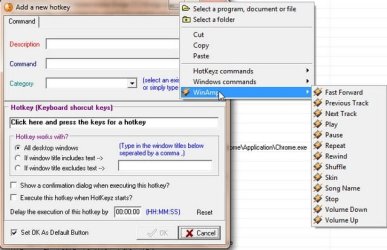
I strongly suggest that you try a program that I have installed on all the computers on my network! It has changed my life when doing web work and it is FREE! I promise you that you will NOT be disappointed; in fact, after a few weeks, you'll wonder how you ever did without it!

http://www.skynergy.com/hotkeyz.html

Oh yeah, an aspect of this software is that it allows you to map shortcut keys to winamp.


Being a newbie here, I'm not certain how the display will be; however, I've uploaded a few screen shots that give you a sample of what this software will do.

winamp_640.jpg

Windows Control Panel_640.jpg

hotkey commands_640.jpg
 
Last edited:

My Computer

Computer type
PC/Desktop
Computer Manufacturer/Model Number
Dell Precision T5610 01
OS
windows 7 Ultimate 64
Back
Top