
Win Mail Question??

pinsol

New member
Local time
5:34 AM
Messages
3
Could use some help folks - I just reinstated Win Mail using PapaBear's fine tutorial. I receives mail fine, but will not send! :cry: Any thoughts out there? I had it working fine on this PC up 'til about a month ago when the PSU melted down taking out my Mobo and SSD. I got it all back together and reinstated Win Mail, but can't send. Thanks for your help! Ron
 

My Computer

Computer Manufacturer/Model Number
Self-built
OS
Windows 7 Ultimate 64 bit
CPU
INTEL i7-920
Motherboard
ASUS P6X58D Premium
Memory
6 GB Tri-Channel Corsair 1600 Mhz
Graphics Card(s)
ATI Radeon VISIONTEK HD 5870
Sound Card
On Board (for now)
Monitor(s) Displays
Lenovo 22" 1920 x 1080 native resolution
Hard Drives
Crucial RealSSD C300 256GB
PSU
Topower PowerBird 900 Watt fully modularized
Case
CoolerMaster 922 HAF
Cooling
Dynatron Genius G95
Welcome to the Seven Forums! pinsol

So you also saw a bad supply take out the board there too lately! :( I just got the replacement board in a week ago for a new build here running for two months before the supply tripped the breaker for the ac outlet! Ouch!
For Windows Mail based on Vista's version of Outlook Express you have to be able to log into your ISP the same as you did with the older XP Outlook Express and set the outgoing server the same as for the incoming in order to see mail sent as well as having the contact's address already in your mail contacts list. Mail can't be sent out to anyone if they are not already added in as a new contact.

For other accounts like Gmail, Hotmail, etc you have to manually configure the POP or IMAP information to get things going both ways for sending as well as receiving provided the particular account can be configured in. If this is for a Windows Live account the option for download and install of the Live Mail will see all live.com or hotmail.com accounts import and send with it's form of OE, WMail window.

Since you had all this working previously before everything was trashed I would recommend simply going back over the account properties to make sure all settings are set up identically to the way you originally saw it working since it only takes one item not to be set correctly to stall the works. You may have to reenter a few things again to see everything work.
 

My Computers

System One System Two

  • Computer type
    PC/Desktop
    Computer Manufacturer/Model Number
    Custom builds = 2
    OS
    W7 Ultimate x64/W10 Pro x64/W11 Pro Triple Boot - Main PC W7 Remote PC Micro ATX W7 Pro x64/W11 Pro
    CPU
    AMD Phenom II X4 975 Deneb 3.6ghz - 965 2nd remote pc
    Motherboard
    Gigabyte GA-790XTA-UD4-Gigabyte GA-880GM-D2H remote pc
    Memory
    Kingston Hyper X DDR3 1600 1.5v 16gb - Hyper X Fury 8gb 2nd
    Graphics Card(s)
    MSI HD Radeon 5750 1gb - MSI HD Radeon 6450 on mini tower
    Sound Card
    Creative Labs X-Fi Xtreme Audio P - Realtek onooard 2nd case
    Monitor(s) Displays
    ASUS VW199T-P 19" HP 2082a Main-HP 2082a 20" remote pc
    Screen Resolution
    Asus 1440x900 - HP 1600x900
    Hard Drives
    WD Black 1TB HD per OS W7, W10, and pending W11 presently on 500gb OS Drive - Pending Triple 1TB HDs for Spanned Storage/backup volume
    Single 2TB external USB enclosure, single 1TB System 7 Host/Boot drive, Pending 8TB external HD for system image b
    PSU
    Corsair 750TX - primary / Corsair CX600 - second
    Case
    Antec 900-2 - SSD compatible / NZXT Vulcan mini tower
    Cooling
    Zalman CNPS9900A
    Keyboard
    AZIO L70 Backlit Letters Gaming - ONN Cordless/USB
    Mouse
    MSI DS200 Programmable, Logitech Cordless
    Internet Speed
    30mbps upgrade - primary hard wired - mini tower usb WiFi
    Antivirus
    GFI VIPRE Internet Security 2014 on W7 2016 beta on W10,
    Browser
    Cyberfox, WaterFox 64bit FF variants, FireFox x64, Pale Moon
    Other Info
    Accomdata fan cooled usb 2.0 PIDE/Sata II, III external enclosure.
    Sambient usb/eSata PATA/Sata II, III external enclosure.
  • Computer type
    PC/Desktop
    System Manufacturer/Model Number
    CUSTOM ASSEMBLY
    OS
    W7 Pro x64/W11 Pro
    CPU
    AMD Deneb 3.6ghz - 965
    Motherboard
    Gigabyte GA-880GM-D2H remote pc
    Memory
    Kingston Hyper X Fury 8gb
    Graphics Card(s)
    MSI HD Radeon 6450 DVI Output
    Sound Card
    Realtek onooard Creative or Other separate PENDING
    Monitor(s) Displays
    VIZIO 32" LCD TV Separate LCD Pending
    Screen Resolution
    1600x1080
    Hard Drives
    WD 500GB OS Host/Boot WD Green 1TB Storage/Backup
    PSU
    Corsair 600W - THERMALTAKE 600W spare case
    Case
    NZXT Vulcan mini tower
    Cooling
    Twin 120mm Top Fans - 240mm Side Cover
    Keyboard
    ONN Cordless/USB Logitech Cordless
    Mouse
    ONN USB/Cordless - Logitech Cordless
    Internet Speed
    DSL 5G
    Browser
    MS Edge, FireFox, WaterFox x64, FireFox Nightly
    Other Info
    OS Testing-Remote Access to Main TeamViewer
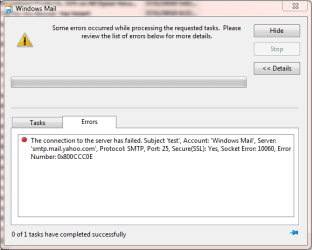
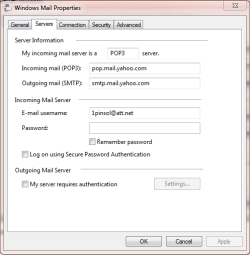
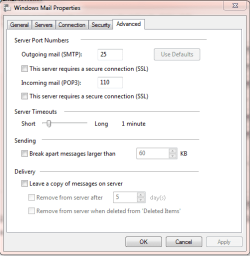
Night Hawk - Thanks for the input, I essentially have the same identical setup that I had before the 'great crash' hehe. Only difference is I had Live Mail installed then. I did check my address book and it was empty. So I added several addresses, but it still won't go. I'm pretty sure the parameters are set right, but thought I would add several screen clips with this reply. Maybe you can spot something? Thank you for the input.
 

Attachments

  • Capture.PNG
    Capture.PNG
    14.6 KB · Views: 3
  • Capture2.PNG
    Capture2.PNG
    12.1 KB · Views: 3
  • Capture3.PNG
    Capture3.PNG
    13.1 KB · Views: 4

My Computer

Computer Manufacturer/Model Number
Self-built
OS
Windows 7 Ultimate 64 bit
CPU
INTEL i7-920
Motherboard
ASUS P6X58D Premium
Memory
6 GB Tri-Channel Corsair 1600 Mhz
Graphics Card(s)
ATI Radeon VISIONTEK HD 5870
Sound Card
On Board (for now)
Monitor(s) Displays
Lenovo 22" 1920 x 1080 native resolution
Hard Drives
Crucial RealSSD C300 256GB
PSU
Topower PowerBird 900 Watt fully modularized
Case
CoolerMaster 922 HAF
Cooling
Dynatron Genius G95
With some ISPs especially where you have an assigned user name and password to set up WMail or OE the second screen show one item left unchecked that would be checked off namely the Outgoing Mail Server item and in the settings you would simply have outgoing set the same as incoming there.

If that was unchecked the old mail here wouldn't connect at all either. The failed to connect error message would have been the same since I've seen that on different occasions until going back into the account properties to verify each item was set correct.

WLive Mail on the other hand avoids all that by connecting directly through IE when logging into any WL Hotmail account you have configured. That can save a lot of headaches when simply forgetting one thing in WM! But this is the first thing to look at there depending on how you generally connect online with or without an ISP assigned user name/password for importing mail from their mail servers.
 

My Computers

System One System Two

  • Computer type
    PC/Desktop
    Computer Manufacturer/Model Number
    Custom builds = 2
    OS
    W7 Ultimate x64/W10 Pro x64/W11 Pro Triple Boot - Main PC W7 Remote PC Micro ATX W7 Pro x64/W11 Pro
    CPU
    AMD Phenom II X4 975 Deneb 3.6ghz - 965 2nd remote pc
    Motherboard
    Gigabyte GA-790XTA-UD4-Gigabyte GA-880GM-D2H remote pc
    Memory
    Kingston Hyper X DDR3 1600 1.5v 16gb - Hyper X Fury 8gb 2nd
    Graphics Card(s)
    MSI HD Radeon 5750 1gb - MSI HD Radeon 6450 on mini tower
    Sound Card
    Creative Labs X-Fi Xtreme Audio P - Realtek onooard 2nd case
    Monitor(s) Displays
    ASUS VW199T-P 19" HP 2082a Main-HP 2082a 20" remote pc
    Screen Resolution
    Asus 1440x900 - HP 1600x900
    Hard Drives
    WD Black 1TB HD per OS W7, W10, and pending W11 presently on 500gb OS Drive - Pending Triple 1TB HDs for Spanned Storage/backup volume
    Single 2TB external USB enclosure, single 1TB System 7 Host/Boot drive, Pending 8TB external HD for system image b
    PSU
    Corsair 750TX - primary / Corsair CX600 - second
    Case
    Antec 900-2 - SSD compatible / NZXT Vulcan mini tower
    Cooling
    Zalman CNPS9900A
    Keyboard
    AZIO L70 Backlit Letters Gaming - ONN Cordless/USB
    Mouse
    MSI DS200 Programmable, Logitech Cordless
    Internet Speed
    30mbps upgrade - primary hard wired - mini tower usb WiFi
    Antivirus
    GFI VIPRE Internet Security 2014 on W7 2016 beta on W10,
    Browser
    Cyberfox, WaterFox 64bit FF variants, FireFox x64, Pale Moon
    Other Info
    Accomdata fan cooled usb 2.0 PIDE/Sata II, III external enclosure.
    Sambient usb/eSata PATA/Sata II, III external enclosure.
  • Computer type
    PC/Desktop
    System Manufacturer/Model Number
    CUSTOM ASSEMBLY
    OS
    W7 Pro x64/W11 Pro
    CPU
    AMD Deneb 3.6ghz - 965
    Motherboard
    Gigabyte GA-880GM-D2H remote pc
    Memory
    Kingston Hyper X Fury 8gb
    Graphics Card(s)
    MSI HD Radeon 6450 DVI Output
    Sound Card
    Realtek onooard Creative or Other separate PENDING
    Monitor(s) Displays
    VIZIO 32" LCD TV Separate LCD Pending
    Screen Resolution
    1600x1080
    Hard Drives
    WD 500GB OS Host/Boot WD Green 1TB Storage/Backup
    PSU
    Corsair 600W - THERMALTAKE 600W spare case
    Case
    NZXT Vulcan mini tower
    Cooling
    Twin 120mm Top Fans - 240mm Side Cover
    Keyboard
    ONN Cordless/USB Logitech Cordless
    Mouse
    ONN USB/Cordless - Logitech Cordless
    Internet Speed
    DSL 5G
    Browser
    MS Edge, FireFox, WaterFox x64, FireFox Nightly
    Other Info
    OS Testing-Remote Access to Main TeamViewer
Could use some help folks - I just reinstated Win Mail using PapaBear's fine tutorial. I receives mail fine, but will not send! :cry: Any thoughts out there? I had it working fine on this PC up 'til about a month ago when the PSU melted down taking out my Mobo and SSD. I got it all back together and reinstated Win Mail, but can't send. Thanks for your help! Ron
I found a guide which lists some things in the setup that doesn't match some of your screenshots
Configure Windows Mail to connect to Yahoo Mail Plus | Windows Vista for Beginners
 

My Computer

Computer Manufacturer/Model Number
Averatec 6130HS-20
OS
Windows 7 Professional 32-bit (6.1, Build 7600)
CPU
Intel(R) Pentium(R) 4 3.00 GHz HT
Memory
2.0 GB
Graphics Card(s)
ATI Mobility Radeon 9600 64MB
Sound Card
Realtek AC'97 Audio
Screen Resolution
1280 x 800
Hard Drives
Seagate 96023A 60GB 7200RPM -
Seagate FreeAgentDesktop 250GB
Cooling
20 Inch Box Fan
Mouse
Targus PAWM10 Wireless Optical Laptop Mouse
He has different tabs open while the article there simply provides more screens. Go back and notice which tabs on the screens are selected and you will see.

On the last screen when using WMail or previously OE I made sure to check off the leave copy on server box in case any mail is lost once downloaded since I would simply go to the mail server online and login there if needed. The sub item for deletion after so many days can also be adjusted unless you plan to keep some indefinitely and manually remove others later.
 

My Computers

System One System Two

  • Computer type
    PC/Desktop
    Computer Manufacturer/Model Number
    Custom builds = 2
    OS
    W7 Ultimate x64/W10 Pro x64/W11 Pro Triple Boot - Main PC W7 Remote PC Micro ATX W7 Pro x64/W11 Pro
    CPU
    AMD Phenom II X4 975 Deneb 3.6ghz - 965 2nd remote pc
    Motherboard
    Gigabyte GA-790XTA-UD4-Gigabyte GA-880GM-D2H remote pc
    Memory
    Kingston Hyper X DDR3 1600 1.5v 16gb - Hyper X Fury 8gb 2nd
    Graphics Card(s)
    MSI HD Radeon 5750 1gb - MSI HD Radeon 6450 on mini tower
    Sound Card
    Creative Labs X-Fi Xtreme Audio P - Realtek onooard 2nd case
    Monitor(s) Displays
    ASUS VW199T-P 19" HP 2082a Main-HP 2082a 20" remote pc
    Screen Resolution
    Asus 1440x900 - HP 1600x900
    Hard Drives
    WD Black 1TB HD per OS W7, W10, and pending W11 presently on 500gb OS Drive - Pending Triple 1TB HDs for Spanned Storage/backup volume
    Single 2TB external USB enclosure, single 1TB System 7 Host/Boot drive, Pending 8TB external HD for system image b
    PSU
    Corsair 750TX - primary / Corsair CX600 - second
    Case
    Antec 900-2 - SSD compatible / NZXT Vulcan mini tower
    Cooling
    Zalman CNPS9900A
    Keyboard
    AZIO L70 Backlit Letters Gaming - ONN Cordless/USB
    Mouse
    MSI DS200 Programmable, Logitech Cordless
    Internet Speed
    30mbps upgrade - primary hard wired - mini tower usb WiFi
    Antivirus
    GFI VIPRE Internet Security 2014 on W7 2016 beta on W10,
    Browser
    Cyberfox, WaterFox 64bit FF variants, FireFox x64, Pale Moon
    Other Info
    Accomdata fan cooled usb 2.0 PIDE/Sata II, III external enclosure.
    Sambient usb/eSata PATA/Sata II, III external enclosure.
  • Computer type
    PC/Desktop
    System Manufacturer/Model Number
    CUSTOM ASSEMBLY
    OS
    W7 Pro x64/W11 Pro
    CPU
    AMD Deneb 3.6ghz - 965
    Motherboard
    Gigabyte GA-880GM-D2H remote pc
    Memory
    Kingston Hyper X Fury 8gb
    Graphics Card(s)
    MSI HD Radeon 6450 DVI Output
    Sound Card
    Realtek onooard Creative or Other separate PENDING
    Monitor(s) Displays
    VIZIO 32" LCD TV Separate LCD Pending
    Screen Resolution
    1600x1080
    Hard Drives
    WD 500GB OS Host/Boot WD Green 1TB Storage/Backup
    PSU
    Corsair 600W - THERMALTAKE 600W spare case
    Case
    NZXT Vulcan mini tower
    Cooling
    Twin 120mm Top Fans - 240mm Side Cover
    Keyboard
    ONN Cordless/USB Logitech Cordless
    Mouse
    ONN USB/Cordless - Logitech Cordless
    Internet Speed
    DSL 5G
    Browser
    MS Edge, FireFox, WaterFox x64, FireFox Nightly
    Other Info
    OS Testing-Remote Access to Main TeamViewer
Back
Top