
Win Media Player, no controls

Getyogrooveon

New member
Local time
1:56 AM
Messages
5
Just started getting a really frustrating issue with Windows Media Player (x32 and x64 versions) on Windows 7 Ultimate x64. Had same system setup/ installation for years, no new software etc.

The skip forward and backwards buttons are greyed out, and cannot be used, additionally if you play a song by double clicking it in the library, when it finishes, WMP does not the proceed to the next track, it just stops.
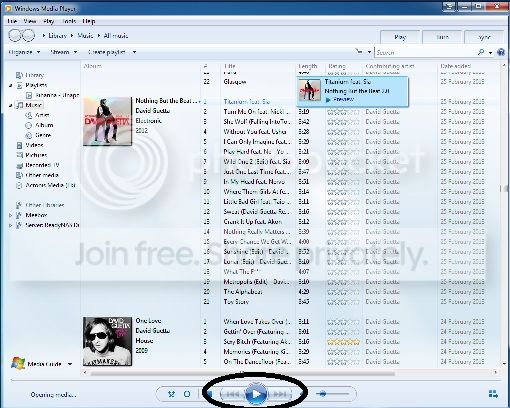
Untitled.jpg


This originally started after installing IE10, which I uninstalled, to no avail. Now done 2 reformat/ reinstalls. Everything works OK for a little while, then all of a sudden the buttons stop working again. Only reverting to a backup reinstates them (even though nothing has been installed since the backup) and then everything works for a few days and then all of sudden it stops.

If anyone could shed any light on this I would be most greatfull.
 

My Computer

Computer type
PC/Desktop
OS
Windows 7 Ultimate x64

My Computer

Computer type
PC/Desktop
Computer Manufacturer/Model Number
Own build (new) Desk1 / Asus ROG Win 7 / Desk2 1st build
OS
Desk1 7 Home Prem / Desk2 10 Pro / Main lap Asus ROG 10 Pro 2 laptop Toshiba 7 Pro Asus P2520 7 & 10
CPU
Desk1 i5 3750K / Laptop i7 GTX 860M / Desk2 i5 2500
Motherboard
Desk1 Asus P877-V / Desk2 Gigabyte H67 UD3H / Laptop ?
Memory
Desk1 8GB (1866) / Desk2 16GB (1333) / Laptop 8Gb DDR3
Graphics Card(s)
Desk 1& 2NVidia GTX 650 & Laptops on board Intel
Sound Card
Desk 1 & 2 -XONAR DG Realtek High Def audio Laptop
Monitor(s) Displays
Desk 1 Benq HD 2450 / Desk2 Philips 24" / Laptop 17.5"
Screen Resolution
1920x1080 D1 & D2 & Laptop 1
Hard Drives
Desk1 Samsung 120GB 830 SSD
Asus ROG 256GB 850 Pro SSD
Desk2 Samsung 840 256 SSD
Toshiba 120GB EVO
PSU
Desk 1 Corsair HX 1050/ Laptop ? / Desk 2 Corsair HX 650
Case
Desk 1 Cooler HAF XM ? Toshiba laptop / Desk2 Coolermaster
Cooling
Fans on all Desk1 -2 Desk2 - all Coolermasters 5 Laptop ?
Keyboard
Desk 1 MS Sidewinder X6 Desk 2 MS Sidewinder X 4
Mouse
Desk 1&2 - Gigabyte MS 900 gamer - laptop - Logitec wireless
Internet Speed
ADSL2+
Other Info
One other Desktop (tester) and spare Toshba laptop both with SSD's
Running Kaspersky 2016 ISS on all machines config'd identically
Logitec audio stereo systems on each machine (x3)
Canon MG5250MFC
Router/modem TP-Link running WPA2SK
Thanks for the reply.

Have done both sfc /scannow and chkdisk, as well a complete reformat/ reinstall (twice), the second time not allowing IE10 to install. All of which have ended up the same way.
 
Last edited:

My Computer

Computer type
PC/Desktop
OS
Windows 7 Ultimate x64
Do you have a 3rd party media player that might be interfering with the proper operation of Windows Media Player?
What Tune Up or Registry Cleaners programs do you use?
 

My Computer

Computer type
PC/Desktop
Computer Manufacturer/Model Number
Home made Desktop
OS
Windows 10 Pro. 64/ version 1709 Windows 7 Pro/64
CPU
Intel i7-6800K @ 4.3
Motherboard
ASUS X-99 Deluxe II
Memory
Corsair Platinum 16 gig @2400
Graphics Card(s)
EVGA GTX 1070 OC
Monitor(s) Displays
Asus 27" LED LCD/VE278Q
Screen Resolution
1920-1080 or 1280-720 HDMI
Hard Drives
INTEL SSD 730-240 Gb Sata 3.0/
PSU
EVGA Platium 1200W
Case
Phanteks Luxe Tempered Glass 8 fans/ one radiator
Cooling
XSPC/ Water Cooled CPU
Keyboard
Das 4 Professional
Mouse
Logitech M705/MX Anywhere 2-S
Internet Speed
100 mbits
Antivirus
Microsoft Security Essentials/ Malwarebytes Premium 3.0/ SAS
Browser
I.E. 11 default/Firefox/ ISP Time Warner Cable/Spectrum
Other Info
LG BluRay Burner/
Sound system-KLipsch-THX/
Icy Dock ssd Hot Swap bays.
Hi Layback Bear
No other media players installed. The PC is used as a media centre primarily, along with a bit of photo/video editing so the only things I have installed are:

Commodo Internet Security (have also tried an install with McAfee instead)
Skype
MS Office 2010
Adobe Master Collection CS5
Shark 007 Codec pack (have also tried and install with K-Lite instead)
Printer drivers

All seems to work fine until the full media library has been built, then after the next reboot, the controls have gone. tried several ways of do it, i.e. building the media library before installing anything else, installing everything else first then building media library.

I have had this set up for years, with all of the same software (I have even tried installing the older versions of all of the software), then all of a sudden, a few weeks ago media player breaks, and cant seem to resolve it).
 

My Computer

Computer type
PC/Desktop
OS
Windows 7 Ultimate x64
What Windows Media Player are you using?

After your reformat have you installed all Windows Updates including SP-1?

Have you had any problems installing Windows Updates?
 

My Computer

Computer type
PC/Desktop
Computer Manufacturer/Model Number
Home made Desktop
OS
Windows 10 Pro. 64/ version 1709 Windows 7 Pro/64
CPU
Intel i7-6800K @ 4.3
Motherboard
ASUS X-99 Deluxe II
Memory
Corsair Platinum 16 gig @2400
Graphics Card(s)
EVGA GTX 1070 OC
Monitor(s) Displays
Asus 27" LED LCD/VE278Q
Screen Resolution
1920-1080 or 1280-720 HDMI
Hard Drives
INTEL SSD 730-240 Gb Sata 3.0/
PSU
EVGA Platium 1200W
Case
Phanteks Luxe Tempered Glass 8 fans/ one radiator
Cooling
XSPC/ Water Cooled CPU
Keyboard
Das 4 Professional
Mouse
Logitech M705/MX Anywhere 2-S
Internet Speed
100 mbits
Antivirus
Microsoft Security Essentials/ Malwarebytes Premium 3.0/ SAS
Browser
I.E. 11 default/Firefox/ ISP Time Warner Cable/Spectrum
Other Info
LG BluRay Burner/
Sound system-KLipsch-THX/
Icy Dock ssd Hot Swap bays.
WMP version = 12.0.7601.17514

tried with both the 64 bit and 32 bit players

Have installed all windows updates (installing from a SP1 disk), all apply OK.

Have tried running CCcleaner with no difference.

Have now just started rebuilding library (stopped windows network sharing service, deleted all the wmp database files, started service) and the controls are back (as usual when building library for first time) and will report back once library is fully rebuilt (takes a while, 50gb of music to go through) and I have rebooted.
 

My Computer

Computer type
PC/Desktop
OS
Windows 7 Ultimate x64
Did yuo try those on call malware scans and an option might be WMP 11 Plus mate are you running two AV's ) a no no)

If you want a decent freebie Bitdefender is one I have gone over to from Comodo as those utilities with CIS now are very annoying and will crap your machine if you are not VERY careful - take it from on who has done it.

Free Antivirus Software - Download Bitdefender Australia Free Edition & these

http://www.superantispyware.com/

http://www.malwarebytes.org/products/malwarebytes_free/

http://www.bleepingcomputer.com/download/adwcleaner/< from bleeping computer
 

My Computer

Computer type
PC/Desktop
Computer Manufacturer/Model Number
Own build (new) Desk1 / Asus ROG Win 7 / Desk2 1st build
OS
Desk1 7 Home Prem / Desk2 10 Pro / Main lap Asus ROG 10 Pro 2 laptop Toshiba 7 Pro Asus P2520 7 & 10
CPU
Desk1 i5 3750K / Laptop i7 GTX 860M / Desk2 i5 2500
Motherboard
Desk1 Asus P877-V / Desk2 Gigabyte H67 UD3H / Laptop ?
Memory
Desk1 8GB (1866) / Desk2 16GB (1333) / Laptop 8Gb DDR3
Graphics Card(s)
Desk 1& 2NVidia GTX 650 & Laptops on board Intel
Sound Card
Desk 1 & 2 -XONAR DG Realtek High Def audio Laptop
Monitor(s) Displays
Desk 1 Benq HD 2450 / Desk2 Philips 24" / Laptop 17.5"
Screen Resolution
1920x1080 D1 & D2 & Laptop 1
Hard Drives
Desk1 Samsung 120GB 830 SSD
Asus ROG 256GB 850 Pro SSD
Desk2 Samsung 840 256 SSD
Toshiba 120GB EVO
PSU
Desk 1 Corsair HX 1050/ Laptop ? / Desk 2 Corsair HX 650
Case
Desk 1 Cooler HAF XM ? Toshiba laptop / Desk2 Coolermaster
Cooling
Fans on all Desk1 -2 Desk2 - all Coolermasters 5 Laptop ?
Keyboard
Desk 1 MS Sidewinder X6 Desk 2 MS Sidewinder X 4
Mouse
Desk 1&2 - Gigabyte MS 900 gamer - laptop - Logitec wireless
Internet Speed
ADSL2+
Other Info
One other Desktop (tester) and spare Toshba laptop both with SSD's
Running Kaspersky 2016 ISS on all machines config'd identically
Logitec audio stereo systems on each machine (x3)
Canon MG5250MFC
Router/modem TP-Link running WPA2SK
My understanding is OP has tried both but one at a time.
Post #5

Commodo Internet Security (have also tried an install with McAfee instead)
 

My Computer

Computer type
PC/Desktop
Computer Manufacturer/Model Number
Home made Desktop
OS
Windows 10 Pro. 64/ version 1709 Windows 7 Pro/64
CPU
Intel i7-6800K @ 4.3
Motherboard
ASUS X-99 Deluxe II
Memory
Corsair Platinum 16 gig @2400
Graphics Card(s)
EVGA GTX 1070 OC
Monitor(s) Displays
Asus 27" LED LCD/VE278Q
Screen Resolution
1920-1080 or 1280-720 HDMI
Hard Drives
INTEL SSD 730-240 Gb Sata 3.0/
PSU
EVGA Platium 1200W
Case
Phanteks Luxe Tempered Glass 8 fans/ one radiator
Cooling
XSPC/ Water Cooled CPU
Keyboard
Das 4 Professional
Mouse
Logitech M705/MX Anywhere 2-S
Internet Speed
100 mbits
Antivirus
Microsoft Security Essentials/ Malwarebytes Premium 3.0/ SAS
Browser
I.E. 11 default/Firefox/ ISP Time Warner Cable/Spectrum
Other Info
LG BluRay Burner/
Sound system-KLipsch-THX/
Icy Dock ssd Hot Swap bays.
My understanding is OP has tried both but one at a time.
Post #5

Commodo Internet Security (have also tried an install with McAfee instead)


that's correct, not tried running both, separate installs with a reformat in-between.

Just finished rebuilding library. Everything worked OK, reboot, back to no controls (although this time the "forward" button is available, but only as a fast forward button within a track - does not work as a "next track" button, and at the end of playing a selected track, WMP just stops).

Have 2 other PCs with similar installs, both of with are working fine. Obviously as WMC is essentially a front end for WMP, this is crucial functionality as want to play an album not just single tracks.
 

My Computer

Computer type
PC/Desktop
OS
Windows 7 Ultimate x64
My understanding is OP has tried both but one at a time.
Post #5

Commodo Internet Security (have also tried an install with McAfee instead)
Hum sorry missed that:o

Well I never had problems with CIS and WMP on the testers or fixes I have done so I guess it is not a conflict between them.

The only things I can suggest and then I'll butt out is tyr those on call scans and maybe just double clicking on the playlist to the track you want to change ahead. Sorry again if I confused the issue.
 

My Computer

Computer type
PC/Desktop
Computer Manufacturer/Model Number
Own build (new) Desk1 / Asus ROG Win 7 / Desk2 1st build
OS
Desk1 7 Home Prem / Desk2 10 Pro / Main lap Asus ROG 10 Pro 2 laptop Toshiba 7 Pro Asus P2520 7 & 10
CPU
Desk1 i5 3750K / Laptop i7 GTX 860M / Desk2 i5 2500
Motherboard
Desk1 Asus P877-V / Desk2 Gigabyte H67 UD3H / Laptop ?
Memory
Desk1 8GB (1866) / Desk2 16GB (1333) / Laptop 8Gb DDR3
Graphics Card(s)
Desk 1& 2NVidia GTX 650 & Laptops on board Intel
Sound Card
Desk 1 & 2 -XONAR DG Realtek High Def audio Laptop
Monitor(s) Displays
Desk 1 Benq HD 2450 / Desk2 Philips 24" / Laptop 17.5"
Screen Resolution
1920x1080 D1 & D2 & Laptop 1
Hard Drives
Desk1 Samsung 120GB 830 SSD
Asus ROG 256GB 850 Pro SSD
Desk2 Samsung 840 256 SSD
Toshiba 120GB EVO
PSU
Desk 1 Corsair HX 1050/ Laptop ? / Desk 2 Corsair HX 650
Case
Desk 1 Cooler HAF XM ? Toshiba laptop / Desk2 Coolermaster
Cooling
Fans on all Desk1 -2 Desk2 - all Coolermasters 5 Laptop ?
Keyboard
Desk 1 MS Sidewinder X6 Desk 2 MS Sidewinder X 4
Mouse
Desk 1&2 - Gigabyte MS 900 gamer - laptop - Logitec wireless
Internet Speed
ADSL2+
Other Info
One other Desktop (tester) and spare Toshba laptop both with SSD's
Running Kaspersky 2016 ISS on all machines config'd identically
Logitec audio stereo systems on each machine (x3)
Canon MG5250MFC
Router/modem TP-Link running WPA2SK
Back
Top