DameonHuber
New member
- Local time
- 3:38 AM
- Messages
- 18
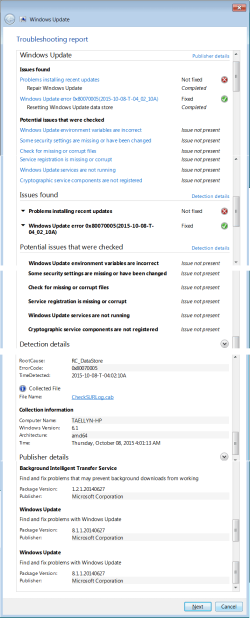
Greetings, I am having issues with Windows Update! First of all when I click the Icon "Windows Update" It actually takes a few moments to get there, which is very unusual! When it does finally come up it shows an "X" on a red shield and says "Check for Updates for your computer - Always install the latest updates to enhance your computer's security and performance" So I click "Check for Updates" and immediately receive an error! "Windows Update cannot currently check for updates, because the service is not running. You may need to restart your computer." Nope, that doesn't work nor did completely shutting it down. So I opened the Administrative Tools and then Services. Scrolled down until I located Windows Update, and clicked on Start the service. I receive the following error: Windows count not start the Windows Update service on Local Computer. Error 0x8007277a: The requested service provider could not be loaded or initialized. So I went to Bing typed in the error code and located a Microsoft webpage about the error and started following instructions and ran First the Norton removal tool, then removed AVG then downloaded and ran Windows Update Diagnostic. It did not fix all the issues. Weird that it told me to run in default & aggressive modes, but there was no different modes.
Website: Error Page - Microsoft Community
The attachment Troubleshooting WU error.png is what I get when I ran the diagnostic. The Troubleshooting WU error details.png is well the details of that error.
So after that I went back to the MS website to run the Manual repair. Website: https://support.microsoft.com/en-us/kb/971058
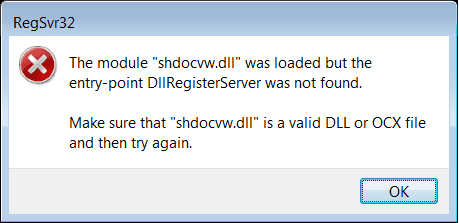
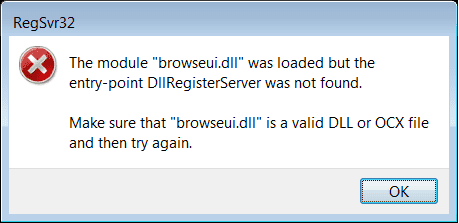
I backed up the registry keys like it said. Running the commands to stop services that it told me to the first three services stated that they were not started. When I got to the last one the net stop cryptsvc I get the error: System Error 5 has occurred. Access is denied. So I continued on. And typed the commands for qmgr*.dat and it said it could not find it. So I continued on with the dll's and the first two were successful. Then more errors occurred. Regretfully I did not think to screenshot the mshtml.dll error, but got the next two for y'all. See attachments: shdocvw_dll error.png and browseui_dll Error.png for more info.
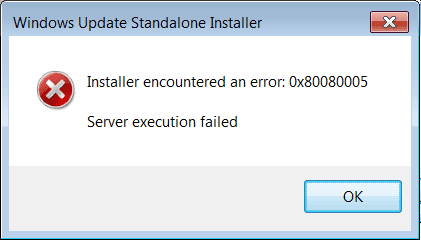
So I come here to the forums locate WU threads and read that y'all have requirements before posting. I downloaded and attempted to run the Stand alone Installer and got an error! See WinUpdate Standalone Installer Error.png for more info! I am seriously stuck. I know there was more stuff y'all needed but I am flustered and exasperated at the moment so please forgive me if I haven't given everything you need! Please be patient with me and tell me what all else is needed. I am about had it and just factory restore my system again. About tired of that, would be my 3rd time if I do. That is why I am here.
Website: Error Page - Microsoft Community
The attachment Troubleshooting WU error.png is what I get when I ran the diagnostic. The Troubleshooting WU error details.png is well the details of that error.
So after that I went back to the MS website to run the Manual repair. Website: https://support.microsoft.com/en-us/kb/971058
I backed up the registry keys like it said. Running the commands to stop services that it told me to the first three services stated that they were not started. When I got to the last one the net stop cryptsvc I get the error: System Error 5 has occurred. Access is denied. So I continued on. And typed the commands for qmgr*.dat and it said it could not find it. So I continued on with the dll's and the first two were successful. Then more errors occurred. Regretfully I did not think to screenshot the mshtml.dll error, but got the next two for y'all. See attachments: shdocvw_dll error.png and browseui_dll Error.png for more info.
So I come here to the forums locate WU threads and read that y'all have requirements before posting. I downloaded and attempted to run the Stand alone Installer and got an error! See WinUpdate Standalone Installer Error.png for more info! I am seriously stuck. I know there was more stuff y'all needed but I am flustered and exasperated at the moment so please forgive me if I haven't given everything you need! Please be patient with me and tell me what all else is needed. I am about had it and just factory restore my system again. About tired of that, would be my 3rd time if I do. That is why I am here.
Attachments

My Computer
- Computer type
- PC/Desktop
- Computer Manufacturer/Model Number
- Compaq Presario CQ5720F
- OS
- Windows 7 Home Premium, system 64 bit
- Memory
- 3.0 GB RAM (2.75 GB Usable)
- Graphics Card(s)
- ATI Radeon 3000 Graphics
- Sound Card
- realtech high definition audio
- Monitor(s) Displays
- Gateway VX900
- Hard Drives
- WDC WD64 00AAKS-65Z7B0 SATA Disk Device
- Browser
- Google Chrome Version 44.0.2403.125 m