Solved Win-update > Sys-restore points gone; how open/use sys-vol-info folder

JamesEJ

New member
Member
VIP
Local time
5:17 AM
Messages
242
Win-update > Sys-restore points gone; how open/use sys-vol-info folder

Well Hello Guys. Yesterday did a slightly belated windows update. Now one (1) too recent system restore point exists.:cry:

But I under stand that all system restore points are save in the "system information folder".

First, How do I open that folder. See bunch xp methods but not Win7.

Second, once this folder is open, can I select the sys-restore point I want and turn the clock back, just like when using a regular system restore point? See nothing on this point.:(

Appreciate your help in advance guys, Jim
 

My Computer My Computer

Computer type
PC/Desktop
Computer Manufacturer/Model Number
gateway
OS
win7 Home Premium x64
Antivirus
avast
Browser
Firefox
Welcome to our forum JamesEJ.

Here is a tutorial by Brink that will guide you step at a time.

http://www.sevenforums.com/tutorials/700-system-restore.html

Their have been problems reported using Avast.
Avast hides or removes the restore points.

By now their should be a repair for that problem on the Avast Forum.

Computer type PC/Desktop
System Manufacturer/Model Number gateway
OS win7 Home Premium x64

Antivirus avast
Browser Firefox
You can use this from the cmd prompt as admin to check and see if Windows 7 see any restore point.

Code:
Vssadmin list shadows
 

My Computer My Computer

Computer type
PC/Desktop
Computer Manufacturer/Model Number
Home made Desktop
OS
Windows 10 Pro. 64/ version 1709 Windows 7 Pro/64
CPU
Intel i7-6800K @ 4.3
Motherboard
ASUS X-99 Deluxe II
Memory
Corsair Platinum 16 gig @2400
Graphics Card(s)
EVGA GTX 1070 OC
Monitor(s) Displays
Asus 27" LED LCD/VE278Q
Screen Resolution
1920-1080 or 1280-720 HDMI
Hard Drives
INTEL SSD 730-240 Gb Sata 3.0/
PSU
EVGA Platium 1200W
Case
Phanteks Luxe Tempered Glass 8 fans/ one radiator
Cooling
XSPC/ Water Cooled CPU
Keyboard
Das 4 Professional
Mouse
Logitech M705/MX Anywhere 2-S
Internet Speed
100 mbits
Antivirus
Microsoft Security Essentials/ Malwarebytes Premium 3.0/ SAS
Browser
I.E. 11 default/Firefox/ ISP Time Warner Cable/Spectrum
Other Info
LG BluRay Burner/
Sound system-KLipsch-THX/
Icy Dock ssd Hot Swap bays.
Thanks for the heads up Layback! Will checkout & advise. Jim
 

My Computer My Computer

Computer type
PC/Desktop
Computer Manufacturer/Model Number
gateway
OS
win7 Home Premium x64
Antivirus
avast
Browser
Firefox
I have updated my post. Take another read.
 

My Computer My Computer

Computer type
PC/Desktop
Computer Manufacturer/Model Number
Home made Desktop
OS
Windows 10 Pro. 64/ version 1709 Windows 7 Pro/64
CPU
Intel i7-6800K @ 4.3
Motherboard
ASUS X-99 Deluxe II
Memory
Corsair Platinum 16 gig @2400
Graphics Card(s)
EVGA GTX 1070 OC
Monitor(s) Displays
Asus 27" LED LCD/VE278Q
Screen Resolution
1920-1080 or 1280-720 HDMI
Hard Drives
INTEL SSD 730-240 Gb Sata 3.0/
PSU
EVGA Platium 1200W
Case
Phanteks Luxe Tempered Glass 8 fans/ one radiator
Cooling
XSPC/ Water Cooled CPU
Keyboard
Das 4 Professional
Mouse
Logitech M705/MX Anywhere 2-S
Internet Speed
100 mbits
Antivirus
Microsoft Security Essentials/ Malwarebytes Premium 3.0/ SAS
Browser
I.E. 11 default/Firefox/ ISP Time Warner Cable/Spectrum
Other Info
LG BluRay Burner/
Sound system-KLipsch-THX/
Icy Dock ssd Hot Swap bays.
Just looked, Brink's tut is for a real nice beginner sys-restore user alright,
but honestly not on point, because I am:

(1) looking to find lost or unfound sys-restore points in my "system information folder", from which:

(2) I can activate chosen points of multiple ones that had existed before the $M update.

Does this clear this issue up for you? Hope so!:)

Thanks very much, Jim
 

My Computer My Computer

Computer type
PC/Desktop
Computer Manufacturer/Model Number
gateway
OS
win7 Home Premium x64
Antivirus
avast
Browser
Firefox
will advise on your updated post, tks. Jim
 

My Computer My Computer

Computer type
PC/Desktop
Computer Manufacturer/Model Number
gateway
OS
win7 Home Premium x64
Antivirus
avast
Browser
Firefox
No idea what this all really means! Did I goof?:rolleyes:

Microsoft Windows [Version 6.1.7601]
Copyright (c) 2009 Microsoft Corporation. All rights reserved.

C:\Users\PaperBusMobile>Vssadmin list shadows
vssadmin 1.1 - Volume Shadow Copy Service administrative command-line tool
(C) Copyright 2001-2005 Microsoft Corp.

Contents of shadow copy set ID: {4bdb678f-30c8-4471-88f7-aa97122f1672}
Contained 2 shadow copies at creation time: 9/2/2015 8:08:24 PM
Shadow Copy ID: {25988ca6-c8ad-4f1d-ab45-1599a6b2fc4e}
Original Volume: (C:)\\?\Volume{d655f046-5ba3-11e3-852a-806e6f6e6963}\
Shadow Copy Volume: \\?\GLOBALROOT\Device\HarddiskVolumeShadowCopy4
Originating Machine: PaperBusPC
Service Machine: PaperBusPC
Provider: 'Microsoft Software Shadow Copy provider 1.0'
Type: ClientAccessibleWriters
Attributes: Persistent, Client-accessible, No auto release, Differentia
l, Auto recovered

Shadow Copy ID: {476e64cc-2483-476b-92a5-11c2df408e9a}
Original Volume: (\\?\Volume{d655f044-5ba3-11e3-852a-806e6f6e6963}\)\\?
\Volume{d655f044-5ba3-11e3-852a-806e6f6e6963}\
Shadow Copy Volume: \\?\GLOBALROOT\Device\HarddiskVolumeShadowCopy1
Originating Machine: PaperBusPC
Service Machine: PaperBusPC
Provider: 'Microsoft Software Shadow Copy provider 1.0'
Type: ClientAccessibleWriters
Attributes: Persistent, Client-accessible, No auto release, Differentia
l, Auto recovered

Contents of shadow copy set ID: {67322e27-cb43-4a2d-8a0a-2fa246310ddc}
Contained 2 shadow copies at creation time: 9/3/2015 2:01:00 PM
Shadow Copy ID: {233c7d98-5de5-499e-ab23-a577c5397db1}
Original Volume: (C:)\\?\Volume{d655f046-5ba3-11e3-852a-806e6f6e6963}\
Shadow Copy Volume: \\?\GLOBALROOT\Device\HarddiskVolumeShadowCopy5
Originating Machine: PaperBusPC
Service Machine: PaperBusPC
Provider: 'Microsoft Software Shadow Copy provider 1.0'
Type: ClientAccessibleWriters
Attributes: Persistent, Client-accessible, No auto release, Differentia
l, Auto recovered

Shadow Copy ID: {fb4d5c3a-b769-44b8-a3b7-cc4da40d0a13}
Original Volume: (\\?\Volume{d655f044-5ba3-11e3-852a-806e6f6e6963}\)\\?
\Volume{d655f044-5ba3-11e3-852a-806e6f6e6963}\
Shadow Copy Volume: \\?\GLOBALROOT\Device\HarddiskVolumeShadowCopy2
Originating Machine: PaperBusPC
Service Machine: PaperBusPC
Provider: 'Microsoft Software Shadow Copy provider 1.0'
Type: ClientAccessibleWriters
Attributes: Persistent, Client-accessible, No auto release, Differentia
l, Auto recovered

Contents of shadow copy set ID: {2e2a9613-2c07-4560-a8c9-1c427928efa6}
Contained 2 shadow copies at creation time: 9/3/2015 3:53:18 PM
Shadow Copy ID: {6c0bf580-7e70-4fd3-9b2c-7665ed4dad0f}
Original Volume: (C:)\\?\Volume{d655f046-5ba3-11e3-852a-806e6f6e6963}\
Shadow Copy Volume: \\?\GLOBALROOT\Device\HarddiskVolumeShadowCopy6
Originating Machine: PaperBusPC
Service Machine: PaperBusPC
Provider: 'Microsoft Software Shadow Copy provider 1.0'
Type: ClientAccessibleWriters
Attributes: Persistent, Client-accessible, No auto release, Differentia
l, Auto recovered

Shadow Copy ID: {a72cec5d-8170-4552-814f-d1890e356dec}
Original Volume: (\\?\Volume{d655f044-5ba3-11e3-852a-806e6f6e6963}\)\\?
\Volume{d655f044-5ba3-11e3-852a-806e6f6e6963}\
Shadow Copy Volume: \\?\GLOBALROOT\Device\HarddiskVolumeShadowCopy3
Originating Machine: PaperBusPC
Service Machine: PaperBusPC
Provider: 'Microsoft Software Shadow Copy provider 1.0'
Type: ClientAccessibleWriters
Attributes: Persistent, Client-accessible, No auto release, Differentia
l, Auto recovered


C:\Users\PaperBusMobile>

 
Last edited by a moderator:

My Computer My Computer

Computer type
PC/Desktop
Computer Manufacturer/Model Number
gateway
OS
win7 Home Premium x64
Antivirus
avast
Browser
Firefox
I'm no expert but to me it means that Windows 7 is seeing Restore Points.

Are you saying that using the tutorial by Brink you can't find the Restore Points?
Or are you saying you would rather choose and use your restore points in another fashion?

Example from your log.

Contents of shadow copy set ID: {2e2a9613-2c07-4560-a8c9-1c427928efa6}
Contained 2 shadow copies at creation time: 9/3/2015 3:53:18 PM

What exactly are you trying to do?
 

My Computer My Computer

Computer type
PC/Desktop
Computer Manufacturer/Model Number
Home made Desktop
OS
Windows 10 Pro. 64/ version 1709 Windows 7 Pro/64
CPU
Intel i7-6800K @ 4.3
Motherboard
ASUS X-99 Deluxe II
Memory
Corsair Platinum 16 gig @2400
Graphics Card(s)
EVGA GTX 1070 OC
Monitor(s) Displays
Asus 27" LED LCD/VE278Q
Screen Resolution
1920-1080 or 1280-720 HDMI
Hard Drives
INTEL SSD 730-240 Gb Sata 3.0/
PSU
EVGA Platium 1200W
Case
Phanteks Luxe Tempered Glass 8 fans/ one radiator
Cooling
XSPC/ Water Cooled CPU
Keyboard
Das 4 Professional
Mouse
Logitech M705/MX Anywhere 2-S
Internet Speed
100 mbits
Antivirus
Microsoft Security Essentials/ Malwarebytes Premium 3.0/ SAS
Browser
I.E. 11 default/Firefox/ ISP Time Warner Cable/Spectrum
Other Info
LG BluRay Burner/
Sound system-KLipsch-THX/
Icy Dock ssd Hot Swap bays.
Frankly I just said it..twice. No, the standard sys-restore program shows nothing but one (1) only system restore point >> But I know for a Fact more exist (maybe?>existed) So every reasonable effective means to just simply see a list of sys-restore points in the subject "FOLDER" (sorry>no shout) and be able to activate each point (if any) would be a wonderful adventure!!! Jim:D
 

My Computer My Computer

Computer type
PC/Desktop
Computer Manufacturer/Model Number
gateway
OS
win7 Home Premium x64
Antivirus
avast
Browser
Firefox
Did you or did you not check the Avast Forum for restore point problems?

I have no more suggestions but I will ask others to have a look.
 

My Computer My Computer

Computer type
PC/Desktop
Computer Manufacturer/Model Number
Home made Desktop
OS
Windows 10 Pro. 64/ version 1709 Windows 7 Pro/64
CPU
Intel i7-6800K @ 4.3
Motherboard
ASUS X-99 Deluxe II
Memory
Corsair Platinum 16 gig @2400
Graphics Card(s)
EVGA GTX 1070 OC
Monitor(s) Displays
Asus 27" LED LCD/VE278Q
Screen Resolution
1920-1080 or 1280-720 HDMI
Hard Drives
INTEL SSD 730-240 Gb Sata 3.0/
PSU
EVGA Platium 1200W
Case
Phanteks Luxe Tempered Glass 8 fans/ one radiator
Cooling
XSPC/ Water Cooled CPU
Keyboard
Das 4 Professional
Mouse
Logitech M705/MX Anywhere 2-S
Internet Speed
100 mbits
Antivirus
Microsoft Security Essentials/ Malwarebytes Premium 3.0/ SAS
Browser
I.E. 11 default/Firefox/ ISP Time Warner Cable/Spectrum
Other Info
LG BluRay Burner/
Sound system-KLipsch-THX/
Icy Dock ssd Hot Swap bays.
Thanks much for your genuine time & interest. Not anyone knows everything though some make out pretenses they do. You are honest and an "I do not know" like you just said by inference is Greatly appreciated!! A GOOD answer!! Thank you so very much for your private time to help a lost stranger. Jim
 

My Computer My Computer

Computer type
PC/Desktop
Computer Manufacturer/Model Number
gateway
OS
win7 Home Premium x64
Antivirus
avast
Browser
Firefox
Oh, and no did not check out avast yet. Much appreciated reminder though. Have a Good night Guy, Jim.
 

My Computer My Computer

Computer type
PC/Desktop
Computer Manufacturer/Model Number
gateway
OS
win7 Home Premium x64
Antivirus
avast
Browser
Firefox
I know when I don't know or understand.

Have a nice day.
 

My Computer My Computer

Computer type
PC/Desktop
Computer Manufacturer/Model Number
Home made Desktop
OS
Windows 10 Pro. 64/ version 1709 Windows 7 Pro/64
CPU
Intel i7-6800K @ 4.3
Motherboard
ASUS X-99 Deluxe II
Memory
Corsair Platinum 16 gig @2400
Graphics Card(s)
EVGA GTX 1070 OC
Monitor(s) Displays
Asus 27" LED LCD/VE278Q
Screen Resolution
1920-1080 or 1280-720 HDMI
Hard Drives
INTEL SSD 730-240 Gb Sata 3.0/
PSU
EVGA Platium 1200W
Case
Phanteks Luxe Tempered Glass 8 fans/ one radiator
Cooling
XSPC/ Water Cooled CPU
Keyboard
Das 4 Professional
Mouse
Logitech M705/MX Anywhere 2-S
Internet Speed
100 mbits
Antivirus
Microsoft Security Essentials/ Malwarebytes Premium 3.0/ SAS
Browser
I.E. 11 default/Firefox/ ISP Time Warner Cable/Spectrum
Other Info
LG BluRay Burner/
Sound system-KLipsch-THX/
Icy Dock ssd Hot Swap bays.
Cool. Best True wishes from Greater Seattle, WA, USA
 

My Computer My Computer

Computer type
PC/Desktop
Computer Manufacturer/Model Number
gateway
OS
win7 Home Premium x64
Antivirus
avast
Browser
Firefox
Hello Jim mate I don't know if this article may of any help Where are the Windows 7 System Restore Points stored and how to preserve them? - Super User and thing is have you done many disk cleans of late or on a regular basis because it will turf out old restore points:(
ie C: > Properties > Disk Clean > then the Advanced one will pop up and if you click that it cleans all the old update crap and if I am not terribly wrong - some of the restore points.

I would as a matter of fact run these to rules out anything untoward there (unless you have already;))

http://www.sevenforums.com/tutorials/1538-sfc-scannow-command-system-file-checker.html

http://www.sevenforums.com/tutorials/433-disk-check.html< if necessary include the /f and /r in the command line as per Option2 >in safe mode if need be

Then these

https://www.malwarebytes.org/mwb-download/index.html

http://www.superantispyware.com/

http://www.bleepingcomputer.com/download/adwcleaner/

ADW download from bleepingcomputer delete any rubbish found with the malware scans

NB If anyone is runningKaspersky security it may rant about ADW - just ignore it or disable it for awhile
 

My Computer My Computer

Computer type
PC/Desktop
Computer Manufacturer/Model Number
Own build (new) Desk1 / Asus ROG Win 7 / Desk2 1st build
OS
Desk1 7 Home Prem / Desk2 10 Pro / Main lap Asus ROG 10 Pro 2 laptop Toshiba 7 Pro Asus P2520 7 & 10
CPU
Desk1 i5 3750K / Laptop i7 GTX 860M / Desk2 i5 2500
Motherboard
Desk1 Asus P877-V / Desk2 Gigabyte H67 UD3H / Laptop ?
Memory
Desk1 8GB (1866) / Desk2 16GB (1333) / Laptop 8Gb DDR3
Graphics Card(s)
Desk 1& 2NVidia GTX 650 & Laptops on board Intel
Sound Card
Desk 1 & 2 -XONAR DG Realtek High Def audio Laptop
Monitor(s) Displays
Desk 1 Benq HD 2450 / Desk2 Philips 24" / Laptop 17.5"
Screen Resolution
1920x1080 D1 & D2 & Laptop 1
Hard Drives
Desk1 Samsung 120GB 830 SSD
Asus ROG 256GB 850 Pro SSD
Desk2 Samsung 840 256 SSD
Toshiba 120GB EVO
PSU
Desk 1 Corsair HX 1050/ Laptop ? / Desk 2 Corsair HX 650
Case
Desk 1 Cooler HAF XM ? Toshiba laptop / Desk2 Coolermaster
Cooling
Fans on all Desk1 -2 Desk2 - all Coolermasters 5 Laptop ?
Keyboard
Desk 1 MS Sidewinder X6 Desk 2 MS Sidewinder X 4
Mouse
Desk 1&2 - Gigabyte MS 900 gamer - laptop - Logitec wireless
Internet Speed
ADSL2+
Other Info
One other Desktop (tester) and spare Toshba laptop both with SSD's
Running Kaspersky 2016 ISS on all machines config'd identically
Logitec audio stereo systems on each machine (x3)
Canon MG5250MFC
Router/modem TP-Link running WPA2SK
Here's a good tool for dealing with restore points, worth a try,

ShadowExplorer.com - Downloads

ShadowExplorer allows you to browse the Shadow Copies created by the Windows Vista / 7 / 8 Volume Shadow Copy Service. It's especially thought for users of the home editions, who don't have access to the shadow copies by default, but it's also useful for users of the other editions.

Shadow Copy
From time to time, Windows Vista / 7 / 8 creates point-in-time copies of your files. This allows you to retrieve older versions from files you accidentally deleted or altered. This service is turned on by default on all versions of Windows Vista/7, but Microsoft grants access to these copies only in Ultimate, Business, and Enterprise editions. This is where ShadowExplorer comes into play.
 

My Computer My Computer

Computer type
PC/Desktop
Computer Manufacturer/Model Number
Self Built
OS
Win 10 Pro x64
CPU
Intel I5-2500K @3.3GHz
Motherboard
Asrock P67 Extreme4
Memory
16GB G.Skill Ripjaws X (4x4GB)
Graphics Card(s)
EVGA GeForce 750 Ti SC 2GB
Sound Card
ASUS Xonar DG 5.1 Channels 24-bit 96KHz PCI Interface Sound
Monitor(s) Displays
auria eq2367
Screen Resolution
1920 x 1080
Hard Drives
250GB Samsung 850 EVO SSD
1TB WD Blue
1TB Hitachi
PSU
SeaSonic X 650W 80 Plus Gold
Case
Corsair Obsidian 750D
Cooling
Corsair H60, Three 140mm case fans
Keyboard
Logitech Wireless Keyboard K520
Mouse
Logitech Wireless Mouse M310
Internet Speed
Wave Broadband ~ 100 dn 5 up
Antivirus
Windows Defender, Malwarebytes Premium
Browser
Edge, IE11, Chrome
Other Info
Laptop specs: HP g7-1365dx /
CPU: AMD A6-3420M APU with Radeon(tm) HD Graphics /
RAM: Crucial 8Gb (2x4Gb) /
SSD: Crucial M4-CT128M4SSD2 ATA Device/ FW 000F /
GFX: AMD Radeon HD 6520G /
OS: Windows 10 Pro x64
Thanks Derek shall keep that one;)
 

My Computer My Computer

Computer type
PC/Desktop
Computer Manufacturer/Model Number
Own build (new) Desk1 / Asus ROG Win 7 / Desk2 1st build
OS
Desk1 7 Home Prem / Desk2 10 Pro / Main lap Asus ROG 10 Pro 2 laptop Toshiba 7 Pro Asus P2520 7 & 10
CPU
Desk1 i5 3750K / Laptop i7 GTX 860M / Desk2 i5 2500
Motherboard
Desk1 Asus P877-V / Desk2 Gigabyte H67 UD3H / Laptop ?
Memory
Desk1 8GB (1866) / Desk2 16GB (1333) / Laptop 8Gb DDR3
Graphics Card(s)
Desk 1& 2NVidia GTX 650 & Laptops on board Intel
Sound Card
Desk 1 & 2 -XONAR DG Realtek High Def audio Laptop
Monitor(s) Displays
Desk 1 Benq HD 2450 / Desk2 Philips 24" / Laptop 17.5"
Screen Resolution
1920x1080 D1 & D2 & Laptop 1
Hard Drives
Desk1 Samsung 120GB 830 SSD
Asus ROG 256GB 850 Pro SSD
Desk2 Samsung 840 256 SSD
Toshiba 120GB EVO
PSU
Desk 1 Corsair HX 1050/ Laptop ? / Desk 2 Corsair HX 650
Case
Desk 1 Cooler HAF XM ? Toshiba laptop / Desk2 Coolermaster
Cooling
Fans on all Desk1 -2 Desk2 - all Coolermasters 5 Laptop ?
Keyboard
Desk 1 MS Sidewinder X6 Desk 2 MS Sidewinder X 4
Mouse
Desk 1&2 - Gigabyte MS 900 gamer - laptop - Logitec wireless
Internet Speed
ADSL2+
Other Info
One other Desktop (tester) and spare Toshba laptop both with SSD's
Running Kaspersky 2016 ISS on all machines config'd identically
Logitec audio stereo systems on each machine (x3)
Canon MG5250MFC
Router/modem TP-Link running WPA2SK
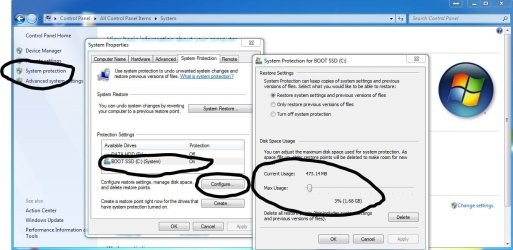
Just a thought, but have you checked you system restore settings to see how much space you are allowing on your HDD for restore points ?
Everytime a new restore point is created an older one will be overwritten if space is limited largely depending on your HDD/SSD size

Heres a snip of mine showing where you can see this info
Control Panel>System>System Protection>(highlight windows drive)Configure
Capture.JPG
 

My Computer My Computer

Computer type
PC/Desktop
Computer Manufacturer/Model Number
Pauly Special
OS
Win7 Ultimate X64
CPU
Intel i5 3570K
Motherboard
Gigabyte Z77X-DS3H
Memory
8GB DDR3 1600
Graphics Card(s)
Onboard
Sound Card
Onboard
Screen Resolution
1280x1024
Hard Drives
Samsung 840 Evo SSD (OS)
1TB Spinner (Data)
PSU
800W Arctic
Case
Cooler Master
Cooling
3x120mm Fans
Keyboard
MS Wireless
Mouse
MS Wireless
Internet Speed
20M
Thanks guys!
@Derekimo
Ok looked it up. Sounds great. Gonna give it a shot. Am looking to get back in time where running programs interface (not win7 system programs) were a readable size rather than about 1/3 normal with tiny print.

@Pauly. Yeah, thought of that but forgot so took a look. My usual "always" 40-50 percent was not there. Rats!! Getting older so could have forgot ya know but honestly not likely. It was at a point similar to the level you have setup, sooo???

@ ICIT2LOL good info there! Yeah do a lot of cleanup and never usually do recheck the sys-restore point counts after a new 40-50 percent setup. Boy if cleanups go after sys-restore points $M gates needs to get his act together seems to me, huh?

Will advise after running ShadowExplorer. Really do appreciate all the help guys. Just cannot see these little programs window with dollar store glasses. He Ha !!
 

My Computer My Computer

Computer type
PC/Desktop
Computer Manufacturer/Model Number
gateway
OS
win7 Home Premium x64
Antivirus
avast
Browser
Firefox

My Computer My Computer

Computer type
PC/Desktop
Computer Manufacturer/Model Number
Bruce ... somewhere in his 40's
OS
Windows 7 Ultimate 32bit SP1
CPU
Intel(R) Core(TM)2 Quad CPU @ 2.40GHz, 2400 MHz
Motherboard
INTEL/D975XBX2
Memory
4 GB
Graphics Card(s)
ATI Radeon HD 2600 Pro
Monitor(s) Displays
Samsung SyncMaster 914v
Screen Resolution
1280 x 1024
Hard Drives
2/500GB each ... ST3500630AS ATA Device.
One is not connected
PSU
Rocketfish 700 W
Case
G.Skill Gigabyte Chassis
Keyboard
Standard PS/2 Keyboard
Mouse
Microsoft PS/2 Mouse
Internet Speed
DSL
Antivirus
Avira Internet Security
Browser
IE 11
Other Info
ATI HDMI Audio
Back
Top