Win wont boot without F8, blinking cursor

TwinTurbo

New member
Local time
12:38 AM
Messages
4
Help! After the system hung (nvstor issue!!) it won't reboot. It gives a blinking cursor, a blip of activity from the hdd and then nothing. F8 works and I can boot into everything there, safemode, repair...everything works. Even booting windows normally from there works ust fine. With F8 it's like booting up skips something (or uses the F8 boot menu instead of something else) and it goes to the windows starting screen and starts just fine. Bootmanager perhaps?

Boot recovery didn't help, neither did sys restore. Anyone have an idea?

tnx

Marck
 

My Computer

OS
Win 7 Professional 64
I already found the issue, F8 also brings up the hdd selection boot menu before the windows boot options. It's THIS selection that allows it to start normally because I select my correct drive there. Went into bios and sure enough the 2 drives were swapped aroudn in their respective order. What could cause this? I have a feeling it's related to the nvstor issues I've been having
 

My Computer

OS
Win 7 Professional 64
It's not malware. I'm on a resh isntall ater win7 took a dump rom that same nvstor problem I've been having (disk hangs, no activity and mouse freezes) so malware is out o the question. I did scan it, nothing what so ever.

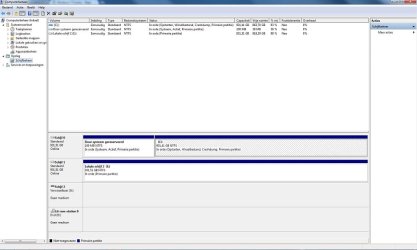
maximized Disk Mgmt drive map/listings ??? do you mean this?

dskmgmt.jpg


I have a feeling all these issues, are related to the nvidia norce chipset driver. I have the latest version and it's a little better but under heavy disc usage it often still gives a yellow nvstor exclamation mark error. This the system recovers from but the red error it hangs on. Never had this prob beore (when I wasn't running W7-64)
 

My Computer

OS
Win 7 Professional 64
I already found the issue, F8 also brings up the hdd selection boot menu before the windows boot options. It's THIS selection that allows it to start normally because I select my correct drive there. Went into bios and sure enough the 2 drives were swapped aroudn in their respective order. What could cause this? I have a feeling it's related to the nvstor issues I've been having
So F8 also displays the BIOS boot device menu? Try setting the right disk on top of bios boot devices. at least higher then the wrong disk
 

My Computer

Computer type
Laptop
Computer Manufacturer/Model Number
ACER ASPIRE 5742G
OS
Microsoft Windows 7 Home Premium 64-bits 7601 Multiprocessor Free Service Pack 1
CPU
Intel(R) Core(TM) i3 CPU M 370 @ 2.40GHz
Motherboard
Acer Aspire 5742G
Memory
4,00 GB
Graphics Card(s)
ATI Mobility Radeon HD 5400 Series
Sound Card
(1) AMD High Definition Audio Device (2) Realtek High Defi
Screen Resolution
1366 x 768 x 32 bits (4294967296 colors) @ 60 Hz
Hard Drives
WDC WD5000BEVT-22ZAT0
That's exactly what I did and that fixed it. What I'm wondering is, how could it have swapped around?
 

My Computer

OS
Win 7 Professional 64
when you press f8 and select the right disk nothing has to be fixed!! That's why "startup repair" and "system restore" didn't fix your problem.

What was in BIOS the boot device sequence? probably floppy,dvd, harddisk 0, harddisk 1.
You told in thread both disks were swapped. What happens when starting from wrong disk?

It should execute the MBR of wrong disk and search an active partition on it. This is not the case so it should have said something like "operating system not found".

I think your MBR on disk1 (where E-volume is on) is corrupt. Was this once a linux disk or did you do strange things with it? To fix it and to prove I'm right:

-press F8 and enter recovery console. Then Commant Prompt
DIR E: (sure this is your E volume?)
Code:
[B]BOOTSECT /NT60 E: /FORCE /MBR[/B]

try to reboot from wrong disk and see if there is still a blinking cursor. OF course we still don't know why swapping of disks occured.
 

My Computer

Computer type
Laptop
Computer Manufacturer/Model Number
ACER ASPIRE 5742G
OS
Microsoft Windows 7 Home Premium 64-bits 7601 Multiprocessor Free Service Pack 1
CPU
Intel(R) Core(TM) i3 CPU M 370 @ 2.40GHz
Motherboard
Acer Aspire 5742G
Memory
4,00 GB
Graphics Card(s)
ATI Mobility Radeon HD 5400 Series
Sound Card
(1) AMD High Definition Audio Device (2) Realtek High Defi
Screen Resolution
1366 x 768 x 32 bits (4294967296 colors) @ 60 Hz
Hard Drives
WDC WD5000BEVT-22ZAT0
This is why I suggested running a pass of Startup Repair which has all boot commands automated.
 
I already found the issue, F8 also brings up the hdd selection boot menu before the windows boot options. It's THIS selection that allows it to start normally because I select my correct drive there. Went into bios and sure enough the 2 drives were swapped aroudn in their respective order. What could cause this? I have a feeling it's related to the nvstor issues I've been having
nvstor problem and swapping of disks are not related! nvstor is just a devicedriver and doesn't change bios-settings
 

My Computer

Computer type
Laptop
Computer Manufacturer/Model Number
ACER ASPIRE 5742G
OS
Microsoft Windows 7 Home Premium 64-bits 7601 Multiprocessor Free Service Pack 1
CPU
Intel(R) Core(TM) i3 CPU M 370 @ 2.40GHz
Motherboard
Acer Aspire 5742G
Memory
4,00 GB
Graphics Card(s)
ATI Mobility Radeon HD 5400 Series
Sound Card
(1) AMD High Definition Audio Device (2) Realtek High Defi
Screen Resolution
1366 x 768 x 32 bits (4294967296 colors) @ 60 Hz
Hard Drives
WDC WD5000BEVT-22ZAT0
This is why I suggested running a pass of Startup Repair which has all boot commands automated.
also for other disk???? that disk is just a data disk. But you could be right ... I don't hope so. A friend of mine has to disks, 1 with linux and one with win7 and uses bios as bootdisk selecter. When he does a startup repair from win7 f8 or repairdisk .... would it repair the mbr on linux disk as well?

Don't hope so
 

My Computer

Computer type
Laptop
Computer Manufacturer/Model Number
ACER ASPIRE 5742G
OS
Microsoft Windows 7 Home Premium 64-bits 7601 Multiprocessor Free Service Pack 1
CPU
Intel(R) Core(TM) i3 CPU M 370 @ 2.40GHz
Motherboard
Acer Aspire 5742G
Memory
4,00 GB
Graphics Card(s)
ATI Mobility Radeon HD 5400 Series
Sound Card
(1) AMD High Definition Audio Device (2) Realtek High Defi
Screen Resolution
1366 x 768 x 32 bits (4294967296 colors) @ 60 Hz
Hard Drives
WDC WD5000BEVT-22ZAT0
it often still gives a yellow nvstor exclamation mark error. This the system recovers from but the red error it hangs on

you mean yellow exclamation mark in device manager? what do you mean by red error?
errors in eventviewer?
 

My Computer

Computer type
Laptop
Computer Manufacturer/Model Number
ACER ASPIRE 5742G
OS
Microsoft Windows 7 Home Premium 64-bits 7601 Multiprocessor Free Service Pack 1
CPU
Intel(R) Core(TM) i3 CPU M 370 @ 2.40GHz
Motherboard
Acer Aspire 5742G
Memory
4,00 GB
Graphics Card(s)
ATI Mobility Radeon HD 5400 Series
Sound Card
(1) AMD High Definition Audio Device (2) Realtek High Defi
Screen Resolution
1366 x 768 x 32 bits (4294967296 colors) @ 60 Hz
Hard Drives
WDC WD5000BEVT-22ZAT0
A data HD can indeed block booting with a corrupt MBR but I've not seen it change boot order.

The issue seems to be settled by setting the correct HD to boot first. If it switches order again I'd try the line Command given or move the data off the data drive to wipe it's boot sector using Diskpart Clean Command.

It seems like an Nvidia storage controller is causing issues. Was this driver issued by the installer or optional Windows Updates or did you incorrectly import it from the manufacturer's chipset without performance issues causing the need for this?

What I'd want to do first is roll back to the installer's storage driver if necessary, or update the driver if this is it's only version. Check optional Windows Updates first as Win7 is the authority on its own drivers.

Also I'd turn off all Nvidia services in services.msc as they are unneeded bloatware unless you use special controls included in their settings. Win7 has better versions of most of these controls anyway. Services - Start or Disable - Windows 7 Forums
 
Back
Top