Win7 64-bit hangs at start for 10 min while hard-drive runs continualy

W7friend

New member
Local time
10:01 PM
Messages
6
Hi all,

I have an HP Pavilian 64-bit laptop running Windows 7.

When I start my computer and the hard-drive light is no longer continually on, things are find for about 10 seconds. And I can start programs as expected. But about 10 seconds after this the hard-drive light goes on continually, and Windows starts running slow and even hangs up and won't accept commands. It hangs up for about 10 minutes and then the hard-drive light goes back to its normal occasional blinking. So in effect, my computer becomes useless for the first 10 minutes after I start it. But after that runs fine.

This problem does not occur if I start in Safe Mode where the computer become useful within a minute of starting, and there is no unwanted continual hard-drive activity.

I've tried using msconfig.exe to disable all start-up services, but the 10 minute hang-up still occurs. What can I do? Thanks.

Mike
 

My Computer My Computer

At a glance

Windows 7 Home Premium x64
OS
Windows 7 Home Premium x64
When you used msconfig, did you disable ALL from startup tab and all NON Microsoft services from the services tab?

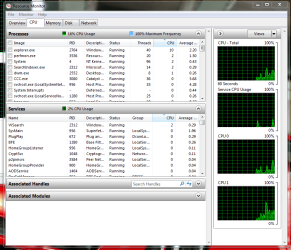
Also if this is possible for you to do, soon as your laptop logs on, right click the taskbar > click start task manager > go to performance tab > click Resource Monitor at the bottom > then click CPU tab.

Then sort the order of highest CPU usage by clicking the CPU filter so your screen should look like this.

Then watch and record what is running when your PC is in slow-mode. Take a print screen
 

Attachments

  • Capture.PNG
    Capture.PNG
    45 KB · Views: 5

My Computer My Computer

At a glance

windows 7 home premium 64bitAmd phenom ii 560 3.30ghzCorsair TwinX 8GB (4x2)AMD radeon HD 5670 1GB
Computer type
PC/Desktop
OS
windows 7 home premium 64bit
CPU
Amd phenom ii 560 3.30ghz
Motherboard
Asus m4a785td-v evo
Memory
Corsair TwinX 8GB (4x2)
Graphics Card(s)
AMD radeon HD 5670 1GB
Sound Card
None
Monitor(s) Displays
Hp
Hard Drives
WD Black Caviar 1TB 7200rpm
PSU
Corsair 500W
Case
CM Enforcer
Cooling
Stock HS, 200mm Front fan + 120mm Exhaust
Keyboard
Cyborg v7
Mouse
Laser Microsoft 6000
Internet Speed
5mb/s
Antivirus
Norton
Browser
Chrome
When you used msconfig, did you disable ALL from startup tab and all NON Microsoft services from the services tab?

Also if this is possible for you to do, soon as your laptop logs on, right click the taskbar > click start task manager > go to performance tab > click Resource Monitor at the bottom > then click CPU tab.

Then sort the order of highest CPU usage by clicking the CPU filter so your screen should look like this.

Then watch and record what is running when your PC is in slow-mode. Take a print screen

Tried that:

Started msconfig.exe, disabled all in the Startup tab and clicked Apply.

Hid all Microsoft services and then disabled all the rest in the Services tab and clicked Apply.

I noticed that Norton Internet Security was still enabled.

Then clicked OK and Restart.

The computer hung for 9 minutes on the Welcome screen with the hard drive light continually on.

I tried starting the Windows task manager as soon as I could. But by the time I got it working (2 minutes more) it wasn't reporting any heavy usage.

Is there a way to make the Windows Task Manager be the first thing that pops up automatically after a restart showing process from all uses in the Processes tab?

Is there something I can do in regedit.exe to prevent unnecessary processes from starting?

Thanks.

Mike
 

My Computer My Computer

At a glance

Windows 7 Home Premium x64
OS
Windows 7 Home Premium x64
Go to Task Scheduler > Create task > Call it whatever > Next tab make new trigger as log on (make sure you use all users or yours) > Next tab action you want start a program > Browse to local disc>windows>system32>resmon.exe.

That should open what you need straight away.

Oh and before you do it, open the resource monitor and click the filters ready so you dont have to click anything when it appears.

See how that goes.
 

My Computer My Computer

At a glance

windows 7 home premium 64bitAmd phenom ii 560 3.30ghzCorsair TwinX 8GB (4x2)AMD radeon HD 5670 1GB
Computer type
PC/Desktop
OS
windows 7 home premium 64bit
CPU
Amd phenom ii 560 3.30ghz
Motherboard
Asus m4a785td-v evo
Memory
Corsair TwinX 8GB (4x2)
Graphics Card(s)
AMD radeon HD 5670 1GB
Sound Card
None
Monitor(s) Displays
Hp
Hard Drives
WD Black Caviar 1TB 7200rpm
PSU
Corsair 500W
Case
CM Enforcer
Cooling
Stock HS, 200mm Front fan + 120mm Exhaust
Keyboard
Cyborg v7
Mouse
Laser Microsoft 6000
Internet Speed
5mb/s
Antivirus
Norton
Browser
Chrome
Oh and i would have disabled norton for this test too, unplug/disconnect internet connection just in case while you do it
 

My Computer My Computer

At a glance

windows 7 home premium 64bitAmd phenom ii 560 3.30ghzCorsair TwinX 8GB (4x2)AMD radeon HD 5670 1GB
Computer type
PC/Desktop
OS
windows 7 home premium 64bit
CPU
Amd phenom ii 560 3.30ghz
Motherboard
Asus m4a785td-v evo
Memory
Corsair TwinX 8GB (4x2)
Graphics Card(s)
AMD radeon HD 5670 1GB
Sound Card
None
Monitor(s) Displays
Hp
Hard Drives
WD Black Caviar 1TB 7200rpm
PSU
Corsair 500W
Case
CM Enforcer
Cooling
Stock HS, 200mm Front fan + 120mm Exhaust
Keyboard
Cyborg v7
Mouse
Laser Microsoft 6000
Internet Speed
5mb/s
Antivirus
Norton
Browser
Chrome
The computer hung for 9 minutes on the Welcome screen with the hard drive light continually on.

Mike

I uninstalled Norton Internet Security, and my computer seems to start normally. I've not noticed any lack of performance after 1 minute from the start up.

Norton advices me that there may be settings that enables boot-time protection. I'll let you know after I reinstall Norton Internet Security if I can disable this feature and if there are any hang-up problems.
 

My Computer My Computer

At a glance

Windows 7 Home Premium x64
OS
Windows 7 Home Premium x64
Norton is the biggest resource hog ive heard. But it shouldnt be doing that to your system. I use norton myself and it is noticeably slower but nothing to your description.

If Uninstalling that sorts your problem out. Which im surprised with, use Norton remover tool first then install it back.

Are you using another Firewall/Antivirus? Maybe a free trial of somekind? If so get rid as they more than 1 dont play nice together
 

My Computer My Computer

At a glance

windows 7 home premium 64bitAmd phenom ii 560 3.30ghzCorsair TwinX 8GB (4x2)AMD radeon HD 5670 1GB
Computer type
PC/Desktop
OS
windows 7 home premium 64bit
CPU
Amd phenom ii 560 3.30ghz
Motherboard
Asus m4a785td-v evo
Memory
Corsair TwinX 8GB (4x2)
Graphics Card(s)
AMD radeon HD 5670 1GB
Sound Card
None
Monitor(s) Displays
Hp
Hard Drives
WD Black Caviar 1TB 7200rpm
PSU
Corsair 500W
Case
CM Enforcer
Cooling
Stock HS, 200mm Front fan + 120mm Exhaust
Keyboard
Cyborg v7
Mouse
Laser Microsoft 6000
Internet Speed
5mb/s
Antivirus
Norton
Browser
Chrome
Back
Top