Win7 64bit IE11 upgrade now needs refresh to display pages

charentejohn

New member
Local time
2:22 PM
Messages
23
Location
France
I just upgraded from IE9 to IE11.0.20 as kept getting IE9 is too old messages. Now when I select some sites, examples below, I need to hit refresh to get them to work. Once refreshed they work fine so it could do it just needed this to make them work. I assume I need to select something to fix this but can't find it.
I have Kaspersky security which vets sites and have not changed it, worked with IE9 maybe conflict with IE11 ?

Problems are
Outlook.com mail loads ok but when I select New mail I just get the top bar of the screen with a message saying 'nearly finished' and circling dots. This doesn't change until I hit refresh and then works, and sends ok.

Meteox web site displays current weather sat pictures ok, and 3 day predictions are ok but 3-7 day is frozen until refresh is hit.

Internet-radio.com displays part of the screen but needs refresh to get the full screen, still won't play using the player from the site (blue play symbol in a circle) but will play using Media Player. This may be the site not recognising IE11 from what I have read.

I did type all this in before but when posting it said I need more than 3 characters here, there were, so saving this time just in case. May also be a symptom ?

Any suggestions as to what I can check ? I can work around this but shouldn't need to, always the way with IE upgrades some small settings change and it takes a while to sort them out.

Regards John
 

My Computer My Computer

At a glance

windows 7 64 home premiumIntel i3
Computer Manufacturer/Model Number
Medion
OS
windows 7 64 home premium
CPU
Intel i3
Hard Drives
Intel 180GB SSD
PS the first try failed with less than 3 chars message so guess what, I hit refresh, pasted the text back in and it worked. Tried posting this first time and lost it too. So trying again, view post, hit refresh, type this in then post it. If I didn't hit refresh it would lost it.
So this is a serious problem as if I keep randomly losing what I type it will get tedious.
John
Edited to add I need to do a refresh after looking at any web page. Just tried Outlook mail again and couldn't look at sent mail. So summary of problem is not that I can't send New mail it is that the first page loads ok but not fully, something is missing although it looks ok. So selecting sent mail, new, mails received, or anything on the screen doesn't work until refreshed.
 
Last edited:

My Computer My Computer

At a glance

windows 7 64 home premiumIntel i3
Computer Manufacturer/Model Number
Medion
OS
windows 7 64 home premium
CPU
Intel i3
Hard Drives
Intel 180GB SSD
Back again.
I found the posts that suggest disabling add-ons to resolve this but limited success. I tried starting without add-ons and it all works. So I went in and disabled any that weren't enabled in my other pc which still has IE9 on it. No difference.

So, disabling all add-ons makes it work but which one is causing the problem ?? I have tried disable/re-enable on various ones, how do I find the culprit ? (had to refresh to send this again)

Edited to add - I tried showing all add-ons then disabling them all, restarting IE11 and no difference.
So, running in no add-on mode works but disabling them all doesn't, what is the difference.

I also noticed that from the taskbar, when I select IE11 two windows open, rather than the one I clicked being highlighted, seems the taskbar creates a new icon on itself, if I click that I get another window on the new icon, not a whole new icon just a 'tiled' view.
 

My Computer My Computer

At a glance

windows 7 64 home premiumIntel i3
Computer Manufacturer/Model Number
Medion
OS
windows 7 64 home premium
CPU
Intel i3
Hard Drives
Intel 180GB SSD

My Computer My Computer

At a glance

Win-7-Pro64bit 7-H-Prem-64biti7-5930K 2nd i9-9940x both water blocked VRM'...Trident-z 3200C14 2nd Trident-z 3600C16EVGA 1080ti ftw3 2nd Titan Xp both water blocked
Computer type
PC/Desktop
Computer Manufacturer/Model Number
Custom assembled by me :}
OS
Win-7-Pro64bit 7-H-Prem-64bit
CPU
i7-5930K 2nd i9-9940x both water blocked VRM's too
Motherboard
ASUS SABERTOOTH X99 2nd ASUS x299 Apex
Memory
Trident-z 3200C14 2nd Trident-z 3600C16
Graphics Card(s)
EVGA 1080ti ftw3 2nd Titan Xp both water blocked
Sound Card
Built-in Realtek
Monitor(s) Displays
1-AOC G2460PG 24"G-Sync 144Hz/ 2nd 1-ASUS VG248QE 24" 144Hz
Screen Resolution
1920 x 1080 144Hz
Hard Drives
2-Samsung M.2 Evo & Evo Plus
2-Samsung 850 EVO 500GB SSD's/ 3-2.5 W.D. Black 1tb-&3-1tb/3-3.5 WD Black 1tb hdd's
PSU
EVGA SuperNOVA 1000-P2 2nd 1200-P2
Case
2-Corsair Obsidian Series 450D Black ATX Mid Tower
Cooling
Custom water loops
Keyboard
Logitech G710+/ 2nd Logitech G910
Mouse
2-RedDragon M901 Perdition 16400 dpi Gaming mouse = wired
Internet Speed
Comcast Ping 19ms 89.31mbps download speed 6.12mbps upload
Antivirus
Malwarebytes Pro/ Superantispyware Pro
Browser
FireFox & Pale moon
Other Info
2nd ASUS X299 Apex/Intel i9-9940x with Custom water loop/7H-Prem-x64/Corsair 450D case/Ram Trident-z 3600C16 4x8gb / Samsung970Evo plus 500gb SSD/Dual ssd EZ swap evo/PSU EVGA SuperNova 1200w-P2 80+Platinum/GPU Titan Xp /8-ML-140 on push-pull on 2-280GTX rads
Thanks for the info, what do I do when in safe mode though, sorry but no real technical skills at all.

In the meantime I found a thread about compatibility mode. IE9 had two options but IE11 just has use the Microsoft list, or not. So I selected Not and now it seems to work ok, still a little sceptical but will see how it goes.
Any suggestions on why this matters would be interesting.
Still need to use Media Player for internet radio but not really a problem.

Edited to add this posted ok with no need to refresh so feel a bit more confident about form filling :)
 
Last edited:

My Computer My Computer

At a glance

windows 7 64 home premiumIntel i3
Computer Manufacturer/Model Number
Medion
OS
windows 7 64 home premium
CPU
Intel i3
Hard Drives
Intel 180GB SSD
No just logged on again and decided not to work .... heelllllp.
I give in, not add-ons and not compatibility then ?
 

My Computer My Computer

At a glance

windows 7 64 home premiumIntel i3
Computer Manufacturer/Model Number
Medion
OS
windows 7 64 home premium
CPU
Intel i3
Hard Drives
Intel 180GB SSD
Hi,
safe mode with.... was to rule out your antivirus program as the cause of the delay loading or having to use the F5 to refresh the page
Pretty much to test with.

It's not a good idea to skip versions
I would suggest uninstalling the ie11 windows update
Then check for updates when you see ie11 right click it and click on Hide.

Then check for updates again and ie10 will appear download and install it
Then test and see if the issue happens.

I also do not use M$ compatibility view lists

You do have to delete your browser history to get rid of the already downloaded lists though
Open ie and use Gear symbol on the top right and Safety and delete browser history
Or ctrl+shift+delete
Uncheck the top box
Then check all others
You can uncheck form fills if you use that
Click on Delete.
Close ie and restart your machine.
Restart and test the issue.
 

My Computer My Computer

At a glance

Win-7-Pro64bit 7-H-Prem-64biti7-5930K 2nd i9-9940x both water blocked VRM'...Trident-z 3200C14 2nd Trident-z 3600C16EVGA 1080ti ftw3 2nd Titan Xp both water blocked
Computer type
PC/Desktop
Computer Manufacturer/Model Number
Custom assembled by me :}
OS
Win-7-Pro64bit 7-H-Prem-64bit
CPU
i7-5930K 2nd i9-9940x both water blocked VRM's too
Motherboard
ASUS SABERTOOTH X99 2nd ASUS x299 Apex
Memory
Trident-z 3200C14 2nd Trident-z 3600C16
Graphics Card(s)
EVGA 1080ti ftw3 2nd Titan Xp both water blocked
Sound Card
Built-in Realtek
Monitor(s) Displays
1-AOC G2460PG 24"G-Sync 144Hz/ 2nd 1-ASUS VG248QE 24" 144Hz
Screen Resolution
1920 x 1080 144Hz
Hard Drives
2-Samsung M.2 Evo & Evo Plus
2-Samsung 850 EVO 500GB SSD's/ 3-2.5 W.D. Black 1tb-&3-1tb/3-3.5 WD Black 1tb hdd's
PSU
EVGA SuperNOVA 1000-P2 2nd 1200-P2
Case
2-Corsair Obsidian Series 450D Black ATX Mid Tower
Cooling
Custom water loops
Keyboard
Logitech G710+/ 2nd Logitech G910
Mouse
2-RedDragon M901 Perdition 16400 dpi Gaming mouse = wired
Internet Speed
Comcast Ping 19ms 89.31mbps download speed 6.12mbps upload
Antivirus
Malwarebytes Pro/ Superantispyware Pro
Browser
FireFox & Pale moon
Other Info
2nd ASUS X299 Apex/Intel i9-9940x with Custom water loop/7H-Prem-x64/Corsair 450D case/Ram Trident-z 3600C16 4x8gb / Samsung970Evo plus 500gb SSD/Dual ssd EZ swap evo/PSU EVGA SuperNova 1200w-P2 80+Platinum/GPU Titan Xp /8-ML-140 on push-pull on 2-280GTX rads
Thanks, I will try the uninstall and then 10 then 11 update.
It will take a while so I will post details when done, hopefully tomorrow morning. Midnight here but I used to work in the UK for a US company so still roughly remember the time differences. Should be done by the time you wake up tomorrow :)
 

My Computer My Computer

At a glance

windows 7 64 home premiumIntel i3
Computer Manufacturer/Model Number
Medion
OS
windows 7 64 home premium
CPU
Intel i3
Hard Drives
Intel 180GB SSD
Seems I have hit a snag as I uninstalled update back to IE9 and still a complete mess.
So tried to install a 'clean' IE11 by using IE11-windows6.1 from microsoft but just ended up the same, kept all the settings/favourites etc so not new.
Searching about I think IE is part of WIN7 (thought they weren't allowed to do that any more ?) so can't be removed which is a shame as they have messed up again.
My plan was to completely remove IE then install IE11 like it was the one and only. So there would be no version confusion just a clean copy.

I have one solution which is to use Firefox, nice browser and very clean, so will go with that for now. At least I can use the PC.

Is there any way to remove IE or is there a load and replace totally option ? Seems my only solution now as IE11 which is sort of loaded now is so messed up it needs redoing. This is normal procedure, can I rename the olf IE11 or something ?
 

My Computer My Computer

At a glance

windows 7 64 home premiumIntel i3
Computer Manufacturer/Model Number
Medion
OS
windows 7 64 home premium
CPU
Intel i3
Hard Drives
Intel 180GB SSD
Hi,
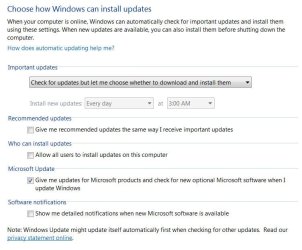
Well depending on how your update settings are setup you shouldn't have any problems uninstalling the ie11 update using these settings ?
win update settings.JPG
 

My Computer My Computer

At a glance

Win-7-Pro64bit 7-H-Prem-64biti7-5930K 2nd i9-9940x both water blocked VRM'...Trident-z 3200C14 2nd Trident-z 3600C16EVGA 1080ti ftw3 2nd Titan Xp both water blocked
Computer type
PC/Desktop
Computer Manufacturer/Model Number
Custom assembled by me :}
OS
Win-7-Pro64bit 7-H-Prem-64bit
CPU
i7-5930K 2nd i9-9940x both water blocked VRM's too
Motherboard
ASUS SABERTOOTH X99 2nd ASUS x299 Apex
Memory
Trident-z 3200C14 2nd Trident-z 3600C16
Graphics Card(s)
EVGA 1080ti ftw3 2nd Titan Xp both water blocked
Sound Card
Built-in Realtek
Monitor(s) Displays
1-AOC G2460PG 24"G-Sync 144Hz/ 2nd 1-ASUS VG248QE 24" 144Hz
Screen Resolution
1920 x 1080 144Hz
Hard Drives
2-Samsung M.2 Evo & Evo Plus
2-Samsung 850 EVO 500GB SSD's/ 3-2.5 W.D. Black 1tb-&3-1tb/3-3.5 WD Black 1tb hdd's
PSU
EVGA SuperNOVA 1000-P2 2nd 1200-P2
Case
2-Corsair Obsidian Series 450D Black ATX Mid Tower
Cooling
Custom water loops
Keyboard
Logitech G710+/ 2nd Logitech G910
Mouse
2-RedDragon M901 Perdition 16400 dpi Gaming mouse = wired
Internet Speed
Comcast Ping 19ms 89.31mbps download speed 6.12mbps upload
Antivirus
Malwarebytes Pro/ Superantispyware Pro
Browser
FireFox & Pale moon
Other Info
2nd ASUS X299 Apex/Intel i9-9940x with Custom water loop/7H-Prem-x64/Corsair 450D case/Ram Trident-z 3600C16 4x8gb / Samsung970Evo plus 500gb SSD/Dual ssd EZ swap evo/PSU EVGA SuperNova 1200w-P2 80+Platinum/GPU Titan Xp /8-ML-140 on push-pull on 2-280GTX rads
Finally managed to uninstall back to IE9, took a while to find the update to IE11.

So following the update to IE10 then IE11 I looked online for an IE10 upgrade. Seems MS don't do them anymore..........
So should the upgrade to IE11 work on IE9 or not ?

If not possible then I will leave as IE9 and switch to Firefox, six and two threes as we say here. As long as I have a working browswer I don't care what it is, IE11 does not work but Firefox does.
I always stick with MS on the basis thet they wrote the OS so their browser should intefrate best, but not in this case.

I will try the 10 then 11 upgrade if possible but if not I give up. As these upgrades have always proved a nuisance probably best to part company now anyway ?
 

My Computer My Computer

At a glance

windows 7 64 home premiumIntel i3
Computer Manufacturer/Model Number
Medion
OS
windows 7 64 home premium
CPU
Intel i3
Hard Drives
Intel 180GB SSD
Hi,
If you're on ie9 now,
All you need to do is check for updates again and hide the ie11 update when it appears,
Once you hide ie11's update
Recheck for updates and ie10 will appear.

After testing with ie10 for a while to see how it works,
To reinstall ie11 just unhide the ie11 update by using Restore hidden updates.
 

My Computer My Computer

At a glance

Win-7-Pro64bit 7-H-Prem-64biti7-5930K 2nd i9-9940x both water blocked VRM'...Trident-z 3200C14 2nd Trident-z 3600C16EVGA 1080ti ftw3 2nd Titan Xp both water blocked
Computer type
PC/Desktop
Computer Manufacturer/Model Number
Custom assembled by me :}
OS
Win-7-Pro64bit 7-H-Prem-64bit
CPU
i7-5930K 2nd i9-9940x both water blocked VRM's too
Motherboard
ASUS SABERTOOTH X99 2nd ASUS x299 Apex
Memory
Trident-z 3200C14 2nd Trident-z 3600C16
Graphics Card(s)
EVGA 1080ti ftw3 2nd Titan Xp both water blocked
Sound Card
Built-in Realtek
Monitor(s) Displays
1-AOC G2460PG 24"G-Sync 144Hz/ 2nd 1-ASUS VG248QE 24" 144Hz
Screen Resolution
1920 x 1080 144Hz
Hard Drives
2-Samsung M.2 Evo & Evo Plus
2-Samsung 850 EVO 500GB SSD's/ 3-2.5 W.D. Black 1tb-&3-1tb/3-3.5 WD Black 1tb hdd's
PSU
EVGA SuperNOVA 1000-P2 2nd 1200-P2
Case
2-Corsair Obsidian Series 450D Black ATX Mid Tower
Cooling
Custom water loops
Keyboard
Logitech G710+/ 2nd Logitech G910
Mouse
2-RedDragon M901 Perdition 16400 dpi Gaming mouse = wired
Internet Speed
Comcast Ping 19ms 89.31mbps download speed 6.12mbps upload
Antivirus
Malwarebytes Pro/ Superantispyware Pro
Browser
FireFox & Pale moon
Other Info
2nd ASUS X299 Apex/Intel i9-9940x with Custom water loop/7H-Prem-x64/Corsair 450D case/Ram Trident-z 3600C16 4x8gb / Samsung970Evo plus 500gb SSD/Dual ssd EZ swap evo/PSU EVGA SuperNova 1200w-P2 80+Platinum/GPU Titan Xp /8-ML-140 on push-pull on 2-280GTX rads
Thanks I will do that, sounds straightforward enough :)
I would like to ge IE working again if possible. They must have heard us as I just did a check for updates and IE10 and 11 options are both there. I will do them one at a time tomorrow.
That should cure it, if it does I will report back, thanks again.
 

My Computer My Computer

At a glance

windows 7 64 home premiumIntel i3
Computer Manufacturer/Model Number
Medion
OS
windows 7 64 home premium
CPU
Intel i3
Hard Drives
Intel 180GB SSD
Well it fell at the first fence, updated to IE10 (no other updates done at that time just this one) and same problem, need to refresh to do stuff. I haven't done the same things as last time, deleting history etc as it made no difference.

Failing a solution I will just roll back to 9 and use firefox, you have to know when something is just not going to work and I don't think this is.

I was not at the machine during install (I was the last times) but when it restarted just before the desktop opened I saw a blank screen with a box in the top left corner but wasn't quick enough to read it before desktop opened. May have been relevant, probably just said there was a newer version of IE.

I assume if I carry on to IE11 I can not roll back to IE9 hence leaving it here.
 

My Computer My Computer

At a glance

windows 7 64 home premiumIntel i3
Computer Manufacturer/Model Number
Medion
OS
windows 7 64 home premium
CPU
Intel i3
Hard Drives
Intel 180GB SSD
I think I now have the sequence of events right.
Years ago I had ny updates to not update explorer but my wife didn't. One day she could no longer enter info into most password type fields and had trouble sending e-mails. My PC was ok so she used that when necessary.
After a week or so we checked the versions of explorer and found hers had updated to 10. So we reversed back to 9 and all was well, IE has never been allowed to update since.

It just dawned on me that she was having the same problem I am now with IE10 just that back then we didn't think to hit refresh and try again.

So basically IE10 was never right and maybe/maybe not IE11 is the same.
Bottom line is IE9 works but upgrading to IE10 is not. This has been around for years so should update correctly. Silly me but I assumed 'plug and play' as it would keep previous settings and just use the new features etc. I didn't expect it to mess with the settings and leave IE10 unusable.

It can't be just me that has this, thousands worldwide must have had the problem so a solution must be easy to find ? I can't see any solution online, jsut try this, delete that ones which make no difference.

Somebody must have had this and figured it out. Basically it loads a web page but stops before the end, I assume the bit where it loads stuff to allow data entry or animations or similar. Hitting refresh loads the page properly, so it can do it if it wants to. So what is set that stops it working. Running without add ons works, but is not a solution, so what to do now.

Unless microsoft themseles, I can't contact them, know what to do then I think sticking with another browser is best. As I can't do a clean install of IE I may as well use something that can and is a standalone product, so if I get problems I can just switch to another one rather than be locked into IE which involves spending hours getting it to work rather than just plug and play.
 

My Computer My Computer

At a glance

windows 7 64 home premiumIntel i3
Computer Manufacturer/Model Number
Medion
OS
windows 7 64 home premium
CPU
Intel i3
Hard Drives
Intel 180GB SSD
Hi,
Well the only time I've had to force refresh was on youtube
I blame more Google than anything and Adobe for a nasty flash player I do not have installed

As far as settings all should be default except for preferences in how links open in tabs...

Never updating is pretty wild so yes you'd be better off with another browser than a out of date ie9
Which is soon to be not supported anymore anyway along with ie10 come January 2016.
 

My Computer My Computer

At a glance

Win-7-Pro64bit 7-H-Prem-64biti7-5930K 2nd i9-9940x both water blocked VRM'...Trident-z 3200C14 2nd Trident-z 3600C16EVGA 1080ti ftw3 2nd Titan Xp both water blocked
Computer type
PC/Desktop
Computer Manufacturer/Model Number
Custom assembled by me :}
OS
Win-7-Pro64bit 7-H-Prem-64bit
CPU
i7-5930K 2nd i9-9940x both water blocked VRM's too
Motherboard
ASUS SABERTOOTH X99 2nd ASUS x299 Apex
Memory
Trident-z 3200C14 2nd Trident-z 3600C16
Graphics Card(s)
EVGA 1080ti ftw3 2nd Titan Xp both water blocked
Sound Card
Built-in Realtek
Monitor(s) Displays
1-AOC G2460PG 24"G-Sync 144Hz/ 2nd 1-ASUS VG248QE 24" 144Hz
Screen Resolution
1920 x 1080 144Hz
Hard Drives
2-Samsung M.2 Evo & Evo Plus
2-Samsung 850 EVO 500GB SSD's/ 3-2.5 W.D. Black 1tb-&3-1tb/3-3.5 WD Black 1tb hdd's
PSU
EVGA SuperNOVA 1000-P2 2nd 1200-P2
Case
2-Corsair Obsidian Series 450D Black ATX Mid Tower
Cooling
Custom water loops
Keyboard
Logitech G710+/ 2nd Logitech G910
Mouse
2-RedDragon M901 Perdition 16400 dpi Gaming mouse = wired
Internet Speed
Comcast Ping 19ms 89.31mbps download speed 6.12mbps upload
Antivirus
Malwarebytes Pro/ Superantispyware Pro
Browser
FireFox & Pale moon
Other Info
2nd ASUS X299 Apex/Intel i9-9940x with Custom water loop/7H-Prem-x64/Corsair 450D case/Ram Trident-z 3600C16 4x8gb / Samsung970Evo plus 500gb SSD/Dual ssd EZ swap evo/PSU EVGA SuperNova 1200w-P2 80+Platinum/GPU Titan Xp /8-ML-140 on push-pull on 2-280GTX rads
Thanks for all your help, shame nothing seemed to do any good though still a mystery as to what is wrong.
Didn't take me long to get used to Firefox, it is still not getting on with Kaspersky though, so will just use that.

As even ie10 is due for retirement I may as well upgrade to 11 before shelving IE for the moment. Then I will have a current albeit non functional version. It does work with add ons disabled so it can do as an emergency browser if firefox freezes or something.
Maybe in the future this will be resolved, someone somewhere must have done it. As it happened to us on 2 PCs it must not be a unique problem.

Thanks again for trying, John
 

My Computer My Computer

At a glance

windows 7 64 home premiumIntel i3
Computer Manufacturer/Model Number
Medion
OS
windows 7 64 home premium
CPU
Intel i3
Hard Drives
Intel 180GB SSD
Let me take this issue because it is almost equal to what I ask.
Right now I'm in version 9 and have the message on youtube saying to stop being compatible with the one I have. I'll stop play videos when that day comes ? In the end only have to import flash. Right ?
In battlelog I have that message to upgrade to a more modern browser But still I can use 90% of the interface.
 

My Computer My Computer

At a glance

64-bit Windows 7 ProfessionalIntel i5-3450 3.1 Ghz8 GB (2x4) Corsair Vengeance Red DDR3 1600MhzASUS HD 7770 DC 1.5GB
Computer type
PC/Desktop
Computer Manufacturer/Model Number
Assembled PC
OS
64-bit Windows 7 Professional
CPU
Intel i5-3450 3.1 Ghz
Motherboard
ASUS P8H77-M PRO
Memory
8 GB (2x4) Corsair Vengeance Red DDR3 1600Mhz
Graphics Card(s)
ASUS HD 7770 DC 1.5GB
Sound Card
Realtek HD Audio / Headphones Asus Orion Pro
Monitor(s) Displays
20" Samsung S20B300N
Screen Resolution
1600x900
Hard Drives
500GB SEAGATE HDD SATA
PSU
Corsair GS600 80PLUS Bronze Gaming
Case
Cooler Master Storm Enforcer
Cooling
Cooler Master Hyper 212 EVO
Keyboard
Logitech K200 USB
Mouse
Logitech M100 USB / Logitech G500 Gaming Mouse
Antivirus
ESET
Browser
Internet Explorer
Other Info
All the hardware selected by myself. I never imagined upgrade my PC :)
Back
Top