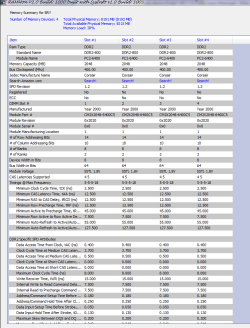
well this statement from windows quotes what you checked in your biosCheck BIOS settings
The problem may occur because some BIOS settings are incorrect.
Enable the memory remapping feature
Check the BIOS settings to see whether the memory remapping feature is enabled. Memory remapping gives Windows access to more memory. You can enable the memory remapping feature in the BIOS by booting to the system setup. See the User's Guide for your computer for instructions on how to boot to system setup on your computer. The name for the memory remapping feature may be different for different hardware vendors. This can be listed as memory remapping, memory extension, or something similar. Be aware that your computer may not support the memory remapping feature.
Change the AGP video aperture size in the BIOS settings
Check the BIOS settings to see how much memory that you have allocated to AGP video aperture. This is the memory that the system is sharing with the video card that is used for texture mapping and rendering. This memory would not be used by the system, because it is locked by the video card. You can adjust the AGP video aperture size in the BIOS. Standard settings are "32MB,""64MB,""128MB,"and "Auto." After you change this setting in the BIOS, restart your computer, and then check the usable memory. You can test each setting to see which offers the best results.
My Computer
At a glance
Operating System : Windows 7 Home Premium Edi...Processor : Intel Core 2 Quad Q8300 @ 2500 MHzPhysical Memory :8GB Corsair4x 2GB 800MHz C5 ...Video Card : XFX 6700 AMD
- Computer Manufacturer/Model Number
- packard bell IXTREME M5722
- OS
- Operating System : Windows 7 Home Premium Edition 6.01.7600 SP1 (x64)
- CPU
- Processor : Intel Core 2 Quad Q8300 @ 2500 MHz
- Motherboard
- Mainboard : Packard Bell (Acer EG43M )
- Memory
- Physical Memory :8GB Corsair4x 2GB 800MHz C5 DDR2
- Graphics Card(s)
- Video Card : XFX 6700 AMD
- Monitor(s) Displays
- Maestro 234DL - BenQ V2220 - BenQ VW2420H
- Screen Resolution
- Current Display :1920x1080p pixels at 60 Hz in HD LED
- Hard Drives
- Hard Disks : WDC (1000 GB)
Drive C: (Hard Disk) : 428 GB available on 491 GB
Drive D: (Hard Disk) : 426 GB available on 492 GB
SAMSUNG spinpoint HD103SJ 1000.2 GB
(X 2) KINGSTON SSD NOW V 30GB
- PSU
- XFX ProSeries 550W PSU
- Case
- PACKARD BELL IXTREME
- Cooling
- System Blower Current: 150mA Air Flow16CFM ;Akasa 90mm rear
- Keyboard
- Gigabyte Aivia K8100
- Mouse
- TRUST-Wireless Laser Mouse - Carbon edition MI-7770C
- Internet Speed
- TP-LINK > TL-WN951N / AV500 Gigabit Powerline Adapters
- Browser
- chrome dev
- Other Info
- EXTRA COOLING>(FAN CONTROLLER) PC Bay Cooler 3 x 40mm fans; Akasa AK-HD-BL Blue hard drive cooler 2 x 40 mm fan 4500 rpm 29.7 dBA
Bios> American Megatrends Inc.
Version : P01-A1
Date : 08/31/2009