win7 address bar missing

jim78b

New member
Member
Local time
9:51 AM
Messages
58
i read a lot o posts but i can't resolve my problem. sometime when i restar win7 64bit with my folder ope i find one folder with address bar and arrows missing....why???
 

Attachments

  • Immagine.jpg
    Immagine.jpg
    168.1 KB · Views: 15

My Computer

Computer type
PC/Desktop
OS
Microsoft Windows 7 Professional 64 bit 7601 Multiprocessor Free Service Pack 1
CPU
Intel(R) Core(TM) i7-4770 CPU @ 3.40GHz
Motherboard
ASUSTeK COMPUTER INC. B85M-E
Memory
16 giga
Graphics Card(s)
NVIDIA Quadro K600
Sound Card
(1) Realtek High Definition Audio (2) NVIDIA High Definiti
Monitor(s) Displays
HP 23 "
Screen Resolution
1920X1080
Hard Drives
(1) ATA Samsung SSD 840 SCSI Disk Device (2) ATA ST500DM002-1BD14 SCSI Disk Device (3) ATA WDC WD20EFRX-68E SCSI Disk Device
Keyboard
LOGYTECH K120
Mouse
LOGITECH M100
Internet Speed
5 MEGA
Antivirus
avast INTERNET SECURITY
Browser
firefox
Hello and welcome jim mate please follow this as the specs are a bit thin on the ground .
SYSTEM SPECS 7
Now before we can help we do need to know what is in your machine so please do this System Info - See Your System Specs - Windows 7 Help Forums
or either enter the specs of your system in your forum profile the specs will appear when we click on that little box bottom left of the post screen it is for me the preferable option as it is easy. As you may appreciate it is very hard when you don’t know what one is working with for example a diesel or petrol engine.
*(pretyped to save time)

Now just as a starter have you tried an sfc and chkdsk if not please follow these and also run the other scans
SFC /SCANNOW Command - System File Checker - Windows 7 Help Forums
Disk Check - Windows 7 Help Forums < if necessary include the /f and /r in the command line as per Option2

if no change then try these

SUPERAntiSpyware | Remove Malware | Remove Spyware - AntiMalware, AntiSpyware, AntiAdware!
Malwarebytes | Malwarebytes for Windows
AdwCleaner Download
ADW download from bleeping computer delete any rubbish found with the malware scans
NB If anyone who has Kaspersky as their security they may find it will not like ADW running and to stop the nagging just temporarily disbale the Kaspersky while one runs ADW

One other thing is I see you are using Avast so please try disabling that while trying what you are.

 

My Computer

Computer type
PC/Desktop
Computer Manufacturer/Model Number
Own build (new) Desk1 / Asus ROG Win 7 / Desk2 1st build
OS
Desk1 7 Home Prem / Desk2 10 Pro / Main lap Asus ROG 10 Pro 2 laptop Toshiba 7 Pro Asus P2520 7 & 10
CPU
Desk1 i5 3750K / Laptop i7 GTX 860M / Desk2 i5 2500
Motherboard
Desk1 Asus P877-V / Desk2 Gigabyte H67 UD3H / Laptop ?
Memory
Desk1 8GB (1866) / Desk2 16GB (1333) / Laptop 8Gb DDR3
Graphics Card(s)
Desk 1& 2NVidia GTX 650 & Laptops on board Intel
Sound Card
Desk 1 & 2 -XONAR DG Realtek High Def audio Laptop
Monitor(s) Displays
Desk 1 Benq HD 2450 / Desk2 Philips 24" / Laptop 17.5"
Screen Resolution
1920x1080 D1 & D2 & Laptop 1
Hard Drives
Desk1 Samsung 120GB 830 SSD
Asus ROG 256GB 850 Pro SSD
Desk2 Samsung 840 256 SSD
Toshiba 120GB EVO
PSU
Desk 1 Corsair HX 1050/ Laptop ? / Desk 2 Corsair HX 650
Case
Desk 1 Cooler HAF XM ? Toshiba laptop / Desk2 Coolermaster
Cooling
Fans on all Desk1 -2 Desk2 - all Coolermasters 5 Laptop ?
Keyboard
Desk 1 MS Sidewinder X6 Desk 2 MS Sidewinder X 4
Mouse
Desk 1&2 - Gigabyte MS 900 gamer - laptop - Logitec wireless
Internet Speed
ADSL2+
Other Info
One other Desktop (tester) and spare Toshba laptop both with SSD's
Running Kaspersky 2016 ISS on all machines config'd identically
Logitec audio stereo systems on each machine (x3)
Canon MG5250MFC
Router/modem TP-Link running WPA2SK
Hello and welcome jim mate please follow this as the specs are a bit thin on the ground .
SYSTEM SPECS 7
Now before we can help we do need to know what is in your machine so please do this System Info - See Your System Specs - Windows 7 Help Forums
or either enter the specs of your system in your forum profile the specs will appear when we click on that little box bottom left of the post screen it is for me the preferable option as it is easy. As you may appreciate it is very hard when you don’t know what one is working with for example a diesel or petrol engine.
*(pretyped to save time)

Now just as a starter have you tried an sfc and chkdsk if not please follow these and also run the other scans
SFC /SCANNOW Command - System File Checker - Windows 7 Help Forums
Disk Check - Windows 7 Help Forums < if necessary include the /f and /r in the command line as per Option2

if no change then try these

SUPERAntiSpyware | Remove Malware | Remove Spyware - AntiMalware, AntiSpyware, AntiAdware!
Malwarebytes | Malwarebytes for Windows
AdwCleaner Download
ADW download from bleeping computer delete any rubbish found with the malware scans
NB If anyone who has Kaspersky as their security they may find it will not like ADW running and to stop the nagging just temporarily disbale the Kaspersky while one runs ADW

One other thing is I see you are using Avast so please try disabling that while trying what you are.


ok thanks i just did it with system specs...

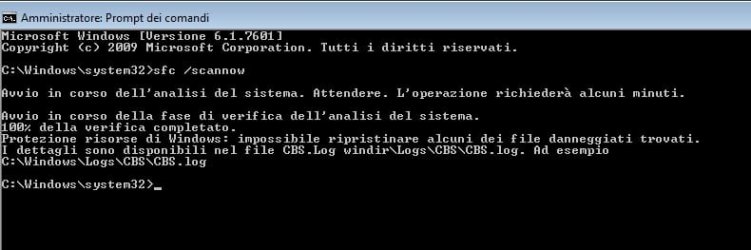
then i did sfc /scannow but give me an error:

now i post the cbs.log file

Dropbox - CBS.log

i don't want reinstall the system because i have a lot of important things and programs..

i try to boot from DVD first problem the mouse and the keyobard was locked so i use a n old ps2 keyboard
then by means of command prompt try sfc scannow but no results... there is some time of protection

however this problem of missing addres bar happen sometimes not always
 

Attachments

  • sfc.jpg
    sfc.jpg
    25.5 KB · Views: 0
Last edited:

My Computer

Computer type
PC/Desktop
OS
Microsoft Windows 7 Professional 64 bit 7601 Multiprocessor Free Service Pack 1
CPU
Intel(R) Core(TM) i7-4770 CPU @ 3.40GHz
Motherboard
ASUSTeK COMPUTER INC. B85M-E
Memory
16 giga
Graphics Card(s)
NVIDIA Quadro K600
Sound Card
(1) Realtek High Definition Audio (2) NVIDIA High Definiti
Monitor(s) Displays
HP 23 "
Screen Resolution
1920X1080
Hard Drives
(1) ATA Samsung SSD 840 SCSI Disk Device (2) ATA ST500DM002-1BD14 SCSI Disk Device (3) ATA WDC WD20EFRX-68E SCSI Disk Device
Keyboard
LOGYTECH K120
Mouse
LOGITECH M100
Internet Speed
5 MEGA
Antivirus
avast INTERNET SECURITY
Browser
firefox
Sorry jim but the file is too large to open for me and the cmd screen I speak a very fractured Italian mate so what I want to know now is can you get into safe mode and run those scans?

What you could try too is an illegal shut down and then when it comes back up with the Start Windows normally bits and pieces you could try selecting launch system repair.

Can you also try these with just the boot drive connected up and as it is an older model - I know it is not that old I would be trying drive test too.
Use this and run the short generic http://www.seagate.com/au/en/support/downloads/seatools/seatools-win-master/

Now just out of interest have you had any blue screens of death (BSOD) at all?
 

My Computer

Computer type
PC/Desktop
Computer Manufacturer/Model Number
Own build (new) Desk1 / Asus ROG Win 7 / Desk2 1st build
OS
Desk1 7 Home Prem / Desk2 10 Pro / Main lap Asus ROG 10 Pro 2 laptop Toshiba 7 Pro Asus P2520 7 & 10
CPU
Desk1 i5 3750K / Laptop i7 GTX 860M / Desk2 i5 2500
Motherboard
Desk1 Asus P877-V / Desk2 Gigabyte H67 UD3H / Laptop ?
Memory
Desk1 8GB (1866) / Desk2 16GB (1333) / Laptop 8Gb DDR3
Graphics Card(s)
Desk 1& 2NVidia GTX 650 & Laptops on board Intel
Sound Card
Desk 1 & 2 -XONAR DG Realtek High Def audio Laptop
Monitor(s) Displays
Desk 1 Benq HD 2450 / Desk2 Philips 24" / Laptop 17.5"
Screen Resolution
1920x1080 D1 & D2 & Laptop 1
Hard Drives
Desk1 Samsung 120GB 830 SSD
Asus ROG 256GB 850 Pro SSD
Desk2 Samsung 840 256 SSD
Toshiba 120GB EVO
PSU
Desk 1 Corsair HX 1050/ Laptop ? / Desk 2 Corsair HX 650
Case
Desk 1 Cooler HAF XM ? Toshiba laptop / Desk2 Coolermaster
Cooling
Fans on all Desk1 -2 Desk2 - all Coolermasters 5 Laptop ?
Keyboard
Desk 1 MS Sidewinder X6 Desk 2 MS Sidewinder X 4
Mouse
Desk 1&2 - Gigabyte MS 900 gamer - laptop - Logitec wireless
Internet Speed
ADSL2+
Other Info
One other Desktop (tester) and spare Toshba laptop both with SSD's
Running Kaspersky 2016 ISS on all machines config'd identically
Logitec audio stereo systems on each machine (x3)
Canon MG5250MFC
Router/modem TP-Link running WPA2SK
Here's the SFC file from the OP. There are a crap load of file errors in this log. Recommend a restore point to a date prior to the issue. If that doesn't work a repair install. Repair Install If you don't get results there A Clean Install The last one is a worst case scenarios. Just thought I would throw these options out there for information sake..
 

Attachments

Last edited:

My Computer

Computer type
PC/Desktop
Computer Manufacturer/Model Number
Custom Built By Me.
OS
Windows 10 Pro 64 bit
CPU
AMD FX 9590 8 Core Black Edition
Motherboard
MSI 990FXA GAMING (MS-7893)
Memory
Corsair Vengeance 16GB DDR3
Graphics Card(s)
AMD Radeon (TM) R9 380 Gaming Series
Sound Card
AMD High Definition
Monitor(s) Displays
Samsung 32" 60Hz 4ms Curved PLS LED
Screen Resolution
1920 X 1080
Hard Drives
C: 223 GB SSD = E: 465 GB HDD = F: 931 GB HDD = G: 149 GB HDD = H: 931 GB HDD
PSU
EVGA Supernova NEX750B 750W ATX EPS12V 80PLUS Bronze
Case
Cool Master
Cooling
Noctua NH-D15 Premium Cooler with 2x NF-A15 PWM 140mm Fan
Internet Speed
Fiber Optic: Download 332.7 Mbps / Upload 331.5 Mbps
Antivirus
Windows Defender
Browser
Slimjet (64bit)
I tried sfc Even in safe mode .no i can not reinstall for an issue that happen sometimes it is eccessive .And I am warry about repair system files....I have a lot of program for work .it is easy to Say reinstall all ;) and i had not any blue screen all works good

The issue of the address bar is years that appear
 

My Computer

Computer type
PC/Desktop
OS
Microsoft Windows 7 Professional 64 bit 7601 Multiprocessor Free Service Pack 1
CPU
Intel(R) Core(TM) i7-4770 CPU @ 3.40GHz
Motherboard
ASUSTeK COMPUTER INC. B85M-E
Memory
16 giga
Graphics Card(s)
NVIDIA Quadro K600
Sound Card
(1) Realtek High Definition Audio (2) NVIDIA High Definiti
Monitor(s) Displays
HP 23 "
Screen Resolution
1920X1080
Hard Drives
(1) ATA Samsung SSD 840 SCSI Disk Device (2) ATA ST500DM002-1BD14 SCSI Disk Device (3) ATA WDC WD20EFRX-68E SCSI Disk Device
Keyboard
LOGYTECH K120
Mouse
LOGITECH M100
Internet Speed
5 MEGA
Antivirus
avast INTERNET SECURITY
Browser
firefox
I tried sfc Even in safe mode .no i can not reinstall for an issue that happen sometimes it is eccessive .And I am warry about repair system files....I have a lot of program for work .it is easy to Say reinstall all ;) and i had not any blue screen all works good

The issue of the address bar is years that appear

I think I may have found a solution to your issue. Try this.

1= Hit Windows key + R
2= Type: REGSVR32 /i BROWSEUI.DLL Hit Enter.
3= Close all Windows Explorer windows
4= Bring up the Task Manager "Ctrl + Shift + Esc"
5= Select the Processes tab. Right click on Explorer.exe and End Task.
6= In Task Manager, select File, then New Task (Run)
7= Type Explorer.exe

Open Windows Explorer. The address bar should now be there. Let us know if this works.
 

My Computer

Computer type
PC/Desktop
Computer Manufacturer/Model Number
Custom Built By Me.
OS
Windows 10 Pro 64 bit
CPU
AMD FX 9590 8 Core Black Edition
Motherboard
MSI 990FXA GAMING (MS-7893)
Memory
Corsair Vengeance 16GB DDR3
Graphics Card(s)
AMD Radeon (TM) R9 380 Gaming Series
Sound Card
AMD High Definition
Monitor(s) Displays
Samsung 32" 60Hz 4ms Curved PLS LED
Screen Resolution
1920 X 1080
Hard Drives
C: 223 GB SSD = E: 465 GB HDD = F: 931 GB HDD = G: 149 GB HDD = H: 931 GB HDD
PSU
EVGA Supernova NEX750B 750W ATX EPS12V 80PLUS Bronze
Case
Cool Master
Cooling
Noctua NH-D15 Premium Cooler with 2x NF-A15 PWM 140mm Fan
Internet Speed
Fiber Optic: Download 332.7 Mbps / Upload 331.5 Mbps
Antivirus
Windows Defender
Browser
Slimjet (64bit)
Is this what came up with you?
 

Attachments

  • RegSvr32 Error.png
    RegSvr32 Error.png
    9.7 KB · Views: 26

My Computer

Computer type
PC/Desktop
Computer Manufacturer/Model Number
Custom Built By Me.
OS
Windows 10 Pro 64 bit
CPU
AMD FX 9590 8 Core Black Edition
Motherboard
MSI 990FXA GAMING (MS-7893)
Memory
Corsair Vengeance 16GB DDR3
Graphics Card(s)
AMD Radeon (TM) R9 380 Gaming Series
Sound Card
AMD High Definition
Monitor(s) Displays
Samsung 32" 60Hz 4ms Curved PLS LED
Screen Resolution
1920 X 1080
Hard Drives
C: 223 GB SSD = E: 465 GB HDD = F: 931 GB HDD = G: 149 GB HDD = H: 931 GB HDD
PSU
EVGA Supernova NEX750B 750W ATX EPS12V 80PLUS Bronze
Case
Cool Master
Cooling
Noctua NH-D15 Premium Cooler with 2x NF-A15 PWM 140mm Fan
Internet Speed
Fiber Optic: Download 332.7 Mbps / Upload 331.5 Mbps
Antivirus
Windows Defender
Browser
Slimjet (64bit)
Yes same to me :(
 

My Computer

Computer type
PC/Desktop
OS
Microsoft Windows 7 Professional 64 bit 7601 Multiprocessor Free Service Pack 1
CPU
Intel(R) Core(TM) i7-4770 CPU @ 3.40GHz
Motherboard
ASUSTeK COMPUTER INC. B85M-E
Memory
16 giga
Graphics Card(s)
NVIDIA Quadro K600
Sound Card
(1) Realtek High Definition Audio (2) NVIDIA High Definiti
Monitor(s) Displays
HP 23 "
Screen Resolution
1920X1080
Hard Drives
(1) ATA Samsung SSD 840 SCSI Disk Device (2) ATA ST500DM002-1BD14 SCSI Disk Device (3) ATA WDC WD20EFRX-68E SCSI Disk Device
Keyboard
LOGYTECH K120
Mouse
LOGITECH M100
Internet Speed
5 MEGA
Antivirus
avast INTERNET SECURITY
Browser
firefox

My Computer

Computer type
PC/Desktop
OS
Microsoft Windows 7 Professional 64 bit 7601 Multiprocessor Free Service Pack 1
CPU
Intel(R) Core(TM) i7-4770 CPU @ 3.40GHz
Motherboard
ASUSTeK COMPUTER INC. B85M-E
Memory
16 giga
Graphics Card(s)
NVIDIA Quadro K600
Sound Card
(1) Realtek High Definition Audio (2) NVIDIA High Definiti
Monitor(s) Displays
HP 23 "
Screen Resolution
1920X1080
Hard Drives
(1) ATA Samsung SSD 840 SCSI Disk Device (2) ATA ST500DM002-1BD14 SCSI Disk Device (3) ATA WDC WD20EFRX-68E SCSI Disk Device
Keyboard
LOGYTECH K120
Mouse
LOGITECH M100
Internet Speed
5 MEGA
Antivirus
avast INTERNET SECURITY
Browser
firefox
Back
Top