Win7 aero/transparency customization question

ksdixon

New member
Member
Local time
1:07 AM
Messages
49
As someone with bad eyesight I often find it hard to read text which has been placed on an aero background. Such as the webpage name and browser version for Firefox, which resides in the "boarder padding" area which wraps around the window. And no matter weather I turn transparency off or on, the text on the toolbars still have a weird glow affect around them. I also find it especially annoying when windows aren't your currently active one they go a paler shade and look washed-out/more transparent as this makes them even more difficult to read.

I have recently come accross this page, which lets me edit the look of the start menu/taskbar of Win7 Basic Theme. However I would like this kind of functionality on all aero/boarder padding and not just the taskbar/startmenu, please, regardless of weather that window is my currently active window or not.

Can somebody help me?
 

My Computer

OS
Windows 7

My Computer

Computer type
PC/Desktop
Computer Manufacturer/Model Number
Custom 2014 Upgrade.
OS
Windows 7 Ultimate x64 sp1
CPU
Intel i5 4590 Haswell refresh 3.30GHz(3.7GHz Turbo) Quad.
Motherboard
Gigabyte GA-H97-HD3 LGA 1150
Memory
G.Skill Ripjaws F3-12800CL9D-8GBRL 16GB (4x4GB) (1600MHz)
Graphics Card(s)
Gigabyte GeForce GT 740 4GB
Sound Card
Onboard. Realtek High Definition Audio
Monitor(s) Displays
Asus VW266H x 2
Screen Resolution
1920x1200 @ 60Hz
Hard Drives
Samsung 840 EVO 120GB SSD /
Samsung 850 Pro Series 1TB SSD x 2 /
Western Digital WD Black 1TB /
Western Digital VelociRaptor 150 GB.
PSU
Corsair 650 hx modular
Case
Cooler Master
Cooling
3x fans
Keyboard
Logitech Media Keyboard 600
Mouse
Logitech Performance Mouse MX
Internet Speed
Cable Broadband 100mbs/D, 2mbs/U
Antivirus
MSE, Malwarebytes, AdwCleaner, SUPERAntiSpyware
Browser
Mozilla Firefox, Google Chrome
Other Info
1GB DataRam
thanks rustberger, that theme does help.
the only thing that bugs me now is how pale window boarders go when they are not the 'active window title/boarder'. Is there any way to change that?
 

My Computer

OS
Windows 7

My Computer

Computer type
Laptop
Computer Manufacturer/Model Number
Sager NP9170
OS
Win 7 Pro x64 / Win 10 Pro
CPU
Intel(R) Core(TM) i7-3630QM CPU @ 2.40GHz
Motherboard
CLEVO P170EM
Memory
12 GB
Graphics Card(s)
(1) Intel(R) HD Graphics 4000 (2) NVIDIA GeForce GTX 675M
Sound Card
(1) Realtek High Definition Audio (2) Intel(R) Display Aud
Monitor(s) Displays
17.3
Screen Resolution
1920x1080
Hard Drives
(1) Samsung 860 EVO 500GB(OS) (1) Samsung 860 EVO 500GB(Data)
Keyboard
Backlite
Antivirus
MSE, Malwarebytes Pro
Browser
Firefox
Other Info
DESKTOP: Custom-built.
OS: Win 10 Pro x64.
CASE: Rosewill R5.
CPU: Intel I5 4670K CPU @ 3.40GHz.
CPU COOLER: Cool Master Hyper 212 EVO.
MOTHERBOARD: Asus Z87-A.
MEMORY: Kingston HyperX 2x4 GB.
GPU: Nvidia Geforce 650 TI.
PSU: Corsair TX750.
DRIVES: (1) Samsung 840 120 GB SSD (2) Western Digital blue 500 GB 7200 RPM.

My Computer

Computer type
Laptop
Computer Manufacturer/Model Number
Sager NP9170
OS
Win 7 Pro x64 / Win 10 Pro
CPU
Intel(R) Core(TM) i7-3630QM CPU @ 2.40GHz
Motherboard
CLEVO P170EM
Memory
12 GB
Graphics Card(s)
(1) Intel(R) HD Graphics 4000 (2) NVIDIA GeForce GTX 675M
Sound Card
(1) Realtek High Definition Audio (2) Intel(R) Display Aud
Monitor(s) Displays
17.3
Screen Resolution
1920x1080
Hard Drives
(1) Samsung 860 EVO 500GB(OS) (1) Samsung 860 EVO 500GB(Data)
Keyboard
Backlite
Antivirus
MSE, Malwarebytes Pro
Browser
Firefox
Other Info
DESKTOP: Custom-built.
OS: Win 10 Pro x64.
CASE: Rosewill R5.
CPU: Intel I5 4670K CPU @ 3.40GHz.
CPU COOLER: Cool Master Hyper 212 EVO.
MOTHERBOARD: Asus Z87-A.
MEMORY: Kingston HyperX 2x4 GB.
GPU: Nvidia Geforce 650 TI.
PSU: Corsair TX750.
DRIVES: (1) Samsung 840 120 GB SSD (2) Western Digital blue 500 GB 7200 RPM.
I think if the active window's boarder is text is white (as in the current ''no glow'' theme I am using), and the inactive window's border being the same darkness shade but it has black text, then it should clearly and instinctively show me which window is the current one.

Please can I have it for both Aero and Basic?

Thanks in advance for this.
 

My Computer

OS
Windows 7
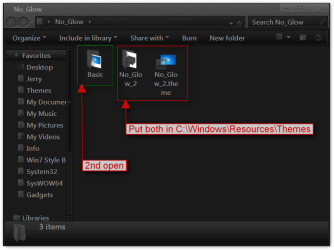
Here you go after you extract the Folder put both Highlighted in red (1 theme folder and 1 .theme file) in C:\Windows\Resources\Themes
No_Glow.png

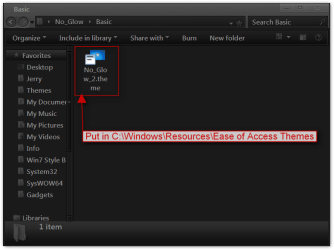
2nd open the Basic folder and inside there put the 1 .theme file in C:\Windows\Resources\Ease of Access Themes
Basic.png

It should show up as Personalize as No_Glow_2 in both Installed Themes & Basic theme areas.
Jerry
 

Attachments

My Computer

Computer type
Laptop
Computer Manufacturer/Model Number
Sager NP9170
OS
Win 7 Pro x64 / Win 10 Pro
CPU
Intel(R) Core(TM) i7-3630QM CPU @ 2.40GHz
Motherboard
CLEVO P170EM
Memory
12 GB
Graphics Card(s)
(1) Intel(R) HD Graphics 4000 (2) NVIDIA GeForce GTX 675M
Sound Card
(1) Realtek High Definition Audio (2) Intel(R) Display Aud
Monitor(s) Displays
17.3
Screen Resolution
1920x1080
Hard Drives
(1) Samsung 860 EVO 500GB(OS) (1) Samsung 860 EVO 500GB(Data)
Keyboard
Backlite
Antivirus
MSE, Malwarebytes Pro
Browser
Firefox
Other Info
DESKTOP: Custom-built.
OS: Win 10 Pro x64.
CASE: Rosewill R5.
CPU: Intel I5 4670K CPU @ 3.40GHz.
CPU COOLER: Cool Master Hyper 212 EVO.
MOTHERBOARD: Asus Z87-A.
MEMORY: Kingston HyperX 2x4 GB.
GPU: Nvidia Geforce 650 TI.
PSU: Corsair TX750.
DRIVES: (1) Samsung 840 120 GB SSD (2) Western Digital blue 500 GB 7200 RPM.
Back
Top