Win7 and Linux machine won't talk to each other

paul1149

New member
Guru
Local time
3:37 PM
Messages
1,025
Hi,

I'm trying to do a restore on a XPh machine on the LAN, using a Paragon Backup linux boot disk. In Paragon's Network Configurator, by drilling down I can see the other XPh machine on the LAN, but though the Win 7 machine is seen, no folders are revealed.

On the Win7 machine I have three locations that are shared - one on the system disk and two on a USB disk. The USB disk holds the backup image I want to use. I have it set to Shared, for Everyone, and Everyone has read/write permissions at the least (under Share it only says Read/Write; under Permissions I opened it up to Full Control temporarily).

It seems the bottleneck here is on the Win7 side. Can anyone see cause of the problem?

Thanks,
p.
 

My Computer My Computer

At a glance

Linux Lite 3.2 x64; Windows 7, 8.1Core2Duo 2.46GB ddr2nVidia
Computer type
PC/Desktop
Computer Manufacturer/Model Number
dell precision t3400 tower
OS
Linux Lite 3.2 x64; Windows 7, 8.1
CPU
Core2Duo 2.4
Memory
6GB ddr2
Graphics Card(s)
nVidia
Hard Drives
120gb SSD, 1TB HD, 2TB HD; sata II
Internet Speed
12/2
Browser
Vivaldi, Slimjet (Chromium) x64
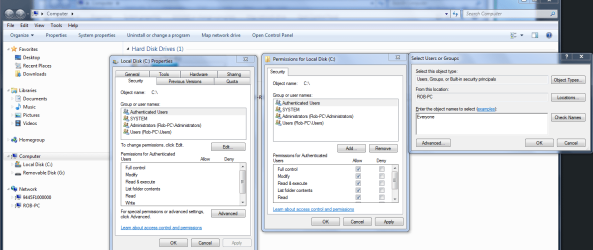
To share out an entire drive with Windows 7 you need to take an extra step beyond the standard sharing permissions.

You need to go into the Security tab of the drive and allow "Everyone" access by adding Everyone to the access list like in the picture below. Be sure and hit the apply and ok buttons once you change the settings for the authenticated users. That should get you full access to the drive. You can change it back after you get what you need.
 

Attachments

  • Sharing entire C drive authenticated users.PNG
    Sharing entire C drive authenticated users.PNG
    65.4 KB · Views: 112

My Computer My Computer

At a glance

Windows 7 Ult, Windows 8.1 Pro,Q9650-4.275GHz, E8600 4.5GHz, E6750-3.8GHzG.Skill PC2 9600 1200Mhz 5 5 5 15 2TGTX480
Computer type
PC/Desktop
Computer Manufacturer/Model Number
Home built
OS
Windows 7 Ult, Windows 8.1 Pro,
CPU
Q9650-4.275GHz, E8600 4.5GHz, E6750-3.8GHz
Motherboard
Evga 780i FTW
Memory
G.Skill PC2 9600 1200Mhz 5 5 5 15 2T
Graphics Card(s)
GTX480
Sound Card
Asus Xonar D2
Monitor(s) Displays
HannsG
Screen Resolution
1680X1050
Hard Drives
GSkill Phoenix Pro 120GB SSD
PSU
ThermalTake Toughpower 1000Watt modular
Case
ThermalTake XaserV
Cooling
Xigmatek S1283
Keyboard
Logitech G15
Mouse
Logitech G9
Internet Speed
T1
Adding further to my confusion, I booted the XPh machine to a new install of XPh, changed the Workgroup to the common one here, rebooted and tried to connect to the Win7 machine. It prompted me for a password, which I couldn't understand, as I hadn't put one on the XPh machine yet. But it was looking for the user/pass of the Win7 machine! When I entered that I gained access to the shared folders.

Why on earth would a network machine need, or be allowed to have, the credentials of another machine/user? This appears to fly against all common sense.

The Win7 folder is set to Everyone. Why is authentication being required at all?

p.
 

My Computer My Computer

At a glance

Linux Lite 3.2 x64; Windows 7, 8.1Core2Duo 2.46GB ddr2nVidia
Computer type
PC/Desktop
Computer Manufacturer/Model Number
dell precision t3400 tower
OS
Linux Lite 3.2 x64; Windows 7, 8.1
CPU
Core2Duo 2.4
Memory
6GB ddr2
Graphics Card(s)
nVidia
Hard Drives
120gb SSD, 1TB HD, 2TB HD; sata II
Internet Speed
12/2
Browser
Vivaldi, Slimjet (Chromium) x64
Hi Chev,

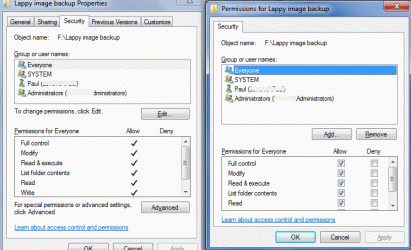
The backup image I want to access is in a folder on the external drive. As it is, I can't even see the folders, let alone access them. Plus, I think my permissions are already lavish. I'm attaching a capture.

Thanks,
p.
 

Attachments

  • Clipboard01.gif
    Clipboard01.gif
    99.9 KB · Views: 16
Last edited:

My Computer My Computer

At a glance

Linux Lite 3.2 x64; Windows 7, 8.1Core2Duo 2.46GB ddr2nVidia
Computer type
PC/Desktop
Computer Manufacturer/Model Number
dell precision t3400 tower
OS
Linux Lite 3.2 x64; Windows 7, 8.1
CPU
Core2Duo 2.4
Memory
6GB ddr2
Graphics Card(s)
nVidia
Hard Drives
120gb SSD, 1TB HD, 2TB HD; sata II
Internet Speed
12/2
Browser
Vivaldi, Slimjet (Chromium) x64

My Computer My Computer

At a glance

Windows 7 Ult, Windows 8.1 Pro,Q9650-4.275GHz, E8600 4.5GHz, E6750-3.8GHzG.Skill PC2 9600 1200Mhz 5 5 5 15 2TGTX480
Computer type
PC/Desktop
Computer Manufacturer/Model Number
Home built
OS
Windows 7 Ult, Windows 8.1 Pro,
CPU
Q9650-4.275GHz, E8600 4.5GHz, E6750-3.8GHz
Motherboard
Evga 780i FTW
Memory
G.Skill PC2 9600 1200Mhz 5 5 5 15 2T
Graphics Card(s)
GTX480
Sound Card
Asus Xonar D2
Monitor(s) Displays
HannsG
Screen Resolution
1680X1050
Hard Drives
GSkill Phoenix Pro 120GB SSD
PSU
ThermalTake Toughpower 1000Watt modular
Case
ThermalTake XaserV
Cooling
Xigmatek S1283
Keyboard
Logitech G15
Mouse
Logitech G9
Internet Speed
T1
I may have discovered why the Win7 authentication was required on the XP machine. The user name in both places was the same. So when I entered the name, XP insisted on prepending the Win7 machine's name to it. I just changed the user name on the XP machine, and to view the Win7 folders now I had to enter the XP login, as it should be. If this is the driver of that error, I would call it a bug. No two users on the same workgroup can have the same name?
 

My Computer My Computer

At a glance

Linux Lite 3.2 x64; Windows 7, 8.1Core2Duo 2.46GB ddr2nVidia
Computer type
PC/Desktop
Computer Manufacturer/Model Number
dell precision t3400 tower
OS
Linux Lite 3.2 x64; Windows 7, 8.1
CPU
Core2Duo 2.4
Memory
6GB ddr2
Graphics Card(s)
nVidia
Hard Drives
120gb SSD, 1TB HD, 2TB HD; sata II
Internet Speed
12/2
Browser
Vivaldi, Slimjet (Chromium) x64
Thanks, Chev, but that appears to be only distantly related to my problem. Neither machine here can access the other, and Win7 doesn't even see the linux boot disk machine.
 

My Computer My Computer

At a glance

Linux Lite 3.2 x64; Windows 7, 8.1Core2Duo 2.46GB ddr2nVidia
Computer type
PC/Desktop
Computer Manufacturer/Model Number
dell precision t3400 tower
OS
Linux Lite 3.2 x64; Windows 7, 8.1
CPU
Core2Duo 2.4
Memory
6GB ddr2
Graphics Card(s)
nVidia
Hard Drives
120gb SSD, 1TB HD, 2TB HD; sata II
Internet Speed
12/2
Browser
Vivaldi, Slimjet (Chromium) x64
I've never been able to access a Windows machine without creds, at not NT based Windows. Have you allowed Guest access ?? That might help. It's supposed to anyway.
 

My Computer My Computer

At a glance

Windows 7 Professional 64 bit4096
Computer Manufacturer/Model Number
Dell Optiplex
OS
Windows 7 Professional 64 bit
Memory
4096
I think you nailed the problem. I was just looking at this, and I realized that the boot disk, while on the LAN, is not a member of the Workgroup. Since there is no workgroup facility on the boot disk, somehow Win7 has to be loosened up further to allow any LAN machine access. I think the answer is to temporarily switch it to being a Homegroup machine. Let me dig deeper.

p.
 

My Computer My Computer

At a glance

Linux Lite 3.2 x64; Windows 7, 8.1Core2Duo 2.46GB ddr2nVidia
Computer type
PC/Desktop
Computer Manufacturer/Model Number
dell precision t3400 tower
OS
Linux Lite 3.2 x64; Windows 7, 8.1
CPU
Core2Duo 2.4
Memory
6GB ddr2
Graphics Card(s)
nVidia
Hard Drives
120gb SSD, 1TB HD, 2TB HD; sata II
Internet Speed
12/2
Browser
Vivaldi, Slimjet (Chromium) x64
Still stumped. Even dropping down to a Homegroup didn't open it up. Nor did making Everyone the folder's owner.

I don't think Guest will help. Under Permissions/Add(or edit, not sure)/Advanced, do a Find and you will see that Guest is a member of the Win7 machine that hosts the folder to be shared. I think Everyone would be broader than that.
 

My Computer My Computer

At a glance

Linux Lite 3.2 x64; Windows 7, 8.1Core2Duo 2.46GB ddr2nVidia
Computer type
PC/Desktop
Computer Manufacturer/Model Number
dell precision t3400 tower
OS
Linux Lite 3.2 x64; Windows 7, 8.1
CPU
Core2Duo 2.4
Memory
6GB ddr2
Graphics Card(s)
nVidia
Hard Drives
120gb SSD, 1TB HD, 2TB HD; sata II
Internet Speed
12/2
Browser
Vivaldi, Slimjet (Chromium) x64
I was afraid that would be the case. I host all my software, OS images, etc. on a Linux box for that reason. Samba lets me create shares that anyone, with or without creds, can access. Makes my life easier.

Any way you can move the images to another machine ?? Does your Paragon disk let you use removable media such as a USB drive ?? (I haven't used it, so I have to ask)
 

My Computer My Computer

At a glance

Windows 7 Professional 64 bit4096
Computer Manufacturer/Model Number
Dell Optiplex
OS
Windows 7 Professional 64 bit
Memory
4096
I would think that USB drives would constitute a large slice of Paragon's usage. But just in case, I've also been running these tests on the Share folder that's on the Win7 system disk, with the same dismal results.

That's a good idea about using Linux. Actually, I could boot my Win7 machine to PC Linux and probably solve the problem, though I have zero experience in setting such a thing up under Linux.

None of this would be an issue, if the target machine's USB (and PCIMIA) functionality were not broken. But as it is, the network is my only option. I could take the USB drive up to the other XPh machine, which is upstairs, which is a bit of an inconvenience, but I've been trying to resolve this logjam on principle, to see what I could learn from it.

Bout the only thing I'm learning, though, is that MS can be .... difficult....

bw,
p.
 

My Computer My Computer

At a glance

Linux Lite 3.2 x64; Windows 7, 8.1Core2Duo 2.46GB ddr2nVidia
Computer type
PC/Desktop
Computer Manufacturer/Model Number
dell precision t3400 tower
OS
Linux Lite 3.2 x64; Windows 7, 8.1
CPU
Core2Duo 2.4
Memory
6GB ddr2
Graphics Card(s)
nVidia
Hard Drives
120gb SSD, 1TB HD, 2TB HD; sata II
Internet Speed
12/2
Browser
Vivaldi, Slimjet (Chromium) x64
Well, it does make the OS more secure, but I'd like to have an option that lets me allow access to anyone.

A Linux Live CD might be your best solution at this point. I use Ubuntu and I'm pretty sure you can set up and run Samba on the fly, though I've never done it personally.

Check out ubuntuforums.org and do a search for Samba and Live CD. You might find just what you're looking for.

Good luck with it.
 

My Computer My Computer

At a glance

Windows 7 Professional 64 bit4096
Computer Manufacturer/Model Number
Dell Optiplex
OS
Windows 7 Professional 64 bit
Memory
4096
I would say that this swings the needle way beyond "more secure", to "less useful".

I already have a Linux install on the Win7 machine, which I could use. But for all I know the real problem is in the Paragon boot disk on the XP machine.

Actually, I'm considering installing an evaluation copy of Win7 Enterprise on the XP machine, which I need in order to study for an MS cert. I'm still researching this problem for its technical value, but I'm not sure which way I'm going to go.

Thanks much for your input.

p.
 

My Computer My Computer

At a glance

Linux Lite 3.2 x64; Windows 7, 8.1Core2Duo 2.46GB ddr2nVidia
Computer type
PC/Desktop
Computer Manufacturer/Model Number
dell precision t3400 tower
OS
Linux Lite 3.2 x64; Windows 7, 8.1
CPU
Core2Duo 2.4
Memory
6GB ddr2
Graphics Card(s)
nVidia
Hard Drives
120gb SSD, 1TB HD, 2TB HD; sata II
Internet Speed
12/2
Browser
Vivaldi, Slimjet (Chromium) x64
Back
Top