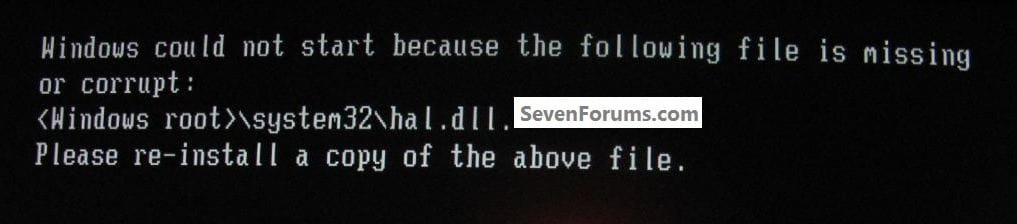
win7 and win-xp dual boot hal.dll and other problems

dalek69

New member
Local time
9:14 AM
Messages
3
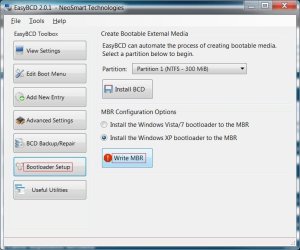
hi, a friend of mine has the following at first solved but repeating problems with dual boot system on two separate harddisks/partitions: first installed windows-7 x64 ultimate and after that win-XP-Pro sp3 on second harddisk. after solving the non-booting w7 with easyBCD writing win 7 bootsector to MBR and setting xp boot from the 100mb system partition, given a driveletter under w7. after that, hacked the register to prevent win-xp from deleting w7 systemrestore points. all succesful. later, xp would not run anymore with a missing or corrupt hal.dll message. solved that with help from this forum by rewriting win7 bootloader to MBR with easyBCD 2. a week later, both win7 and win-xp started doing a unwanted CHKDSK routine when not cancelled, at boot. very annoying. solved that too with this forum, thank you. after THAT, a few days later, the hal.dll error returned on xp boot. solved that again with easyBCD. but these problems should not be returning every other week, very annoying indeed. does anybody know what causes it and how to solve permanently?
help much appreciated!
 

My Computer My Computer

At a glance

windows 7 64 bit home premium
OS
windows 7 64 bit home premium
Hi, my friend does now not get the Hal.dll error anymore, but now has a error "NTOSKRNL.EXE corrupt or missing"when XP is booted first. when w7 is booted first or after xp and then xp again, no problem occurs.....
have previously restored w7 bootloader with easyBCD.
 

My Computer My Computer

At a glance

windows 7 64 bit home premium
OS
windows 7 64 bit home premium
Hello dalek69, welcome to Seven Forums!


I've seen both of those when I had XP installed first and marked the Windows 7 partition active for the install; I used EasyBCD to repair the XP boot files then added a boot menu entry for XP to get them both booting again, it took several tries of different methods to get it right but finally I got them both booting, just keep working at it.


click to enlarge
HAL2.jpg
XP_7.jpg
 

My Computer My Computer

At a glance

W 7 64-bit UltimateIntel Q9550 Yorkfield8GB Dominator 8500C5DATI : XFX 5870
Computer Manufacturer/Model Number
* BFK Customs *
OS
W 7 64-bit Ultimate
CPU
Intel Q9550 Yorkfield
Motherboard
ASUS P5Q Pro
Memory
8GB Dominator 8500C5D
Graphics Card(s)
ATI : XFX 5870
Sound Card
Realtek HD Audio 7-1
Monitor(s) Displays
1x 47" LCD HDMI & 3x 26" LCD HDMI
Screen Resolution
1920x1080P & 1920x1200
Hard Drives
1x 80GB Intel X25-M G2 SSD : 1x 500GB & 1x 640GB WD Caviar Black(s)
PSU
Corsair 620HX
Case
Cooler Master RC-690
Cooling
Tuniq Tower 120, 2x 140mm and 3x 120mm case fans
Keyboard
Microsoft 500
Mouse
Razer Diamondback 3G
Internet Speed
14 Mb/s
Other Info
1x Koutech 3Gb/s SATA HDD Hot Swap Rack
thanks for the encouragement, but it would be helpful to learn WHAT methods you used to get it working!
 

My Computer My Computer

At a glance

windows 7 64 bit home premium
OS
windows 7 64 bit home premium
Hello again.


I was just experimenting and it's been a while; download and install EasyBCD and first have a look to see if this will sort the issue of getting XP to boot.

EasyBCD Free Boot Manager Software


click to enlarge
WriteMBR.jpg


My Computer My Computer

At a glance

W 7 64-bit UltimateIntel Q9550 Yorkfield8GB Dominator 8500C5DATI : XFX 5870
Computer Manufacturer/Model Number
* BFK Customs *
OS
W 7 64-bit Ultimate
CPU
Intel Q9550 Yorkfield
Motherboard
ASUS P5Q Pro
Memory
8GB Dominator 8500C5D
Graphics Card(s)
ATI : XFX 5870
Sound Card
Realtek HD Audio 7-1
Monitor(s) Displays
1x 47" LCD HDMI & 3x 26" LCD HDMI
Screen Resolution
1920x1080P & 1920x1200
Hard Drives
1x 80GB Intel X25-M G2 SSD : 1x 500GB & 1x 640GB WD Caviar Black(s)
PSU
Corsair 620HX
Case
Cooler Master RC-690
Cooling
Tuniq Tower 120, 2x 140mm and 3x 120mm case fans
Keyboard
Microsoft 500
Mouse
Razer Diamondback 3G
Internet Speed
14 Mb/s
Other Info
1x Koutech 3Gb/s SATA HDD Hot Swap Rack
Back
Top