Win7 clean install won't complete

This post is remarkably similar to mine!


EDIT: Below is my setup. I am curious if we share any similarities:

Motherboard: Biostar TA790GXE 128m
CPU: AMD Athlon II x2 255 Regor 3.1ghz am3
HDD: Western Digital Caviar Green 500 gb drive
DVD: Sony optiarc 24x DVDR sata model ad-7240s-ob
Mem: OCZ 4gb (2x2g) 240 pinn DDR2 SDRAM 1066(PC2 8500)(Have also tried 2gig)
DVD & HDD are hooked up using SATA cables.
20" Hanns-g monitor hooked up via HDMI (Have also tried VGA)

These installs have failed after reboot:
Win 7 x64 professional install dvd
Win 7 x32 home install dvd
Win 7 Enterprise install from USB (ISO downloaded)
DOS (win 98 version)

My config is
Motherboard - Gigabyte P55UD3P
CPU i570
disk Seagate 1.5TB
DVD Samsung Blu/DVD
Mem 2 gb 1333 Kensington for now (will be 8)
DVD and HD are SATA but mobo seems to be looking at them as IDE - not sure how to interpret the mobo settings
temporarily using generic VGA 17"CRT until build is complete
 

My Computer

Computer Manufacturer/Model Number
custom build
OS
Windows 7 Pro 64 SP1
CPU
i5 750
Motherboard
Gigabyte GA-P55A-UD3P
Memory
4* 2GB 1333 DDR3 Kingston (8GB)
Graphics Card(s)
Radeon HD5850 XFX
Sound Card
Realtek HDAudio
Monitor(s) Displays
CMV CT-722A
Hard Drives
seagate 80GB sata system
seagate 1.5TB sata user data
PSU
Zalman ZM-750HP
Case
Centurion 5 II
Keyboard
PS2 generic
Mouse
HP USB
Other Info
Samsung SH-B083 BD-ROM/DVD
made a number of BIOS changes
the PCH SATA control mode is set to IDE
options are IDE, RAID(XHD) and ACHI. Should this beset to ACHI or is IDE the correct default?
....
However I took my eyes off it for a moment and it went into a reboot loop so I'm going to try again to see what happened.

Sat at "Completing installation" for several minutes then screen flashed (old CRT) and resolution changed to much higher. sat at "Completing installation"for another couple of minutes and then reported installation would continue after reboot.

PC rebooted and came up with "Starting Windows" screen and then stopped and rebooted.

So significant progress but not a working installation yet.
 

My Computer

Computer Manufacturer/Model Number
custom build
OS
Windows 7 Pro 64 SP1
CPU
i5 750
Motherboard
Gigabyte GA-P55A-UD3P
Memory
4* 2GB 1333 DDR3 Kingston (8GB)
Graphics Card(s)
Radeon HD5850 XFX
Sound Card
Realtek HDAudio
Monitor(s) Displays
CMV CT-722A
Hard Drives
seagate 80GB sata system
seagate 1.5TB sata user data
PSU
Zalman ZM-750HP
Case
Centurion 5 II
Keyboard
PS2 generic
Mouse
HP USB
Other Info
Samsung SH-B083 BD-ROM/DVD
The log last entry will tell you what went wrong.

It is on the drive of the failed install, e.g.

"C:\$WINDOWS.~BT\Sources\Panther\setuperr.log"

Boot 7 dvd , go to command prompt, type

Notepad

when notepad appears, click File>Save, browse to the setuperr.log and have a look.

I tried to do this. I have booted from the install CD and gone into notepad

In notepad I see 3 disk drives.
System reserved (C: )
Local Disk (D: )
Boot (X: )
and removable CD drive (E: )

X: has 4 folders Program Files, sources, users and Windows.
Sources has 4 folders en-US, inf, License and recovery and 3 files hwcompat, hwexclude and idwbinfo
recovery has 1 empty folder en-Us and no files

am I looking in the wrong place?


X: is a Ram memory created by setup for the installation files of win7 :)
So that is correct.
 

My Computer

Computer type
PC/Desktop
Computer Manufacturer/Model Number
Built them myself, Science Experiments !
OS
Win7 Enterprise, Win7 x86 (Ult 7600), Win7 x64 Ult 7600, TechNet RTM on AMD x64 (2.8Ghz)
CPU
AMD fx8350 4ghz, AMD-32 2400mhz, AMD-64 3200mhz, AMDx64 2.8G
Motherboard
SIS 755, ECS-K8M890M-M (Ult 7600), GigaByte & others
Memory
2gb, 4gb on the Ult 7600, 4gb on Technet RTM, 32gb on FX8350
Graphics Card(s)
Draw my own Graphics, several nVidia cards
Sound Card
on motherboard
Monitor(s) Displays
19" flat scr, 28" I-Inc widescr,22" Emprex Widescr, 23" Acer
Screen Resolution
1280 x 1024, 1440 x 900, 1920 x 1080
Hard Drives
6 pata Ide HD's & 2 Sata HD's
added 80gb external on Ult 7600 computer,
numerous extra 1tb, 2TB, 3Tb SATA HD's
A collection of ext HD Docks w/ HDs
PSU
430w, 550w, 600w, 700, 800, etc
Case
All Generic Full Towers
Cooling
Open Air & a few fans, some w/ colored LEDs
Keyboard
Compaq & Dell recycled from GoodWill
Mouse
Made in China Optical Wired Mouse
Internet Speed
Fast Cable InterNet
Antivirus
AVG Free on 24 different Desktops, NO Problems!
Browser
IE 8 is preferred, but use FireFox sometimes
Other Info
Linksys Routers, switches, & Hubs
Too Many USB Flash Drives to count, Biggest is 64GB !
Eight computers in my home network.
Sixteen computers at my business network.
Linked via TeamViewer !
Lots of old used spare computer parts everywhere!
This is with 2gb Ram installed & the VGA Cable & 17' VGA CRT Monitor ?

Sounds very close ? :confused:
 

My Computer

Computer type
PC/Desktop
Computer Manufacturer/Model Number
Built them myself, Science Experiments !
OS
Win7 Enterprise, Win7 x86 (Ult 7600), Win7 x64 Ult 7600, TechNet RTM on AMD x64 (2.8Ghz)
CPU
AMD fx8350 4ghz, AMD-32 2400mhz, AMD-64 3200mhz, AMDx64 2.8G
Motherboard
SIS 755, ECS-K8M890M-M (Ult 7600), GigaByte & others
Memory
2gb, 4gb on the Ult 7600, 4gb on Technet RTM, 32gb on FX8350
Graphics Card(s)
Draw my own Graphics, several nVidia cards
Sound Card
on motherboard
Monitor(s) Displays
19" flat scr, 28" I-Inc widescr,22" Emprex Widescr, 23" Acer
Screen Resolution
1280 x 1024, 1440 x 900, 1920 x 1080
Hard Drives
6 pata Ide HD's & 2 Sata HD's
added 80gb external on Ult 7600 computer,
numerous extra 1tb, 2TB, 3Tb SATA HD's
A collection of ext HD Docks w/ HDs
PSU
430w, 550w, 600w, 700, 800, etc
Case
All Generic Full Towers
Cooling
Open Air & a few fans, some w/ colored LEDs
Keyboard
Compaq & Dell recycled from GoodWill
Mouse
Made in China Optical Wired Mouse
Internet Speed
Fast Cable InterNet
Antivirus
AVG Free on 24 different Desktops, NO Problems!
Browser
IE 8 is preferred, but use FireFox sometimes
Other Info
Linksys Routers, switches, & Hubs
Too Many USB Flash Drives to count, Biggest is 64GB !
Eight computers in my home network.
Sixteen computers at my business network.
Linked via TeamViewer !
Lots of old used spare computer parts everywhere!
Do you have the latest BIOS version update?

Try clearing the CMOS: Clear CMOS - 3 Ways to Clear the CMOS - Reset BIOS

Have you removed all but 2gb of RAM and tested the RAM?

Try testing the HD using maker diagnostics: Hard Drive Diagnostics Tools and Utilities (Storage) - TACKtech Corp.

What I do when I don't want to take any more time troubleshooting install is to pull the HD, put it in another machine to see if it will install there. Then return it to problem machine. If it will start it will swap out all drivers, requesting several restarts, and run fine. I always run CHKDSK just be be sure.
 
WindowsStar,

Great. Glad to hear that the partitioning approach solved problems. And I appreciate the feedback.
 

My Computer

Computer Manufacturer/Model Number
Toshiba Satellite S875D-S7239 laptop
OS
MS Windows 7 Ultimate SP1 64-bit
CPU
AMD A10-4600M
Motherboard
AMD Pumori (Socket FT1)
Memory
6.00 GB Dual-Channel DDR3 @ 798MHz (11-11-12-28)
Graphics Card(s)
AMD Radeon HD 7660G
Sound Card
High Definition Audio Device
Monitor(s) Displays
Generic PnP Monitor (1600x900@60Hz)
Screen Resolution
1600x900@60Hz
Hard Drives
SSD 119GB Corsair CSSD-V128GB2 ATA Device
Keyboard
Standard PS/2 Keyboard
Mouse
HP Wireless Optical Mobile Mouse Model FHA-3410
Internet Speed
What the local pub, local coffee shop offers.
Other Info
Optical Drive:MATSHITA BD-CMB UJ160B ATA Device


Also have an Asus ha1002xp netbook with Win 7 Ultimate installed.
Ibex,

On the motherboard, bios settings--I always go with the defaults first and foremost. If I suspect problems there then 1st go to motherboard's website for recommendations and 2nd-very important-only make one change at a time- otherwise you never know whether you moving forwards or backwards.

Definitely check the website for your motherboard and see if there is a bios update. This is extremely important in view of the fact that you are using a 2T harddrive.

Will send in next post procedure for preparing and partitioning of your hard disk. Will be back in about 30 minutes.
 

My Computer

Computer Manufacturer/Model Number
Toshiba Satellite S875D-S7239 laptop
OS
MS Windows 7 Ultimate SP1 64-bit
CPU
AMD A10-4600M
Motherboard
AMD Pumori (Socket FT1)
Memory
6.00 GB Dual-Channel DDR3 @ 798MHz (11-11-12-28)
Graphics Card(s)
AMD Radeon HD 7660G
Sound Card
High Definition Audio Device
Monitor(s) Displays
Generic PnP Monitor (1600x900@60Hz)
Screen Resolution
1600x900@60Hz
Hard Drives
SSD 119GB Corsair CSSD-V128GB2 ATA Device
Keyboard
Standard PS/2 Keyboard
Mouse
HP Wireless Optical Mobile Mouse Model FHA-3410
Internet Speed
What the local pub, local coffee shop offers.
Other Info
Optical Drive:MATSHITA BD-CMB UJ160B ATA Device


Also have an Asus ha1002xp netbook with Win 7 Ultimate installed.
Ibex,
Took longer than I wanted. Had to go get one of my external drives to make 100% sure of the procedure.

[FONT=&quot]PARTITION A HARD DISK PRIOR TO WINDOWS 7 INSTALL[/FONT]

LEAVE THE DVD TRAY OPEN
Ø Turn on your computer. The purpose of this is so that the DVD door can be opened.
Ø Open the DVD door.
Ø Turn off the computer with the DVD door open.

BOOT FROM YOUR WINDOWS 7 DVD AND GO TO A COMMAND PROMPT
Ø Insert the Windows 7 DVD and close the DVD door.
Ø Power on your computer.
Ø When that very first dialog appears where you would normally push the NEXT button, then use the SHIFT + F10 key combo to get to a command prompt.
Ø The command prompt will be X:>


USE THE DISKPART PROGRAM TO PREPARE AND PARTITION THE HARD DISK
Type the commands shown, hitting the Enter key after each.

Do not proceed to the next command until the current command is finished.

· DISKPART (the command prompt will change to DISKPART>)
· LIST DISK (list the disks present)
· SELECT DISK 0 (assuming disk zero is the desired hard disk)
· DETAIL DISK (show you info regarding the disk you selected)
· CLEAN (write zeros to first and last sectors on disk)
· CREATE PARTITION PRIMARY SIZE=256644
(
create a 256 gig primary partition)
(256644 = 1024 x 256 1 Gig=1024 Megs)

· CREATE PARTITION PRIMARY SIZE=513288
(
create a 512 gig primary partition)
(513288 = 1024 x 512 1 Gig=1024 Megs)

· CREATE PARTITION PRIMARY
(create a partition occupying the remainder)

You now have three partitions on your disk.
Next you need to:
Ø Declare one partition as the “system” partition
Ø Format each of the partitions
Ø Assign a drive letter to the partitions.
You can mix the operations up. You just need to complete them all.


· SELECT PARTITION 1
· ACTIVE (make this the system partition)
· FORMAT FS=NTFS (format the partition)
· ASSIGN (next available drive letter is assigned)
·
· SELECT PARTITION 2
· FORMAT FS=NTFS (format the partition)
· ASSIGN (next available drive letter is assigned)
·
· SELECT PARTITION 3
· FORMAT FS=NTFS (format the partition)
· ASSIGN (next available drive letter is assigned)
·
· LIST PARTITION (to see what you have wrought)
·
·
· EXIT (this will exit you from the DiskPart program)
· EXIT (this will exit you back to the Windows 7 install
program)
 

My Computer

Computer Manufacturer/Model Number
Toshiba Satellite S875D-S7239 laptop
OS
MS Windows 7 Ultimate SP1 64-bit
CPU
AMD A10-4600M
Motherboard
AMD Pumori (Socket FT1)
Memory
6.00 GB Dual-Channel DDR3 @ 798MHz (11-11-12-28)
Graphics Card(s)
AMD Radeon HD 7660G
Sound Card
High Definition Audio Device
Monitor(s) Displays
Generic PnP Monitor (1600x900@60Hz)
Screen Resolution
1600x900@60Hz
Hard Drives
SSD 119GB Corsair CSSD-V128GB2 ATA Device
Keyboard
Standard PS/2 Keyboard
Mouse
HP Wireless Optical Mobile Mouse Model FHA-3410
Internet Speed
What the local pub, local coffee shop offers.
Other Info
Optical Drive:MATSHITA BD-CMB UJ160B ATA Device


Also have an Asus ha1002xp netbook with Win 7 Ultimate installed.
Ibex,
...
Ø Assign a drive letter to the partitions.
You can mix the operations up. You just need to complete them all.


· SELECT PARTITION 1
· ACTIVE (make this the system partition)
· FORMAT FS=NTFS (format the partition)
· ASSIGN (next available drive letter is assigned)
·
· SELECT PARTITION 2
· FORMAT FS=NTFS (format the partition)
· ASSIGN (next available drive letter is assigned)
·
· SELECT PARTITION 3
· FORMAT FS=NTFS (format the partition)
· ASSIGN (next available drive letter is assigned)
·
· LIST PARTITION (to see what you have wrought)
·
·
· EXIT(this will exit you from the DiskPart program)
· EXIT(this will exit you back to the Windows 7 install
program)

Will do this tonight.

One question about the drive letters. If I do this in the order above I'll have
Partition 1 C:
Partition 2 D:
Partition 3 E:

I'm still a little concerned that the Win7 install is going onto the D: drive. One other forum expressed some concern about this but on here everyone seems OK with it. I thought it was "normal" to put Windows on C:
 

My Computer

Computer Manufacturer/Model Number
custom build
OS
Windows 7 Pro 64 SP1
CPU
i5 750
Motherboard
Gigabyte GA-P55A-UD3P
Memory
4* 2GB 1333 DDR3 Kingston (8GB)
Graphics Card(s)
Radeon HD5850 XFX
Sound Card
Realtek HDAudio
Monitor(s) Displays
CMV CT-722A
Hard Drives
seagate 80GB sata system
seagate 1.5TB sata user data
PSU
Zalman ZM-750HP
Case
Centurion 5 II
Keyboard
PS2 generic
Mouse
HP USB
Other Info
Samsung SH-B083 BD-ROM/DVD
One question about the drive letters. If I do this in the order above I'll have
Partition 1 C:
Partition 2 D:
Partition 3 E:

I'm still a little concerned that the Windows 7 install is going onto the D: drive. One other forum expressed some concern about this but on here everyone seems OK with it. I thought it was "normal" to put Windows on C:

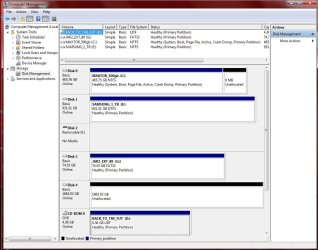
Partition 1 should default to Active, primary, boot for the install.
 

Attachments

  • Disk_Management_New_2tbHD.JPG
    Disk_Management_New_2tbHD.JPG
    108.7 KB · Views: 38
Last edited:

My Computer

Computer type
PC/Desktop
Computer Manufacturer/Model Number
Built them myself, Science Experiments !
OS
Win7 Enterprise, Win7 x86 (Ult 7600), Win7 x64 Ult 7600, TechNet RTM on AMD x64 (2.8Ghz)
CPU
AMD fx8350 4ghz, AMD-32 2400mhz, AMD-64 3200mhz, AMDx64 2.8G
Motherboard
SIS 755, ECS-K8M890M-M (Ult 7600), GigaByte & others
Memory
2gb, 4gb on the Ult 7600, 4gb on Technet RTM, 32gb on FX8350
Graphics Card(s)
Draw my own Graphics, several nVidia cards
Sound Card
on motherboard
Monitor(s) Displays
19" flat scr, 28" I-Inc widescr,22" Emprex Widescr, 23" Acer
Screen Resolution
1280 x 1024, 1440 x 900, 1920 x 1080
Hard Drives
6 pata Ide HD's & 2 Sata HD's
added 80gb external on Ult 7600 computer,
numerous extra 1tb, 2TB, 3Tb SATA HD's
A collection of ext HD Docks w/ HDs
PSU
430w, 550w, 600w, 700, 800, etc
Case
All Generic Full Towers
Cooling
Open Air & a few fans, some w/ colored LEDs
Keyboard
Compaq & Dell recycled from GoodWill
Mouse
Made in China Optical Wired Mouse
Internet Speed
Fast Cable InterNet
Antivirus
AVG Free on 24 different Desktops, NO Problems!
Browser
IE 8 is preferred, but use FireFox sometimes
Other Info
Linksys Routers, switches, & Hubs
Too Many USB Flash Drives to count, Biggest is 64GB !
Eight computers in my home network.
Sixteen computers at my business network.
Linked via TeamViewer !
Lots of old used spare computer parts everywhere!
The driver letter is ill relevant anymore, this is a carryover from the DOS days. I wish Microsoft would have gotten rid of the drive letters years ago (another subject). Yes it is nice to have everything on the C: drive so you are talking the same drive while helping someone over the phone or you are reading instructions and they keep referring to C: and yours is H: so you have to remember to substitute H: for C: When you do your install you should be able to pick the C: drive.
 

My Computer

Computer type
PC/Desktop
Computer Manufacturer/Model Number
Dell OP7010
OS
Windows 7 Enterprise (x64); Windows Server 2008 R2 (x64)
Memory
16GB
Monitor(s) Displays
4 Dell 24" LCD
Screen Resolution
1280x1024
Keyboard
Dell
Mouse
Dell Optical
Internet Speed
40meg
The driver letter is ill relevant anymore, this is a carryover from the DOS days. I wish Microsoft would have gotten rid of the drive letters years ago (another subject). Yes it is nice to have everything on the C: drive so you are talking the same drive while helping someone over the phone or you are reading instructions and they keep referring to C: and yours is H: so you have to remember to substitute H: for C: When you do your install you should be able to pick the C: drive.

Not so much. The active BIOS disk and the active partition will get the bootloader with a standard 7 install. It will be C: During install, before you get to the partitioning screen press Shift+F10 for a command prompt and issue the "diskpart" command. That will allow you to issue the "ina(ctivate)" command on the install media volume so the 7 install can setup the 100MB system partition as active as recommended and also play out the partitioning scheme.
 

My Computer

Computer type
Laptop
Computer Manufacturer/Model Number
Apple
OS
El Capitan / Windows 10
CPU
i7-4980HQ
Memory
16GB
Graphics Card(s)
Iris 5200
Ibex,
Just follow the procedure I gave you and all will be ok.

You see, I've been there, done that and more than just once. In fact, the last time was just yesterday.
Now if you would like reassurance that the drive letters are assigned as you like, then before you exit from DISKPART, type LIST VOLUME

Now let's say that you find that C and D are swapped from what you would like, then
[FONT=&quot]SWAP DRIVE LETTERS[/FONT]

LIST VOLUME (to see current volume versus letter assignments)

SELECT VOLUME 1 (assuming volume 1 corresponds to C: )

ASSIGN R (this will assign the letter R to volume 1)

SELECT VOLUME 2 (assuming volume 2 corresponds to D: )

ASSIGN S (this will assign the letter S to volume 2)

Now you are ready to “reuse” the letters C and D.

SELECT VOLUME 1 (volume 1 was “C” )

ASSIGN D (now volume 1 is “D” )

SELECT VOLUME 2 (volume 2 was “D”)

ASSIGN C (now volume 2 is “C”)

Exit you way out.
You only need to swap the drive letters if the LIST VOLUME assignment was not as desired.

The idea is to swap the drive letters by first assigning the drives to unused letters and then reassigning them the desired letters.
 

My Computer

Computer Manufacturer/Model Number
Toshiba Satellite S875D-S7239 laptop
OS
MS Windows 7 Ultimate SP1 64-bit
CPU
AMD A10-4600M
Motherboard
AMD Pumori (Socket FT1)
Memory
6.00 GB Dual-Channel DDR3 @ 798MHz (11-11-12-28)
Graphics Card(s)
AMD Radeon HD 7660G
Sound Card
High Definition Audio Device
Monitor(s) Displays
Generic PnP Monitor (1600x900@60Hz)
Screen Resolution
1600x900@60Hz
Hard Drives
SSD 119GB Corsair CSSD-V128GB2 ATA Device
Keyboard
Standard PS/2 Keyboard
Mouse
HP Wireless Optical Mobile Mouse Model FHA-3410
Internet Speed
What the local pub, local coffee shop offers.
Other Info
Optical Drive:MATSHITA BD-CMB UJ160B ATA Device


Also have an Asus ha1002xp netbook with Win 7 Ultimate installed.
Just FYI-

Swap your SATA cable.

My issue is fixed by swapping a SATA cable. I used an aftermarket 3" sata cable because the HDD was right next to the SATA ports on the MB. Swapped the SATA cable out with the cable provided by the MB and presto.. Drive boots right up.
 

My Computer

OS
Win 7 x64
Just FYI-

Swap your SATA cable.

My issue is fixed by swapping a SATA cable. I used an aftermarket 3" sata cable because the HDD was right next to the SATA ports on the MB. Swapped the SATA cable out with the cable provided by the MB and presto.. Drive boots right up.

Lots of SATA cables so I can try this.
 

My Computer

Computer Manufacturer/Model Number
custom build
OS
Windows 7 Pro 64 SP1
CPU
i5 750
Motherboard
Gigabyte GA-P55A-UD3P
Memory
4* 2GB 1333 DDR3 Kingston (8GB)
Graphics Card(s)
Radeon HD5850 XFX
Sound Card
Realtek HDAudio
Monitor(s) Displays
CMV CT-722A
Hard Drives
seagate 80GB sata system
seagate 1.5TB sata user data
PSU
Zalman ZM-750HP
Case
Centurion 5 II
Keyboard
PS2 generic
Mouse
HP USB
Other Info
Samsung SH-B083 BD-ROM/DVD
Ibex,
Just follow the procedure I gave you and all will be ok.

You see, I've been there, done that and more than just once. In fact, the last time was just yesterday.
Thanks Karlsnooks. More than happy to follow your instructions.
Now if you would like reassurance that the drive letters are assigned as you like, then before you exit from DISKPART, type LIST VOLUME

Now let's say that you find that C and D are swapped from what you would like, then


[FONT=&quot]SWAP DRIVE LETTERS[/FONT]


LIST VOLUME (to see current volume versus letter assignments)

SELECT VOLUME 1 (assuming volume 1 corresponds to C: )

ASSIGN R (this will assign the letter R to volume 1)

SELECT VOLUME 2 (assuming volume 2 corresponds to D: )

ASSIGN S (this will assign the letter S to volume 2)

Now you are ready to “reuse” the letters C and D.

SELECT VOLUME 1 (volume 1 was “C” )

ASSIGN D (now volume 1 is “D” )

SELECT VOLUME 2 (volume 2 was “D”)

ASSIGN C (now volume 2 is “C”)

Exit you way out.
You only need to swap the drive letters if the LIST VOLUME assignment was not as desired.

The idea is to swap the drive letters by first assigning the drives to unused letters and then reassigning them the desired letters.


I started a memetest running before I left for work this morning so should have been going for 16 hours by the time I get back to it. That should eliminate or identify RAM as the issue at that point.

Still just abit confused about the drive lettering. I now understand how to change the lettering but is the end point I'm aiming at:
Partition 1 - 256GB SYSTEM labelled as D:
Partition 2 - 512GB labelled as C:
Partition 3 - balance of disk labelled with next available.

and then I tell the installer to install on partition 2?
 

My Computer

Computer Manufacturer/Model Number
custom build
OS
Windows 7 Pro 64 SP1
CPU
i5 750
Motherboard
Gigabyte GA-P55A-UD3P
Memory
4* 2GB 1333 DDR3 Kingston (8GB)
Graphics Card(s)
Radeon HD5850 XFX
Sound Card
Realtek HDAudio
Monitor(s) Displays
CMV CT-722A
Hard Drives
seagate 80GB sata system
seagate 1.5TB sata user data
PSU
Zalman ZM-750HP
Case
Centurion 5 II
Keyboard
PS2 generic
Mouse
HP USB
Other Info
Samsung SH-B083 BD-ROM/DVD
'Installer" will install to the partition you marked as Active.
 

My Computer

Computer Manufacturer/Model Number
Toshiba Satellite S875D-S7239 laptop
OS
MS Windows 7 Ultimate SP1 64-bit
CPU
AMD A10-4600M
Motherboard
AMD Pumori (Socket FT1)
Memory
6.00 GB Dual-Channel DDR3 @ 798MHz (11-11-12-28)
Graphics Card(s)
AMD Radeon HD 7660G
Sound Card
High Definition Audio Device
Monitor(s) Displays
Generic PnP Monitor (1600x900@60Hz)
Screen Resolution
1600x900@60Hz
Hard Drives
SSD 119GB Corsair CSSD-V128GB2 ATA Device
Keyboard
Standard PS/2 Keyboard
Mouse
HP Wireless Optical Mobile Mouse Model FHA-3410
Internet Speed
What the local pub, local coffee shop offers.
Other Info
Optical Drive:MATSHITA BD-CMB UJ160B ATA Device


Also have an Asus ha1002xp netbook with Win 7 Ultimate installed.
Yes, you are looking the wrong place.

The $WINDOWS.~BT folder should be on the partition you were trying to install onto.

The log last entry will tell you what went wrong.

It is on the drive of the failed install, e.g.

"C:\$WINDOWS.~BT\Sources\Panther\setuperr.log"

Boot 7 dvd , go to command prompt, type

Notepad

when notepad appears, click File>Save, browse to the setuperr.log and have a look.

I tried to do this. I have booted from the install CD and gone into notepad

In notepad I see 3 disk drives.
System reserved (C: )
Local Disk (D: )
Boot (X: )
and removable CD drive (E: )

X: has 4 folders Program Files, sources, users and Windows.
Sources has 4 folders en-US, inf, License and recovery and 3 files hwcompat, hwexclude and idwbinfo
recovery has 1 empty folder en-Us and no files

am I looking in the wrong place?
 

My Computers

System One System Two

  • Computer type
    PC/Desktop
    OS
    7 X64
    CPU
    i5 8400
    Motherboard
    gigabyte b365m ds3h
    Memory
    2x8gb 3200mhz
    Hard Drives
    various
    PSU
    pure power 11 400w cm
    Case
    Coolermaster
    Cooling
    cryorig m9i
  • Computer type
    PC/Desktop
    OS
    7x64
    CPU
    g5400
    Motherboard
    ga b365m ds3h
    Memory
    8gb ddr4 2400
    PSU
    xfx pro 450w
If you install by booting the dvd - Windows will assign itself C whichever partition you install it on.


Still just abit confused about the drive lettering. I now understand how to change the lettering but is the end point I'm aiming at:
Partition 1 - 256GB SYSTEM labelled as D:
Partition 2 - 512GB labelled as C:
Partition 3 - balance of disk labelled with next available.

and then I tell the installer to install on partition 2?
 

My Computers

System One System Two

  • Computer type
    PC/Desktop
    OS
    7 X64
    CPU
    i5 8400
    Motherboard
    gigabyte b365m ds3h
    Memory
    2x8gb 3200mhz
    Hard Drives
    various
    PSU
    pure power 11 400w cm
    Case
    Coolermaster
    Cooling
    cryorig m9i
  • Computer type
    PC/Desktop
    OS
    7x64
    CPU
    g5400
    Motherboard
    ga b365m ds3h
    Memory
    8gb ddr4 2400
    PSU
    xfx pro 450w
If you decide that you marked the wrong partition as Active,
then go back into DiskPart, select the partition you marked as active, then use the INACTIVE command, then select the partition you want to be active and use the ACTIVE command.
 

My Computer

Computer Manufacturer/Model Number
Toshiba Satellite S875D-S7239 laptop
OS
MS Windows 7 Ultimate SP1 64-bit
CPU
AMD A10-4600M
Motherboard
AMD Pumori (Socket FT1)
Memory
6.00 GB Dual-Channel DDR3 @ 798MHz (11-11-12-28)
Graphics Card(s)
AMD Radeon HD 7660G
Sound Card
High Definition Audio Device
Monitor(s) Displays
Generic PnP Monitor (1600x900@60Hz)
Screen Resolution
1600x900@60Hz
Hard Drives
SSD 119GB Corsair CSSD-V128GB2 ATA Device
Keyboard
Standard PS/2 Keyboard
Mouse
HP Wireless Optical Mobile Mouse Model FHA-3410
Internet Speed
What the local pub, local coffee shop offers.
Other Info
Optical Drive:MATSHITA BD-CMB UJ160B ATA Device


Also have an Asus ha1002xp netbook with Win 7 Ultimate installed.
Back
Top