
Win7 & Defender no longer finds/installs updates—perpetually checking

MrELB

New member
Member
Local time
10:49 PM
Messages
16
Win7 & Defender no longer finds/installs updates—perpetually checking

Hello and thanks for reading.

My Win7 system has run without issues for years now (I keep a clean, well-organized PC). However, within the last few months (I believe it started in late November or December) Windows Update simply stopped working (FYI, I have it set to automatically check for, but not install, updates, at which point I trigger the system to download and install). It's been "Checking for updates..." perpetually for hours (never left it for more than, say, four hours) until the present.

I made some rudimentary attempts at fixes, like running Windows Update Troubleshooter, but nothing worked. I did receive a few errors at one time (that I didn't record), but then whatever steps I took seemed to clear them. Now it simply goes nowhere.

The same applies to Windows Defender. I believe that one of the updates that my machine is unable to download and install is a Defender definition update.

At some point, I read about a fix that included resetting your Windows Updates, which I was able to implement to at least some degree. I believe that this involved booting in safe mode, clearing C:\Windows\SoftwareDistribution and deleting all files. So now my update log appears clear (as if I've downloaded no updates), but the updates through November 2016 are still clearly installed.

I assume that this is inadequate information for an accurate diagnosis, so could you please let me know what you need and, if somewhat involved (error report, etc.), how to obtain it?

Obviously, I want to keep my system updated, but re-installing Windows is a time-consuming nightmare. I'm really hoping that I can avoid this at all costs.

Thanks so much for taking the time to read and offer guidance.

- MrELB
 

My Computer My Computer

At a glance

Win 7 64 Home Premium
OS
Win 7 64 Home Premium
Hi Mr Elb,
can you go to and copy/paste this log

C >> windows >> windowsUpdate

Im assuming you mean MSE, microsoft security essentials, Defender is not a full AV suite


Roy
 

My Computer My Computer

At a glance

W7 home premium 32bit/W7HP 64bit/w10 tp insid...E5300 dual core3gbNvidia Geforce 7100 Nforce 630i
Computer type
PC/Desktop
Computer Manufacturer/Model Number
medionl/Aspire 6930G/acer x55a
OS
W7 home premium 32bit/W7HP 64bit/w10 tp insider ring
CPU
E5300 dual core
Motherboard
medion MS7366
Memory
3gb
Graphics Card(s)
Nvidia Geforce 7100 Nforce 630i
Monitor(s) Displays
avixc
Internet Speed
n (isp resticted to 72)
Antivirus
mse/pands
Browser
palemoon
Other Info
Belkin Fd7050 n USB using Railink RT2870 drivers, more upto date
Hi, Roy. Thanks very much for your response. Since the log exceeded the size limit of 1MB, I split it in two and uploaded both (p2 contains older entries).

I don't know about MSE. I think Defender is correct. It may not be a full AV suite, but my PC still appears to use it. At this point, I'm really just focused on the Win Update issue, and the hanging/perpetual checking seems to go hand in hand with Defender (same issue) as well.

If I just solve Win Update, however, I'm good. One thing at a time.

Thanks so much for looking into this.

- ELB
 

Attachments

My Computer My Computer

At a glance

Win 7 64 Home Premium
OS
Win 7 64 Home Premium
Hi Elb,
trawling thru the logs.
How did you stop the W10 install nags??
is this update on your system KB3197868,
note there are 2 ways to check on windowsUpdate GUI, 1 at top 1 at bottom
Please update your Nvidea gtx 760 driver,
if Nvidea shows as upto date please turn OFF MS driver updating

can you also run this tool copy/paste the output
http://go.microsoft.com/fwlink/?LinkID=52012

Roy
 

My Computer My Computer

At a glance

W7 home premium 32bit/W7HP 64bit/w10 tp insid...E5300 dual core3gbNvidia Geforce 7100 Nforce 630i
Computer type
PC/Desktop
Computer Manufacturer/Model Number
medionl/Aspire 6930G/acer x55a
OS
W7 home premium 32bit/W7HP 64bit/w10 tp insider ring
CPU
E5300 dual core
Motherboard
medion MS7366
Memory
3gb
Graphics Card(s)
Nvidia Geforce 7100 Nforce 630i
Monitor(s) Displays
avixc
Internet Speed
n (isp resticted to 72)
Antivirus
mse/pands
Browser
palemoon
Other Info
Belkin Fd7050 n USB using Railink RT2870 drivers, more upto date
Hi again, Roy:

Many thanks again for taking the time to assist me with my issue. Really looking forward to (hopefully) getting this resolved.

How did you stop the W10 install nags??
I actually installed Win10 before the free upgrade period ran out. Didn't do a clean install, since, as I mentioned before, that would be extremely time consuming and my machine has been running extremely well on Win7. But since, at the very least, I wanted access to Win10 later, I decided to upgrade and then roll it back if necessary (once you've upgraded, I was told, even if you go back to Win7, you're still able to upgrade to Win10 at any point).

I would have stuck with Win10 if it was issue-free, but, unfortunately, it wasn't. While it functioned to a degree, I did have problems in a number of areas (can't remember exactly now). So I immediately restored Win7. But with that initial install, the Win10 install nags disappeared.

Just FYI, I reinstalled Win7 through use of a full backup from an external drive. So my machine would be identical to the pre-Win10 install.

is this update on your system KB3197868,
No. (And I checked per your instructions.)

Please update your Nvidea gtx 760 driver,
Done. Clean, manual install.

if Nvidea shows as upto date please turn OFF MS driver updating
It wasn't up to date, so not sure if I still need to do this. It is up to date now. If I do need to do this, not sure how.

can you also run this tool copy/paste the output
Report was rather long, so copied in attached Notepad text file.

Thanks again!!!
 

Attachments

My Computer My Computer

At a glance

Win 7 64 Home Premium
OS
Win 7 64 Home Premium
Hi ELB,
interesting comment re W10/W7 re-install.
Just FYI, I reinstalled Win7 through use of a full backup from an external drive. So my machine would be identical to the pre-Win10 install.(1)


The logs you posted earlier are telling me that GetW10, the GWX install, is STILL on your system.
Was the W7 image install, and first updated, late OCT
PLEASE CONFIRM IF THIS IS WHEN YOU REINSTALLED
(it will mean im on the right track)

What i thinks happening is that GWX is looking for its counterpart when you update, cant find it and says the process is corrupt so im not installing anything.
Youve missed the remove GWX KB's (1)

Possibly a couple of ways round this,
removing the GWx's KB's (lots of them)
using the GWX control panel 3rd party program
removing the registry entries
repair install, not to sure if it will work


Roy

you are correct about installing w10 at a later date for free
 

My Computer My Computer

At a glance

W7 home premium 32bit/W7HP 64bit/w10 tp insid...E5300 dual core3gbNvidia Geforce 7100 Nforce 630i
Computer type
PC/Desktop
Computer Manufacturer/Model Number
medionl/Aspire 6930G/acer x55a
OS
W7 home premium 32bit/W7HP 64bit/w10 tp insider ring
CPU
E5300 dual core
Motherboard
medion MS7366
Memory
3gb
Graphics Card(s)
Nvidia Geforce 7100 Nforce 630i
Monitor(s) Displays
avixc
Internet Speed
n (isp resticted to 72)
Antivirus
mse/pands
Browser
palemoon
Other Info
Belkin Fd7050 n USB using Railink RT2870 drivers, more upto date
Hi, Roy.

It's entirely possible that the "Get Windows 10" is still on the machine in some fashion because it was there, then I installed Windows 10 and then reverted back to Windows 7 via a pre-Win10-install image from an external drive.

However, this did not occur in late October. It happened in late July (on or around July 24th). If I recall correctly, the "free upgrade to Win 10 offer expired on July 31st" (at least for me), so it must have been done prior to that.

And I don't think my Windows update issues began until around November. I certainly think I would have noticed if I began having Win update problems immediately or even shortly after returning to Win 7. I'd be happy to remove the GWx, if you still believe that could be the culprit. If so, which method that you listed would you recommend?

If that's not it, I'm hoping you have other ideas.

Thanks so much,

ELB
 

My Computer My Computer

At a glance

Win 7 64 Home Premium
OS
Win 7 64 Home Premium
Hi Elb,
yours is the first problem of this type i've encountered, simply because of the way MS "promoted" W10,
BY installing additional files/folders/registry entries:mad:. (and a lot of them were hidden and undocumented)
and when you reinstalled W7, in essence you have a gap during which MS used a one-time only removal tool to clear the W10 update entries.

If you want to play Guinea-pig, its gonna be hit and miss:sarc:
or i can provide you with a W7 SP1 iso download link

guinea pig choice 1 follow this link, install/run GWX control panel

http://ultimateoutsider.com/downloads/GwxControlPanelSetup.exe


Roy
 

My Computer My Computer

At a glance

W7 home premium 32bit/W7HP 64bit/w10 tp insid...E5300 dual core3gbNvidia Geforce 7100 Nforce 630i
Computer type
PC/Desktop
Computer Manufacturer/Model Number
medionl/Aspire 6930G/acer x55a
OS
W7 home premium 32bit/W7HP 64bit/w10 tp insider ring
CPU
E5300 dual core
Motherboard
medion MS7366
Memory
3gb
Graphics Card(s)
Nvidia Geforce 7100 Nforce 630i
Monitor(s) Displays
avixc
Internet Speed
n (isp resticted to 72)
Antivirus
mse/pands
Browser
palemoon
Other Info
Belkin Fd7050 n USB using Railink RT2870 drivers, more upto date
Hi, Roy.

I've installed the GWX control panel, but I think the smart thing might be to create another system image before I use it. I haven't done that since July anyway. Since that will take some time, I'll do that overnight.

Also, do you have any tips regarding the tool. It offers many options. First, I read that it may be better to run from an Administrator Account. I do have one, but I almost never use it. Would you recommend that?

Then in terms of options...you can:
1) Disable Get Windows 10 App (remove icon)
2) Delete Windows 10 Download folders
3) Change Windows Update Settings
4) Disable Non-Critical Windows 10 Settings
5) Prevent Windows 10 Upgrades
6) Delete Windows 10 Programs
7) Clear Windows Update Cache
8) Enable Monitor Mode

I'm thinking I'd do 1, 2, maybe 3, 4, 5 (necessary at this point?), not sure I should do 6, 7 (good idea?)...and I have no idea what 8 is.

And, lastly, what would a Win7 SP1 iso do? I assume that's to install Win7. I have my install disk, so if I wanted to reinstall (or repair), I can do that. And, honestly, if I were going to reinstall (and if we're talking about a clean install), then I'd just upgrade to Win 10. I'm pretty sure my last install of Win 10 didn't work because it wasn't a clean install (it did work some, but there clearly were issues that revealed themselves immediately).

Thanks for sticking with this!

ELB
 

My Computer My Computer

At a glance

Win 7 64 Home Premium
OS
Win 7 64 Home Premium
Hi ELB,
never hurts to make a back-up.

link to gwx user manual, for info
Ultimate Outsider: Using GWX Control Panel to Permanently Remove the 'Get Windows 10' Icon

No need to run as Admin -- unless you have have additional users, kids/wife's etc.

I'd run 1,3,4,5,6 and definately 7
8 is optional, basically a visual running commentary.

not sure if a repair install would work, as GWX would not be catered for, ie those hidden w10 entries, so i would be opting for a clean install.

The media creation tool W10.
http://www.microsoft.com/en-gb/software-download/windows10

At the end of the day it depends on you and if its time critical.
note
MS has now changed the way it provides updates:- Monthly roll-ups
for system changes and security - and they can be installed outside of the normal WU proceedures

Roy
 

My Computer My Computer

At a glance

W7 home premium 32bit/W7HP 64bit/w10 tp insid...E5300 dual core3gbNvidia Geforce 7100 Nforce 630i
Computer type
PC/Desktop
Computer Manufacturer/Model Number
medionl/Aspire 6930G/acer x55a
OS
W7 home premium 32bit/W7HP 64bit/w10 tp insider ring
CPU
E5300 dual core
Motherboard
medion MS7366
Memory
3gb
Graphics Card(s)
Nvidia Geforce 7100 Nforce 630i
Monitor(s) Displays
avixc
Internet Speed
n (isp resticted to 72)
Antivirus
mse/pands
Browser
palemoon
Other Info
Belkin Fd7050 n USB using Railink RT2870 drivers, more upto date
Hi, Roy:

I tried Windows Update Diagnostic yesterday (again...I've run it several times before). It found no errors. Then I let Windows Update run for about five hours. It was still searching when I got up. So I made the backup image of my Computer.

Now I just ran all the steps you mentioned in GWX Control Panel. The only one I didn't do is Delete Windows 10 Download Folders. That was #2, and you left that one out, so I skipped it.

I'm going to reboot in a few hours when I'm done with the PC for the night and let Windows Update run again. I've heard it can take awhile after you've cleared your cache. We'll see what it comes up with.

- ELB
 

My Computer My Computer

At a glance

Win 7 64 Home Premium
OS
Win 7 64 Home Premium
Please forgive me for jumping in. Roy, I've been following this thread and your suggestions have been spot on. What do you think about running a System File Checker scan at some point just in case some files became damaged or corrupted? Again, my apologies. No disrespect meant.
 

My Computer My Computer

At a glance

Win 7 Pro 64-bitIntel i5 2.4 Ghz8GB DDR3Intel HD 3000
Computer type
Laptop
Computer Manufacturer/Model Number
Sony Vaio VPCEB47GM Laptop
OS
Win 7 Pro 64-bit
CPU
Intel i5 2.4 Ghz
Memory
8GB DDR3
Graphics Card(s)
Intel HD 3000
Sound Card
IDT High Definition
Monitor(s) Displays
15.6 WGXA Anti-Glare LED
Screen Resolution
1280x800
Hard Drives
640Gb 7200rpm
Antivirus
MSE
Browser
Opera (primary) with IE9 backup
Nah marsmimar, no worries

Its a unique situation.
Dont think SFC or chdsk will be of use, the files/disk as such arn't corrupt, and are properly signed by MS.
Thats why i think a repair install will also fail.
They wont repair/replace what it see's as valid
I could well be wrong and it wouldn't hurt to run them thou.

Roy
 

My Computer My Computer

At a glance

W7 home premium 32bit/W7HP 64bit/w10 tp insid...E5300 dual core3gbNvidia Geforce 7100 Nforce 630i
Computer type
PC/Desktop
Computer Manufacturer/Model Number
medionl/Aspire 6930G/acer x55a
OS
W7 home premium 32bit/W7HP 64bit/w10 tp insider ring
CPU
E5300 dual core
Motherboard
medion MS7366
Memory
3gb
Graphics Card(s)
Nvidia Geforce 7100 Nforce 630i
Monitor(s) Displays
avixc
Internet Speed
n (isp resticted to 72)
Antivirus
mse/pands
Browser
palemoon
Other Info
Belkin Fd7050 n USB using Railink RT2870 drivers, more upto date
Hi again, Roy.

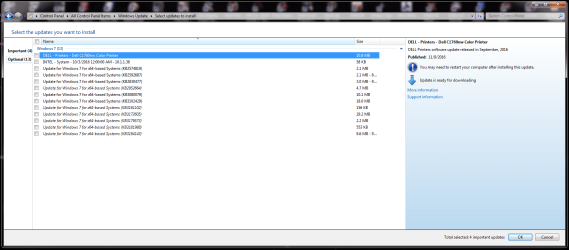
Well, I may have some good news! I ran GWX, just as you suggested, and at the end of my day I restarted my PC and tried Windows Update once more (with a freshly cleared cache). And, fairly quickly, I was greeted with the screens I've captured in the attached PNG files. Found both important and optional updates (possible reason for celebration).

Just to be extra careful, I did not proceed with installation. Any reason I shouldn't install at least all of the important ones?

Maybe getting closer...or already there!

Thanks so much,

ELB
 

Attachments

  • ImportantUpdates.PNG
    ImportantUpdates.PNG
    66.2 KB · Views: 2
  • OptionalUpdates.PNG
    OptionalUpdates.PNG
    64.4 KB · Views: 1

My Computer My Computer

At a glance

Win 7 64 Home Premium
OS
Win 7 64 Home Premium
Hi Mr ELB,
try updating the oldest dated one first,
If that works GO for it

GWX control panel is a good tool for the W10 stuff.


Roy
 

My Computer My Computer

At a glance

W7 home premium 32bit/W7HP 64bit/w10 tp insid...E5300 dual core3gbNvidia Geforce 7100 Nforce 630i
Computer type
PC/Desktop
Computer Manufacturer/Model Number
medionl/Aspire 6930G/acer x55a
OS
W7 home premium 32bit/W7HP 64bit/w10 tp insider ring
CPU
E5300 dual core
Motherboard
medion MS7366
Memory
3gb
Graphics Card(s)
Nvidia Geforce 7100 Nforce 630i
Monitor(s) Displays
avixc
Internet Speed
n (isp resticted to 72)
Antivirus
mse/pands
Browser
palemoon
Other Info
Belkin Fd7050 n USB using Railink RT2870 drivers, more upto date
Hi, Roy.

More good news...

Installed a few updates one at a time (oldest first) successfully. So then I checked them all and everything installed properly. I then rechecked for updates and, curiously, it found about five more (some older). So I installed those, but did receive an error after it successfully installed one of the five (code 80070308). So I restarted and did it again. Again, more installed (maybe two or three of the four remaining), but I may have received the same error (code 80070308) one more time. I figured it just had to do with install order, as it was installing at least one each time. So, I did one more round of restart, etc. and all installed.

I checked for updates once more to see if there were any remaining. None. Windows is up to date!

So (I believe) success! Issue resolved.

Let me know if getting that code 80070308 was meaningful or just had to do with Windows having to restart several times to install everything in order. Same if you have any other concerns.

Otherwise, I think you've done it!

Thanks so much,

ELB
 

My Computer My Computer

At a glance

Win 7 64 Home Premium
OS
Win 7 64 Home Premium
Hi Mr ELB:party::party::party:

Thats great news, GWX, aka the UltimateOutsider, was an educated guess on my part he certainly seemed to have a lot more knowledge of the ins/outs of the w10 process.
Its hats off to him at the end of the day:geek:
Also to >>you<< the comment FYI..... system image restore, put me on the right track
INFO is the key that unlocks the doors

The error code relates to Pending items, no more until you reboot me.
So NO worries there.

I've learned something as well


Happy surfing

Roy
 

My Computer My Computer

At a glance

W7 home premium 32bit/W7HP 64bit/w10 tp insid...E5300 dual core3gbNvidia Geforce 7100 Nforce 630i
Computer type
PC/Desktop
Computer Manufacturer/Model Number
medionl/Aspire 6930G/acer x55a
OS
W7 home premium 32bit/W7HP 64bit/w10 tp insider ring
CPU
E5300 dual core
Motherboard
medion MS7366
Memory
3gb
Graphics Card(s)
Nvidia Geforce 7100 Nforce 630i
Monitor(s) Displays
avixc
Internet Speed
n (isp resticted to 72)
Antivirus
mse/pands
Browser
palemoon
Other Info
Belkin Fd7050 n USB using Railink RT2870 drivers, more upto date
Back
Top